

In recent years, cryptocurrency scams have become increasingly common as digital currencies like Bitcoin and Ethereum rise in popularity and value. One of the most prevalent crypto scams involves fake websites that falsely claim to offer free cryptocurrency giveaways from high-profile figures like Elon Musk. These “Elon Musk’s Official Bitcoin & Ethereum Giveaway” websites promise users free Bitcoin or Ethereum, but are simply a fraud to steal money or personal information from victims.
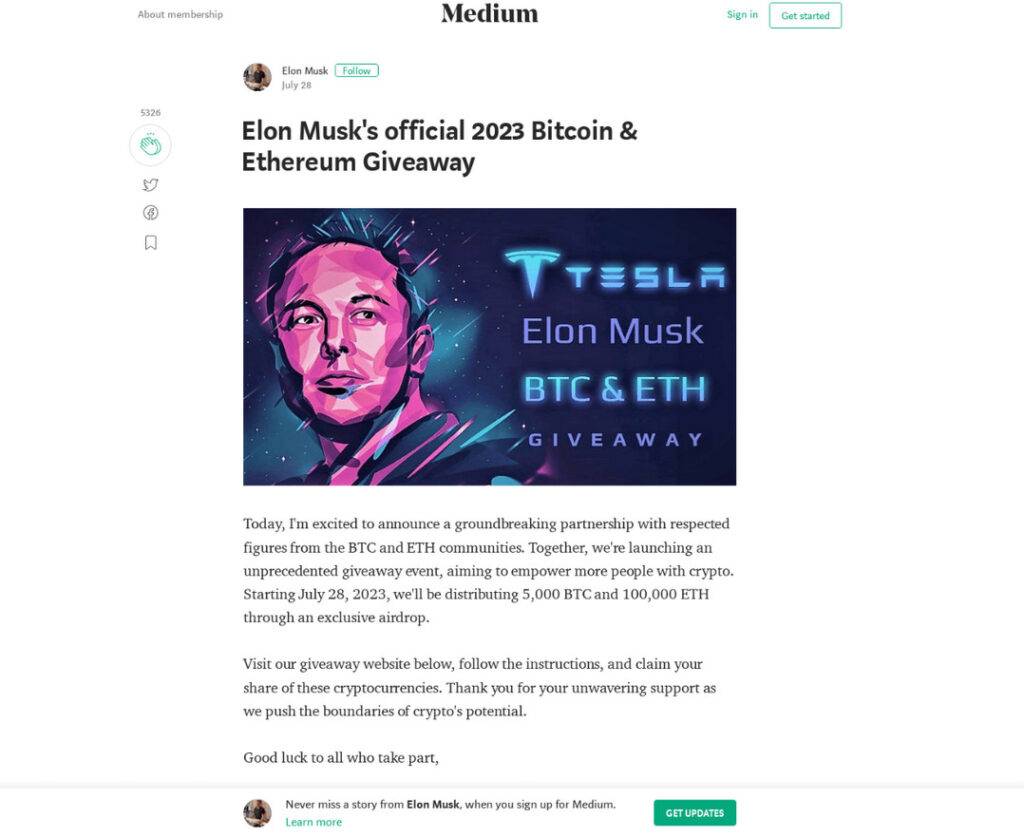
Overview of the Scam
The fake “Elon Musk’s Official Bitcoin & Ethereum Giveaway” websites promote a supposedly exclusive giveaway event where Elon Musk is distributing free BTC or ETH to participants. The sites encourage users to visit a provided website, follow instructions, and double the ammount of crypto that is sent.
However, these offers are completely fabricated. The promises of free cryptocurrency are used to lure potential victims onto the scam website and trick them into handing over money or personal information. The websites are intentionally designed to look legitimate and mimic the branding of prominent crypto companies. But make no mistake – these “giveaways” do not exist, and any funds sent to them will be stolen.
How the Scam Works
The fraudsters carrying out these scams build fake websites modeled off of legitimate companies in the cryptocurrency space. The sites use the branding, images, and reputation of Elon Musk to make the giveaway appear credible.
When victims land on the scam website, they are greeted with promises that any Bitcoin or Ethereum sent to the provided wallet address will be instantly doubled and returned.
In reality, there is no cryptocurrency doubling service and any funds sent are simply stolen outright. The scammers immediately withdraw any deposits to their own wallets, rapidly laundering through mixers to obscure the trail before victims can react. No doubled coins are ever returned to victims after sending crypto to the scam site, despite the false promises.
The Aim of the Scam
The ultimate goal of the “Elon Musk’s Official Bitcoin & Ethereum Giveaway” scam is to profit from stealing cryptocurrency and personal information from victims.
By piggybacking on Elon Musk’s name and popularity within the crypto community, the scammers aim to trick trusting users who hope the promises of free coins are real. The people behind these sites have no actual affiliation with Elon Musk.
How to Spot This Scam
While the scam websites may look convincing at first glance, there are a few key signs that can help you identify an “Elon Musk’s Official Bitcoin & Ethereum Giveaway” fraud:
- Skeptical promises – If an offer seems too good to be true, it probably is. No legitimate giveaways will ever ask for you to send money first.
- Suspicious web addresses – Scam sites often use a domain name slightly different than the company they impersonate. Look for subtle differences and typos.
- No affiliation – The scammers have no actual partnership, sponsorship, or affiliation with Elon Musk. Any site claiming otherwise is lying.
- Poor spelling/grammar – These scam sites are amateur operations. Spelling mistakes, formatting errors, and grammatical issues are common.
- No proofs – There is no evidence that any previous winners exist, because no one ever receives the promised coins.
- Aggressive calls to act fast – Scammers insist that you must act immediately to register before the limited giveaway ends. This pressures victims to skip vetting the offer.
Avoiding This Crypto Scam
The best way to avoid falling prey to the “Elon Musk’s Official Bitcoin & Ethereum Giveaway” scam is to be wary of offers that seem suspiciously generous. Here are some tips:
- Never send money or personal information to participate in a cryptocurrency giveaway. Legitimate giveaways will never require this.
- Be skeptical of any contest or free promotion using Elon Musk’s likeness. Check directly on his social media to confirm if an offer is real.
- Check the URL carefully when visiting external sites. Scammers often use lookalike domains.
- Use anti-phishing browser extensions that block known scam sites and report phishing URLs.
- Enable 2FA on all your crypto accounts and be cautious of malware links which can steal your 2FA codes.
- Only join crypto airdrops and events suggested by official channels like a coin’s Twitter or Discord group.
What to Do If You Are Scammed
If you have unfortunately already fallen victim to the “Elon Musk’s Official Bitcoin & Ethereum Giveaway” or similar scams, here are some steps to take:
- Report the scam website to authorities, cybersecurity groups, social networks, and the hosting provider. Getting the site shut down can prevent future victims.
- Notify your wallet provider about any compromised information or stolen funds. They may be able to implement enhanced account security.
- Change passwords for any crypto accounts, exchanges, or related platforms that may have been compromised. Enable 2FA everywhere possible.
- Contact bank/credit card providers about fraudulent charges from crypto scams to reverse the transactions if applicable.
- Warn others in any crypto communities you are in to avoid becoming victims of the same scam website.
- Check for tracking malware that could have been installed on your device to steal your information and access your crypto accounts.
Conclusion
The “Elon Musk’s Official Bitcoin & Ethereum Giveaway” scam websites prey on unsuspecting cryptocurrency users with promises of free coins. They aim to profit off stealing funds and information from victims lured in by the fraudulent offers.
Spotting these fake giveaways comes down to looking for suspicious traits like too-good-to-be-true offers, typos, urgent calls to action, and other red flags. With crypto scams on the rise, it’s crucial to implement security best practices to keep your coins and account details safe.
Being an informed and vigilant user is the best defense against predatory scammers conducting fake giveaways or other cryptocurrency fraud. Don’t become a victim – recognize signs of a scam, secure your accounts properly, and avoid sending payments or info to questionable sites. Spreading awareness about these deceptive “Elon Musk” crypto schemes can also help the community stay protected.
Frequently Asked Questions
Q: Are there any legitimate cryptocurrency giveaways hosted by Elon Musk?
A: No, Elon Musk has repeatedly confirmed that he is not associated with any crypto giveaways. These promotions using his name and likeness are always fraudulent.
Q: How do the scammers profit from the fake Elon Musk giveaways?
A: They profit by collecting the small registration fees from victims, as well as stealing cryptocurrency if users are persuaded to send coins to the scam wallet addresses.
Q: What should I do if I sent money to one of the scam giveaway sites?
A: Immediately report the transaction to your wallet provider or bank. Notify cybersecurity authorities to get the scam website shut down. Check your devices for tracking malware.
Q: Can I get my money back if I fell victim to the scam?
A: Unfortunately, recovery of funds is very unlikely. The scammers launder stolen crypto rapidly. Focus on revoking access, enhancing security, warning others, and reporting the frauds.
Q: Why do the scammers use Elon Musk’s name and likeness for their fake giveaways?
A: Elon Musk is a hugely prominent figure in the crypto space, so linking the scam to him helps convince unsuspecting victims of the giveaway’s legitimacy.

Join the discussion
0 commentsShare your experience or ask a question about this article.
Discussion
Start the conversation
Have a question or something useful to share? Add the first comment.