

Recipients of a phishing text claiming EVRI attempted delivery of a parcel are being targeted in a new scam. This article explains how to identify the fraudulent EVRI message and avoid falling victim.
Overview of the EVRI ‘We Attempted Delivery’ Scam
A text message scam impersonating courier company EVRI states they tried but failed to deliver your parcel. It instructs you to reschedule the delivery via a website link.
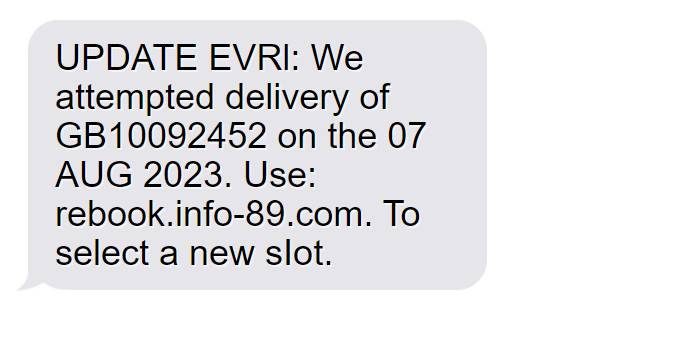
The full scam text reads:
“EVRI: We attempted delivery of GB10092452 on the 06 AUG 2023. Use: rebook.info-89.com. To select a new slot.“
This message is not from EVRI. It is a scam aiming to steal personal information and install malware. The scam link goes to a fake EVRI site gathering data for identity theft.
How the EVRI ‘We Attempted Delivery’ Scam Works
The scam takes advantage of people waiting on parcel deliveries from EVRI to trick them into giving away valuable personal information.
The fraudulent text will understandably cause concern for recipients expecting a package from EVRI. It leads them to believe their delivery was unsuccessfully attempted.
Clicking the link in the message brings the victim to a fake website pretending to be EVRI’s actual site. The scam site prompts visitors to enter details like name, address, phone number, and sometimes even full payment card information.
Unwittingly submitting these personal details hands cybercriminals the tools for identity theft and financial fraud. The scam site may also secretly install malware onto the victim’s device, allowing extraction of additional data.
By impersonating a trusted company like EVRI, scammers lower recipients’ defenses and convince them to share information they should keep secure. This “We Attempted Delivery” phishing campaign then leverages stolen data to commit further crimes using victims’ identities.
Being aware of this tactic and identifying signs of scam texts like suspicious links allow internet users to steer clear of these fake EVRI messages. Refusing to click unsolicited links or provide information to unusual requests protects against having your personal details stolen through this scam.
Spotting the Telltale Signs of the EVRI ‘We Attempted Delivery’ Scam Text
Though the phishing text looks legitimate, a few key indicators reveal it is fraudulent:
- Generic parcel number – Authentic EVRI parcel IDs contain letters and are longer than in the text.
- Suspicious link – rebook.info-89.com is not an official EVRI domain. EVRI’s real website is evri.com.
- Requests personal details – EVRI would never ask for information like your full name and phone number via unsolicited text.
- Unexpected message – If not expecting a delivery, receiving an alleged failed delivery notice would be odd.
- Spelling and grammar errors – Subtle mistakes like “AUG” rather than “August” suggest an amateur scammer.
Steering Clear of the EVRI ‘We Attempted Delivery’ Scam Text
If you get the suspicious text claiming EVRI attempted delivery, take the following actions:
- Avoid clicking – Do not click the link or respond, as engagement encourages more scam texts.
- Report the text – Forward it to 7726 to inform your mobile provider of the phishing attempt.
- Delete the text – Remove the scam message from your device so you do not click by accident.
- Contact EVRI – Reach out to EVRI directly to verify delivery status if you are awaiting a parcel.
- Watch for charges – Check financial accounts for fraudulent charges indicating your data was misused.
- Change passwords – Update passwords on online accounts as a safety precaution.
Steps to Take if You Clicked the EVRI ‘We Attempted Delivery’ Scam Link
If you unfortunately clicked and submitted any personal information or payment details, take these steps immediately:
- Inform your bank – For any account details entered, notify your bank and credit card companies. Cancel cards and reset passwords.
- Place a fraud alert – Contact the credit bureaus to set a fraud alert on your credit file, making opening new accounts harder.
- Monitor accounts closely – Watch accounts diligently for unauthorized transactions and report any found.
- Update account passwords – Change passwords and security questions on accounts that may have been compromised. Enable two-factor authentication when possible.
- Run anti-virus software – If you suspect your device is infected with malware, you should run a scan with Malwarebytes Anti-Malware.
- Consider fraud protection – Proactive monitoring services can alert you to misuse of your personal information.
Avoiding Related EVRI Phishing Attempts
Scammers may continue phishing attempts via email, call, or additional texts pretending to be from EVRI support. Never confirm personal details or payment information.
Go directly to EVRI’s official website or contact customer service via verified channels for any inquiries. Do not trust delivery updates sent via text or provide sensitive data when requested out of the blue.
Conclusion
The fake EVRI text messaging scam can easily catch recipients off guard. But understanding the warning signs can help avoid becoming a victim. Being vigilant against unexpected requests for your information keeps your identity and finances secure.
Frequently Asked Questions
Q: Are EVRI aware of this phishing scam?
A: Yes, EVRI is aware of the scam texts and advises reporting the messages and contacting them directly about deliveries.
Q: How did scammers get my phone number?
A: Scammers likely obtained your number through data breaches or by randomly generating numbers hoping to reach EVRI customers.
Q: Could my identity be stolen if I entered information?
A: Yes, providing personal details makes identity theft possible. Take action to get ahead of criminals misusing your info.
Q: I’m expecting an EVRI delivery. What should I do?
A: Do not rely on text updates. Go directly to EVRI’s official website or contact customer service through verified channels.
Q: How can I get these scam texts to stop?
A: Try forwarding them to 7726 to report as spam. Avoid replying or clicking links, as engagement encourages more texts. Eventually they may stop if scammers don’t see a response.

Join the discussion
0 commentsShare your experience or ask a question about this article.
Discussion
Start the conversation
Have a question or something useful to share? Add the first comment.