


A request for quotation can look like a valuable new lead. Suppliers are trained to respond quickly when a large prospective customer appears.
This RFQ uses detailed purchasing language, but the attachment’s real file type tells a very different story.
Overview
The procurement opportunity presented
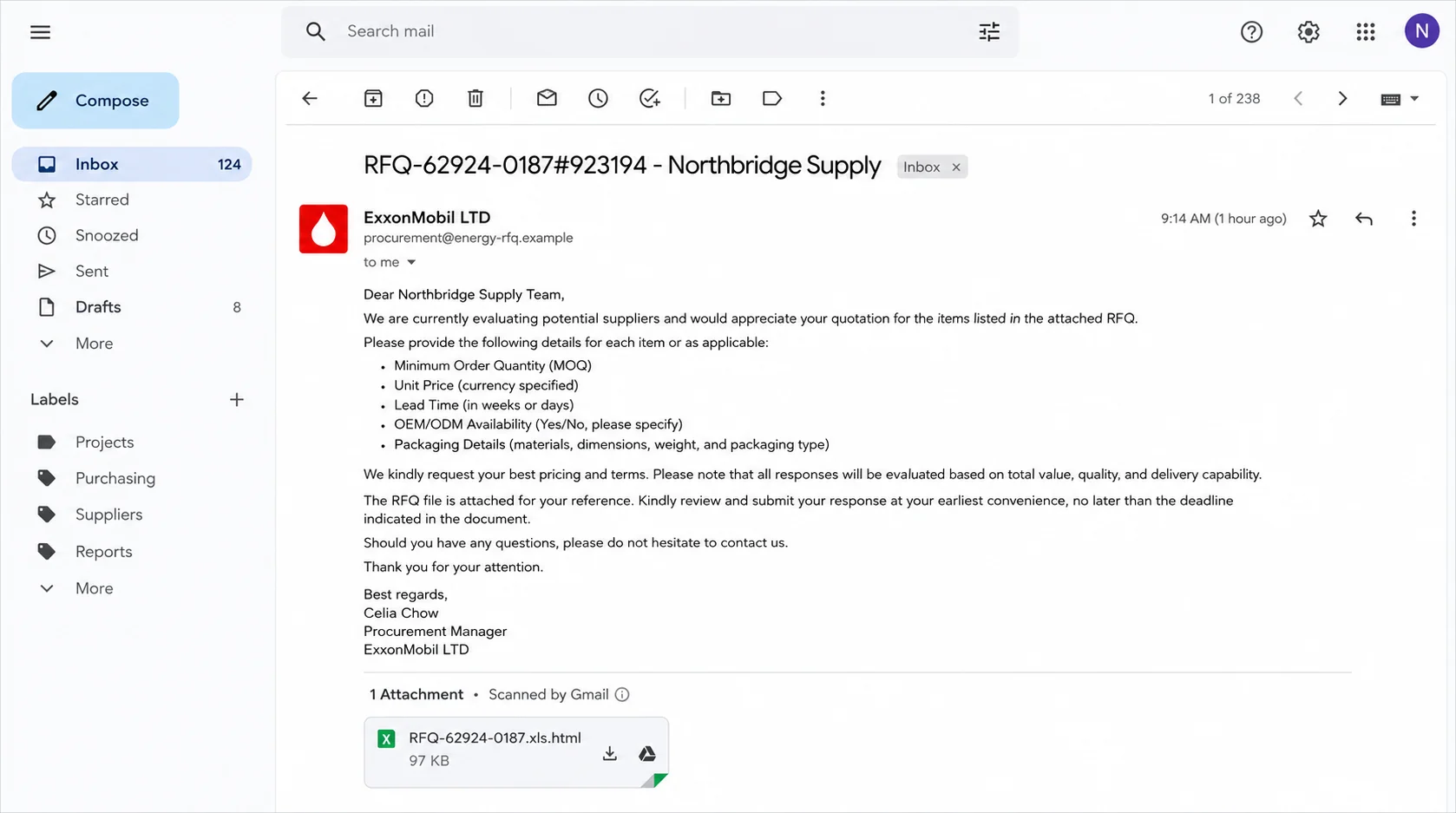
The Confirmation of Request for Quotation email impersonates ExxonMobil. One observed subject used the reference “RFQ-62924-0187#923194” alongside the recipient.
The message was signed by “Celia Chow, Procurement Manager.” It asked for minimum order quantities, pricing, lead times, customization availability, and packaging details.
That vocabulary makes the request feel tailored to manufacturers and wholesalers. It resembles the information a genuine purchasing team might need before choosing a supplier.
The attachment is not what the email promises
The body refers to an attached RFQ PDF. The actual filename ends in “.xls.html,” a double extension that identifies an HTML webpage.
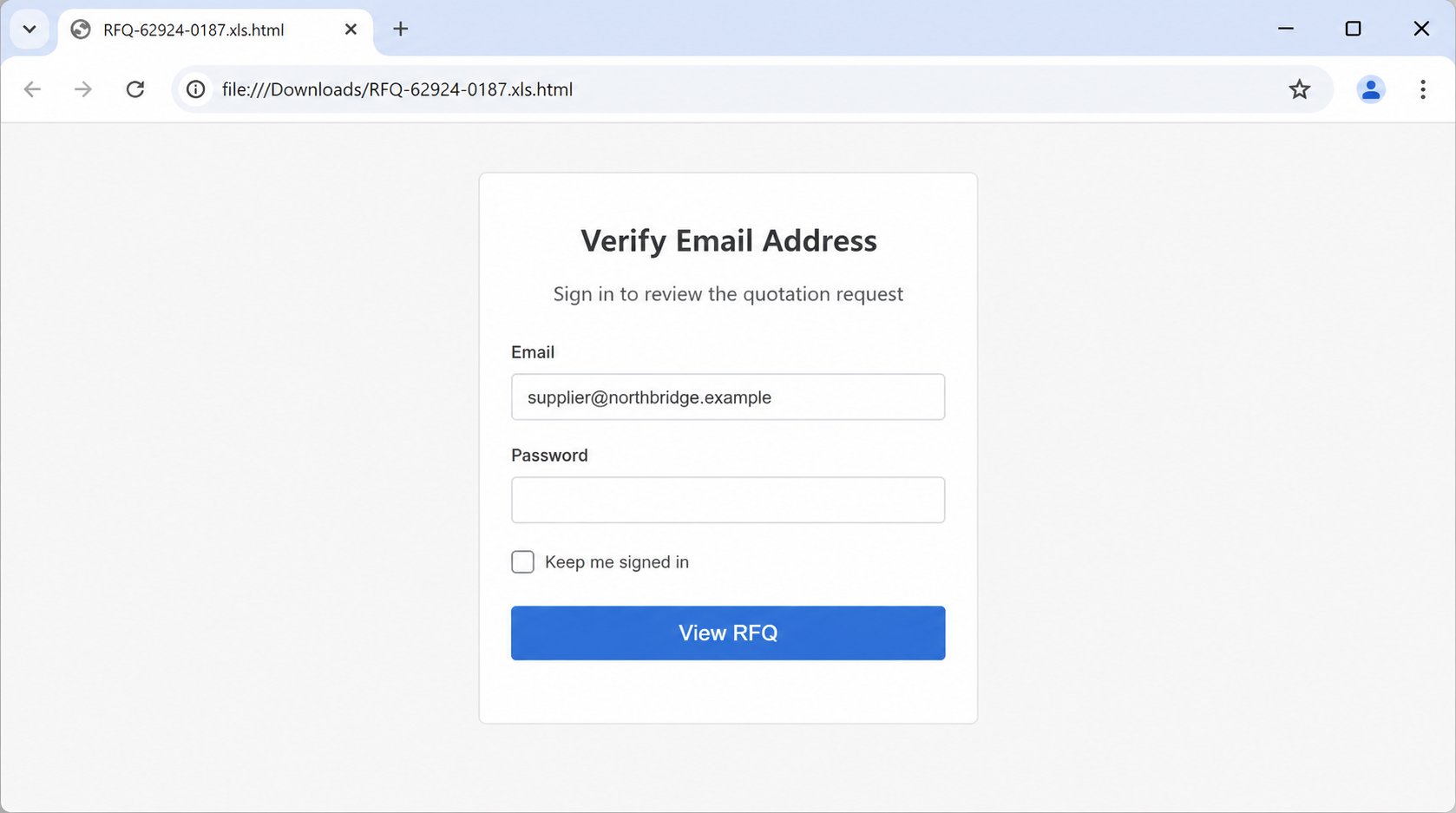
Opening the file in a browser displays a fake webmail login. It asks the supplier to verify an email address and provide the account password.
The form can submit entered credentials to criminals. ExxonMobil and Google are not involved in the fraudulent message or login page.
The clearest warning signs
- A major company supposedly sends an unsolicited high-value purchasing opportunity.
- The sender domain does not match the claimed organization.
- The email describes a PDF while the attachment ends in HTML.
- A local quotation file asks for the recipient’s email password.
- The request lacks a verified buyer relationship or procurement portal record.
- Detailed purchasing terms create credibility without proving the buyer’s identity.
An HTML attachment can open directly from the Downloads folder. Its local address does not prevent scripts or forms from communicating with an external server.
Simply viewing the page is not the same as submitting credentials. The main confirmed theft occurs when the user enters and sends the password.
Suppliers should verify the buyer through independently located corporate contacts. A promising contract is not worth bypassing ordinary customer-onboarding controls.
How the ExxonMobil RFQ Email Scam Works
Step 1: Criminals approach a supplier with a prestigious buyer name
A recognizable energy company suggests purchasing power, repeat business, and a valuable account. That prospect can override the caution applied to ordinary spam.
The message targets people accustomed to receiving inquiries from unknown customers. For sales teams, unfamiliarity alone is not unusual, which gives attackers room.
Public catalogs and business directories reveal what a company sells. Scammers can send broadly relevant RFQs without understanding the supplier deeply.
The real company’s name, address, and employee titles can be copied from public sources. Accurate public details do not authenticate the sender.
Step 2: Procurement language makes the inquiry feel operational
The email asks for MOQ, unit price, lead time, OEM or ODM options, and packaging. These are practical details rather than vague promises.
Specific terminology lowers suspicion because it sounds like an experienced buyer. Yet every requested field can be copied into a reusable template.
The reference number adds another layer of apparent process. Attackers can invent an RFQ number without any matching record inside the company they impersonate.
A legitimate procurement contact should be verifiable through the company’s supplier portal or established switchboard. The email’s detail cannot replace that check.
Step 3: The attachment uses a misleading double extension
The body calls the file a PDF, but the attachment ends in “.xls.html.” That final HTML extension determines its actual behavior.
Placing “xls” before “html” encourages the recipient to see a spreadsheet. Some mail interfaces truncate long names or emphasize the first familiar extension.
HTML attachments are webpages saved as files. They can contain forms, scripts, copied logos, and links, then open inside the default browser.
They are not inherently malicious. Their use becomes suspicious when an unexpected sender mislabels them and embeds a login form unrelated to the document.
Step 4: The local page imitates webmail authentication
Once opened, the attachment displays “Verify Email Address” and asks for the recipient’s password before revealing the quotation.
The browser address may begin with “file:///” because the page is stored locally. That does not mean the form is offline or trustworthy.
HTML can send form data to a remote endpoint when the user clicks a button. The collection address may be hidden in the page’s code.
A genuine buyer does not need a supplier’s mailbox password to share requirements. Authentication should occur through the supplier’s own identity provider or a known portal.
Step 5: The form captures business email credentials
Entered addresses and passwords can be transmitted to the phishing operator. A fake loading screen or error may appear afterward.
The page might ask twice, claiming the first password was wrong. That tactic can collect alternate passwords or increase confidence in a repeated entry.
If multi-factor authentication is enabled, the attacker may immediately trigger a login. The victim could receive a prompt while expecting the RFQ to open.
Never approve an unexpected prompt. Contact IT if one appears after interacting with a suspicious attachment, even when the password seemed rejected.
Step 6: A supplier mailbox reveals commercial relationships
Sales and finance accounts hold quotations, customer contacts, invoice values, bank instructions, delivery schedules, and internal approval messages.
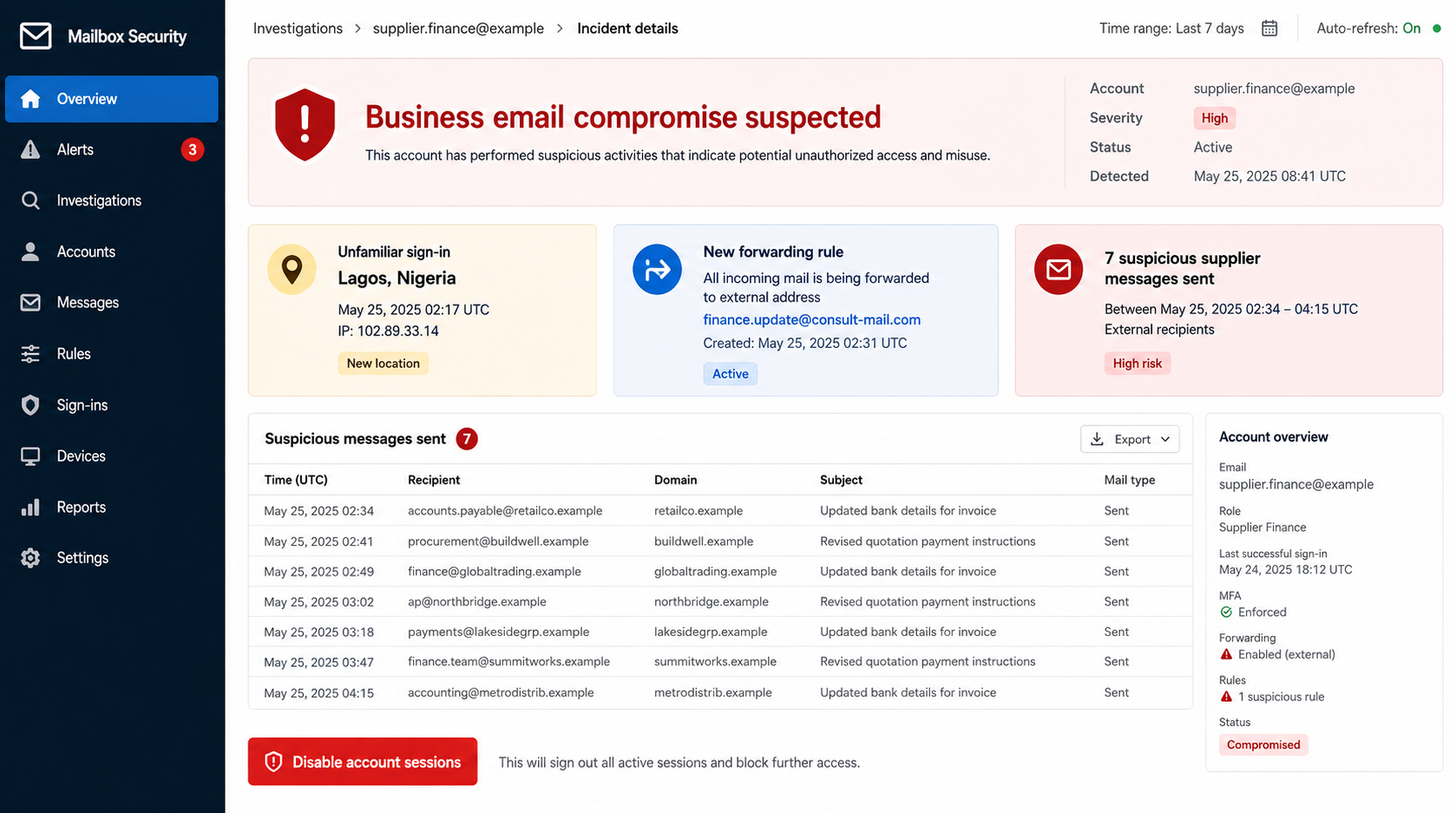
An intruder can use those records to craft believable follow-ups. They may impersonate the supplier toward customers or impersonate customers toward the supplier.
Mailbox rules can forward incoming messages and hide security notices. Attackers may remain quiet while learning which conversations offer the greatest financial opportunity.
Compromise also damages reputation. Customers receiving fraudulent payment requests from a familiar supplier account may blame the supplier for resulting losses.
Step 7: The fake RFQ can lead to invoice diversion
After observing real transactions, criminals may send revised bank details or replacement invoices. They often choose a moment when payment is already expected.
A message sent inside an authentic thread inherits its history and participants. That makes a fraudulent change appear connected to the legitimate order.
Payment diversion is a plausible next stage of business email compromise. It was not established as the outcome of every RFQ message in this campaign.
Finance teams should verbally verify new beneficiary details using a known number. Email confirmation alone cannot safely authorize a bank-account change.
Why Suppliers Are Attractive Targets
Unknown inquiries are part of normal sales work
Consumer phishing looks suspicious when the sender is unfamiliar. Sales teams, however, expect first contact from companies they have never served.
Scammers exploit that openness. The possibility of winning business encourages recipients to open attachments before the buyer passes formal verification.
One mailbox connects many organizations
A supplier’s account communicates with customers, logistics providers, banks, and colleagues. Compromising it creates trusted paths into several businesses.
The attacker can study tone, signatures, payment cycles, and common attachments. Later messages can closely resemble the victim’s ordinary correspondence.
Commercial urgency can bypass security
Large opportunities may receive executive attention. Employees can fear that cautious delays will cost the company a valuable contract.
Good buyers respect verification. Refusal to confirm identity through official channels is a warning, not a reason to relax controls.
How to Validate an Unexpected RFQ
Confirm the buyer through official channels
Locate the company’s supplier or procurement information independently. Search the official website manually instead of using any link in the message.
Call the published switchboard and ask whether the named employee and RFQ reference are genuine. Do not use the telephone number in the email signature.
Inspect the complete filename
Enable visible file extensions and read the final suffix. A promised PDF should actually end in “.pdf,” not “.html” or an executable type.
Send suspicious files to the security team. Do not rename them, enable content, or enter credentials to discover what they contain.
Use a clean onboarding process
New customers should provide legal identity, billing details, credit information, and authorized contacts through documented procedures.
Separate sales enthusiasm from account approval. No single unsolicited email should create both the opportunity and the proof that it is real.
What a Genuine Corporate RFQ Usually Provides
A traceable procurement identity
Real corporate buyers normally use approved domains, supplier portals, tender platforms, or existing purchasing contacts. Their identity can be confirmed outside the message.
A reference number should lead to a record that an authorized procurement team recognizes. Random digits in a subject line provide no such traceability.
Commercial requirements without credential collection
A genuine RFQ may request pricing, capacity, certifications, and delivery terms. It does not require the supplier to reveal an email password.
Secure portals authenticate users through their own accounts or a documented single-sign-on flow. They do not hide webmail forms inside local attachments.
Clear delivery and contracting expectations
Legitimate buyers can explain the contracting entity, billing process, delivery location, inspection requirements, and payment terms before requesting valuable goods.
Fraudulent inquiries often postpone those details. They keep attention on pricing until trust is established, then introduce unusual shipping or credit requests.
How an HTML Attachment Can Look Like a Document
An HTML file uses the same language as a webpage. It can reproduce a sign-in card, company colors, buttons, and instructions inside the browser.
Because the file came from email, users may assume its content was scanned or approved. Mail scanning cannot guarantee that every interactive form is honest.
The form’s submission address can differ from everything visible on screen. Security analysts can inspect that code without sending credentials to the operator.
For ordinary recipients, the safe rule is simpler: no quotation attachment should ask for the password to an unrelated mailbox.
Company, Address, and Fulfillment Checks
Verify the exact legal entity
Large corporate groups contain many similarly named entities. Confirm which entity is buying, where it is registered, and which procurement process it uses.
The email’s “ExxonMobil LTD” label does not establish a legal relationship. ExxonMobil was impersonated and is not responsible for the campaign.
Treat copied addresses as unproven
Scammers can paste a real headquarters address beneath a fake sender domain. Address accuracy proves only that the information was publicly available.
Compare registration records, tax details, delivery locations, and correspondence domains. Inconsistencies should pause quotation work until the buyer confirms them.
Call an independently published number
Use the company’s official switchboard or established supplier contact. Ask to be transferred to procurement and verify the named person and reference.
Never let the suspicious message define the entire verification channel. A criminal can control the email address, signature, telephone number, and reply.
Verify delivery and payment expectations
Fraudulent buyers may later request samples, credit terms, or shipments to unrelated freight forwarders. Confirm every location and responsible entity before dispatch.
Do not confuse a fulfillment warehouse with a corporate office. Understand who owns the goods, who accepts delivery, and who is legally obligated to pay.
What to Do if You Have Fallen Victim to This Scam
- Preserve the RFQ evidence. Close the local page without another submission, then retain the original email and attachment for your security team.
- Change the mailbox password. Use a clean device and the official account portal. Choose a unique password that is not used elsewhere.
- Revoke sessions and review multi-factor methods. Remove unfamiliar devices, tokens, recovery addresses, telephone numbers, and application passwords.
- Inspect mailbox rules and delegates. Delete unauthorized forwarding, hiding rules, connected applications, and delegated access. Review sent and deleted folders.
- Notify management, finance, and IT. They should search for the campaign, review affected conversations, and warn customers about possible impersonation.
- Audit recent payment changes. Call known customers and suppliers to verify beneficiary updates, revised invoices, and unusual requests made from the account.
- Change reused credentials. Prioritize banking, customer portals, cloud storage, payroll, and administrator accounts that shared the exposed password.
- Scan the computer. The confirmed lure targets credentials, but run Microsoft Defender and Malwarebytes to check for additional downloads or scripts.
- Add layered web filtering. AdGuard can block some malicious destinations and advertisements, but staff must still verify unexpected business opportunities.
- Report attempted fraud quickly. Contact banks immediately if funds moved, then file reports with law enforcement and relevant cybercrime authorities.
Frequently Asked Questions
Was this RFQ really sent by ExxonMobil?
No. The investigated message impersonated ExxonMobil. The sender and attachment were part of a credential-phishing campaign.
Why does the attachment end in .xls.html?
The final “.html” means it is a webpage file. Adding “xls” earlier in the name helps it resemble a quotation spreadsheet.
Can a local HTML file steal information?
Yes. It can display a form and send entered data to a remote server. A “file:///” address does not guarantee offline behavior.
Am I compromised if I opened it but entered nothing?
The confirmed credential risk is much lower. Close it, report it, scan the device, and investigate any download, prompt, or unusual browser behavior.
Should I reply and ask the buyer to verify themselves?
No. Contact the company through an independently sourced switchboard or supplier portal. Replying keeps verification inside a channel the attacker may control.
Could the scam lead to financial theft?
Yes. A stolen business mailbox can support invoice diversion and fraudulent bank changes, although that outcome was not confirmed for every recipient.
The Bottom Line
The fake ExxonMobil RFQ uses realistic procurement language to deliver an HTML credential form disguised as a quotation document.
Read complete filenames, verify new buyers independently, and never provide an email password to open an attachment. If credentials were entered, secure the mailbox and notify business partners quickly.

Join the discussion
0 commentsShare your experience or ask a question about this article.
Discussion
Start the conversation
Have a question or something useful to share? Add the first comment.