


You need to turn a document into a PDF, extract audio from a video, or open a file your usual software does not recognize.
A search result offers the job for free. The free file converter scam can even deliver the converted file before the real problem becomes visible.
That successful conversion is what makes this campaign particularly deceptive.
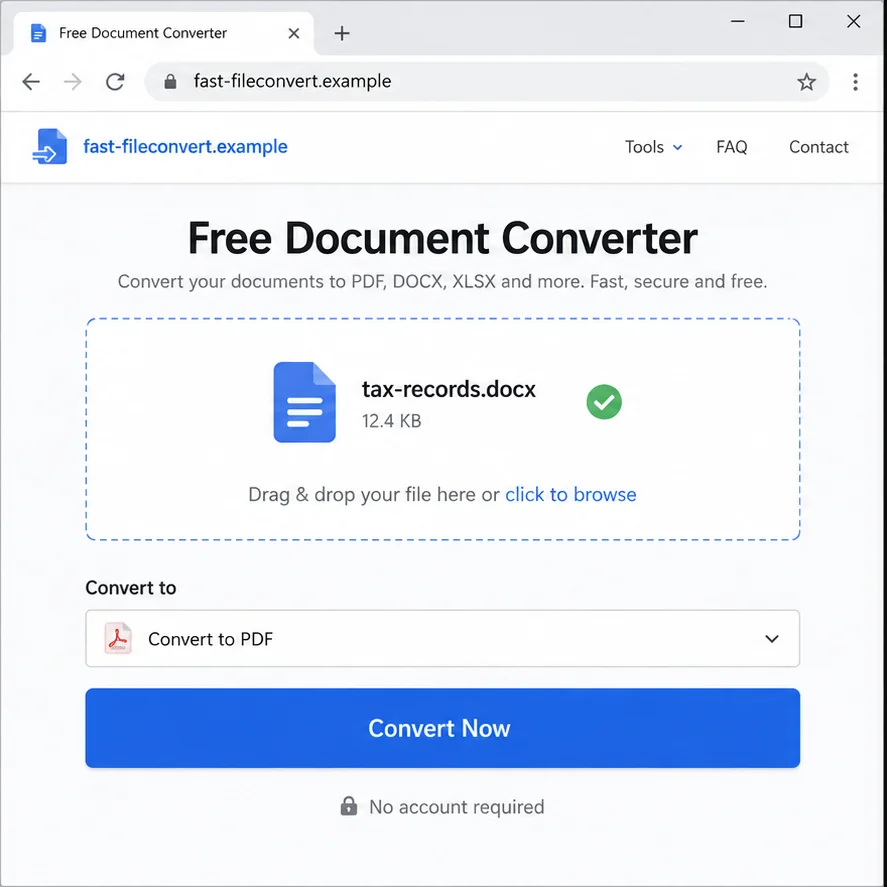
The page looks like a simple utility. You upload a file, choose a format, wait for a progress bar, and click Download.
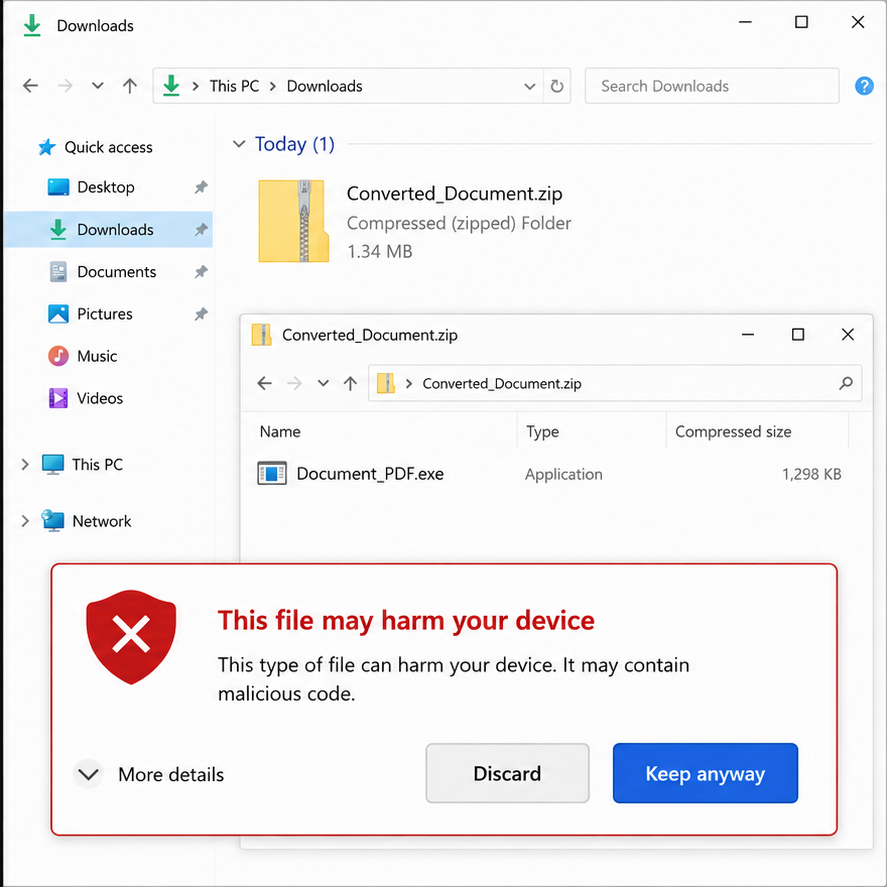
The returned archive may contain the promised document alongside an executable, installer, shortcut, or script. Another version quietly collects information from the uploaded file.
A resume, tax form, bank statement, legal document, or cryptocurrency record can reveal far more than the user intended to share with an unknown website.
The operation may lead to password theft, ransomware, identity fraud, financial loss, or access to an employer’s network.
Overview
The tool may perform the advertised conversion
A malicious converter does not have to fail. Producing a usable PDF, image, or media file reduces suspicion and encourages the victim to open everything in the download.
The harmful part can be a second file, deceptive installer, browser notification, or malware embedded in the process.
The uploaded source file is valuable too
When a document is sent to an unknown server, the operator can retain and examine it. The file may contain identity data, banking details, medical information, contracts, passwords, or cryptocurrency secrets.
Deleting the local copy or closing the page does not remove what was uploaded.
Common conversion and download lures include
- Word, Excel, and image files converted to PDF;
- PDF files converted into editable documents;
- video links turned into MP3 or MP4 downloads;
- compressed archives supposedly repaired or unpacked;
- electronic books converted for a different reader;
- a browser extension required to finish the job;
- a ZIP file containing an unexpected installer;
- a fake security or codec update shown after conversion.
The FBI Confirmed Malicious Converter Sites
In March 2025, FBI Denver warned about free online file converter scams used to load malware onto victims’ computers.
The bureau said some tools perform the advertised conversion while making the resulting file available with hidden malware. The payload can include ransomware.
The warning also explained that malicious sites may scrape submitted files for personally identifiable information, banking details, cryptocurrency information, email addresses, and passwords.
This is a confirmed online scam pattern, not a claim that every free converter is malicious. Reputable services and built-in software can perform legitimate conversions.
The risk comes from an unverified site receiving a sensitive source file or delivering an unexpected program while posing as a simple document tool.
A high search position, professional interface, HTTPS lock, or functional conversion does not establish that the operator is trustworthy.
Why a Working Tool Can Still Be Dangerous
Users expect malicious websites to look broken. A converter that produces the requested output contradicts that expectation and lowers defenses.
The downloaded ZIP may show the correct filename and icon. File extensions can be hidden by the operating system, allowing an executable to appear like a document.
A shortcut can also carry a familiar icon while launching a command. A script may open the real converted file after installing something else in the background.
Some pages do not attack immediately. They request browser notification permission, offer a helper extension, or say a codec is needed for the output.
Those extra steps create persistence. The browser can begin showing scam alerts, search redirects, or malicious advertising long after the original visit.
Uploading creates a separate privacy risk. The converter may copy text, metadata, embedded images, comments, revision history, or hidden spreadsheet sheets.
A document that appears harmless on screen can contain Social Security numbers, signatures, internal addresses, API keys, account numbers, or deleted comments.
Work files add organizational risk. One employee may unknowingly send confidential customer, legal, financial, or product information to an operator no one approved.
How the Free File Converter Scam Works
Step 1: The victim searches for a quick utility
The task is usually ordinary and time-sensitive. Search terms such as convert to PDF, download MP3, open unusual file, or compress video lead to many competing sites.
A malicious page may gain visibility through ads, search manipulation, copied content, or links placed in forums and social posts.
Step 2: A polished page accepts the upload
The site shows format choices, file-size limits, privacy claims, and a familiar drag-and-drop box. HTTPS protects the connection but says nothing about the operator’s intentions.
The uploaded file is now available to the site’s server unless the conversion truly happens locally in the browser.
Step 3: The server processes and may copy the data
The tool can extract document text, metadata, images, email addresses, account details, or credentials. A criminal can retain the original even after promising automatic deletion.
There may be no visible sign that collection occurred.
Step 4: The conversion appears successful
A preview displays correctly and a download button appears. This normal result convinces the victim that the page was only a utility.
The output may be genuine because the criminal benefits from avoiding immediate suspicion.
Step 5: The download hides an additional payload
Instead of one expected file, the site returns a ZIP, installer, executable, disk image, shortcut, or script. The filename may include repeated extensions.
The user is told the helper is necessary to open, decrypt, clean, or improve the converted file.
Step 6: Malware gains access
Running the extra file can install an information stealer, remote-access tool, cryptocurrency clipboard hijacker, or ransomware.
Saved browser passwords, session cookies, documents, wallets, and email access can become targets.
Step 7: Stolen access produces secondary fraud
Attackers may take over email, reset financial accounts, impersonate the victim, steal cryptocurrency, or use a work login to reach an employer.
Ransomware may encrypt local and network files. Stolen documents can support highly personalized phishing weeks later.
Identity, Address, Support, and Traceability Checks
The operator should be identifiable before the upload
Look for a consistent legal name, privacy policy, contact method, and explanation of where processing occurs. Vague claims such as completely secure are not evidence.
A converter handling confidential files should not be anonymous.
The web address must be read carefully
Copied tools often use domains that resemble established services or contain generic words such as free, fast, safe, document, and convert.
Do not assume a sponsored result or HTTPS certificate means the service was reviewed for safety.
The download must match the requested file type
If you requested a PDF, the result should not require an EXE, MSI, DMG, script, extension, or special downloader.
Enable visible file extensions and inspect the complete name before opening anything.
The retention claim must be believable and appropriate
A privacy policy may promise deletion after one hour, but users cannot independently confirm that claim. Sensitive files should not be uploaded solely because such a sentence exists.
Use local software or an organization-approved service when the contents matter.
Warning Signs Around the Conversion
- The result is packaged in a ZIP without a clear reason.
- A document conversion requires an executable installer.
- The page asks to enable browser notifications.
- A helper extension is required after the upload finishes.
- The download name ends with two different extensions.
- A security warning is dismissed as a false positive.
- The site requests a password unrelated to opening the source file.
- The page has no identifiable operator or support route.
- Pop-ups claim that a codec, cleaner, or update is missing.
- The service encourages uploads containing confidential records.
A single unexpected program is enough reason to stop. A normal conversion should not require giving a random utility control of the computer.
Safer Ways to Convert Files
Check whether the application that created the file already has Export, Save As, Print to PDF, or Download options. Built-in tools avoid sending the source to another operator.
Modern operating systems can create PDFs, resize images, preview common formats, and unpack ordinary archives. Use those features when they meet the need.
For work documents, follow the organization’s approved software and cloud-service list. Ask IT rather than uploading customer or internal material to a convenient website.
When an online converter is necessary, use an established service with a verifiable operator and clear handling terms. Remove unnecessary sensitive content before upload.
Make a copy and strip hidden metadata, comments, revision history, unused spreadsheet sheets, and embedded files where appropriate.
Do not upload passwords, private keys, seed phrases, identity documents, medical records, or unredacted financial statements to a general converter.
Keep file extensions visible. Scan the downloaded item and open documents with protected-view features when available.
What the Hidden Malware May Do Next
An information stealer can copy saved browser passwords, authentication cookies, autofill data, cryptocurrency wallet details, and files from common folders. Theft may finish within minutes.
Session cookies are especially important. A criminal may enter an account without typing the password again, so changing only the password may not end every active session.
A clipboard hijacker watches copied cryptocurrency addresses and replaces them with an attacker’s address. The victim may approve a transfer after checking only the first few characters.
Remote-access malware lets another person operate the computer, capture screens, browse documents, and install more tools. The machine may look normal between sessions.
Ransomware can encrypt local files and reachable network storage. A converted document opened on a work device can therefore affect shared resources far beyond that one file.
Malware may also steal email access and wait. The attacker can study invoices and conversations, then insert fraudulent bank details into a convincing reply.
Security alerts should be reviewed from a clean device. If sensitive business access was present, the response should include the employer even when the conversion was personal.
A quick scan is useful, but no scanner can prove that data was never copied. Credential rotation, session revocation, and document-specific response remain necessary.
What to Do if You Have Fallen Victim to This Scam
- Stop opening the download. If an unexpected installer, script, shortcut, or archive appears, do not run additional files.
- Disconnect a potentially infected device. Remove network access if a suspicious executable ran, especially when work shares or backup drives are connected.
- Tell workplace security immediately. A company document or device can expose customers and colleagues. Fast reporting helps contain access.
- Record what was uploaded. Identify every document, its contents, hidden data, and the account or organization it concerned.
- Preserve evidence safely. Save the converter address, search result, timestamps, download name, browser history, and security alerts without reopening the payload.
- Scan the device. Malwarebytes can detect many malicious files, information stealers, and unwanted programs. Severe infections may require professional recovery or a clean rebuild.
- Change credentials from a clean device. Prioritize email, password managers, financial accounts, work access, and any password stored in the uploaded document.
- Revoke sessions and tokens. Sign out other devices, rotate API keys, replace exposed recovery codes, and review connected applications.
- Contact financial providers. If banking, card, or cryptocurrency information was exposed, report it and follow account-protection instructions.
- Protect identity data. Consider credit freezes and document replacement when Social Security numbers, passport images, or signatures were uploaded.
- Restore from clean backups. For ransomware or system compromise, do not reconnect backups until the threat has been removed.
- Block repeat exposure. AdGuard can reduce access to known malicious ads and pages, but it cannot retrieve an uploaded file from an unknown server.
- Report the campaign. Submit the domain, download details, hashes if available, and losses to the FBI Internet Crime Complaint Center and relevant security providers.
Frequently Asked Questions
Are all free online file converters scams?
No. Many tools are legitimate. The confirmed scam involves malicious or deceptive sites that steal uploaded data or attach malware to the result.
Can a converter infect me if it produced the correct file?
Yes. A working output may be included beside a malicious program, or the process may have already copied sensitive information from the upload.
Is a ZIP file always dangerous?
No, but it deserves inspection when you expected one document. Do not run executables, scripts, or shortcuts hidden inside a converted-file archive.
Does HTTPS make a converter safe?
HTTPS encrypts the connection to the site. It does not prove that the operator is honest, deletes files, or provides safe downloads.
What sensitive data can be hidden in a document?
Files may contain metadata, authors, comments, revision history, hidden sheets, embedded objects, account details, signatures, or previously deleted text.
Should I change passwords after uploading a document?
Change any credential contained in the file or exposed after running a suspicious download. Use a clean device and revoke existing sessions.
The Bottom Line
The free file converter scam succeeds because the useful result distracts from the data leaving the browser and the extra files coming back.
Use built-in or approved tools whenever possible. Never install a helper simply to open a converted document, and keep sensitive records away from anonymous services.
If a suspicious file ran, disconnect, scan, change credentials from a clean device, and report quickly. A correct PDF does not prove the conversion was safe.

Join the discussion
0 commentsShare your experience or ask a question about this article.
Discussion
Start the conversation
Have a question or something useful to share? Add the first comment.