


A contract waiting for an end-of-day signature can interrupt almost any schedule. The request feels ordinary, particularly when it mentions familiar delivery pressures.
This message deserves attention for a different reason. The file that arrives after the click is not the document promised in the email.
Overview
The urgent signature request
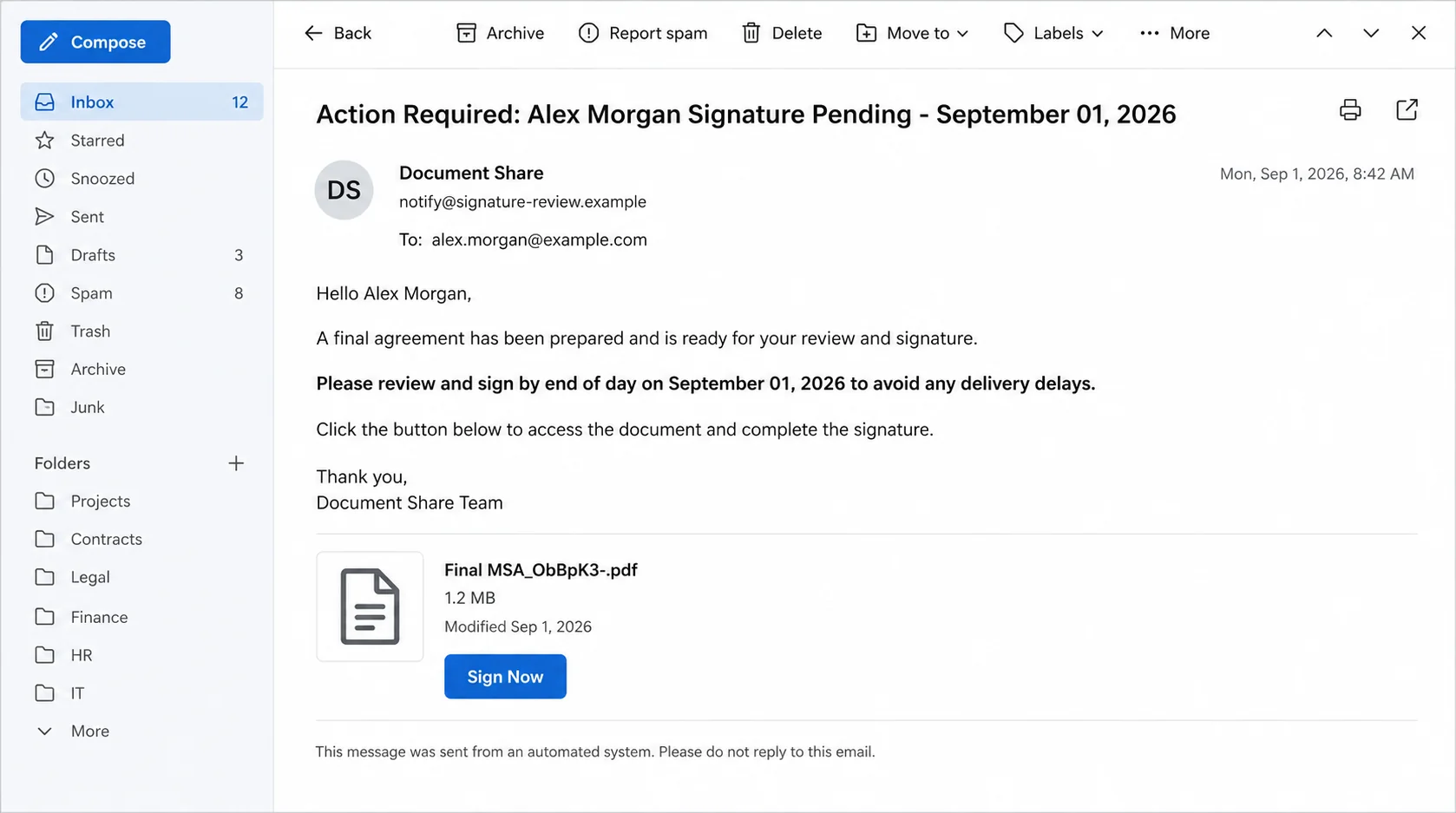
The Action Required: Signature Pending email pretends to be an Adobe shared-file notification. It addresses the recipient and claims a final agreement needs signing.
One subject included the recipient, “Signature Pending,” and a September 2026 date. The body described a legal file named “Final MSA_ObBpK3-.pdf.”
The message said the agreement was the final executable version. It requested a signature by end of day to prevent delivery delays and discourage further review.
What the Sign Now button delivers
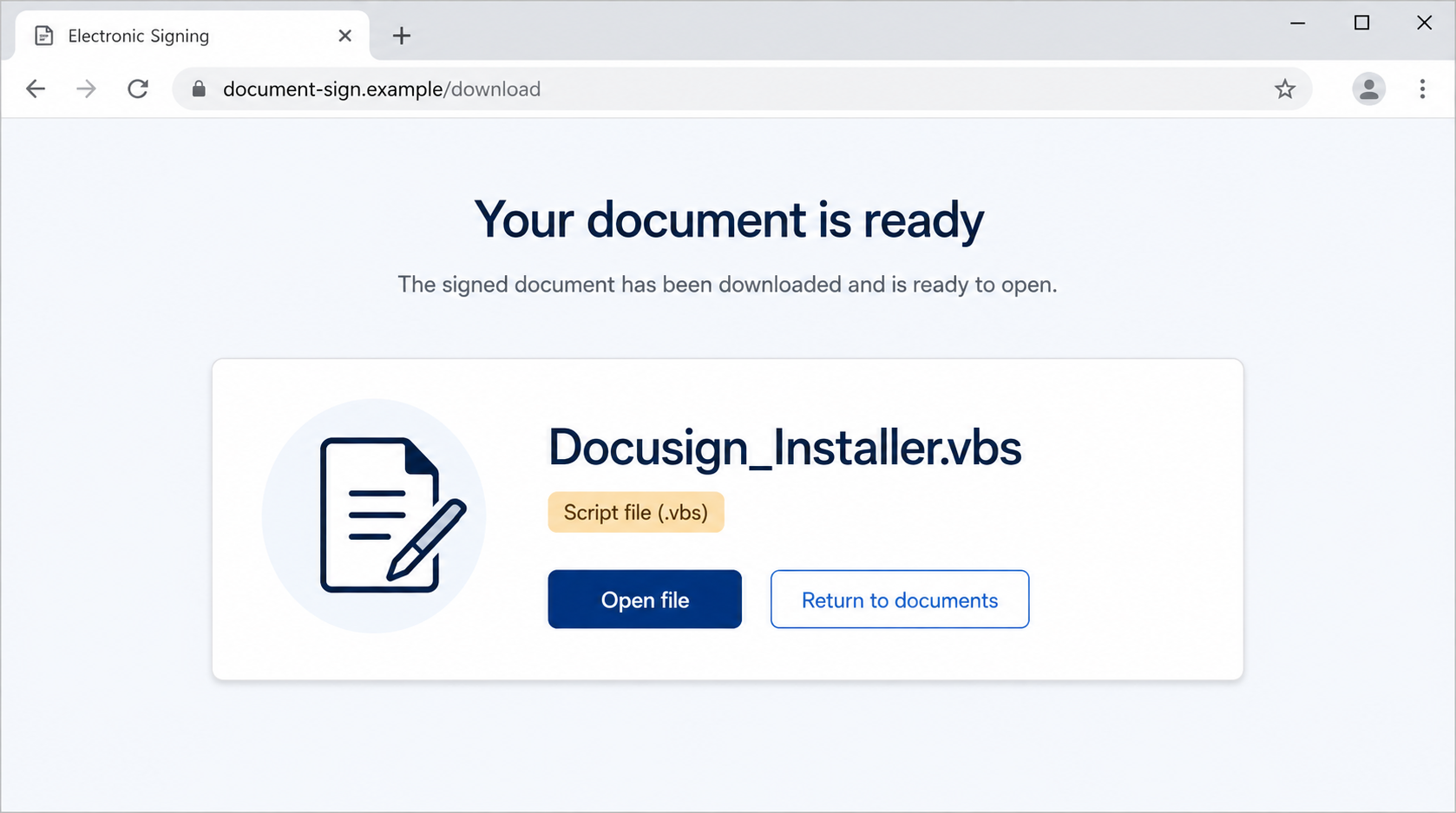
The button opened a fake electronic-signing page imitating DocuSign. That page claimed the document had downloaded and was ready to open.
The actual download was named “Docusign_Installer.vbs.” Its VBS extension identifies a Visual Basic Script, not a PDF contract or signing package.
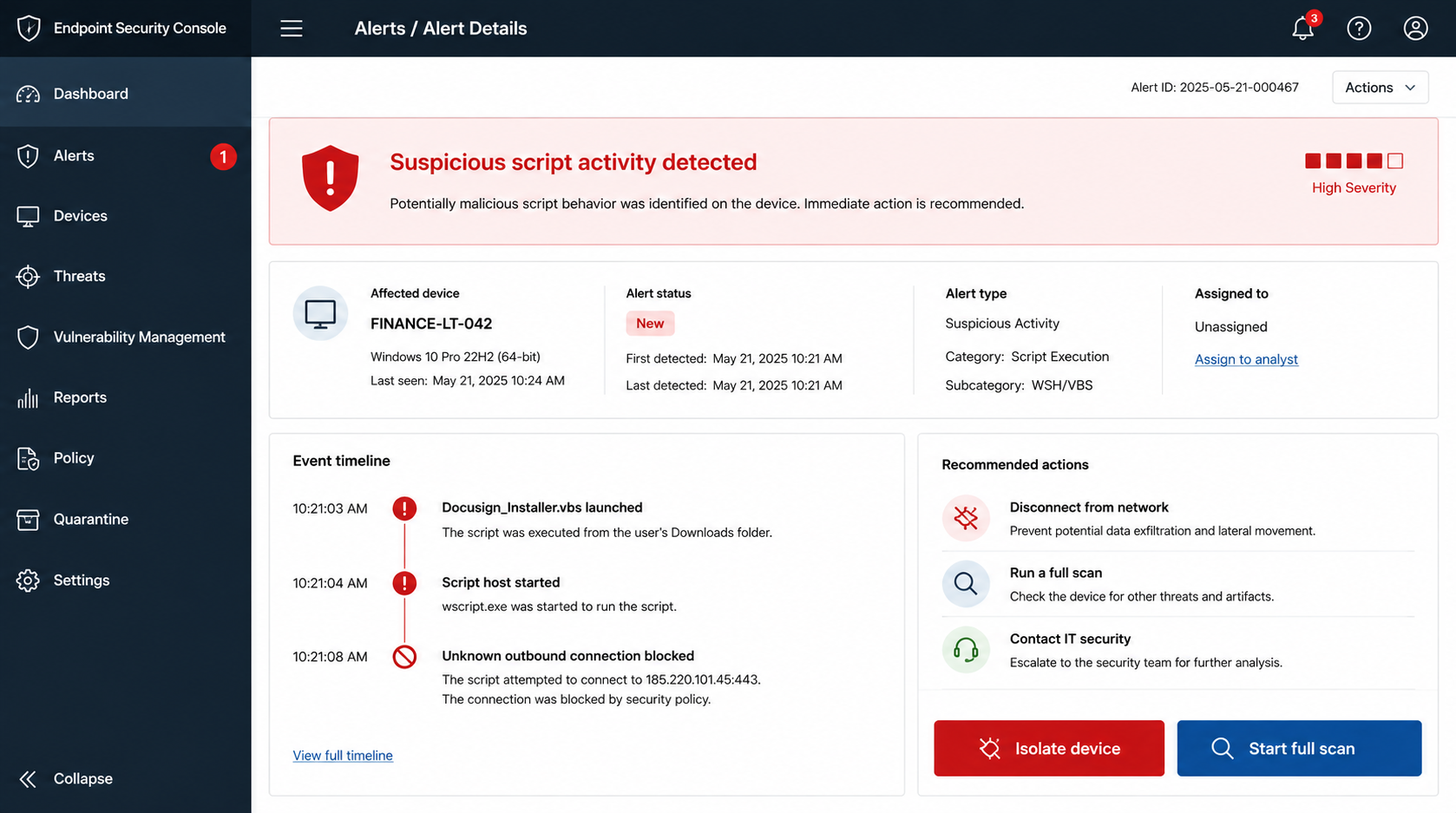
Running that script can execute commands on Windows. Analysis confirmed malicious behavior, although the final malware family delivered by this campaign was not identified.
Facts that change the response
- Adobe and DocuSign are not connected with this fraudulent message.
- The email promises a PDF but the site delivers a VBS script.
- Clicking may download the file, while running it creates the greater danger.
- The exact final malware payload remains unknown.
- The end-of-day deadline is designed to reduce careful inspection.
- Unexpected script execution requires device containment, not only a password change.
A VBS file is not automatically malicious in every context. Here, its deceptive delivery, false identity, and execution behavior make the file unsafe.
Do not rename the file to PDF or open it to investigate. Preserve it only if trained security staff request a quarantined sample.
If the script was launched, disconnect the computer from networks and contact IT immediately. The absence of visible symptoms does not confirm that nothing happened.
How the Signature Pending Email Scam Works
Step 1: The attacker chooses a believable legal deadline
Master service agreements, purchase contracts, and delivery documents frequently require electronic signatures. That routine makes the subject relevant across many industries.
The phrase “final executable version” sounds like legal language. It suggests negotiations have ended and the recipient’s remaining job is merely administrative.
An end-of-day deadline adds pressure without sounding theatrical. The threat of delivery delays gives operations staff a business reason to act quickly.
The recipient may assume a colleague handled earlier discussions. Attackers benefit when divided responsibilities prevent anyone from checking the complete history.
Step 2: Copied document-sharing design supplies borrowed trust
The email imitates an Adobe file notification, using familiar layout and document terminology. Such artwork can be copied without access to any legitimate account.
The file name, size, and modified date make the request look specific. They are displayed text and do not prove that a real PDF exists.
The sender address and linked domain matter more than the visual template. A genuine brand notification should originate from infrastructure that the brand documents.
Organizations should train staff to verify the transaction, not memorize one logo. Phishing templates change quickly, while context and domain ownership remain stronger tests.
Step 3: The button hands the visitor to another impersonated service
Although the message resembles Adobe, the landing page imitates DocuSign. That unexplained switch is a valuable warning.
Real workflows can involve multiple providers, but the transition should be transparent and documented. An unsolicited route should never be trusted because both brands are familiar.
The page says the signed document has downloaded automatically. This wording encourages the visitor to look for a file and open it without checking the extension.
Browser download panels can make any file appear like part of the page’s workflow. The browser does not certify the file simply by displaying it.
Step 4: A script is disguised as a signing installer
The delivered filename includes “Docusign_Installer,” framing the script as software required to complete the signature. That explanation is false.
The important characters are at the end: “.vbs.” Windows uses that extension for Visual Basic Script files capable of running system commands.
If file extensions are hidden, the name may appear less alarming. Enabling visible extensions helps users distinguish documents from scripts and executables.
A legitimate PDF opens through a browser or PDF reader. It does not require an unsolicited VBS installer delivered from a mystery signing page.
Step 5: Launching the VBS starts the malicious chain
When the victim runs the script, Windows Script Host can interpret its instructions. Those instructions may contact external servers or launch additional components.
The examined campaign was classified as malware delivery. However, the available analysis did not identify a specific final payload.
It would be inaccurate to promise that the script installs one named trojan or ransomware family. Operators can change payloads while keeping the same email lure.
Possible consequences of script-based malware include credential theft, remote access, data theft, or additional downloads. These are risks, not confirmed outcomes for every device.
Step 6: The infection may operate without dramatic symptoms
Malware does not need to display a ransom note or obvious error. Quiet access is often more valuable because it allows reconnaissance and credential collection.
A script can finish quickly and close. The user may believe nothing happened, retry the signing page, or continue working on a compromised computer.
Security logs may show script host activity, network connections, scheduled tasks, or newly created files. Trained responders should inspect those records.
Do not use the potentially infected device to change important passwords. Keylogging or browser theft could expose the new credentials immediately.
Step 7: Stolen access can spread through trusted relationships
If malware captures a business mailbox, attackers can send the same contract story from a real account. Colleagues and suppliers may trust the familiar sender.
Remote access could also expose shared drives, customer records, browser sessions, and saved credentials, depending on the device and user privileges.
That possibility makes isolation urgent. Disconnecting the network reduces communication while responders determine what executed and what accounts require protection.
A clean scan is helpful but not always conclusive. High-risk business systems may require forensic review or a verified rebuild before returning to service.
How to Tell a Document From a Dangerous Script
Read the final extension
Document filenames can contain many reassuring words. The final extension identifies how the operating system treats the file.
Common document extensions include PDF, DOCX, and XLSX. VBS, JS, EXE, MSI, CMD, BAT, and SCR files can execute code.
Double extensions deserve caution. A name such as “Agreement.pdf.vbs” remains a VBS script because the last extension controls the file type.
Do not install software to read one agreement
Mainstream signing services work through browsers and established applications. An unexpected installer is inconsistent with a normal review-and-sign task.
Ask the sender to provide the agreement through the organization’s approved platform. A genuine counterparty can accommodate a security verification.
Verify the contract before the technology
Confirm the counterparty, internal owner, project, and negotiation history. A valid business agreement should exist independently from its email notification.
Call the known contact using stored details. Do not rely on a reply address or number included only in the unexpected message.
What to Do Before Opening an Unexpected Signature Request
Use the service from a trusted starting point
Open the official signing platform through a bookmark or company portal. Look for the pending envelope inside the authenticated account.
If no request appears, contact the supposed sender independently. Do not ask the suspicious email to prove itself by sending another link.
Save evidence without executing the attachment
Report the original email as an attachment so headers survive. Security teams may need the link, sender path, hash, and download name.
Do not forward the live lure casually. Forwarding can expose another employee to the button and may remove external-email warnings.
Let a managed environment inspect the file
Security teams can examine downloads in controlled systems. Ordinary users should not open a suspicious script merely to discover what it does.
Deleting the download is appropriate when evidence is not needed. Empty the browser’s download list only after reporting the necessary details.
Why “Nothing Happened” Is Not a Safety Test
Scripts can finish without opening a window
A VBS file may run through Windows Script Host and exit quickly. No visible installer, progress bar, or error is required.
The script can launch another process in the background. The original file may disappear while a downloaded component continues operating.
The payload can change between victims
Campaign infrastructure can deliver different files according to location, date, or system details. One sample does not define every possible outcome.
This flexibility is why naming an unconfirmed malware family is risky. Responders should examine the actual endpoint rather than assume a fixed payload.
Business impact may appear later
Stolen browser sessions or passwords might be used hours later. Attackers sometimes wait until staff are offline before accessing mailboxes or shared services.
Containment should begin when execution is discovered, not when fraudulent messages or missing files finally become visible.
Record what appeared on screen before disconnecting. That small timeline can help responders distinguish the initial script from later activity.
Company, Address, and Fulfillment Checks
Confirm the company named in the agreement
A real MSA identifies legal parties and authorized representatives. Verify those details through internal legal or procurement records before signing.
Adobe and DocuSign branding does not identify the counterparty. Both companies were impersonated and had no role in the observed campaign.
Compare every domain in the route
Inspect the sender domain, button destination, redirect pages, and final download host. Unexplained changes between services weaken the claim.
A valid certificate only encrypts the connection. It does not prove that the site honestly represents the brand or contract partner.
Use known telephone and address records
Contact the counterparty through details already held in the vendor or customer record. Do not trust contact information inside the suspicious signature request.
Corporate addresses and staff names can be copied from public records. Confirmation requires an established relationship, not merely accurate public information.
Recognize that fulfillment checks do not apply
This is malware delivery, not a product shipping dispute. Returns warehouses and order fulfillment are irrelevant to determining whether the script is safe.
Focus on document legitimacy, file type, domain ownership, endpoint behavior, and the business identity requesting the signature.
What to Do if You Have Fallen Victim to This Scam
- If you only read the email, report and delete it. Do not follow the button, and warn coworkers who may have received the same request.
- If the VBS downloaded but never ran, remove it safely. Delete the file, empty quarantine if instructed, and perform a security scan.
- If the script ran, disconnect immediately. Disable Wi-Fi and unplug Ethernet without shutting down unless your incident-response policy says otherwise.
- Contact IT or security. Provide the email, filename, approximate execution time, and observed behavior. Do not attempt an informal cleanup on a business device.
- Scan from a controlled state. Use Microsoft Defender Offline and Malwarebytes. Follow organizational guidance for endpoint isolation and forensic collection.
- Change credentials from a clean device. Prioritize workplace email, administrator accounts, banking, cloud storage, and any password saved in the affected browser.
- Revoke sessions and tokens. Sign out active sessions, rotate API credentials, review connected applications, and remove unfamiliar authentication methods.
- Inspect persistence and lateral movement. Security staff should review scheduled tasks, startup entries, script logs, new accounts, remote tools, and network activity.
- Consider a verified rebuild. If responders cannot establish trustworthy containment, reimaging the device may be safer than relying on one clean scan.
- Reduce future exposure. Malwarebytes can detect many payloads, while AdGuard can block some malicious routes. Neither makes unexpected scripts safe to run.
Frequently Asked Questions
Is the Action Required: Signature Pending email real?
The examined email was fraudulent. It impersonated document services and delivered a VBS script instead of the promised PDF agreement.
What is Docusign_Installer.vbs?
It is a Visual Basic Script filename used by this campaign. It is not a normal DocuSign installer or signed contract.
Am I infected if the file only downloaded?
Downloading is less dangerous than executing it. Delete the file, scan the device, and investigate further if it opened or ran.
Which malware does the script install?
The exact final payload was not identified in the available analysis. Avoid claims naming a specific malware family without sample-based confirmation.
Why did the email mention Adobe but the page resemble DocuSign?
Attackers borrow several trusted brands to keep the workflow familiar. The unexplained switch is a warning that the route is fabricated.
Can Malwarebytes completely guarantee the computer is clean?
No scanner offers an absolute guarantee. Use multiple evidence sources and follow professional incident-response guidance, especially on devices handling sensitive business access.
The Bottom Line
The Signature Pending scam turns a routine legal deadline into malware delivery. Its decisive warning is simple: the promised PDF becomes a VBS script.
Never run an unexpected signing installer. If the script executed, isolate the device, involve security professionals, and change important credentials from a known-clean system.

Join the discussion
0 commentsShare your experience or ask a question about this article.
Discussion
Start the conversation
Have a question or something useful to share? Add the first comment.