


An email promising money from a privacy settlement sounds like familiar phishing. In this case, the underlying lawsuit and payment program are real.
That fact makes the inbox decision harder, not easier. A legitimate distribution gives criminals the perfect event to imitate with convincing payment notices.
Overview
The $725 million Facebook settlement is genuine
Meta agreed to a $725 million class-action settlement involving allegations about Facebook user data shared with third parties.
The case covered people who used Facebook in the United States between May 24, 2007, and December 22, 2022.
The claim deadline passed in 2023. A new email cannot legitimately create a fresh claim for someone who never submitted one.
Real additional payments were approved in 2026
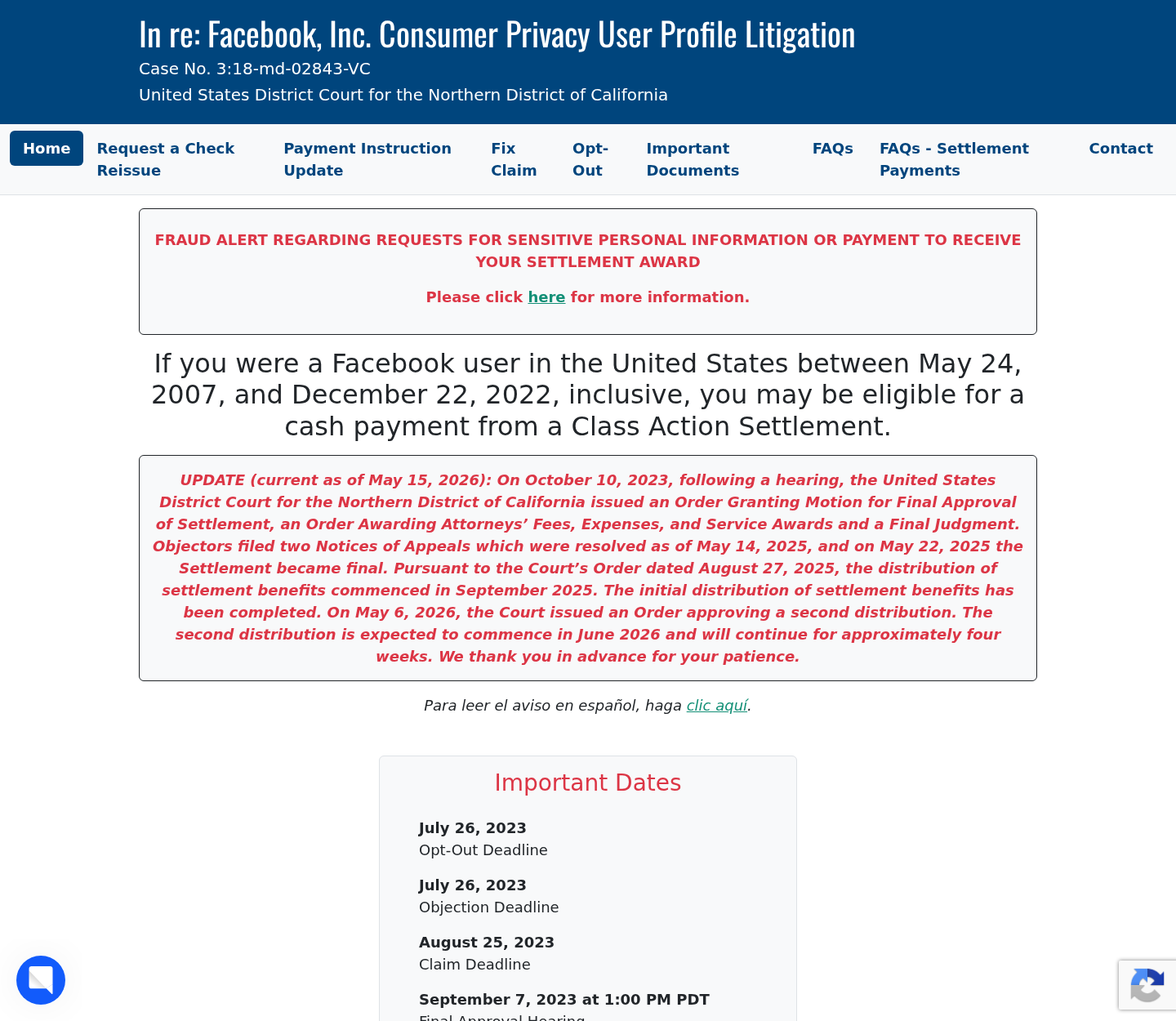
The official settlement website says the initial distribution began in September 2025 and was completed.
It also states that the court approved a second distribution on May 6, 2026, expected to begin during June.
That update explains why some approved claimants received another payment message even after an earlier payment succeeded.
Copycat messages exploit the exact same timeline
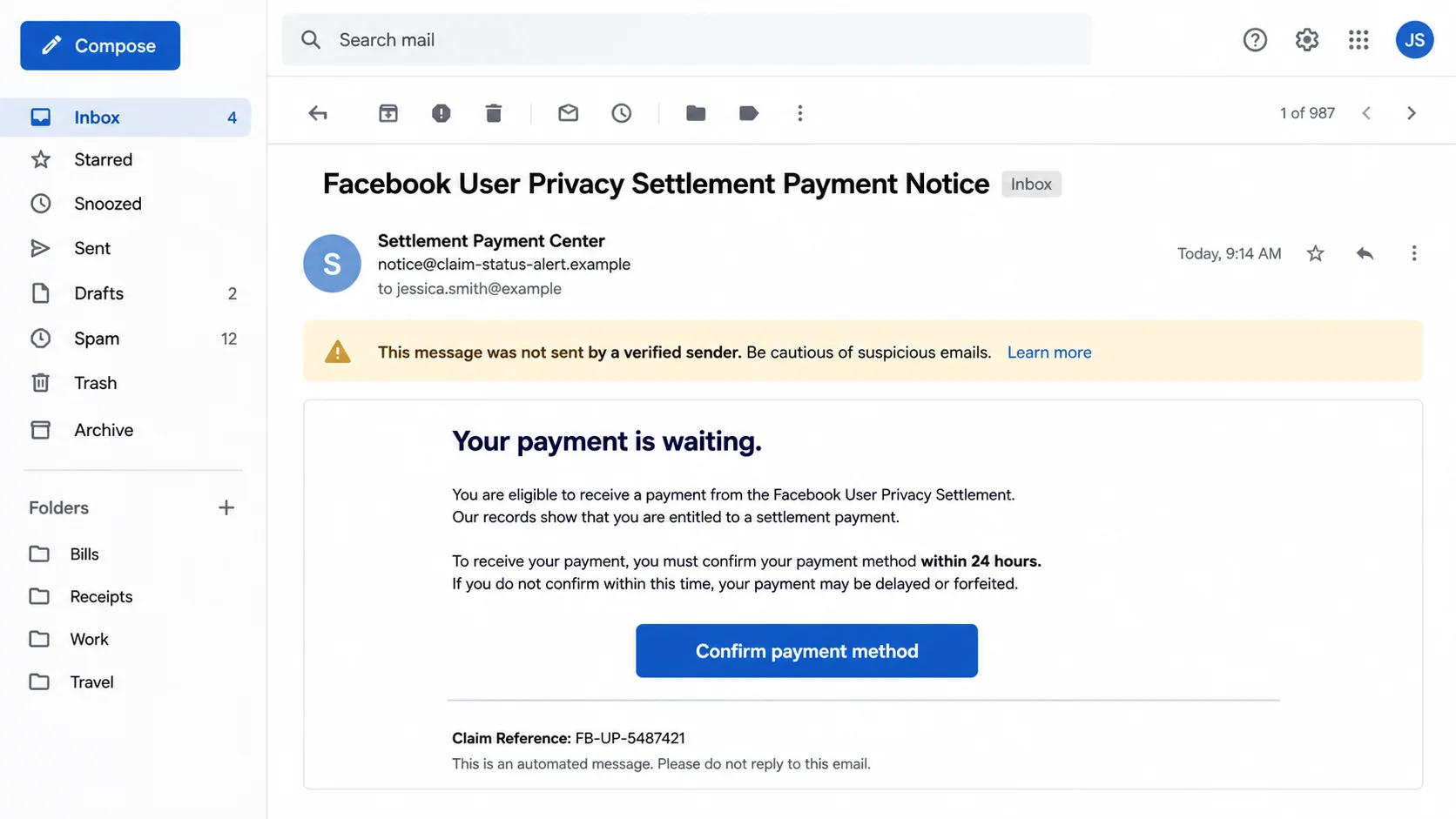
A scammer can copy the case name, settlement amount, official-looking subject, and language about an additional payment.
The malicious version then asks for a fee, bank login, card details, Social Security number, password, or urgent payment-method confirmation.
The correct response is to verify the claim independently through the official settlement domain and records retained from the original claim.
- The settlement itself is real.
- The deadline for submitting a new claim has passed.
- The second distribution concerns eligible prior claimants.
- No fee should be required to release an award.
- A sender name can be forged or imitated.
- Use the official website directly rather than an email button.
The email is not automatically fraudulent and not automatically safe. Its connection to your real 2023 claim must be established without trusting the message.
What the Legitimate Settlement Involves
The lawsuit is formally known as In re: Facebook, Inc. Consumer Privacy User Profile Litigation.
It was handled in the United States District Court for the Northern District of California under case number 3:18-md-02843-VC.
The settlement resolved allegations concerning Facebook user data and third-party access. Meta denied violating the law.
Eligible users had to submit a timely claim by August 25, 2023. That requirement is important when evaluating newer messages.
A person who never filed should be skeptical of an email saying a surprise payment now awaits confirmation.
A claimant who did file should compare the new message with their original confirmation, claim identifier, selected payment method, and prior settlement correspondence.
Why Some People Received a Second Payment Notice
Class settlements can retain funds when initial payments are uncashed, rejected, expired, or otherwise not completed.
A court can approve another distribution of remaining money to eligible people under the settlement plan.
The official site states that a second distribution was approved in May 2026 after the first distribution finished.
Reports about these notices describe additional payments going to claimants whose initial payment had been successfully received.
That context makes an additional-payment email plausible for a prior claimant. It does not make every matching email authentic.
Scammers often become most convincing when they borrow a real event, real amount, and real deadline.
The Settlement Timeline a Genuine Message Should Fit
The case covers eligible Facebook users in the United States between May 24, 2007, and December 22, 2022.
The deadline to file a claim was August 25, 2023. A message inviting a brand-new 2026 application conflicts with that closed deadline.
Initial distribution began in September 2025 and was later described as completed. That explains why earlier approved claimants received payment-related communication.
The court approved another distribution on May 6, 2026. The official site expected those payments around June 2026, roughly four weeks later.
A scammer can copy every public date correctly. Accurate background information does not make the sender, link, attachment, or requested action authentic.
The decisive question is whether your message matches an already approved claim. It should not invent a new eligibility window or demand payment.
Details a Copycat Sender Usually Cannot Prove
A persuasive email may address you by name and mention the settlement amount. Names and email addresses can come from unrelated marketing lists or breaches.
Generic greetings are suspicious, but personalization is not proof. Modern phishing tools can merge stolen profile data into thousands of tailored messages.
A legitimate notice should correspond with the payment choice and contact information previously attached to the claim.
Do not reveal those details to a caller asking you to confirm them. Contact the administrator using the independently located settlement website.
Real administrators may need to resolve rejected payments. They should not demand gift cards, cryptocurrency, remote access, or a processing payment.
Be especially careful with attachments claiming to contain tax forms or payment receipts. A PDF can carry a misleading link, while other files may contain malware.
Hovering can expose a destination on a computer, but shortened and tracking links remain difficult to judge. Direct navigation is safer than link inspection alone.
If a message quotes a claim number, compare it privately with your preserved records. Do not publish the number while asking strangers whether the email is real.
A mismatch does not always mean theft, because records can contain errors. It does mean the email should remain untrusted until independently verified.
How the Scam Works
Step 1: The criminal copies a real settlement announcement
The attacker uses the $725 million figure, case language, and news about a second distribution.
Those facts survive a quick search, so the message appears to pass basic verification.
The deception lies in the sender, destination, and requested action, not necessarily the public background story.
Step 2: A payment notice lands in the inbox
The subject may mention an additional award, payment notice, failed delivery, unclaimed balance, or required payment-method update.
The message can include a generic claim number and address the recipient by name using information from a data leak.
Some versions create urgency by saying the award expires within 24 hours or will be redistributed.
Step 3: The button opens a lookalike claim portal
The fake page copies blue colors, court language, Facebook references, and settlement terminology.
Its address differs from facebookuserprivacysettlement.com, sometimes by one word, letter, hyphen, or unfamiliar domain ending.
Mobile browsers can hide much of a long address, allowing the visual design to overpower the location clue.
Step 4: The victim is asked to verify eligibility
The form requests a name, date of birth, address, telephone number, email, and perhaps a Social Security number.
Those details are framed as necessary to match the claimant or satisfy tax and identity rules.
A real-looking claim identifier does not justify submitting sensitive data through an email link.
Step 5: The page collects a payment method
The fraudulent portal may offer PayPal, Venmo, Zelle, direct deposit, prepaid card, or mailed check.
It can ask for online-banking credentials or a card number instead of the limited routing information a legitimate payment process might use.
Any demand for a banking password, email password, or one-time code is a decisive warning sign.
Step 6: A release fee turns the lure into immediate theft
Some victims are told to pay a processing fee, tax, verification charge, or refundable deposit before the award can arrive.
The amount may seem small compared with the promised payment, making compliance feel reasonable.
Legitimate settlement administrators do not demand gift cards, cryptocurrency, or an advance fee to release an approved award.
Step 7: Stolen details fuel additional fraud
Captured credentials can be used for account takeover, identity theft, unauthorized transfers, and targeted follow-up calls.
The criminal may contact the victim again while pretending to fix a failed settlement payment.
Each new conversation asks for one more detail until the attacker has enough information to cause wider damage.
How to Tell a Real Settlement Email From a Fake
Begin with your own history. Did you submit a Facebook settlement claim before the August 2023 deadline?
If not, a message offering a new 2026 claim or guaranteed award conflicts with the official timeline.
If you did file, search your inbox for the original confirmation. Compare the claim identifier and payment method without replying to the new email.
Expand the sender address fully. Legitimate notices have been associated with the facebookuserprivacysettlement.com domain, not a similar claims or payment domain.
Do not rely on the display name Facebook User Privacy Settlement Administrator. Anyone can type that label into an email account.
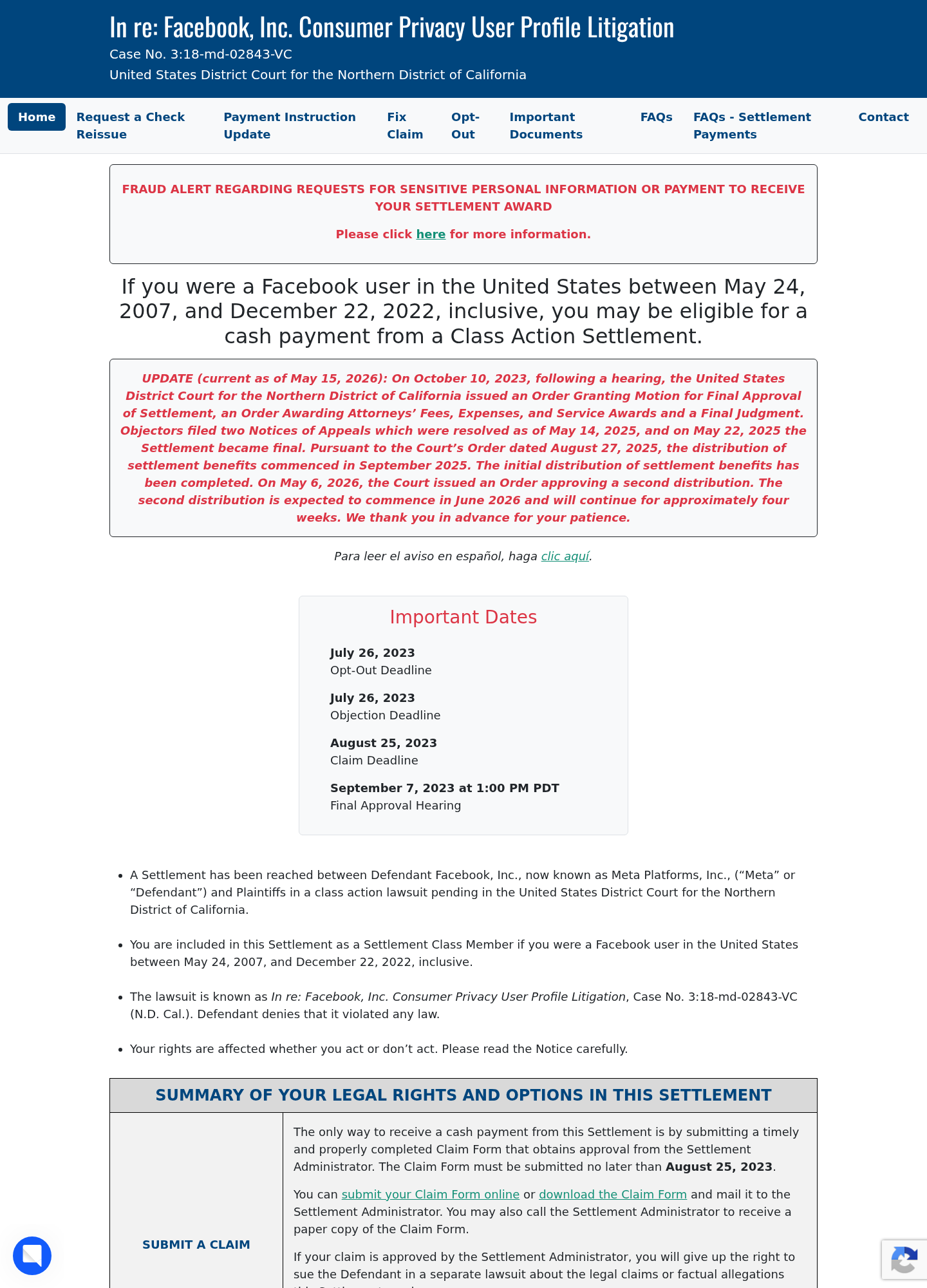
Open facebookuserprivacysettlement.com manually. The official homepage carries a prominent fraud alert about requests for sensitive information or payment.
The site also displays the court case number and distribution update, giving you reference points that do not depend on the email.
Red Flags That Override the Real Backstory
A request for an upfront fee is not made legitimate by the real lawsuit.
A demand for a Facebook password, email password, bank password, or one-time code is equally unacceptable.
A message telling non-claimants to apply now conflicts with the closed claim deadline.
Threats that money expires within hours are designed to prevent independent checking.
Attachments described as claim forms, tax documents, or payment receipts can contain malware or lead to credential theft.
A telephone number inside the message can connect directly to a criminal call center. Locate contact information separately.
A legitimate-looking footer, privacy link, or postal address can be copied. Judge where the button actually goes.
Company, Address, and Fulfillment Checks
The official case is anchored to a federal court record
The settlement site identifies the court, case name, and case number. These details provide independent legal context.
A copycat page may repeat them accurately. Their presence proves the underlying case, not ownership of the page.
Always verify the full domain before relying on copied legal language.
The official settlement domain is specific
The public information site uses facebookuserprivacysettlement.com. Extra words, alternate endings, substitutions, and shortened links require suspicion.
Type the domain yourself. Do not search and click a sponsored result because criminals can advertise lookalike pages.
Once there, use the site’s own navigation to reach payment or contact information.
The administrator should not charge for payment release
A settlement award is not a lottery prize requiring an activation fee.
Taxes and reporting questions should be addressed through official documents, not gift cards, cryptocurrency, or an unexpected card-payment form.
A request for a small fee is enough reason to stop and verify independently.
Support must be contacted through a separately found route
Public reporting identifies info@facebookuserprivacysettlement.com as an administrator contact for payment questions.
Confirm the current address on the official website before sending claim information because contact details can change.
Do not send a full Social Security number, password, or bank login in an email to anyone.
What a Real Payment Notice Should Not Require
A legitimate notice should not ask you to create a new claim after the deadline.
It should not require a fee to unlock, insure, process, or expedite the payment.
It should not demand access to your Facebook account, email account, or online banking.
It should not require remote-access software or a screen-sharing session with a support agent.
It should not tell you to move money to a safe account while a payment problem is investigated.
It should not pressure you to keep the conversation secret from your bank or family.
When any of these appear, the genuine settlement becomes part of the cover story, not evidence that the request is safe.
What to Do if You Have Fallen Victim to This Scam
- Stop all contact. Close the page, end the call, and do not approve another prompt or security code.
- Contact the payment provider. Report transfers or card charges immediately and ask what recovery or account-lock steps remain available.
- Secure your email. Change its password, remove unknown sessions and forwarding rules, and enable multifactor authentication.
- Protect financial accounts. Replace exposed credentials, notify the bank’s fraud team, and monitor statements and credit reports.
- Freeze your credit when needed. If identity data was submitted, contact all major credit bureaus and preserve the freeze PINs.
- Inspect the device. Remove unknown downloads or extensions and run a Malwarebytes scan if the page installed anything.
- Reduce future lures. AdGuard can block many malicious ad and tracking routes, but email verification still requires independent checking.
- Report the impersonation. Notify the settlement administrator, email provider, payment service, and relevant fraud-reporting agency with screenshots.
Frequently Asked Questions
Is the Facebook $725 million settlement real?
Yes. The settlement and court case are genuine. That does not authenticate every email using their names.
Can I submit a new claim in 2026?
No. The official claim deadline was August 25, 2023. Current payments concern previously submitted and approved claims.
Why would I receive an additional payment?
The court approved a second distribution of remaining settlement funds in May 2026 for eligible prior claimants.
Will the administrator ask for a release fee?
No legitimate award should require gift cards, cryptocurrency, or an advance fee before payment.
What domain should I verify?
The official public site is facebookuserprivacysettlement.com. Type it directly and confirm current contact details there.
What if I clicked but entered nothing?
Close the page and check for downloads or permission prompts. Change passwords if the browser autofilled or submitted any credentials.
The Bottom Line
The Facebook settlement email may describe real money, but scammers can wrap theft around accurate public facts.
Verify your original claim and the official domain independently. A real settlement never makes an email button safer than your own careful route.

Join the discussion
0 commentsShare your experience or ask a question about this article.
Discussion
Start the conversation
Have a question or something useful to share? Add the first comment.