


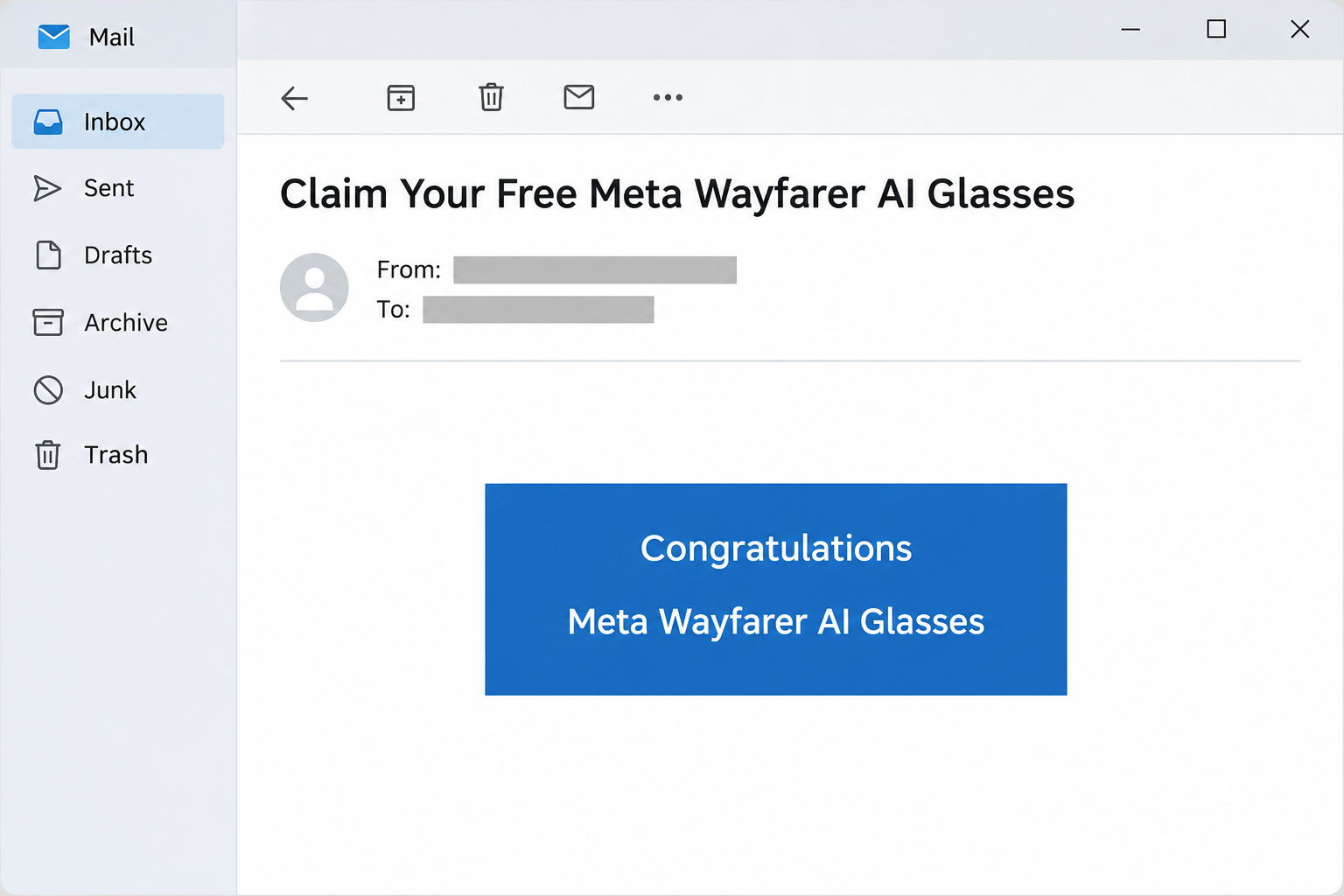
The email tells you to claim a free pair of Meta Wayfarer AI glasses. You open the offer and see a page asking about your experience with Facebook.
A short questionnaire sounds like a small trade for an expensive gift. But the email and the survey don’t actually promise the same thing.
Overview
The email says free gift, while the survey says chance to win
In the Facebook survey scam, an email promotes Meta Wayfarer AI glasses as a free gift. Its subject tells the recipient to claim them.
The linked page uses a different promise. It asks the visitor to answer questions for a chance to receive the glasses, rather than confirming a prize already awarded.
The page also gives a same-day deadline and displays a countdown at the bottom. Neither establishes that any genuine promotion is about to close.
The image recreates a part of the email. It doesn’t show an original message from Facebook or provide a route to the offer.
The survey is not on a Facebook or Meta site
The documented page appeared at shadownessbeseech[.]makeup. The email sample also displayed a sender and reply address outside Facebook, despite labeling the sender Facebook.
The branding and the product name help the page look connected to Meta. The browser address and the email headers tell a different story.
The underlying Wayfarer product line is real. Meta’s own Wayfarer listing shows the official Ray-Ban Meta Wayfarer line, but its existence doesn’t validate a questionnaire hosted elsewhere.
The copy does not establish a payment, shipment, or exact data fields
The evidence documents the email and the first survey screen. It does not show a legitimate drawing, delivery, final card form, subscription, or a charge to a victim.
It is a phishing lure, not a purchase recommendation. Treat any later request for personal details, credentials, or payment according to what it actually asks you to disclose.
Here are the details that help distinguish this specific offer:
- The email calls it a free gift, but the landing page describes a chance to receive one.
- The linked site does not belong to Facebook or Meta.
- The page shows a short clock and a stated end date, neither backed by verified rules.
- The pictured glasses do not establish that the site owns or can ship the product.
- A receipt or tracking claim in a later message would need independent confirmation too.
Why the Difference Between a Gift and a Chance Matters
A message congratulating you for a free gift implies that somebody already made a decision. A chance to win means that, even on its own terms, nothing has been awarded.
It’s easy to miss that change if you have just clicked from the congratulatory email. You may feel like you’re completing a final detail rather than entering something new.
The survey also asks about a service most recipients recognize. You don’t need to know anything about the glasses to understand a question about Facebook.
That makes the first action feel low-risk. Answering how often you use an app sounds less sensitive than typing where you live or how you pay.
Treat each new request according to the information it actually asks for. A question about your experience doesn’t create a reason to give a card number later.
If you didn’t enter a contest, find out how the supposed organizer got in touch and where the rules are published. Don’t take the product photo as an answer.
A genuine drawing will be tied to specific terms and an identifiable sponsor. An attractive page can make the reward clear while leaving the organizer’s identity vague.
How the Facebook Wayfarer Survey Scam Works
Step 1: A congratulatory email gets you to open the offer
The source message calls the reward a free gift and names the glasses. It looks more like an announcement of good news than a request for a favor.
The sender name in a mail app is just a label. Look at the underlying address, then verify the offer through independently opened Meta information rather than replying.
If a friend forwarded the message, ask if they found an official announcement. The fact that a friend saw the same promise doesn’t make it genuine.
Step 2: A Facebook-branded survey quietly changes the deal
The landing page asks visitors to share their experience with Facebook for a chance at the reward. It repeats the product name, so the shift can be easy to overlook.
The page is outside Facebook even though it uses familiar branding. It doesn’t establish who will collect a response or how that person is connected to the company.
A genuine research survey and a genuine prize drawing can each exist. Their existence doesn’t explain why this particular questionnaire has moved to an unrelated address.
Step 3: The timer gives you a reason not to check
The page combines a date-specific deadline with a visible countdown. Together they encourage a visitor to begin before looking for official terms.
A countdown on a page is not a clock supplied by an independent contest organizer. You don’t need to wait for it to reach zero to see whether it’s real.
If an offer is genuine, you should still be able to find its sponsor and eligibility rules. “Limited time” doesn’t replace those answers.
Step 4: The page puts you in a position to disclose information
The recorded first screen invites you to begin a survey. Any later move from feedback to identity, payment, or account access would require a separate decision.
The first survey screen doesn’t show a final form. Don’t assume a specific fee or charge appeared later in this sample.
If you reached another page asking for shipping details, ask why a contest that hasn’t verified a winner needs them. Leave if the route still cannot be tied to Meta.
Step 5: A follow-up can exploit what you already shared
Someone using an address or phone number you entered may contact you again about delivery or verification. A message that knows the offer doesn’t prove there’s a package.
The same applies if you receive a new request saying a payment failed. Check your own card activity before supplying any information to fix the alleged problem.
If all you gave was an opinion about Facebook, report that accurately. It calls for different action than submitting a password, identity document, or card number.
How to Check a Prize Without Using the Survey
Look for published terms from the named organizer
Start from the supposed sponsor’s site or app rather than the email. Look for a title that matches, the dates, eligibility, and how eligible people are notified.
A legitimate listing for the glasses is useful for confirming what was pictured. It is not a press release announcing a giveaway or a set of contest rules.
If a real promotion uses a research company, the sponsor may identify it through independently verifiable information. A logo on an unfamiliar site doesn’t establish that relationship on its own.
Check whether the email describes a product generation or merely names the line. Don’t fill gaps in a vague reward from a separate official product listing.
Don’t pay an unexpected charge to collect it
FTC guidance on prize scams warns about unexpected fees presented as shipping, taxes, or handling. A promised gift is not a reason to send money.
That’s advice for any later request, not a claim that this example included a checkout. The documented survey does not establish an amount or a recurring plan.
If someone sends a tracking number, verify it in the carrier’s own service. A number pasted into a message can refer to an unrelated shipment.
If a transaction really appears after the visit, record its amount, date, and merchant descriptor. Your issuer can match those details to your account without the survey’s help.
What to Do if You Have Fallen Victim to This Scam
-
If you only received the message, don’t use its link. Report it in your email app and verify any supposed Facebook announcement through the platform or company directly.
If a relative asks whether it is real, explain the change from free gift to chance to win. Avoid passing along the clickable version.
-
If you began the survey, write down what you actually entered. Record whether you gave feedback only, then note any name, phone, address, or account information you supplied.
Close the page rather than completing more questions to see its final destination. Be alert to calls or texts that refer to the same giveaway.
-
If you supplied your Facebook password, recover the account yourself. Open Facebook’s account recovery independently and check for changes to your email, phone, and logged-in devices.
Use a new password and replace it anywhere else you reused it. Pay particular attention to the email account tied to Facebook.
-
If you entered card data, contact the issuer without waiting for a charge. Use your bank’s app or the number on your card and explain which details were disclosed.
Ask whether it recommends blocking or replacing the card. If a charge has appeared, report the transaction and ask what evidence the issuer needs.
-
If you sent identity information, respond to the actual exposure. In the United States, IdentityTheft.gov offers recovery steps based on what was shared.
Don’t send a second copy of an identity document to someone who claims they’re confirming delivery. Use the relevant institution’s own support route.
-
Save the evidence without revisiting the survey. Keep the email, any screenshots you already have, and records of calls or payments.
Include when you received each message. That helps distinguish the original email from later contact that might not be from the same sender.
How to Recognize a Follow-Up About Delivery
Check the claim before you check the address
A follow-up may begin with a question that sounds small, such as whether your apartment number is correct. That doesn’t establish that anyone has prepared a shipment in your name.
If a carrier is named, open that carrier’s own site from a saved address. You can ask whether a genuine package exists without sending new information to the survey operator.
Check whether the message says you entered a drawing or already won. Those are different events, and a delivery claim can’t explain when the organizer selected you.
If it uses a return deadline or a last delivery attempt, compare it with records you already have. Don’t use a new reason to reopen the old survey.
Treat each type of information separately
An email address can lead to more junk mail. A phone number can lead to calls or texts that refer to the same prize, even if nobody has your password.
If you used the same password for Facebook and email, protect both accounts through their verified services. Securing Facebook won’t fix the other account just because it shares an address.
Provide your card issuer with the transaction amount and merchant text if you actually see a charge. A form saying payment was declined doesn’t establish that nothing was attempted.
If you entered a one-time code, tell the service which message carried it. The code may have applied to a sign-in or payment you didn’t mean to approve.
Don’t let a correction become another disclosure
A caller might claim a gift was sent to the wrong place and ask for your identity or a new card. Verify the offer before giving them anything.
If a family member is involved, help them recover the account or contact their bank from a known device. You don’t need the original link to assist them.
Keep the difference between the email and landing page in your report. It helps an investigator identify the exact version without treating every promotion mentioning the same glasses as related.
Frequently Asked Questions
Is the Meta Wayfarer Facebook survey legitimate?
The reported survey appeared on an unrelated website. Its Facebook graphics and reference to a real product don’t make it an official giveaway.
Why did the email say I could claim the glasses?
The inbox message presents a free gift, while the page describes a chance at one. That shift makes the offer look more certain before you follow the link.
Does the countdown mean I really have to act today?
The clock comes from the page making the offer. It doesn’t establish that a confirmed promotion exists or that you are about to miss anything.
Are Ray-Ban Meta Wayfarer glasses themselves fake?
The Wayfarer line is real and listed by Meta. The deception is the unauthorized survey claiming to give the product away, not the product named in it.
What if I typed only my mailing address?
Watch for follow-ups concerning a delivery, tax, or supposed address correction. A disclosed address calls for vigilance, but does not establish that your Facebook account was accessed.
Should I pay postage if the page says the prize is free?
Don’t pay to release an unexpected prize from this survey. Check whether the sponsor recognizes the promotion through its own channels instead of using a form sent afterward.
The Bottom Line
Skip the survey promising Meta Wayfarer AI glasses. The email’s free-gift claim becomes a chance to win on a website that doesn’t belong to Facebook.
If you entered anything, respond to what you shared. Recover an exposed account through Facebook, call your issuer about card details, and keep records of any attempted follow-up.

Join the discussion
0 commentsShare your experience or ask a question about this article.
Community experiences
Did this happen to you?
Your experience could help someone recognize the same scam. Submit a private report for our team to review.
I experienced this tooReports are reviewed before publication. Sharing publicly is always your choice.
Discussion
Start the conversation
Have a question or something useful to share? Add the first comment.