


An email says the domain behind your address hasn’t been revalidated. It sounds like routine compliance work, until the message mentions what could happen to your inbox.
If you run a small business, seven days without an answer can feel uncomfortably short. The rule number in the notice is a good place to start.
Overview
The warning threatens both incoming and outgoing mail
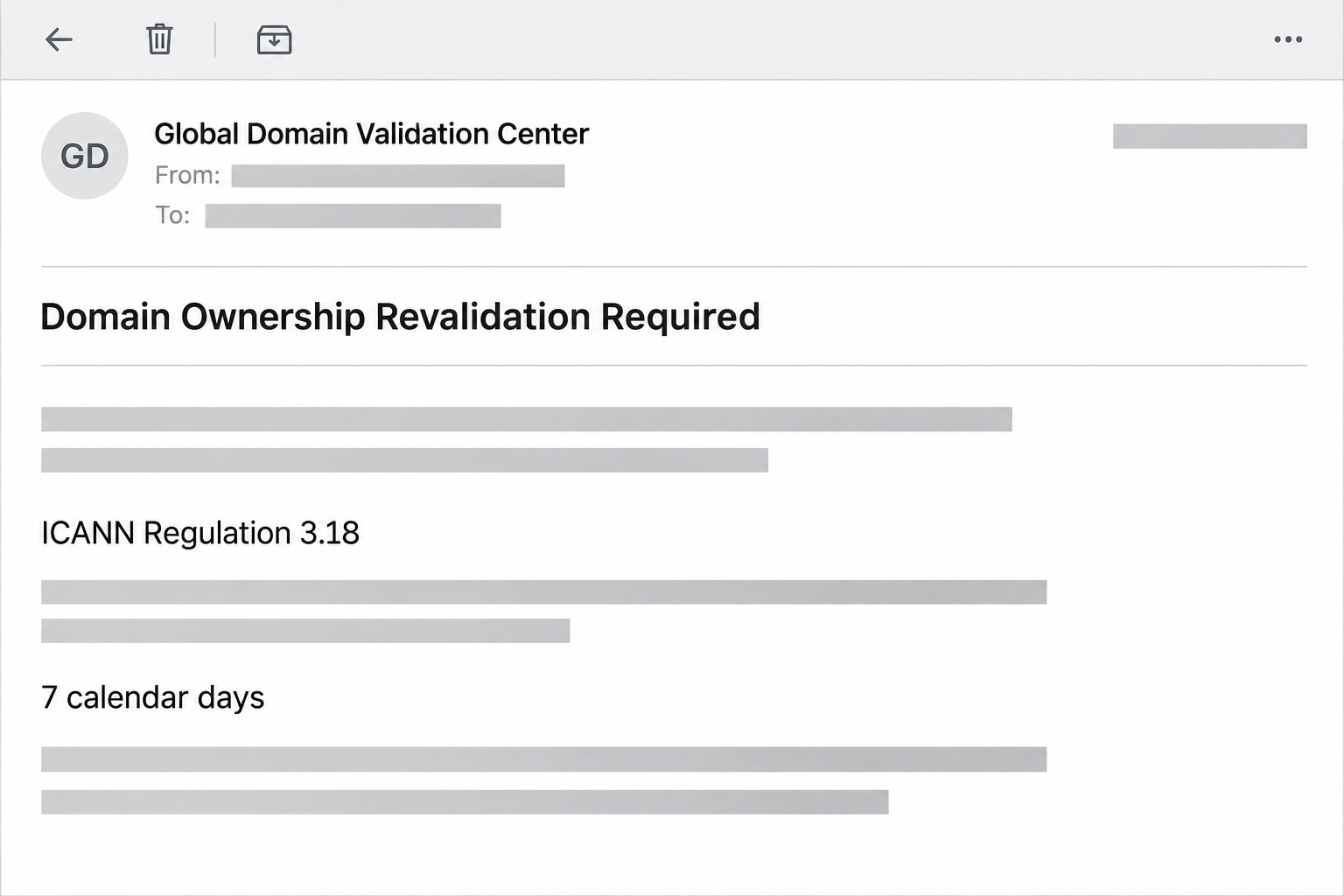
The Domain Ownership Revalidation Required email scam says a domain associated with your mailbox hasn’t been checked in 90 days. It gives you seven calendar days to respond.
The message claims mail sent to you will be rejected and that you won’t be able to send anything yourself. It calls this a domain ownership problem.
The reported sender uses the name Global Domain Validation Center. The email also points to “ICANN Regulation 3.18” and talks about DNS records or an administrative contact.
The image recreates a few details from that notice, with addresses and identifying information omitted. It isn’t a notification from a domain registrar.
The cited section is real, but it addresses a different problem
ICANN’s advisory on Section 3.18 explains registrar obligations around DNS abuse, including how registrars handle abuse reports and respond when they have actionable evidence.
That isn’t the same thing as a universal rule requiring customers to sign in to webmail every 90 days. The number lends authority to a demand the section doesn’t describe.
Registrars really can ask customers to verify contact information. You don’t need to deny that possibility to reject this particular request. Check the issue independently with the relevant provider.
The action leads to a Roundcube password form
The observed link opened a Roundcube lookalike on a Firebase Storage address, not a domain registrar’s account page. The form already displayed the recipient’s email address.
That form asked for the mailbox password. It didn’t show the domain’s registration account, an authenticated notice from the registrar, or a check for a particular DNS record.
Treat the services as separate until you confirm who operates each one:
- The registrar manages the domain registration and can tell you whether its contact verification is outstanding.
- The DNS provider operates the records that tell other services how to reach your domain.
- The mail host manages the accounts that send and receive through your domain.
- Your mailbox password belongs on the confirmed mail service, not a file-hosting page showing a familiar logo.
- If you only received the message, don’t alter DNS records or replace passwords as though a takeover already occurred.
Why Domain Ownership and Mail Access Don’t Mean the Same Thing
Suppose your website and your mailbox both use the same business name. You might still pay one company for registration, another for DNS, and another for email.
A real issue with DNS can affect mail delivery. That practical connection gives the scam a believable premise without proving that the writer can suspend anything.
A registrar confirmation typically concerns the domain registration and the information on file for its contact. ICANN’s contact verification guide explains why a registrar may need to contact you.
A webmail sign-in concerns a different resource: the contents and settings of a particular inbox. It doesn’t establish that whoever knows the password owns the domain.
A small organization might have a contractor who originally set up all three services. Don’t assume the employee who opens the mailbox is the person named on the registration.
If you’re not sure which provider you use, look up invoices or service records saved before this email appeared. Your team may already have contact information in its password manager.
ICANN Lookup can identify the registrar for many domains. It won’t necessarily identify the reseller that handles your account, so compare the result with your receipts and existing records.
The word “domain” in a subject line shouldn’t determine where you sign in. Let the specific thing that needs verification tell you which account you should open.
How the Domain Ownership Revalidation Email Scam Works
Step 1: A routine-sounding inspection turns into a deadline
The email starts from a supposed gap in the domain records. It says the domain missed a review in the past 90 days.
The next part makes the issue immediate. The notice gives you seven calendar days and describes both incoming messages and outbound mail as at risk.
That can make the recipient think about orders, replies, and appointments they might miss. It’s harder to ignore a deadline when the message makes the consequences feel specific.
If you see a real interruption, record when it started and which mailboxes are affected. Give that information to the actual provider instead of testing the warning’s link.
Step 2: A regulatory reference makes the demand sound official
The email invokes Section 3.18 and describes the request as protection against problems such as hijacking. Those ideas are related to domains, but the message draws an unsupported conclusion.
The actual section concerns what accredited registrars must do about abuse. Nothing in that cited obligation turns a Roundcube form into a registry or registration contact check.
Look for the exact contract or rule when a notice relies on a number. An official document can show whether the stated requirement belongs to the service receiving your information.
You don’t have to resolve every technical detail before deciding whether to click. A mismatch between the reference and the requested action is enough reason to change routes.
Step 3: A revalidation link takes you to an unrelated host
The button is presented as the start of ownership verification. Instead, the captured route goes to a page hosted through a general cloud-storage service.
A cloud provider can host content for many customers. Its name in the address doesn’t make the material part of Google Workspace or the service that runs your email.
In this case, the wrong place to sign in is the decisive clue. Roundcube’s branding cannot override a domain you didn’t reach through your mail host.
Step 4: The form asks for a password it has no business needing
The copied Roundcube screen displays a prefilled address and a password field. A reader can recognize their own mailbox without seeing evidence that its provider is involved.
If your password manager doesn’t recognize the page, don’t treat that as a software problem to overcome. Check whether you’re on your service’s genuine sign-in address.
The submission would expose the password to a form outside your mail service. The documented example shows a credential request, not a verified DNS change or recorded device infection.
Step 5: A mailbox problem can become a broader account problem
A compromised mailbox can expose renewal notices, reset messages, provider names, and contacts. Someone with access might try to use that information to reach an account that controls the domain.
That is a possible consequence, not proof of a transfer or change in this case. A mailbox password does not directly transfer the domain to another registrar.
If it was reused for the registrar or hosting dashboard, tell the responders. They can check those higher-impact accounts alongside the inbox rather than assuming the problem stops at email.
How to Check Domain Status Without the Email
Start with the account that actually bills for registration
Open the registrar using a saved address or your previous purchase record. If the domain belongs to your employer, have the designated owner check rather than guessing which login applies.
Compare registration status, the renewal date, and any notices about verification. Don’t confuse a reminder about registration contact information with a warning that your mail quota is full.
If the dashboard doesn’t answer the question, open a ticket from the official account. Describe the notice, but don’t paste a password or a live link into a support request.
Where a vendor manages registrations for you, use its existing contact to confirm the handoff. A forwarding address in an unexpected email is not a substitute for that relationship.
Confirm which system accounts for any change you see
If something has actually changed, ask which system shows the event. A new forwarding rule is a mailbox issue; a change of nameservers is a domain or DNS issue.
Write down the record, time, and expected value before asking for help. That gives the provider something to investigate without encouraging you to try random edits.
For a shared domain, see whether other mailboxes or services are affected. A single user’s sign-in problem calls for a different response from a business-wide outage.
If someone asks you to add an unfamiliar DNS record as a “verification” follow-up, stop and get the request confirmed. DNS changes can affect services beyond the inbox.
What to Do if You Have Fallen Victim to This Scam
-
If you only received the email, don’t start the revalidation. Report the message in your mail app or through your company procedure and verify any real questions separately.
If you manage someone else’s domain, forward the evidence only through the procedure your organization uses. Avoid putting a clickable copy into a team chat.
-
If you reached the copied sign-in but didn’t submit information, close it. Note the title and time if you need to report which page you saw.
Don’t open the link again to take a screenshot. You can tell your mail host or IT team what happened without trying the same route twice.
-
If you entered a mailbox password, recover the mailbox directly. Use the known login or help desk from a trusted device and tell them about any approved code or prompt.
Ask the provider to review active sessions, recovery settings, and unfamiliar forwarding rules. If you can, use a fresh password you haven’t used for any other service.
-
Protect the registration and DNS accounts when they share exposure. If you reused the password or the mailbox receives registrar reset messages, flag that connection to the domain owner.
Check recent registration changes, new administrative contacts, DNS edits, and transfer notices in those providers’ dashboards. Ask support to help if you’re locked out.
-
Confirm normal mail operation with a known contact. After account access is secured, check that expected messages arrive and that there are no unexpected sent items.
Keep the original warning and record unexplained changes. Your provider can review the activity without anyone replying to the sender in the notice.
What to Ask the Registrar and the Mail Host
Ask for a specific event in the correct account
Tell the registrar which domain you are asking about. Request confirmation of any contact-verification notice, renewal hold, or transfer request tied to that registration.
If the registrar confirms a real request, restart from its known account or support channel. Ask which contact information needs attention rather than following the path supplied by the warning.
If only mail is affected, ask the mail provider for the bounce message or delivery status. A rejection notice can help locate trouble without touching the registration.
A webmail provider may be able to review access or forwarding without controlling the domain itself. If you need both teams, send each only the detail relevant to its system.
Keep recovery channels inside your control
If your billing or recovery notices go to the mailbox you just secured, confirm that you can still receive them. Use an independently verified reset route for any related account.
A real domain transfer alert is worth checking promptly, but do not start a transfer to see what happens. Ask your registrar whether there is already a pending request.
Once the immediate issue is resolved, keep your registrar and mail host details separately. The next warning will be easier to check if the first contact is already written down.
Frequently Asked Questions
Is the Domain Ownership Revalidation Required message a real ICANN notice?
The reported example is not a genuine ICANN compliance message. It misuses a registrar abuse obligation and leads to a Roundcube copy outside the mail provider.
Do registrars ever ask for verification by email?
Registrars can contact customers to verify registration information. Check any request directly in your known registrar account or with the provider you already use.
Will ignoring the link shut off my business email?
The email’s warning does not establish an actual suspension. Check mail and domain status through their genuine providers, especially if other people are also seeing a problem.
Does a Firebase Storage address mean Google verified the form?
It shows the page was served through that hosting service. It doesn’t make the page a Google login, a Roundcube provider, or an authorized ICANN workflow.
Can changing the mailbox password repair a DNS change?
Changing the mailbox password secures that account, not the DNS settings. Ask the domain or DNS provider to check and correct a confirmed change in its own system.
What if the notice had my actual address and domain?
Both details can be placed into a message and shown again on a form. Verify the sender and the destination instead of relying on the presence of known information.
The Bottom Line
Don’t revalidate a domain through this Roundcube lookalike. Section 3.18 concerns registrar abuse obligations, not an instruction to enter your mailbox password on a cloud-hosted page.
If you supplied credentials, secure the inbox and tell the domain owner about related accounts at risk. Verify any actual registration or email interruption through the provider responsible for it.

Join the discussion
0 commentsShare your experience or ask a question about this article.
Community experiences
Did this happen to you?
Your experience could help someone recognize the same scam. Submit a private report for our team to review.
I experienced this tooReports are reviewed before publication. Sharing publicly is always your choice.
Discussion
Start the conversation
Have a question or something useful to share? Add the first comment.