


A page headed “Claim Your $oooo” looks like a new part of a project you’ve already used. The language about moving between chains sounds familiar.
Maybe you’ve earned points or used its bridge before. That history makes the claim worth checking, but it doesn’t tell you who put the page up.
Overview
The copy asks people to claim a token associated with a real project
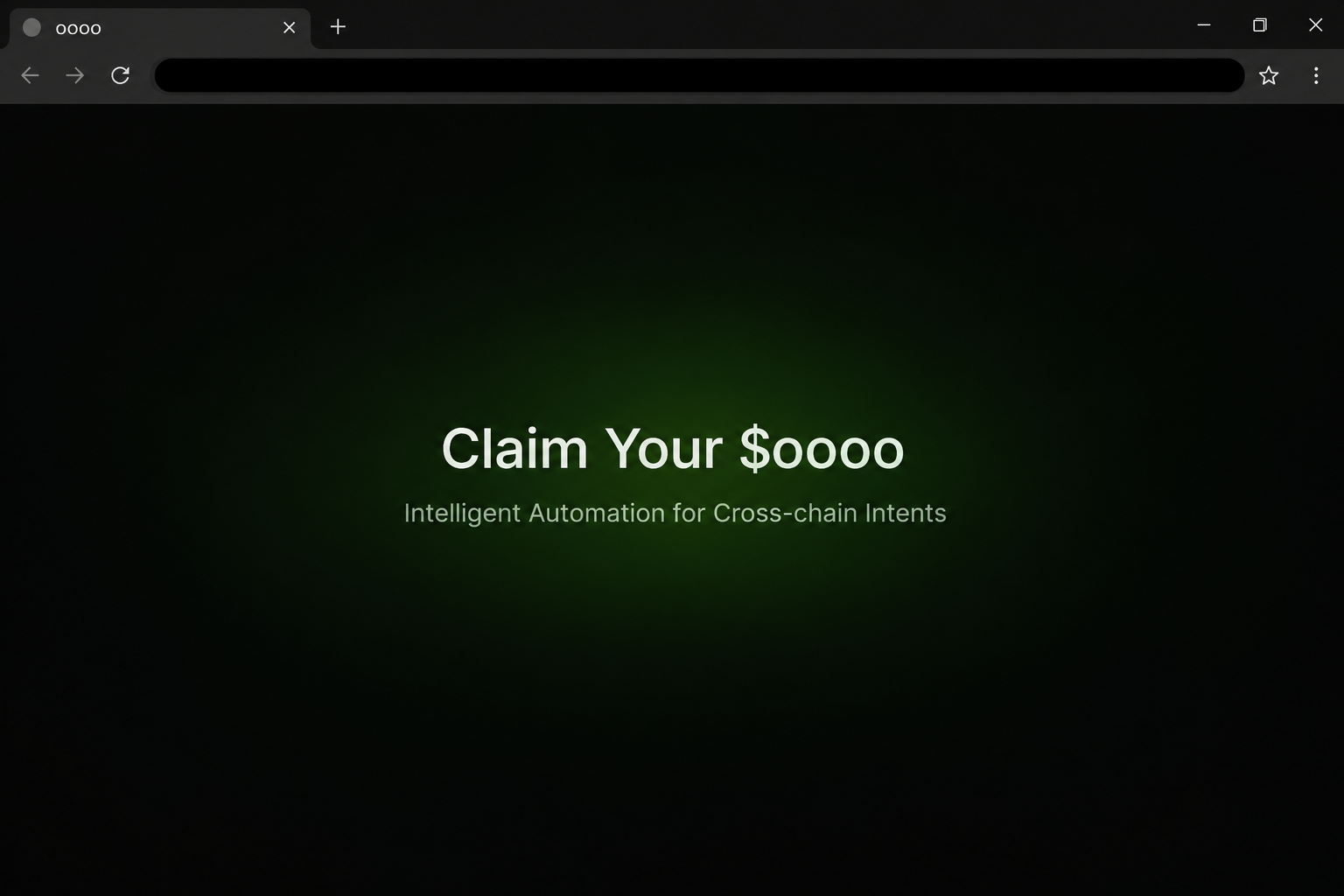
The fake $OOOO claim page uses oooo’s name and references cross-chain automation. It was documented at oooo-update[.]com, outside the project’s oooo.money domain.
In the captured example, the claim action opens a selection of cryptocurrency wallets. The visible flow doesn’t establish a personal allocation, a signed transaction, or an actual payout.
The image recreates the campaign heading and a portion of the layout. It has no claim control and is not a picture of a verified token distribution.
Points, a fee voucher, and a token have different purposes
Archived oooo documentation describes an asset with the ticker $oooo and lists allocations for campaigns. That distribution plan does not authorize this website.
The project separately described Goooo Points and an o-Voucher for bridge service-fee discounts. Neither turns an unexpected token claim into an official one.
Look at the exact item you earned or expected. A point balance, a fee discount, and a transferable asset should not be treated as three labels for the same thing.
A wallet selector does not validate the request
The example shows a list of recognizable wallets. Anyone assessing exposure needs to check what happened beyond that list in the wallet and network they actually used.
Ask these questions before going any further:
- Does the project’s own documentation confirm the campaign and the precise claim destination?
- Are you expecting a token, a voucher for bridge fees, or points from a quest?
- Which account or network did you use for the original activity?
- Does the wallet request match that activity, or ask for a different permission or transfer?
- Can you resolve your question from existing records without connecting to this page?
Why Cross-Chain Language Makes Verification More Important
The project’s public repository profile describes its focus on connecting blockchain networks. Someone who used oooo may already expect to see more than one network or wallet.
That history makes the copy’s language sound reasonable. The danger is treating any unexpected chain or account request as normal because the service talks about going across chains.
Start by identifying the account that actually performed your activity. If you used one address for a quest and another for transfers, don’t assume a new page knows that distinction.
A claim known to involve one network does not automatically need access to every chain you use. Check the network the official instructions expect before deciding whether anything matches.
The word “update” in a domain can suggest an authorized change without naming who approved it. A domain outside the project needs an independently verifiable link from the project itself.
This check still matters when a direct message appears to come from someone in the community. A knowledgeable participant may recognize the real token and share the wrong claim page.
If someone cites your points as proof, ask to see the program’s rules outside the promotion. Real points can make the premise plausible, not authenticate the route.
How the Fake Claim $OOOO Scam Works
Step 1: The page presents the token as something you’re already owed
“Claim Your $oooo” is a short phrase, but the word “your” does some work. It suggests that the token is waiting rather than asking whether you actually qualify.
People who remember bridge usage or early quests have something to connect to that promise. The page itself doesn’t have to show how that activity was scored.
Don’t assume the copy knew anything about you before you arrived. An identical landing screen could be shown to someone who never used the project.
Step 2: Familiar terminology replaces a clear announcement
The page invokes the project’s cross-chain language. It presents the claim beside descriptions that sound like the genuine service, without establishing who runs the destination.
An announcement you can verify should tell you enough to recognize the exact program. Look for eligibility, the relevant chain, and what the verified page says you need to do.
If all you can find is a description of the token, you’ve confirmed the name, not the promotion. Keep looking for the specific distribution before acting.
Step 3: The button moves you to a wallet chooser
The recorded claim action brings up an interface with multiple wallet options. The picker can look familiar even though its context is an impersonation.
There’s a meaningful difference between recognizing a wallet provider and trusting the site that invoked it. A real wallet app can receive a request from an unrelated webpage.
You can stop without selecting anything. If you already connected, check what your wallet says about that site rather than opening its claim flow again.
Step 4: You may be asked for authority unrelated to a reward
A site that says “claim” may present a different action in the actual wallet. A request to give another party spending rights isn’t explained by the word reward.
Check the account, asset, chain, and action shown in the trusted interface. If those details don’t line up with what you independently verified, reject the request.
The captured menu doesn’t establish which later request a visitor may have received. Don’t use the screenshot alone to decide that your wallet lost funds.
Step 5: Check what happened for the account that interacted
If you connected with more than one wallet, start with the address that was selected when the request came in. Each address can have a different history.
A portfolio screen may combine balances across networks, making a change harder to interpret. Look at the affected account on the network where the action took place.
Distinguish an unexpected permission from a recorded transfer and from a disclosed secret. Disconnecting may address the site session, but not the other exposures.
How to Check a Real oooo Program Without the Claim Page
Identify the reward before you try to redeem anything
Find the project material that describes the activity you remember. The community documentation can discuss campaigns broadly without announcing a payment to your address.
If the program was a quest, start with its official account view and any completion record you already saved. Check whether the program explains what the points can become.
If the item was an o-Voucher, the project describes its purpose as reducing a bridge service fee. That isn’t a reason to accept a separate site offering transferable tokens.
A single project can run more than one promotion at a time. Keep the dates and eligibility rules tied to the exact program rather than combining details from different announcements.
Keep a fee, approval, and transaction separate
A genuine bridge operation involves a destination network and an asset you intended to move. A reward site shouldn’t turn that into a transfer you never planned to make.
A permission can also be granted without a token leaving your account at that moment. MetaMask’s explanation of allowances explains why checking approved spending is a separate task.
If a supposed support representative says you must move assets to prove prior activity, don’t comply. Existing records can show prior activity without a new transaction.
Avoid sending small amounts to prove a claim page is legitimate. If the destination is wrong, the amount is still a real payment and doesn’t make the offer genuine.
What to Do if You Have Fallen Victim to This Scam
-
Leave the copy and don’t test another account. If you only read the page, check the project’s genuine documentation for any program you intended to use.
Keep a note of the name and time if someone sent you the link. Don’t share the live address when warning the next person.
-
Disconnect an unfamiliar site in the wallet you actually used. Check the connection list from the wallet interface, with the relevant account selected.
If you selected multiple accounts while looking at the site, note them individually. Don’t assume an account was connected just because it appeared in the wallet.
-
Review any request you signed or approved. Use the appropriate network’s records and the wallet’s own tools to identify unexpected permissions or transfers.
If your wallet provider identifies an unwanted allowance, follow its verified revocation instructions. Revocation doesn’t pull back funds that already moved.
-
Use a trusted device if you exposed recovery words or a key. Get wallet-specific guidance for moving remaining funds and retiring the affected secret.
Don’t hand the same secret to a supposed bridge operator or recovery helper. Someone can identify public transactions without ever seeing your recovery phrase.
-
Record any unexplained movement by network and address. Save the transaction identifier and which assets were affected, rather than relying on the copy’s total.
Tell any relevant exchange or wallet provider through a channel you know. The FBI’s cryptocurrency guidance lists useful details for US reports.
-
Check old bookmarks before you return to normal bridge use. Remove the imitation from your saved list and find the service independently the next time you need it.
If someone promises to credit old points by having you sign for a different wallet, verify that through project support before treating it as real.
What to Check if an Old oooo Quest Looks Familiar
Compare the original promise with the new one
An old quest completion may have a date and an account attached to it. Save both details before deciding where to look up any credit from that activity.
A campaign could have ended without converting points to tokens for everyone. The token allocation document tells you about supply and intended distribution categories, not any individual’s balance.
An official voucher description might also refer to claiming something. Read the object of that verb. Claiming a fee discount does not mean redeeming an independent asset in your wallet.
If the claim appears in a support message, ask which official program it concerns. A vague answer about past bridge transfers doesn’t identify an eligibility rule.
Look for the same action in your own records
Suppose someone says a prior bridge transfer qualifies you. Locate that earlier transaction on its original network, then confirm whether the specific campaign says it counts.
If the record came from an exchange, check its account history separately. Matching amounts don’t make a withdrawal the same as program activity.
When you changed wallets since the old event, don’t sign for both addresses to solve that uncertainty. Look for official rules instead of granting more permissions.
Make a note of the network name and public address you used, not just the wallet brand. The same app can display multiple accounts and several supported networks.
Use the project route to resolve apparent differences
A genuine program can point to a partner, but the partner should appear in verified project material. A partner’s logo on the claim page does not supply that independent link.
If older program pages are unavailable, don’t turn to a site promising to reopen the window. Look for current confirmation through a project channel you can verify independently.
Share the legitimate program description with other participants if it answers their question. Avoid giving the imitation more traffic by circulating a clickable version of the warning.
If a partner sends a message about an allocation you didn’t request, read it alongside the original program. Confirm both the sponsor and the action it names.
If the wording in a new wallet prompt is unfamiliar, leave the request pending only long enough to reject it. You don’t need to accept it to investigate the notice.
Frequently Asked Questions
Is the $oooo token itself fake?
The project’s documentation lists the ticker and describes its intended role. The fake claim page uses that genuine name, but isn’t shown to be an authorized distribution.
Does a points balance prove I am owed tokens?
Points show activity under a particular program. Look for the exact terms explaining whether those points affect a distribution before treating them as tokens you can claim.
Is an o-Voucher the same as an airdrop?
The project describes the voucher as a way to reduce a bridge fee. The voucher’s existence does not prove that a separate token claim is real.
What if I only selected a wallet provider?
A provider menu isn’t evidence of a completed transfer. Check whether the site actually connected, then respond to any request you accepted rather than to the menu itself.
Why does more than one network matter?
A wallet can control accounts on different networks. Look at the specific network involved in the request so you don’t mistake a balance elsewhere for proof that nothing happened.
Can a bridge support agent ask for my secret phrase?
A support agent doesn’t need your phrase to review a public transaction. Keep wallet secrets private and contact help through an independently confirmed project or provider route.
The Bottom Line
Don’t use the unsolicited “Claim Your $oooo” page to check old points or collect a reward. The token name is genuine, but the documented claim site isn’t the project’s domain.
If you interacted, check the exact account and chain before deciding what to do. Deal with a connection, a signed permission, or exposed wallet secrets according to what actually happened.

Join the discussion
0 commentsShare your experience or ask a question about this article.
Community experiences
Did this happen to you?
Your experience could help someone recognize the same scam. Submit a private report for our team to review.
I experienced this tooReports are reviewed before publication. Sharing publicly is always your choice.
Discussion
Start the conversation
Have a question or something useful to share? Add the first comment.