

A Go decimal package looks like the library your project needs. The name is familiar, the documentation fits, and the version number seems unremarkable.
Before trusting it, check one small detail in the module path. In this case, a single letter changed what developers were actually bringing into their software.
Overview
A malicious imitation, not a flaw in the legitimate library
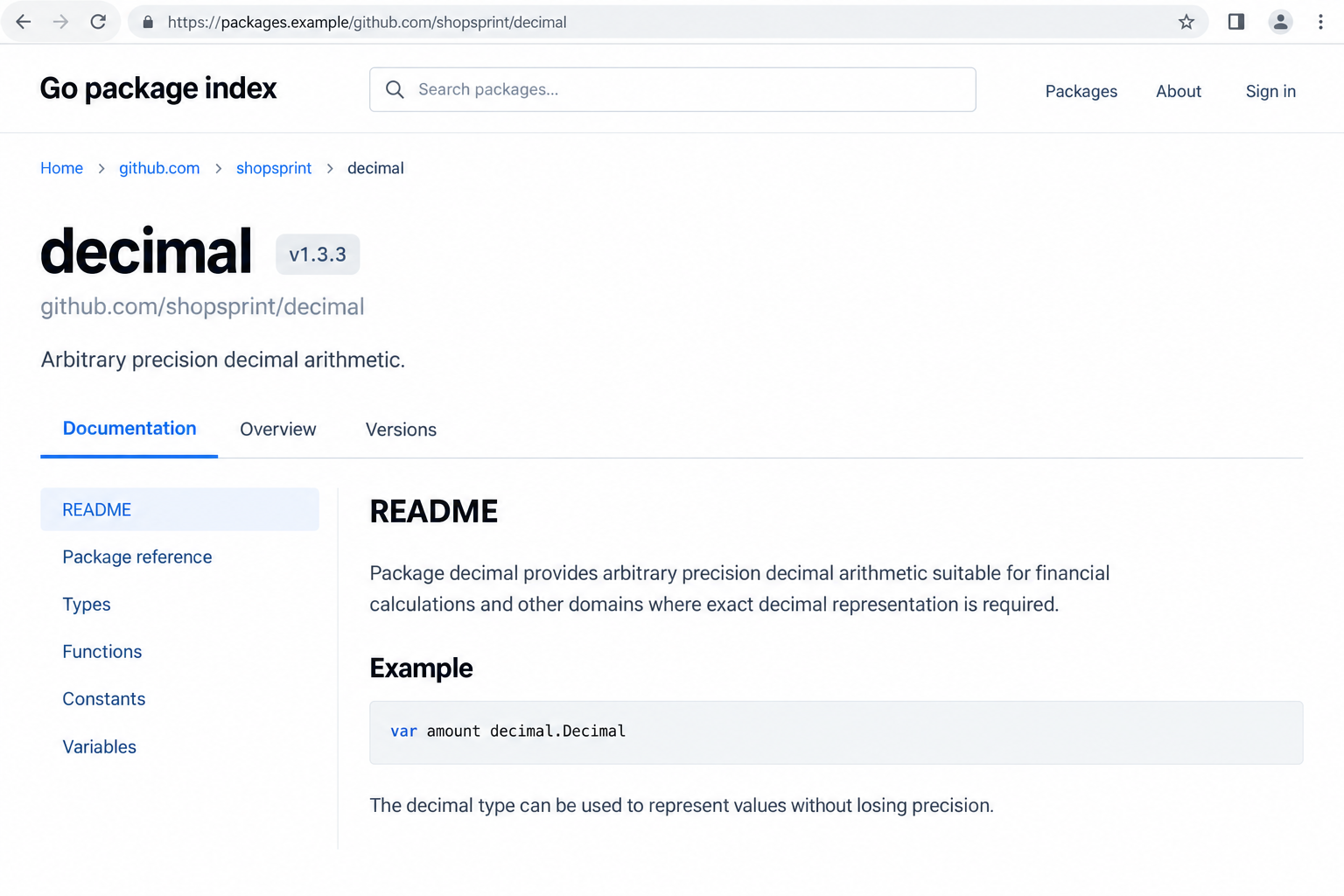
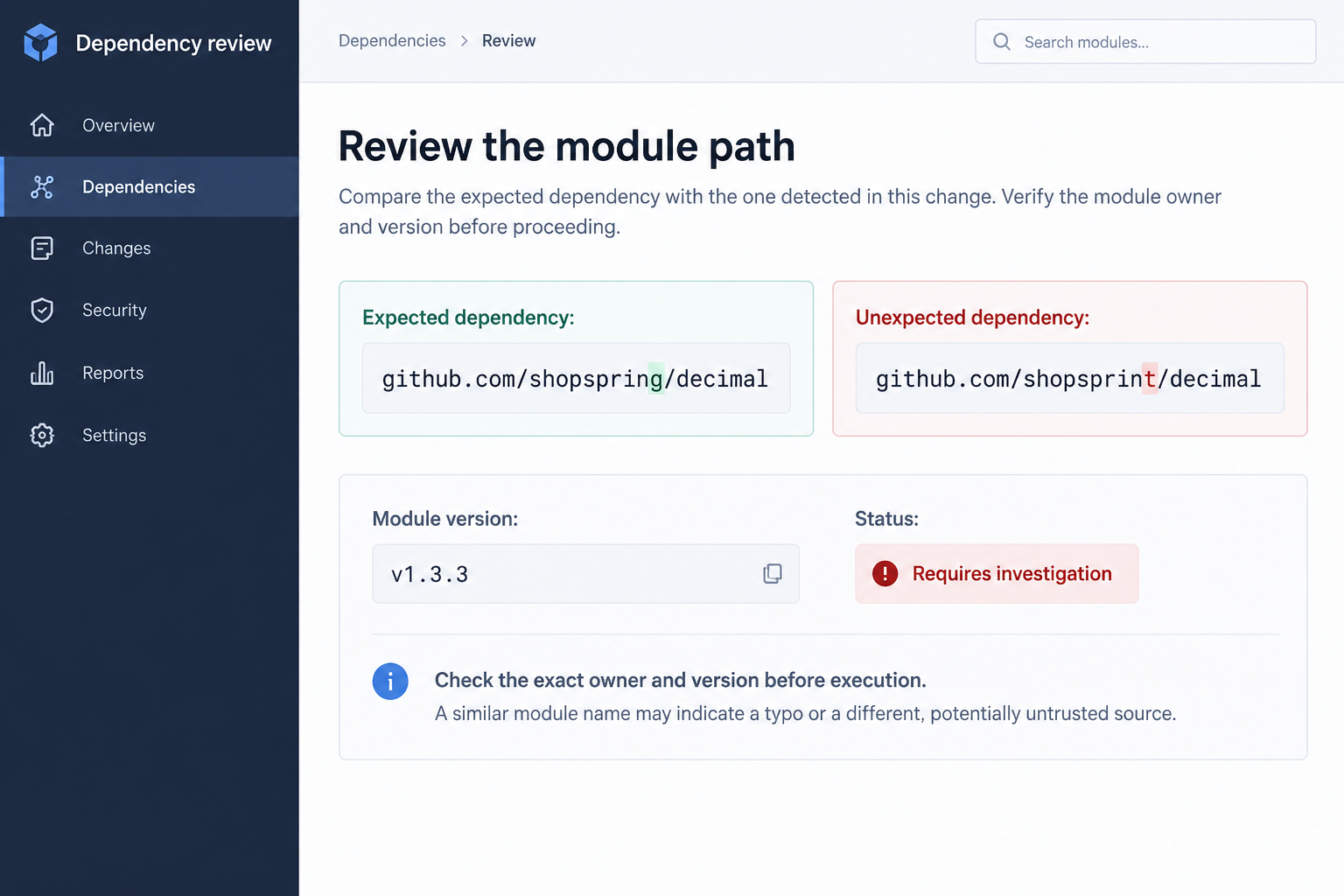
The confirmed malicious package was github.com/shopsprint/decimal at version v1.3.3. Its name imitated the legitimate github.com/shopspring/decimal module.
Read the owner names carefully: shopsprint ends with a t, while shopspring ends with a g. The difference identifies a different source.
Socket documented the backdoor on May 19, 2026. This is an older confirmed supply-chain attack, not a newly observed mass email campaign.
The malicious version added initialization code that repeatedly queried DNS TXT records and attempted to execute the returned program names.
Earlier versions of the imitation had mirrored ordinary library code. That history made the later poisoned version less obvious to someone relying on past appearances.
The dangerous action occurs when affected software runs
A dependency is code your application uses. If an imported package includes initialization behavior, that behavior can run before your own application’s main function.
Go’s initialization rules explain why this matters. Package initialization is part of running the completed program, not merely looking at documentation.
Downloading source or reading a package page is not, by itself, proof that this payload executed. Testing or running affected software changes that assessment.
- The imitation: shopsprint/decimal instead of the legitimate shopspring/decimal path.
- The confirmed malicious release: v1.3.3 of the imitation.
- The hidden behavior: DNS-driven program execution started during package initialization.
- The relevant exposure: software incorporating the affected release and then executing in a workstation, build, or service environment.
- The lasting concern: old caches, vendored source, and existing binaries are not fixed by removing a public listing.
The public distribution route was withdrawn
Socket reported that the Go security team withdrew the module after disclosure. Our October 4 proxy check returned HTTP 403 with an explicit malicious-module security warning.
Withdrawal helps stop new retrieval through that route. It does not rewrite a company’s copied dependency or a binary built before the intervention.
The legitimate library is not the perpetrator. The attack is the deceptive imitation and malicious code, not an accusation against the real project’s maintainers.
The interface images are fictional reconstructions. They illustrate the name mismatch and review process, not a current public listing or a live malicious download.
How the Fake Go Decimal Package Scam Works
Step 1: A nearly identical module name borrows recognition
A familiar project name makes a dependency look expected. When the difference is one letter in the owner, a quick scan can miss it.
That is the point of a typosquat: it benefits from confusion with a different, trusted name. The resemblance does not make the two projects equivalent.
Check the complete module path against the genuine project’s documentation. Do not confirm it merely by searching the same mistaken name you were originally given.
A copied README can explain genuine library features while still belonging to the wrong repository. Useful documentation cannot authenticate its publisher by itself.
If an example introduces an unfamiliar dependency, verify it before accepting the change. Treat pasted setup instructions as proposed code, not as independent authority.
Step 2: A plausible version history makes the imitation seem established
A project can appear old, active, and technically functional without every release being safe. Prior benign behavior cannot guarantee what a later version contains.
This is why the exact version matters during an investigation. Finding the suspicious owner name is a lead; determining which artifact ran establishes a more precise scope.
Review the release your project actually selected, rather than the latest page displayed by a package index. Lockfiles and build records are more useful here.
An old dependency may also remain in an internal mirror or vendored source tree. Public availability is only one part of your actual software inventory.
Do not silently replace evidence while trying to fix the problem. Record the original dependency identity and version so responders can reconstruct what happened.
Step 3: The malicious release enters an application’s dependency graph
A project may depend on a package directly or through another package. Reviewing only the imports you personally typed can overlook indirect inclusion.
Check the resolved dependency graph and any replacement directives. A declared name alone may not tell you which source was used for a particular build.
The official Go Modules reference describes module identities, versions, and dependency selection. Those records help answer which dependency a project actually uses.
A checksum helps verify artifact consistency, but consistency is not the same as safety. The same malicious bytes can be retrieved and verified consistently.
Likewise, successful compilation shows the code can build. It does not establish that every initialization function or network action serves the library’s advertised purpose.
Step 4: Running affected software starts hidden initialization behavior
Package initialization happens before the main application entry point. An imported dependency can therefore perform an action without an explicit call in your own main function.
That is normal language behavior abused by malicious code. It does not mean Go itself is a scam or that all initialization functions are suspicious.
For an arithmetic library, unexplained network access and process execution deserve close review. Ask why those actions are needed for the actual documented functionality.
Do not run the suspicious program to see whether anything happens. A quiet screen is not evidence that its background behavior is harmless.
A test command can execute code too. Distinguish reviewing files from running tests, examples, utilities, or services that include the affected package.
Step 5: DNS responses supply program names to the backdoor
The analyzed loop used TXT responses from dnslog-cdn-images[.]freemyip[.]com. The domain is shown defanged for identification, not as a link to visit.
Each returned value was handed to Go’s process-execution function as a program name. The loop retried periodically, with a five-minute delay.
The exact form did not invoke a shell or automatically parse a full command line into arguments. That limitation matters when describing what the code could execute.
Go’s process-execution documentation distinguishes launching programs from invoking a shell. A familiar command-looking string is not automatically interpreted as shell syntax.
Even with that limit, an arithmetic dependency should not accept executable names from an unknown operator. The behavior is unrelated to performing decimal calculations.
Step 6: Existing artifacts can outlive a public takedown
Removing a repository or blocking future retrieval does not remove copies already inside a project. A previously built application may still contain the affected code.
That is why remediation must reach beyond the public package page. Review deployed software, build artifacts, internal caches, and vendor directories where relevant.
Fixing one source file does not automatically update every production instance. Confirm which clean build replaced each affected deployment through the normal release process.
Do not assume a fresh build is clean just because it succeeded. Confirm the resolved source and version, including internal mirrors and replacement rules.
If an old binary remains in use, its dependency problem remains relevant. A public intervention helps future distribution, not your organization’s already running program.
What to Check in Your Project Before Drawing Conclusions
Start with the exact module path. Look for shopsprint, not a general occurrence of the word decimal, which is common in perfectly legitimate software.
Inspect dependency manifests, checksum records, vendored code, and build inventories without executing suspected artifacts. A qualified responder can handle deeper analysis in isolation.
Separate four facts: source was downloaded, a binary was built, that binary ran, and malicious follow-on activity was observed. They are not interchangeable.
If you only have a copied module, record that finding accurately. Do not claim a machine was remotely controlled without evidence that affected code executed.
If affected software did run, investigate its execution context. Which user ran it? Which files, credentials, service accounts, and network destinations were accessible?
A developer workstation, a CI runner, and a production container may expose different resources. The response should follow those resources, not an imagined universal blast radius.
Ask the security team to review available DNS and process telemetry. Missing logs limit certainty; they do not prove either successful exploitation or complete safety.
Keep an evidence timeline that includes the dependency addition, resolved release, build dates, and execution dates. This helps identify which environments need follow-up.
What to Do if You Have Fallen Victim to This Scam
Do not execute the suspected package for confirmation. If this involves work systems, coordinate containment and rebuilding with the people responsible for those environments.
- Preserve the dependency evidence. Record the exact path, version, source revision, and affected build identifiers. Keep original records available to your incident-response team.
- Determine whether affected software ran. Review build, test, and deployment activity. Prioritize environments where v1.3.3 was included and executable code actually started.
- Contain affected execution safely. Follow your organization’s response process. Coordinate service isolation or replacement rather than improvising changes that could disrupt production or destroy evidence.
- Replace the imitation with verified source. Review the legitimate dependency and rebuild through a clean, approved process. Confirm the resolved graph and deployed artifact.
- Review accessible secrets and accounts. Rotate credentials exposed to affected execution according to the assessed risk. Do not perform recovery from an environment still considered compromised.
- Verify the wider cleanup. Check internal mirrors, caches, vendored source, and old deployments. Public withdrawal does not remove those copies for you.
For a personal workstation, Malwarebytes can help inspect for additional malicious or unwanted software. It does not replace dependency review or a clean rebuild.
AdGuard can reduce some deceptive website and ad exposure. It does not audit Go dependencies or stop this backdoor merely by filtering web content.
Do not treat a clean scanner result as proof the malicious library was never present. The package identity and execution history require their own checks.
Review credentials with a defined scope. Secrets available to an affected process deserve attention; unrelated accounts should not be declared stolen without supporting evidence.
If a service must remain available, coordinate replacement with its owner. Security containment and operational continuity need a deliberate plan, not a rushed guess.
After rebuilding, verify the deployment rather than stopping at a successful local build. The running service must actually use the corrected artifact.
Keep a record of the remediation and its remaining uncertainties. Future responders should be able to distinguish verified cleanup from assumptions made during the incident.
How to Avoid Similar Package Impersonations
Verify a new module from the genuine project’s official documentation before adding it. Check the full owner and repository path, including its final characters.
Give dependency changes the same review as application code. A new library can change what a program does even when your own source change looks small.
Pay attention to behavior that does not fit the package’s purpose. A calculation helper requesting network or process access needs an explanation.
Keep an inventory connecting builds to resolved dependencies. Without that link, answering which deployments contain an affected release becomes unnecessarily difficult.
Do not treat an old version history as a security guarantee. A previously benign fork may change, and an update should be reviewed on its own merits.
Limit the privileges and secrets available to build and runtime environments. An unnecessary credential expands potential exposure without helping the software perform its task.
For unfamiliar demonstration repositories, inspect dependencies before running setup or tests. A convincing tutorial should not exempt new code from your usual review.
Document exceptions for internal mirrors and replacements. Otherwise, two developers can believe they use the same module while actually resolving different source.
Frequently Asked Questions
Is the real shopspring/decimal library malicious?
No. This case concerns the shopsprint imitation and its v1.3.3 backdoor. The one-letter owner mismatch identifies a separate module.
Check the complete resolved path in your own project. Do not blame the legitimate maintainers merely because their project’s name was used as the imitation’s bait.
Did downloading the module automatically run the backdoor?
Downloading source alone does not establish execution of this payload. The relevant initialization runs when a completed program incorporating the package executes.
Tests and examples can run code, so include those activities in the investigation. Looking at a README and starting a program are different exposure stages.
Which version was confirmed malicious?
The analyzed poisoned version was shopsprint/decimal v1.3.3. Earlier copied versions were described as non-malicious in the published research.
Finding another version still warrants verifying provenance, but it does not justify claiming that release contains the same backdoor without checking its actual code.
Is the package still distributed through the public Go proxy?
The investigation reports withdrawal by the Go security team after disclosure. The article’s historical description of proxy availability should not be read as a current download recommendation.
Previously retrieved copies may remain in private caches or built software. Check your own artifacts instead of treating a blocked public route as proof of local cleanup.
Does the DNS payload execute any arbitrary shell command?
Not in the analyzed form. It supplies returned TXT values as program names without automatically invoking a shell or splitting a command line into arguments.
That does not make it acceptable. Unknown remote instructions to launch available programs are still outside the purpose and trust boundary of a decimal arithmetic library.
Is changing the dependency enough to finish remediation?
Not necessarily. You also need to rebuild, replace affected deployments, and assess what happened where the malicious version executed.
Credentials, old artifacts, and retained copies may need separate attention. The appropriate scope depends on execution evidence and the privileges available in each affected environment.
The Bottom Line
The fake Go decimal package used a familiar name to conceal unrelated program execution. This was verified malicious code, not simply an unpopular fork.
Check the full module identity, determine which software ran, and replace affected artifacts through a verified process. Public withdrawal does not finish local remediation.

Join the discussion
0 commentsShare your experience or ask a question about this article.
Discussion
Start the conversation
Have a question or something useful to share? Add the first comment.