

A passport renewal call scam can arrive when no trip is booked and no application is pending. The voice already knows your name and says the document is about to be canceled.
The message feels administrative, not dramatic. Then the caller adds a deadline, a payment link, and a consequence designed to make checking feel slower than complying.
Overview
The scam turns an ordinary expiration into an emergency
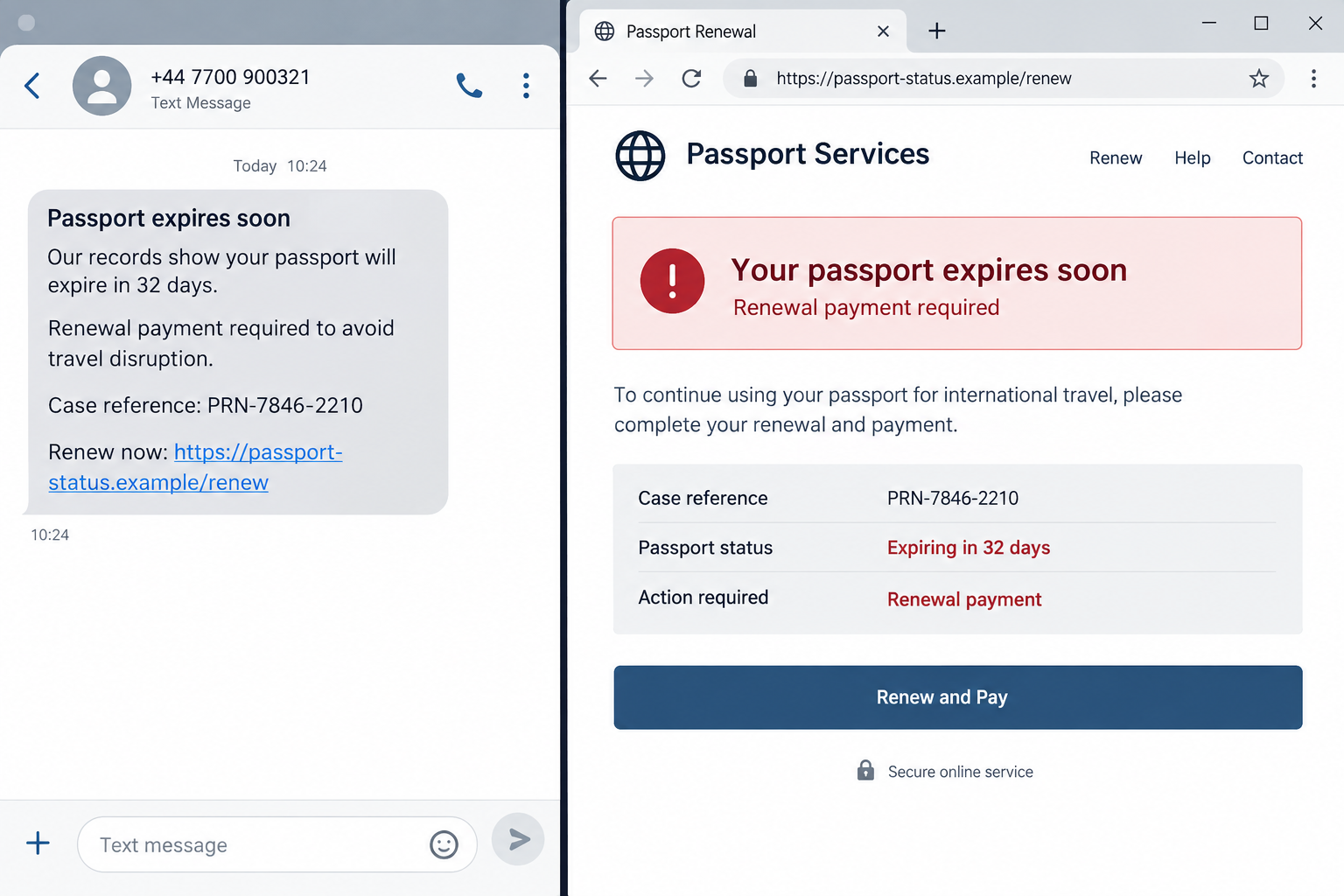
A passport renewal call scam claims that a passport, driver’s license, or another identity document is expiring and must be renewed immediately. The criminal may call, text, or email before sending the target to a copied government page.
The warning often says travel privileges will be suspended, an application will be canceled, or legal action will begin unless a fee is paid that day.
Real passport renewals have formal applications, published fees, and predictable processing. A surprise caller cannot cancel a passport because you refuse to pay during the conversation.
A convincing page can steal more than the stated fee
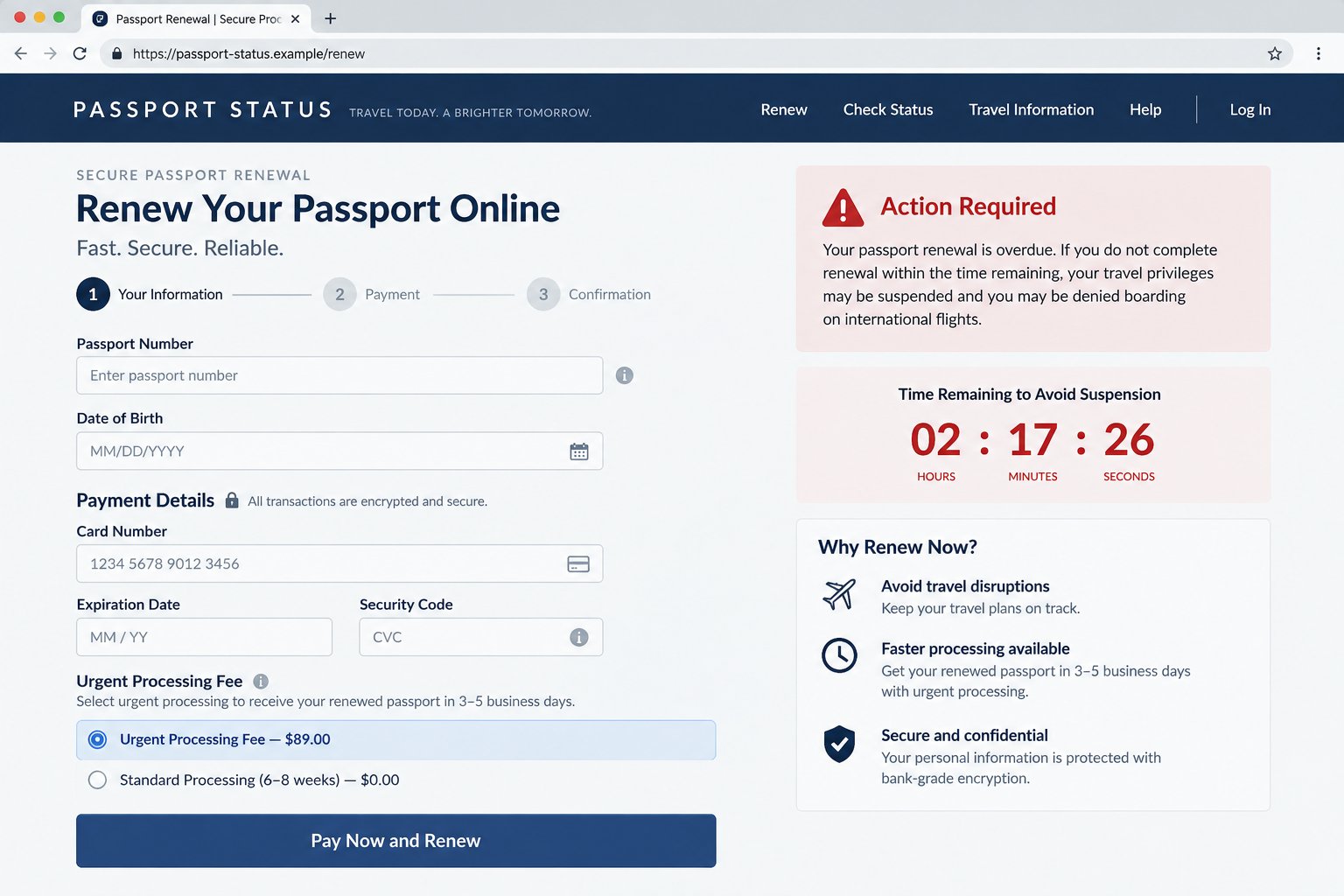
The link may open a site with official colors, a padlock, government-style wording, and a form that requests a passport number, date of birth, address, and card details.
Submitting the form gives criminals a compact identity file. They may charge the card, reuse the information for account recovery, or sell it to other fraud groups.
The first charge can be small enough to avoid suspicion. Later transactions, subscription debits, or identity fraud may appear after the victim believes the renewal was completed.
The FBI confirms this is a documented impersonation method
In a September 17, 2026 public warning, the FBI described scammers who claim passports, driver’s licenses, or professional licenses are expiring and demand payment for renewal. IC3 received 496 complaints about this type of government impersonation between January 2025 and July 2026, with losses above USD 348,000.
The broader government and law enforcement impersonation category produced nearly 61,000 complaints and more than USD 1.6 billion in reported losses during that period. The agency says government officials will not call or text to demand payment or sensitive information.
Warning signs include:
- an unexpected call or text announcing a passport deadline;
- a link that does not end in the genuine government domain;
- a threat to cancel travel rights within hours;
- a demand for an urgent processing or reinstatement fee;
- a form requesting card details before identity and eligibility checks;
- a caller who insists on remaining connected while you pay;
- payment through cryptocurrency, gift cards, wire transfer, or a person;
- a promise that the new passport will arrive unusually quickly.
Why the Message Looks Plausible at First
Passports really do expire, and processing times can affect travel. Scammers borrow those true facts, then invent an emergency that only their payment page can solve.
A recipient may not remember the exact expiration date. If a trip is approaching, the fear of losing flights, hotels, or a family event can overpower the urge to verify.
The operator can buy personal data from breach markets or obtain it through earlier phishing. Correct names, old addresses, or partial document numbers make the call feel connected to a real record.
Search engines can also expose travelers to impersonators. Paid ads and copied application sites may appear before the real government service, especially for urgent phrases such as renew passport fast.
The fake portal does not need to match every official page. Many people have never renewed online and do not know what the genuine process should look like.
Security icons and HTTPS only show that the connection is encrypted. Criminals can obtain certificates for deceptive domains just as legitimate organizations can.
How the Passport Renewal Call Scam Works
Step 1: The campaign sends a broad expiration warning
Calls, texts, and emails are sent to large groups. The message may avoid giving an exact expiration date so almost anyone can imagine that the warning applies.
Other campaigns use stolen data to personalize the document type, country, name, or travel history.
Step 2: A caller or message creates a short deadline
The target is told that renewal is overdue, a notice was ignored, or the document will be blocked. A same-day deadline prevents the recipient from calmly checking the official rules.
The threat may expand to fines, airport detention, denied boarding, or cancellation of a current application.
Step 3: A copied portal collects identity data
The victim follows a link to a page that resembles an immigration or passport service. It requests the passport number, birth details, address, telephone number, and sometimes a document upload.
Those fields are valuable even if the victim abandons payment. A saved form can support later identity theft.
Step 4: An urgent fee moves the victim to checkout
The page adds a renewal, processing, appointment, delivery, insurance, or reinstatement charge. A countdown may claim the standard option is no longer available.
The amount can be close to a real fee, which reduces suspicion while still sending money to the wrong recipient.
Step 5: Card data or irreversible payment is captured
A fake checkout stores the full card number, expiration date, security code, billing address, and contact information. Some callers instead demand a wire, gift card, or cryptocurrency transfer.
An error message may claim the first payment failed, encouraging the victim to try another card and exposing multiple accounts.
Step 6: Fake confirmation delays discovery
The site generates an application number, receipt, or delivery estimate. The victim waits for a passport that was never ordered while dispute time passes.
Support may send tracking updates or ask for another charge when the promised document does not arrive.
Step 7: Stolen details support follow-up fraud
Criminals can use the identity package for account recovery, new applications, targeted phishing, or resale. A passport scan is especially sensitive because it contains standardized biographical data and a photograph.
The victim may receive a second call from a supposed investigator offering to recover the fee or protect the identity for another payment.
How to Find the Real Passport Service
Do not begin with the link in a message. Type the official national government address yourself or navigate from a trusted government directory.
In the United States, passport information is published at travel.state.gov. Other countries provide their own official immigration or foreign affairs portals.
Compare the complete domain, not the page design. Words such as official, secure, passport, government, or renewal can appear in a private domain without conferring authority.
Read the eligibility and fee pages before submitting personal information. A genuine service explains who can renew online, which documents are needed, processing estimates, and the exact government fee.
Call the telephone number printed on the official government site if the status is uncertain. Do not use a sponsored result, text message, or caller-provided extension.
If a third-party service appears in search, determine whether it clearly states that it is private and whether it merely prepares forms. A private form service cannot issue a passport or override government processing.
What a Real Renewal Process Does Not Need
A government passport office does not need gift cards, cryptocurrency, or a cash courier. These methods provide no normal application record or consumer protection.
A legitimate employee does not remain on the telephone while you sign into banking. Nor will the office instruct you to hide the transaction from a bank employee.
Renewal does not require remote access to your computer or phone. Anyone asking you to install a support application is seeking control, not helping with a form.
No passport website needs your email password, bank password, one-time banking code, wallet seed phrase, or complete credit report.
A real application may require a photograph and identity documents, but uploads occur only after you deliberately enter the verified government service. A surprise link is not a safe upload route.
Travel urgency does not change the verification rule. Expedited government options are documented publicly; a private caller cannot create a secret faster channel.
Caller ID and Case Numbers Are Easy to Stage
Caller ID is chosen by the originating system and can be spoofed. A displayed government number does not prove that the call entered from that office.
Case numbers are simple strings. A fake website can accept any number and display a matching record because the same criminals control both the call and the page.
A second caller may pose as a supervisor or police officer to validate the first. Multiple voices only show coordination within the scam.
The safe check crosses into a channel the criminal does not control: a government domain you typed, an official app, or a telephone number from the real agency directory.
If the caller forbids that check, end the conversation. Real agencies expect citizens to protect sensitive identity documents.
What to Do When Real Travel Is Close
Open the issuing authority’s official processing-time page and compare the available standard and expedited options. Do not let a caller define an imaginary deadline.
Check the passport’s printed expiration date and the destination country’s entry rules. Some countries require validity beyond the return date, but those rules come from official travel guidance.
If departure is genuinely urgent, contact the real passport office or embassy and ask about documented urgent appointments. A verified appointment does not require secrecy or an unrelated payment recipient.
Keep airline and hotel changes separate from the renewal decision. A scammer may exploit the total trip cost to make an unsafe fee seem small.
Company, Address, and Fulfillment Checks
The operator must be a real issuing authority
Identify the government department legally responsible for passports in your country. A commercial company, help center, or processing agent cannot issue the document on its own.
Confirm the service through the main government site, not search advertising.
The domain and contact details must match official records
Check every character in the domain and email address. A padlock, copied logo, and local telephone number do not repair a mismatched domain.
Use the official contact page to verify any appointment or application reference.
The payment destination must be disclosed before submission
Official fee pages name the amount, accepted method, and government recipient. A charge to an individual, unrelated company, foreign account, or wallet is a decisive warning.
Save the legitimate fee page so it can be compared with the request.
The promised passport must have a verifiable application trail
A real submission creates a record in the issuing authority’s own system. An email receipt from a separate domain is not proof of fulfillment.
Check status only through the government portal you accessed independently.
What to Do if You Have Fallen Victim to This Scam
- Stop using the site and caller. Do not submit another card after an error and do not pay a second fee for cancellation or delivery.
- Contact the card issuer or bank. Report an impersonation transaction, ask about reversing it, replace exposed cards, and monitor for small test charges or recurring debits.
- Notify the passport authority. Use its official site to report the impersonation and ask what protection is appropriate for any passport data or copy you disclosed.
- Secure your email first. Change the password from a clean device, enable multifactor authentication, remove unfamiliar recovery options, and review forwarding rules and active sessions.
- Begin identity-theft recovery. Record every field and document you submitted. US victims can create a tailored plan at IdentityTheft.gov.
- Preserve the evidence. Save the message, caller number, full URL, screenshots, receipt, card descriptor, confirmation number, and any uploaded files.
- Scan the device if anything was downloaded. Remove unexpected browser extensions or applications and run a full Malwarebytes scan. Seek professional help if remote access was granted.
- Block follow-up pages. AdGuard can help filter known phishing domains and malicious advertising, but continue checking accounts because stolen data may be used elsewhere.
- Report the campaign. Notify the message provider and hosting platform, then report to local police and the relevant fraud agency. US reports can go to ReportFraud.ftc.gov and IC3.gov.
- Ignore recovery promises. A stranger who guarantees a refund for an upfront payment is attempting to victimize you again.
Frequently Asked Questions
Will a passport office call me before my passport expires?
Notification practices vary, but a surprise call demanding immediate payment is not a safe renewal channel. Verify through the official authority.
Can my passport be canceled because I ended the call?
No legitimate status depends on staying connected with an unexpected caller. Check the document through the issuing authority.
Is a website safe because it uses HTTPS?
No. HTTPS protects data while it travels to the site; it does not prove the site belongs to the government.
What if the caller knew my passport number?
Treat that as a possible data exposure, not proof of authority. End the call, notify the passport agency, and follow identity-protection guidance.
Can a private service renew my passport faster?
Some legitimate couriers or form services may assist, but they cannot bypass the issuing authority. Verify every claim and fee before sharing documents.
What if I entered information but closed the page before paying?
Assume the form may have saved it. Secure accounts, notify the passport authority, monitor identity activity, and preserve the URL for reporting.
The Bottom Line
A passport renewal call scam turns a routine document deadline into a rushed payment and identity-theft opportunity.
Ignore the caller’s route and start again from the real government site. A passport is too important to manage through a link that arrived unexpectedly.

Join the discussion
0 commentsShare your experience or ask a question about this article.
Discussion
Start the conversation
Have a question or something useful to share? Add the first comment.