

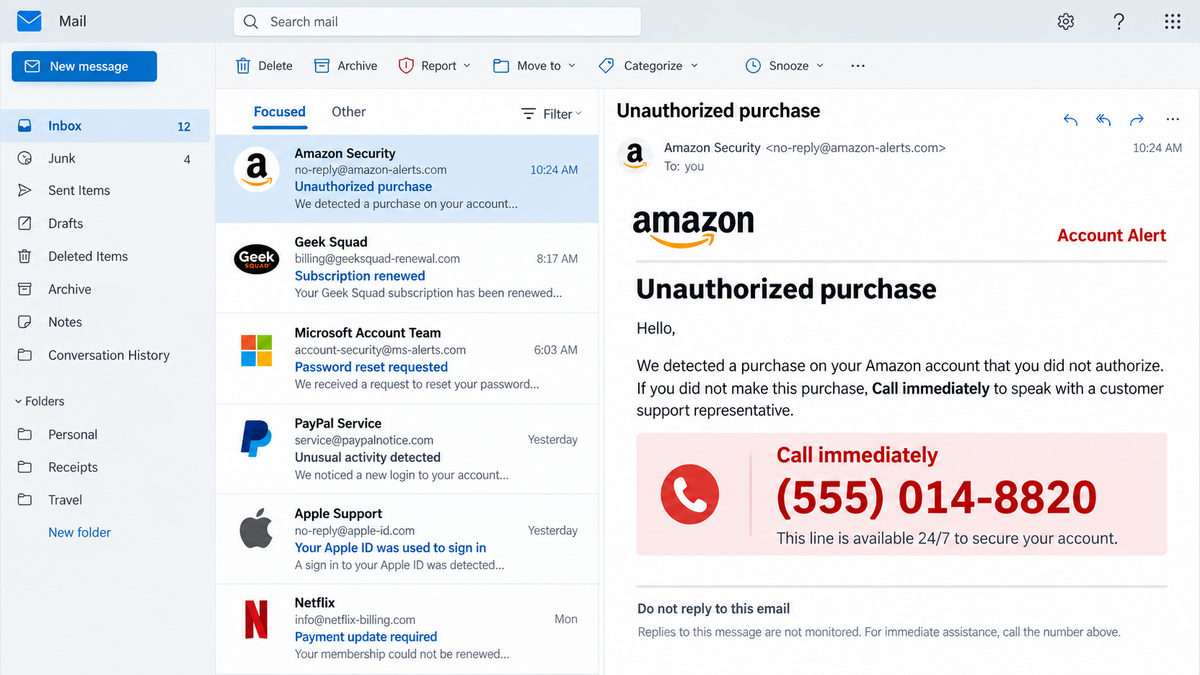
An email claims that an expensive order was placed on your account, a security setting changed, or a subscription renewed. There may be no suspicious link at all, only a phone number and an instruction to call immediately.
That absence of a link can make the message feel safer. It also helps the email bypass defenses that are trained to look for malicious websites and attachments.
The phone number is the payload. Once the victim calls, the scammer controls the conversation and can turn an invented charge into remote access, stolen card details, gift card payments, or a transfer from the victim’s bank.
Overview
The email borrows a familiar brand and a familiar fear
Call-back scam emails impersonate companies such as Amazon, Microsoft, PayPal, Norton, Geek Squad, Target, Canva, Temu, and even government agencies. The story usually involves an unauthorized purchase, password reset, subscription renewal, or account problem.
The brands and amounts change, but the instruction is remarkably consistent. Do not reply, do not wait, and do not use the normal support channel. Call the number in the message now.
The number moves the attack outside the inbox
The email may contain no clickable URL. Instead, a toll-free or ordinary-looking VoIP number connects the recipient to someone trained to keep them worried and engaged.
Once the call begins, email security can no longer inspect what happens. The operator adapts the script to the victim’s answers and can change tactics when the first request creates suspicion.
The fake refund becomes the real theft
The caller may ask for card details to cancel the charge, request a one-time code, persuade the victim to install remote access software, or claim that a refund was issued for too much money.
The invented purchase was never the loss. It is the reason the victim calls. The real loss begins when money, credentials, or control of the computer is handed to the person on the line.
- The emails are distributed at scale and in many visual variations.
- Popular and unexpected brands are impersonated.
- The lure is often an unauthorized purchase or account change.
- The message creates urgency and fear of financial loss.
- Recipients are told to call instead of replying.
- Free email accounts and VoIP numbers lower the cost of each campaign.
- Some versions include a fake invoice hosted through a trusted service.
- The impersonated companies are not operating the scam.
Why a Phone Number Can Be More Dangerous Than a Link
People have learned to fear suspicious links. A phone number feels different because calling customer support is a normal response to an unfamiliar charge. The scam turns good caution about clicking into the behavior the attacker wants.
Links and files can be scanned, blocked, or compared with threat intelligence. A newly created VoIP number may be harder to classify immediately, and the harmful instructions are delivered verbally only after the victim connects.
A human operator can also personalize the pressure. If the victim sounds uncertain, the caller can slow down and sound helpful. If the victim is angry about the charge, the caller can promise an immediate refund.
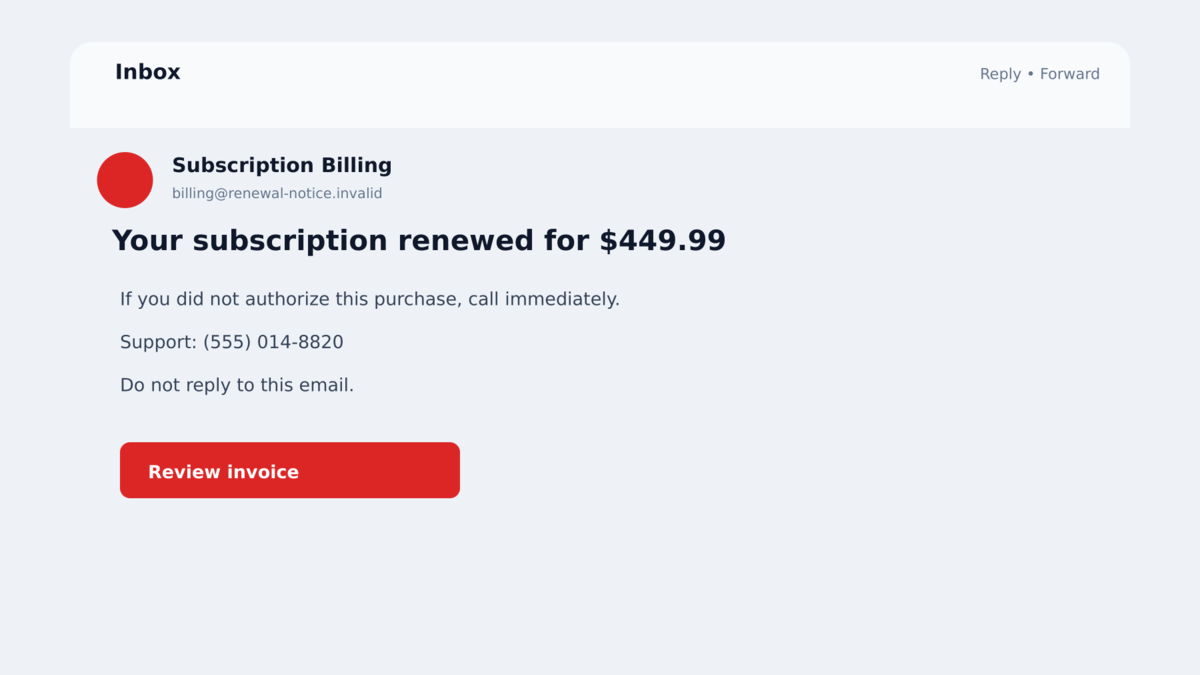
AI makes the email side easier to scale. Criminals can produce many brand, language, wording, and layout variations quickly. Messages that look different to filters can still direct victims into the same call center script.
The email may use an image instead of selectable text. That lets the attacker change a few pixels, phone numbers, or amounts while preserving the same design, producing variations that are not exact duplicates.
Some campaigns go further by placing the phone-scam message inside a legitimate invitation, document name, meeting description, or service notification. The surrounding email can pass normal authentication because it was genuinely sent by the abused platform.
That is why the account itself is the best reference point. A real charge, renewal, or security change should appear there without requiring a call to an unfamiliar number.
Company, Address, and Fulfillment Checks
The display name does not prove who sent the message
An email can display “Amazon Security” while coming from a free mailbox or an unrelated domain. Open the sender details and read the complete address, including the part after the @ symbol.
Authentication results can help, but they are not a universal guarantee. A criminal may send through a legitimate service while placing the scam message in a field the service allows users to customize.
The phone number is not the brand’s verified support line
Do not search the number from the email and trust the first matching result. Scam sites and copied directories may repeat it. Find the company through its official app, a saved bookmark, or the number printed on a card or statement.
If the official account shows no order, renewal, or password change, the email’s premise has failed. There is no need to call the number to ask whether the fake charge is real.
The invoice lacks verifiable account details
A template may include a convincing logo, order number, subtotal, tax, and renewal date. Those details are easy to invent. Compare them with purchase history inside the real account.
Be suspicious when the invoice does not identify the account holder, payment method, delivery address, or product history accurately. A mass email cannot include information the criminal does not have.
Independent research confirms mass distribution
Cofense reports seeing phone-scam emails impersonating well-known brands in client inboxes every day. Analysts documented a repeatable process built around brand selection, urgent lures, bulk delivery, and VoIP numbers.
The research describes a broad scam model, not a customer-service dispute with any one company. Amazon, Microsoft, PayPal, Geek Squad, and the other names are used as costumes.
How Fake Purchase Alert Call-Back Scams Work
Step 1: The scammer chooses a high-recognition brand
The attacker selects a company that many recipients know or use. A large customer base increases the chance that a random message will reach someone with a real account.
Unexpected brands can work too. A message about Canva, Temu, GitHub, or a government agency may stand out precisely because the recipient has never seen that type of notice before.
Step 2: A fake loss is placed in the email
The message claims that a purchase completed, a security setting changed, or a subscription renewed. The amount is high enough to cause concern but not so absurd that the notice is dismissed immediately.
The email may say that the transaction will become final soon. That deadline makes calling feel like the only responsible action.
Step 3: A prominent number replaces the usual account route
The message tells the recipient to call immediately and may discourage replies. Some versions contain no link, while others provide a fake invoice that repeats the same number.
The number is often a low-cost VoIP line. It can be replaced quickly when reported, just as phishing domains are rotated.
Step 4: The operator verifies that fear has taken hold
The caller asks why the victim is calling, then confirms the invented charge. Basic details such as name, email, or the invoice number may be requested to make the conversation sound procedural.
Every answer gives the operator more information. A victim who reveals the bank used, device type, account balance, or recent purchases helps the scammer choose the next script.
Step 5: The caller introduces a harmful solution
The supposed agent may ask for a card number to process a refund, a one-time code to verify identity, or remote access to cancel the transaction. Another script claims that the refund was accidentally too large and must be returned.
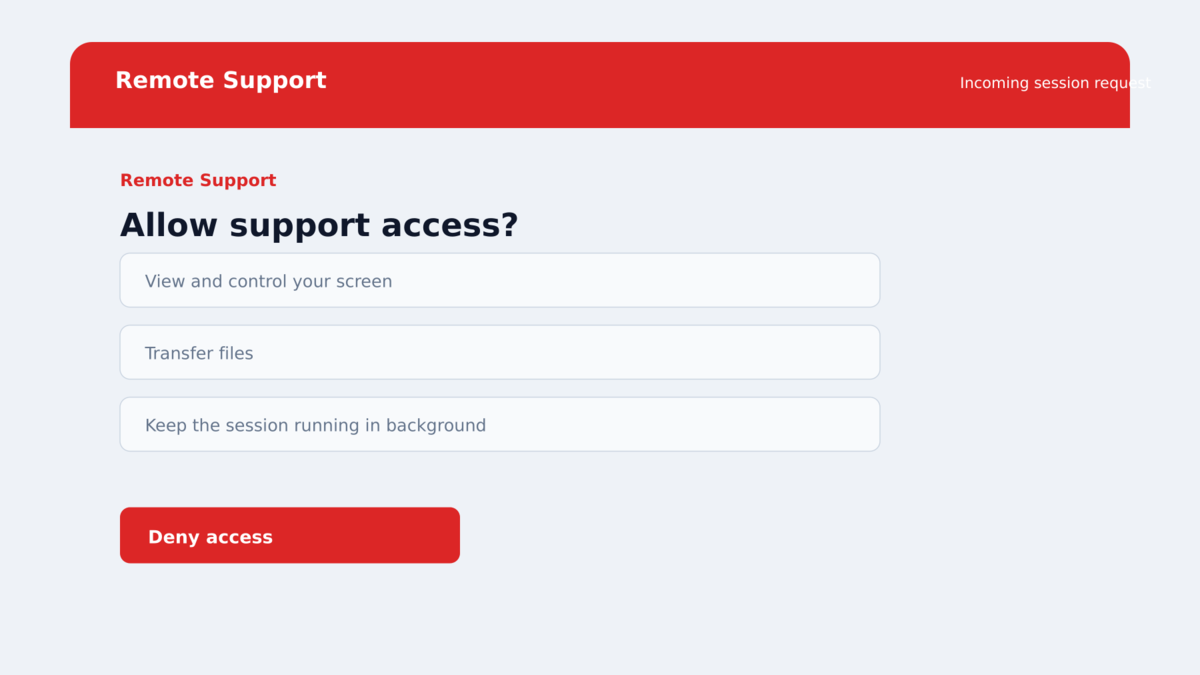
Remote access can let the scammer hide the screen, alter what the victim sees, move money, read saved passwords, and pressure the victim into logging into online banking.
Step 6: Money is moved through a hard-to-recover method
The final demand may involve gift cards, cryptocurrency, cash by courier, wire transfer, or a bank transfer labeled as a safe account. None of those methods is required to reverse a normal purchase.
If the victim pays, the caller may invent another error, tax, security hold, or transfer. The conversation continues while money remains available.
The Most Common Call-Back Scam Endings
In a remote access version, the caller directs the victim to install software such as AnyDesk, TeamViewer, Zoho Assist, or another legitimate support tool. The program itself may be genuine, but the person receiving access is not.
In a refund version, the operator asks the victim to sign in to online banking while the screen is shared. A fake page, altered display, or transfer between the victim’s own accounts can be used to create the illusion of an overpayment.
In a card verification version, the caller requests the card number, CVV, billing address, and one-time code. The information can be used immediately for an unrelated transaction.
In a gift card version, the victim is told to buy cards at a local store and read the codes over the phone. The cards can be drained quickly, and the caller may warn the victim not to tell the cashier why they are being purchased.
In an account takeover version, the caller sends a real password-reset request and asks the victim to read back the code. That code belongs only in the official app or site and should never be shared with an incoming caller.
Warning Signs in a Call-Me Email
- The message reports an order you cannot find in the official account.
- The sender domain does not match the displayed company.
- The only solution is calling the number in the email.
- The message tells you not to reply or use normal support.
- The invoice is an image with a large phone number.
- The caller asks you to install remote access software.
- You are told to log in to online banking while the caller watches.
- A one-time code, card PIN, or complete password is requested.
- The refund requires gift cards, cryptocurrency, cash, or another payment.
- The caller warns you not to speak with the bank, family, or store employee.
A legitimate company does not need secret cooperation to cancel its own transaction. End the call and verify the account through a channel you selected independently.
What to Do if You Have Fallen Victim to This Scam
- End the call. Do not stay connected while checking whether the caller is genuine. A real company can be reached again through its official number.
- Disconnect remote access. Unplug the network cable or turn off Wi-Fi if the caller controls the screen. Do not use that device for banking until it has been checked.
- Call the bank immediately. Use the number printed on the card. Ask to stop transfers, freeze cards, revoke online banking sessions, and secure the account.
- Change passwords from a clean device. Secure email first, then banking, shopping, and any account viewed during the remote session. Use unique passwords.
- Remove remote access tools and persistence. Uninstall software the caller requested, review startup items and user accounts, and ask a trusted professional for help if control continues.
- Run a complete security scan. Malwarebytes can detect malicious files or unwanted remote tools. AdGuard can block known scam pages and deceptive ads, but it cannot reverse a transfer.
- Preserve evidence. Save the original email, attachment, phone number, call time, remote software name, receipts, wallet addresses, gift card numbers, and bank records.
- Report the number and message. Notify the impersonated company, email provider, phone carrier, payment provider, and appropriate national fraud authority.
- Warn contacts if email was exposed. Attackers may use the mailbox to send the same story to coworkers, relatives, or customers.
Frequently Asked Questions
Can a scam email be dangerous without a link?
Yes. The phone number can be the main attack route. Harmful instructions, payment requests, and remote access happen after the victim calls.
Why does the message use a toll-free number?
VoIP and toll-free services are inexpensive and can look professional. The number format does not prove that it belongs to the displayed company.
Was the brand in the email hacked?
Usually not. The campaign documented by Cofense relies on impersonation. Verify the sender and account independently before assuming any company system was breached.
Is remote support software itself malware?
Not necessarily. Many tools are legitimate, but giving access to an unknown caller can provide the same control an attacker would seek through malware.
Can the bank recover a transfer?
Recovery depends on the method and speed of reporting. Contact the bank immediately. Do not wait for the scammer to promise a refund.
Should I call the number just to investigate?
No. Calling confirms that your address and number are active and exposes you to a live operator. Use the company’s official app or independently verified support number.
The Bottom Line
Fake purchase alert emails do not need a malicious link to cause serious loss. The urgent phone number is enough to move the victim into a controlled conversation.
Never use the contact information inside an unexpected charge or renewal notice. Check the real account first, then call the verified number from the company’s official site, app, card, or statement.
If you installed remote software or sent money, act immediately. End access, call the bank, secure email and financial accounts, and preserve the evidence.

Join the discussion
0 commentsShare your experience or ask a question about this article.
Discussion
Start the conversation
Have a question or something useful to share? Add the first comment.