


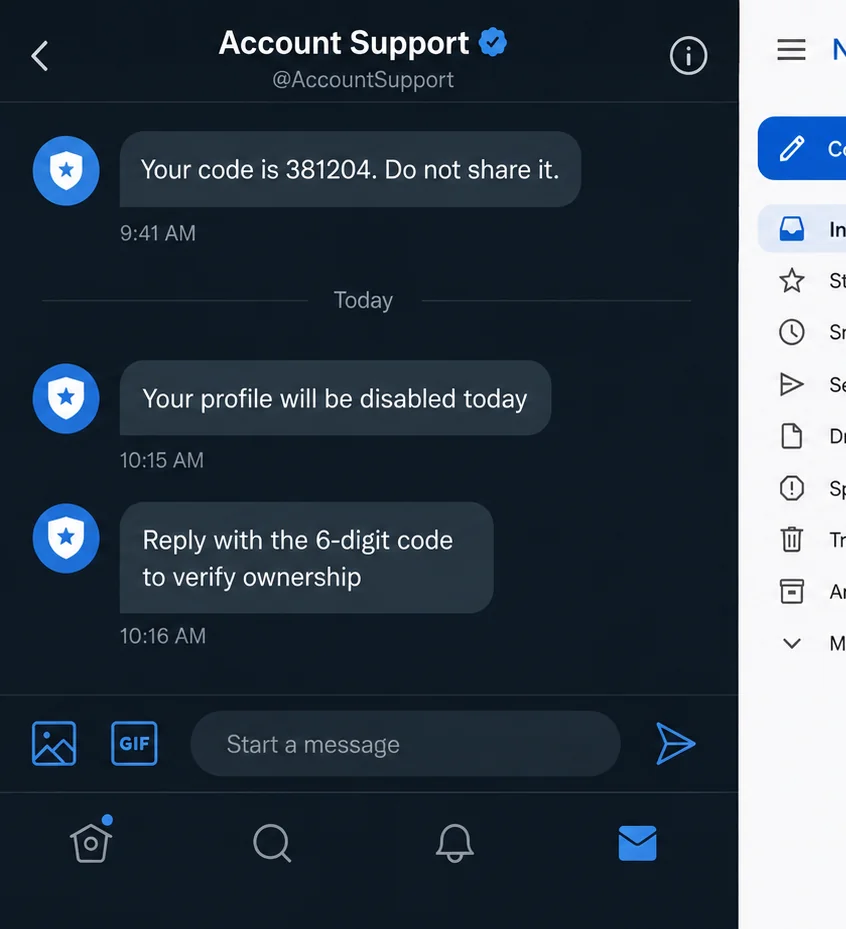
A text says your social media account will be locked unless you confirm a recent login. Another message offers help from a friendly support agent.
The fake social media support scam needs only one small piece of information to turn that warning into an account takeover.
When the stolen account contains private photos or videos, the damage can move far beyond a lost password.
The attacker may already know the victim’s username, telephone number, email address, and names of friends. That information makes the support approach feel personal.
The crucial request is usually a login code, password-reset code, PIN, or approval notification. The scammer claims the code will verify ownership or cancel an unauthorized change.
In reality, the criminal has triggered the genuine recovery process. The code arriving on the victim’s phone is the key needed to complete the takeover.
Once inside, attackers search messages, cloud-connected galleries, archives, and saved drafts. Real private material can then be posted, sold, or used for harassment and extortion.
Overview
The message pretends to solve an account emergency
The lure may say an account is suspended, reported, scheduled for deletion, or signed in from an unfamiliar location. A fake representative offers a fast appeal or security check.
The attacker creates both the anxiety and the supposed rescue. That keeps the victim focused on following instructions rather than verifying who sent them.
The verification code belongs only on the real platform
A one-time code is not a customer-service reference. It can authorize a login, reset a password, change recovery details, or approve a new device.
Anyone who asks you to read or forward that code may be trying to use it in another session.
The takeover can expose several layers of data
- private messages and attachments;
- photos or videos saved in chats and archives;
- contact lists and trusted relationships;
- email addresses and telephone numbers;
- linked advertising or payment accounts;
- backup codes and recovery details;
- identity documents previously sent in a conversation;
- material that can be used for impersonation or sextortion.
The FBI Confirmed the Account-Takeover Pattern
In August 2026, the FBI warned about criminals taking over social media accounts to steal non-consensual intimate content.
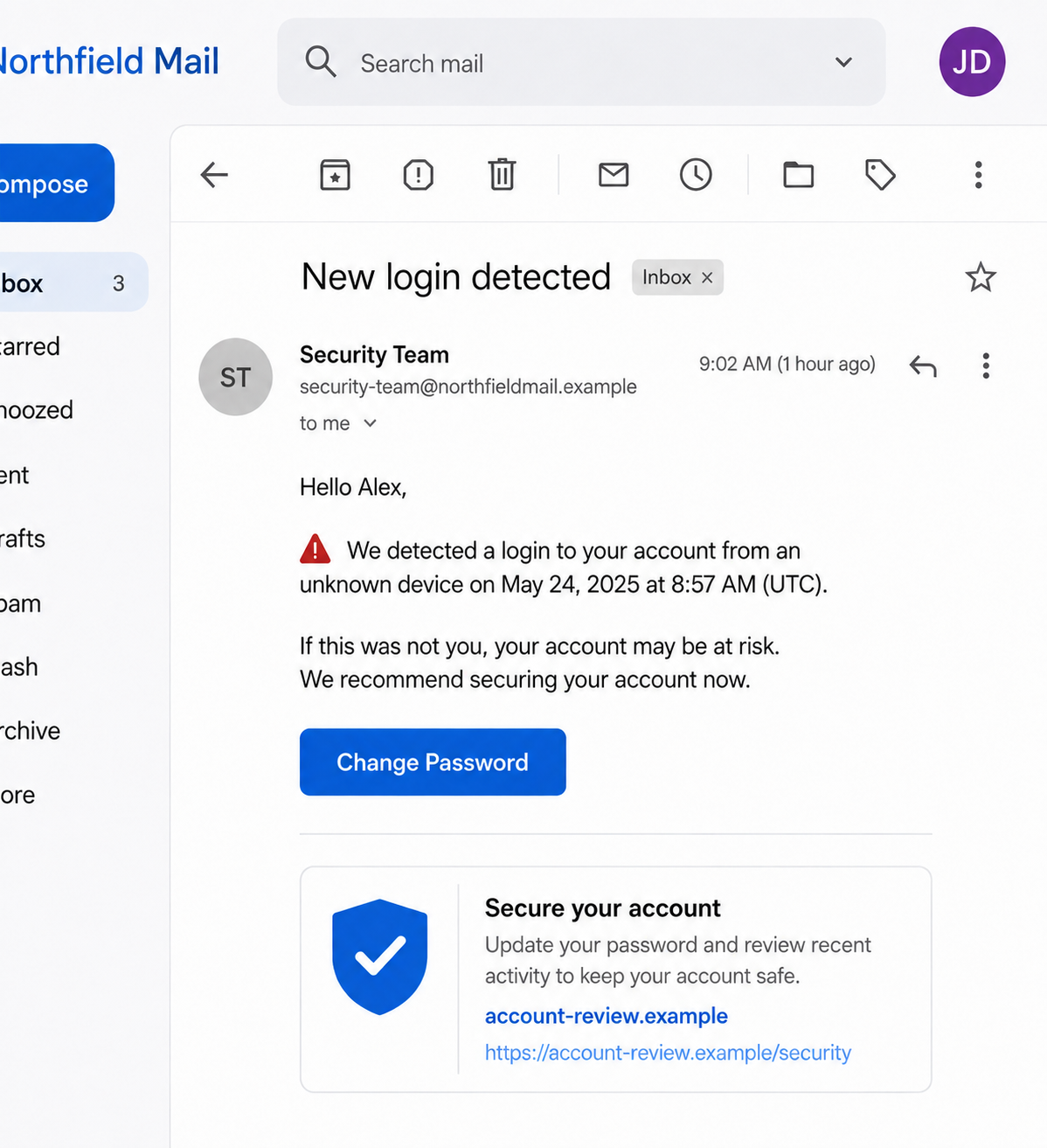
The alert identified several access methods. They included password and PIN attacks, fake customer-support messages asking for a verification code, and lookalike domains reached through fraudulent new-login alerts.
The FBI said criminals may post or sell authentic stolen material with the victim’s personal information. That can enable repeated victimization, harassment, stalking, or sextortion.
This detail matters because many familiar sextortion emails are bluffs. They claim to possess a recording but provide no evidence.
In this campaign, the danger is different. A successful account takeover can give the criminal access to real content and real conversations.
The copied social platform is not necessarily responsible for the message. Attackers impersonate support teams and abuse genuine password-recovery systems.
Why the Support Story Feels Convincing
Social accounts are personal. A warning about losing years of photos, conversations, followers, or business contacts creates immediate pressure.
The message may arrive just after the attacker deliberately triggers a password reset. A genuine code then appears from the platform, seemingly confirming that the support agent is real.
The opposite is true. The code proves that someone is attempting a protected action. It does not prove that the person asking for it works for the platform.
Attackers also use compromised accounts to contact the victim. A message from a friend may say they need help recovering their own profile or voting in a contest.
Because the account is genuine, the sender name and history look correct. The person controlling it is not the friend.
Some operators move the conversation to text, WhatsApp, Telegram, or email. They claim the main platform cannot handle the appeal until identity is confirmed.
That move removes visible safety warnings and gives the scammer more control. Real platform support should remain within documented official channels.
Shame can deepen the trap. A victim who realizes that intimate material may be exposed can feel too embarrassed to ask for help, giving the attacker more time.
How the Fake Social Media Support Scam Works
Step 1: The attacker identifies a valuable account
The target may have a public profile, a recognizable brand, many contacts, or clues that private material exists. Leaked credentials can reveal reused email and password combinations.
Public posts also provide birthdays, partner names, workplaces, and other details useful in a convincing approach.
Step 2: A lockout or login warning creates urgency
The victim receives a text, direct message, or email saying the account violated a rule, received a complaint, or was accessed from a new device.
A link leads to an appeal page, or a supposed support employee begins a conversation. The deadline may be only a few minutes.
Step 3: The criminal triggers a real recovery request
Using the victim’s known username or telephone number, the attacker asks the real platform to send a login or password-reset code.
The victim receives that genuine code while speaking with the impostor. The timing is deliberately used as false proof.
Step 4: Support asks the victim to share the key
The agent calls the code a case number, ownership code, cancellation number, or appeal PIN. They ask for a screenshot or request that it be typed into a fake form.
Some scams use a push notification instead. The victim is told to tap Approve so support can block the unknown device.
Step 5: Recovery details are replaced
The attacker enters the code in the real login flow, changes the password, and adds a new email address, telephone number, or authenticator.
Existing sessions may be closed. The victim suddenly loses access while the criminal gains a stable foothold.
Step 6: Private content and trusted contacts are exploited
The criminal downloads messages, media, archives, and contact details. They may impersonate the victim to request money or repeat the same code scam against friends.
Authentic intimate content can be paired with a name, employer, address, or family contacts to increase pressure.
Step 7: Extortion and recovery fraud follow
The attacker may demand payment to keep content private or restore the account. Paying does not remove copies or guarantee silence.
A second criminal may later pose as a recovery expert. They promise to hack the account back or delete images for another fee.
Identity, Address, Support, and Traceability Checks
The support channel must start from the official app
Open the platform yourself and use its help center, account-status page, or security settings. Do not follow the route supplied by an unsolicited message.
A real issue should be visible through the platform’s own interface or documented support process.
The complete domain matters more than the logo
Lookalike pages can copy fonts, colors, and sign-in screens. Read the hostname from right to left and compare it with the platform’s published domain.
A brand name placed before an unrelated domain does not make the page official.
The representative should never need your secret code
A one-time code is designed for the person completing the login or recovery action. It is not something a support agent needs to read back.
The same rule applies to passwords, backup codes, authenticator numbers, and approval prompts.
The account history should support the warning
Check active sessions, security emails, login locations, connected apps, and recent profile changes from inside the genuine account.
If the warning exists only in the suspicious message, treat it as hostile. If it is real, resolve it without the sender’s link.
Signs the Account Helper Is an Impostor
- The message threatens deletion within minutes.
- Support contacts you from an ordinary mobile number.
- The sender asks to continue on another messaging app.
- A verification code is described as a ticket number.
- You are asked to approve a login you did not initiate.
- The link uses a misspelled or unrelated domain.
- The page requests both a password and an authentication code.
- The agent asks for private photos as identity proof.
- You are told not to contact the platform directly.
- Payment is required to unlock or protect the account.
Legitimate support processes can be slow and imperfect. That inconvenience does not make an unsolicited person with a shortcut trustworthy.
Protect Private Content Before a Crisis
Use a unique password for every major social and email account. A password manager makes that practical and limits the damage from an unrelated breach.
Prefer an authenticator app or security key when the platform supports it. Text codes are still useful, but they can be phished or exposed through carrier attacks.
Save recovery codes offline and do not store the only copy inside the account they protect. Review recovery email addresses and telephone numbers periodically.
Remove old sessions and connected apps. A third-party service that no longer has a purpose should not retain access to messages, profile information, or media.
Consider what remains in message archives and cloud backups. Deleting a local copy does not always remove a version sent to another person or synchronized elsewhere.
These steps reduce exposure, but they cannot guarantee that intimate material will never be copied. If abuse occurs, responsibility belongs to the person who stole or shared it.
When the Stolen Account Starts Messaging Friends
A takeover rarely remains limited to one profile. The account’s history and trusted name give the criminal a ready-made audience for the next fraud.
Friends may receive a request to vote in a contest, help recover an account, test a payment, or share a verification code. The message can reference real conversations.
Another version claims the victim is stranded and needs money. A voice note or video taken from the account may be reused to make the emergency believable.
Warn contacts through a different channel. A short public notice from another verified account can prevent friends from trusting direct messages sent during the takeover.
Businesses should also review ad accounts, pages, scheduled posts, administrators, and saved payment methods. Attackers may run fraudulent ads while the owner focuses only on the visible profile.
After recovery, do not assume every connected service was restored automatically. Check each page role, business integration, creator tool, and linked login separately.
What to Do if You Have Fallen Victim to This Scam
- Use the platform’s official recovery process. Type the known website yourself or open the genuine app. Do not use links sent by the attacker.
- Secure your email account first. Email often controls social recovery. Change its password, remove unknown sessions, and verify forwarding rules and recovery details.
- Change reused passwords. Assume any matching password on another service is exposed. Start with financial, cloud-storage, mobile-carrier, and messaging accounts.
- Revoke unfamiliar access. Remove unknown devices, connected apps, app passwords, browser sessions, and authentication methods.
- Tell trusted contacts. Warn them not to send money, share codes, or trust urgent messages from the compromised account.
- Preserve evidence. Save the original text or email, full domain, profile links, payment demands, account-change notices, and copies of threats.
- Do not bargain for deletion. Payment cannot prove that every copy was removed and may encourage additional demands.
- Report intimate-content abuse. Use the platform’s non-consensual imagery process and submit information through the FBI’s NCII reporting portal.
- Seek urgent help when safety is threatened. Contact local law enforcement for stalking, credible threats, or immediate danger. Call emergency services when necessary.
- Use specialist resources for minors. If any depicted person was under 18, contact law enforcement and the National Center for Missing and Exploited Children.
- Check the device. Malwarebytes can scan for malicious downloads or remote-access software. A clean result does not restore stolen cloud data.
- Reduce repeat phishing. AdGuard can block many known malicious links and ads, but it cannot make a verification code safe to share.
- Reject paid recovery hackers. Use platform support and law enforcement. Strangers promising guaranteed deletion or account recovery frequently create another loss.
Frequently Asked Questions
Will real social media support ask for a login code?
A legitimate support agent should not need you to read a one-time login, password-reset, authenticator, or backup code. Enter codes only in the official app or site you opened yourself.
What if the verification text came from the real platform?
The code can be genuine because the attacker triggered it. Its arrival confirms an attempted action, not the identity of the person requesting it.
Does a verified badge prove the support account is safe?
No. Accounts can be compromised, display names can mislead, and badges may be imitated in screenshots. Begin support through the platform’s official help area.
Should I pay to stop private photos from being posted?
Payment offers no reliable control over copies and can lead to repeated demands. Preserve evidence, report the account, use specialist removal channels, and contact law enforcement.
Can deleted messages still be stolen?
Copies may remain in archives, backups, downloads, notifications, or another participant’s account. Review cloud and account settings, but avoid blaming yourself for criminal misuse.
Can an account recovery service guarantee access?
No outside service can honestly guarantee recovery or deletion. Use official platform procedures and be cautious of anyone demanding crypto or an upfront fee.
The Bottom Line
The fake social media support scam turns a real security feature into a weapon. The message creates fear, triggers a genuine code, and persuades the victim to surrender it.
Treat every login code like a password. No support shortcut, urgent appeal, or friendly message changes that rule.
If an account is taken, secure the connected email, use official recovery, warn contacts, and preserve evidence. When private content is involved, report quickly and do not face the threats alone.

Join the discussion
0 commentsShare your experience or ask a question about this article.
Discussion
Start the conversation
Have a question or something useful to share? Add the first comment.