

A business can borrow a bank’s name without copying its login page. It can present itself as a related company, use familiar colors, and let the reputation of the real institution answer questions it has not earned the right to answer.
That is the problem with an operation calling itself Westpac-Group Australia. The wording sounds close enough to a major bank that a payment request can feel connected to an organization the recipient already knows.
Westpac has now removed that ambiguity. The business is not affiliated with the bank and is not authorized to use its name.
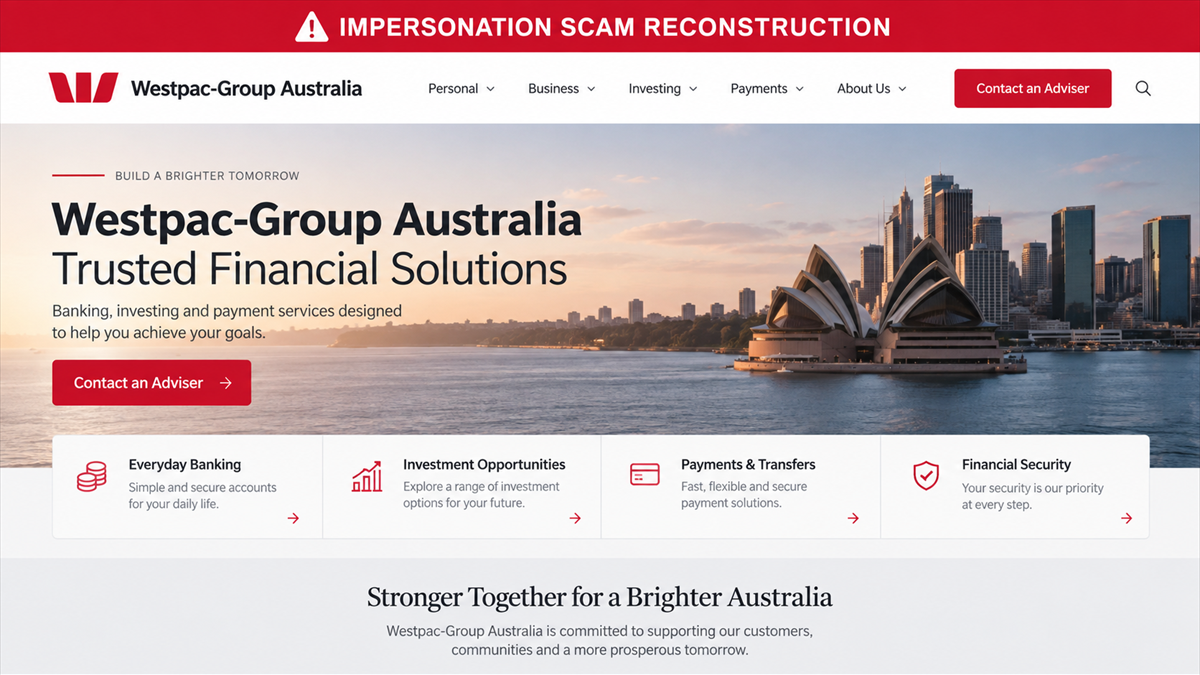
Overview
What Westpac has confirmed
Westpac says it is aware of a business operating under the name Westpac-Group Australia that claims to be associated with Westpac. The bank states that the business is not affiliated with Westpac and has not been authorized to use the Westpac name.
The warning is direct. This is not a dispute about poor service or a legitimate subsidiary with unhappy customers. The claimed connection to Westpac is false.
How the name creates trust
Westpac-Group Australia combines the real bank’s brand with corporate language that sounds plausible. A recipient may read it as a division, partner, investment arm, payment service, or regional company inside the same group.
That assumption can make a website, message, or payment instruction appear safer than it is. The victim may focus on the familiar word Westpac and fail to verify the exact legal entity asking for money.
The decision that keeps you safe
Do not make a payment, disclose banking details, or continue through a website that represents Westpac-Group Australia as connected to Westpac. Verify every claim directly with Westpac through a contact channel you found independently.
- Westpac says there is no affiliation.
- The business is not authorized to use the Westpac name.
- A hyphen, group label, or Australian reference does not create a corporate relationship.
- Payment details must match a verified legal entity, not merely a familiar brand.
- Any urgency is a reason to pause, not a reason to skip verification.
Why This Impersonation Is More Than a Similar Name
Businesses can legitimately have similar words in their names. The decisive issue here is the representation. Westpac says the operation claims an association that does not exist and uses a name it has not been authorized to use.
That false connection changes how a recipient evaluates risk. A new company normally has to explain who owns it, where it is registered, what it offers, and why it should be trusted. An impersonator tries to replace those checks with the reputation of the bank.
The name may also distort search results. A quick search for Westpac can return the real bank’s pages, news, and contact information. Seeing those legitimate results near the unfamiliar business can create the impression that the relationship was verified when only the brand was verified.
The official Westpac scam alert tells people to be cautious if contacted by this business, asked to make a payment, or directed to a website claiming to represent Westpac. It advises independent verification through official Westpac channels.
How the Westpac-Group Australia Scam Works
Step 1: The name supplies borrowed credibility
The operation presents itself as Westpac-Group Australia. The addition of Group and Australia makes the name sound like a corporate entity rather than a random website or individual.
The victim may assume that the business sits somewhere inside the Westpac organization. That assumption can exist even if the contact never explicitly says it is the bank’s main retail service.
Step 2: Contact creates a business reason to engage
A recipient may encounter the name through a website, email, message, call, document, or payment request. Westpac’s alert does not state that every contact uses the same script, so the visible offer may change.
The common element is the claimed association. Whether the subject is a financial service, an opportunity, an account matter, or a transaction, the Westpac name is used to lower the recipient’s guard.
Step 3: A polished presentation fills in the gaps
A convincing page can copy colors, typography, financial imagery, and corporate language. It may include an About section, adviser contact, legal-sounding documents, or a professional email signature.
Those elements are easy to create and do not prove ownership. The exact domain, legal entity, recipient, and authorization matter more than the design.
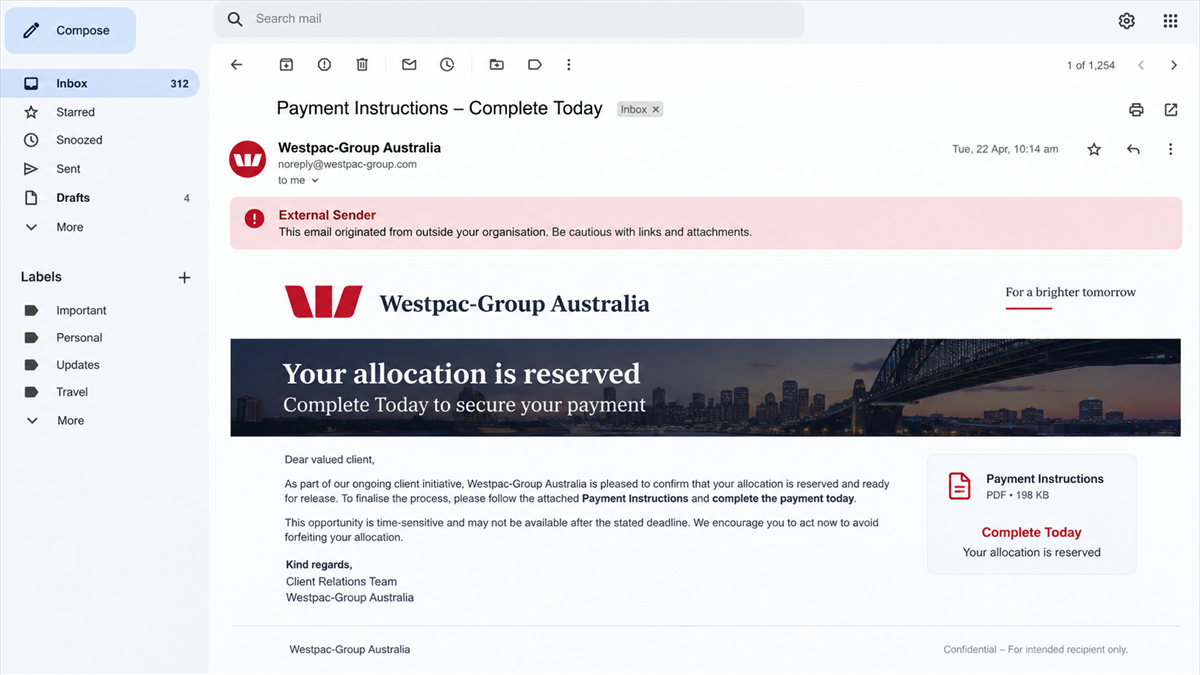
Step 4: The victim is asked for money or information
Westpac specifically warns people who are asked to make a payment by the impersonating business. A request may also seek passwords, security codes, or banking details that can be used for unauthorized access.
The request can feel routine because the recipient believes it comes from a bank-related company. That is precisely why the entity must be verified before any transfer or disclosure.
Step 5: Urgency suppresses independent checks
The contact may describe an expiring allocation, delayed transaction, compliance deadline, account issue, or final step. The exact wording can change as websites and messages are replaced.
Urgency prevents the victim from calling Westpac, searching a regulator, or comparing the payment recipient with the claimed business. A legitimate organization can survive a careful verification call.
Step 6: The familiar name absorbs the blame
After a payment or data loss, the victim may initially believe Westpac is responsible. That confusion gives the impersonator time while the person contacts the wrong organization or waits for a promised response.
Westpac’s public denial shortens that delay. Once the name Westpac-Group Australia appears, the claim should be treated as false and the payment should stop.
The Logo Is Not the Company
A logo proves only that someone obtained an image file. The same is true of branch photographs, executive names, Australian addresses, privacy policies, and company numbers displayed on a page. Each item can be copied or attached to the wrong entity.
Verification requires a chain that the impersonator does not control. Start from Westpac’s official domain, use its published contact details, and ask about the exact company name, web address, and representative.
If the contact claims a license or registration, search the relevant government or regulatory database yourself. Confirm that the address, directors, authorized services, domain, and payment recipient all match. A real registration for a similarly named company is not permission to use Westpac’s identity.
MalwareTips has documented the same borrowed-trust pattern in a fake Westpac account warning. The visible story may change, but the defense remains the same: leave the contact and reach the bank through a route you already trust.
Red Flags Around Westpac-Group Australia
- The name Westpac-Group Australia is presented as a Westpac affiliate.
- The sender’s domain is not an official Westpac domain.
- A website uses Westpac branding but cannot be reached from Westpac’s own site.
- The representative asks for a payment before the legal entity is independently verified.
- The recipient name on the bank transfer does not match the claimed company.
- The contact requests online banking passwords, card details, PINs, or security codes.
- The opportunity or transaction must be completed before you can call the bank.
- Documents describe a partnership that Westpac itself denies.
- The representative discourages contact with a branch or official support line.
The absence of spelling errors does not make the contact genuine. Corporate impersonation works best when the message looks calm and ordinary.
Company and Checkout Checks
Verify the exact business name
Do not shorten the name to Westpac when searching. Check Westpac-Group Australia exactly, then compare what you find with Westpac’s own alert and official corporate information.
Verify the domain and sender
Read the complete email address and web hostname. A brand word inside a longer address does not establish ownership. Reach Westpac by typing its known domain yourself.
Verify the payment recipient
Before paying, compare the account name with the independently verified legal entity. Stop if the recipient is a person, unrelated company, crypto wallet, or a name that changes during the conversation.
Verify the claimed service
Ask Westpac whether it offers the product or relationship described. Check relevant regulator records for permission to provide that service. Do not accept a certificate or database screenshot supplied by the seller.
What to Do if You Have Fallen Victim to This Scam
- Stop all contact and payments. Do not send a verification deposit, cancellation fee, tax, or recovery charge.
- Contact your bank immediately. Report the payment as connected to a bank-impersonation scam and ask about a recall, hold, dispute, or recipient-account warning.
- Contact Westpac through official channels. Share the business name, website, sender, phone number, and documents so the impersonation can be investigated.
- Preserve evidence. Save emails, chat exports, web addresses, invoices, account details, receipts, call logs, and the exact representations about affiliation.
- Secure exposed accounts. Change reused passwords from a clean device, enable multi-factor authentication, revoke unfamiliar sessions, and review account recovery settings.
- Scan affected devices. If you downloaded a file, installed remote-access software, or opened a suspicious attachment, run a full security scan. Malwarebytes can help check for account stealers and remote tools.
- Protect identity documents. If you submitted identification or financial statements, contact the issuers and follow local identity-theft guidance.
- Report the business and website. Notify the relevant fraud authority, regulator, hosting provider, advertising platform, and messaging service.
AdGuard can reduce exposure to malicious advertisements, trackers, and known phishing destinations. It cannot confirm a corporate relationship, so direct verification with Westpac remains essential.
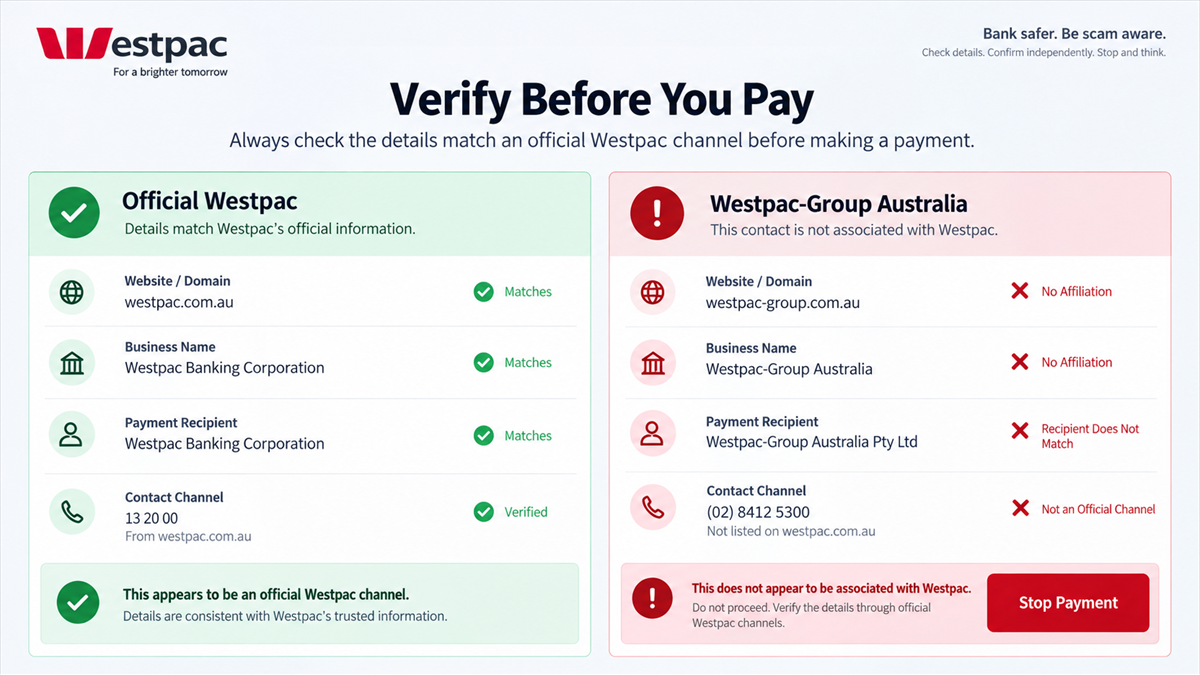
How to Verify a Bank Affiliate Without Using Its Links
Open a fresh browser window and type the bank’s known address. Search the official site for the exact product, partner, or subsidiary. If the relationship is real, the bank should be able to confirm it through a channel the seller does not control.
Call the number on the back of your bank card, a statement, or the official site. Read the unfamiliar domain and recipient name to the representative. Do not use the number printed on the suspicious proposal.
Repeat the process with the regulator and corporate registry. A consistent result across independent sources is meaningful. Repeated copies of the same claim on sites controlled by the promoter are not independent confirmation.
Why independent contact matters
Scammers often offer to prove themselves using another email, call, website, or document. That appears to add evidence, but every new confirmation may still come from the same people. Independence means choosing the source yourself.
Begin with a channel that existed before the offer reached you. A bank card, previous statement, verified mobile app, or bookmarked official site is stronger than a contact detail that arrived inside the proposal.
Describe the situation plainly when you call. Give the exact business name, sender domain, web address, requested amount, and recipient. Ask whether the bank recognizes the entity and whether the payment route makes sense.
Do not let the promoter stay on another line during verification. A scammer who hears the conversation can coach your answers, interrupt warnings, or tell you that the employee you reached lacks access to a confidential program.
If the supposed opportunity disappears while you verify it, that is useful information. A legitimate financial service should not punish a customer for checking who will receive their money.
Finally, record how you verified the claim. Save the official page, time of the call, department contacted, and any reference number. That record can help your bank or authorities if the impersonator approaches you again under a different name.
Use the same process even when the amount is small. A modest first payment can be a test of trust before a larger request arrives. Verification is most valuable before the operation learns that you are willing to pay.
Frequently Asked Questions
Is Westpac-Group Australia part of Westpac?
No. Westpac states that the business is not affiliated with Westpac and is not authorized to use the Westpac name.
Does a Westpac logo prove the website is real?
No. Logos and page designs can be copied. Verify the full domain and the exact business relationship through Westpac’s official website and support channels.
What if the payment account is in Australia?
An Australian account does not prove Westpac affiliation. Confirm the recipient name, legal entity, and purpose independently. Local accounts can still receive scam payments.
Can I verify the representative by calling back?
Only if you call a number obtained from Westpac’s official site or another trusted source. A number in the message or document returns you to the same operation.
What if I only shared banking details?
Contact your bank, explain what was shared, change relevant credentials, and monitor the account. Security codes, passwords, and card details require especially urgent action.
Will Westpac recover a payment sent to the impersonator?
Recovery is not guaranteed. Contact the sending bank immediately because faster reporting can improve the chance of a recall or freeze. Avoid anyone promising guaranteed recovery for a fee.
The Bottom Line
Westpac-Group Australia does not have the relationship its name suggests. Westpac has publicly said the business is unaffiliated and unauthorized to use the bank’s name.
Do not let a familiar brand complete the verification on behalf of an unfamiliar entity. Stop the payment, leave the contact, and ask Westpac about the exact business through an official channel.

Join the discussion
0 commentsShare your experience or ask a question about this article.
Discussion
Start the conversation
Have a question or something useful to share? Add the first comment.