

Facebook page owners are increasingly receiving alarming messages in their inboxes, seemingly from an account called “Final Inbox Sp Review.” The message warns that your page will be permanently deleted due to violating trademark rights or intellectual property. It provides a link to supposedly appeal this termination. However, this is a scam tactic aimed at stealing your Facebook login credentials.
This con is essentially a phishing attack disguising itself as an official notification from Facebook. The message is designed to panic recipients into urgently clicking the link to try saving their page. In reality, it sends users to a fake Facebook login page where any information entered is captured by scammers. Losing access to your page can destroy your business or brand’s online presence.
Read on to learn more about how this “Final Inbox Sp Review” Facebook scam works, red flags to recognize it, steps to take if your account is compromised, and most vitally, how to keep your page safe from these phishing attacks.
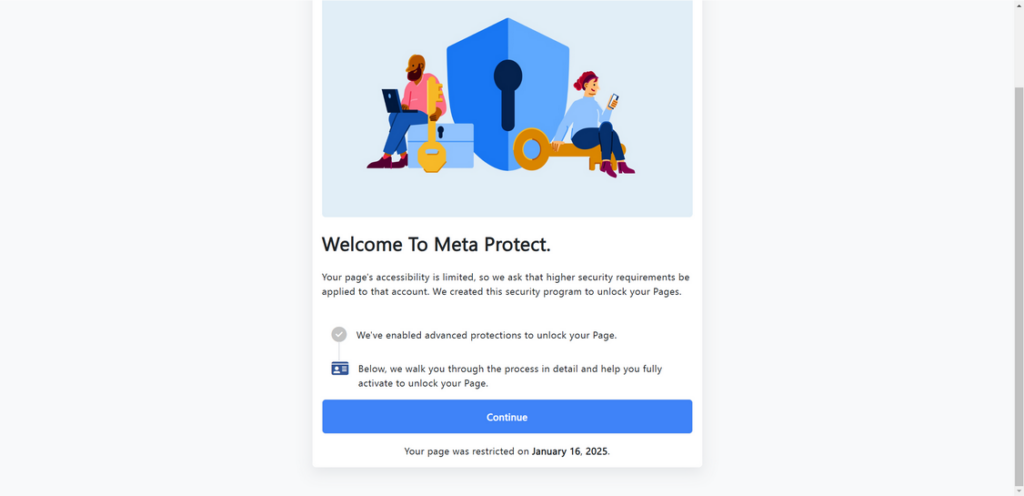
Overview of the Final Inbox Sp Review Scam Targeting Facebook Pages
This scam stems from nefarious actors sending Facebook page owners fictitious messages claiming their page is scheduled for deletion within 24 hours. The reason given is typically that the page violated someone’s trademark rights or intellectual property.
The message urges the recipient to submit a complaint via a provided link in order to appeal the termination. However, the link actually directs users to a convincing but fraudulent Facebook login page. If entered, your username and password are stolen by scammers.
From there, criminals access and take over your Facebook account. They lock out the real owner and proceed to post malicious content, message friends, steal money, engage followers under false pretenses, and damage your page’s reputation.
This “Final Inbox Sp Review” scam is essentially phishing dressed up in official-looking messaging. The sender name, Facebook branding, and threatening wording coerce targets into clicking the link reflexively. But legitimate Facebook notifications would never come unsolicited through such shady means.
With so many businesses rely on Facebook pages to reach customers, losing your account can be devastating. Recognizing and avoiding this scam is crucial to protect your online presence.
How the Final Inbox Sp Review Facebook Scam Works
Cybercriminals have developed an alarmingly simply but effective process to steal Facebook pages via phishing:
- Scammers identify a target Facebook page to hijack, whether to resell it, harvest followers, post dangerous links, etc.
- The scammer creates a fake account mimicking Facebook’s messages and naming it something vague like “Final Inbox Sp Review.”
- They send the Facebook page owner an ominous message warning their page will be deleted for a policy violation in 24 hours.
- The message provides a link, typically shortened via bit.ly, claiming it leads to an appeals form they must submit.
- When users click the link, it redirects not to an official Facebook domain but rather a fake login page.
- If the user enters their credentials, the scammers capture them and gain full access to the Facebook account.
- Once inside, scammers change passwords, steal info, remove admins, and take over the page to use it for financial gain or distributing malware.
- Meanwhile, the legitimate page owner is locked out without access or control. Their entire online presence may be destroyed.
- The criminals now control a credible page to post dangerous links that may infect or hack visitors who trust the source.
By preying on people’s fear of losing their page unfairly, this scam tricks targets into compromising credentials themselves. This hands over their accounts to scammers without the need for advanced hacking skills.
Warning Signs of the Final Inbox Sp Review Facebook Scam
Here are some indicators to recognize phishing attempts from the fake Final Inbox Sp Review account:
- Message warns your page will be removed permanently soon for a policy violation
- Message urges you to act fast by submitting an appeal via link
- Link uses URL shorteners like bit.ly instead of directing to facebook.com
- Message sent from non-verified account with vague name like “Final Inbox Sp Review”
- Landing page mimics Facebook’s login design and branding
- Loss of access to your Facebook account after clicking link and entering password
- Name, profile pic, cover photo changed without your doing after clicking link
- Strange posts made from your account without your knowledge after clicking link
No legitimate Facebook alert would come unprompted through such shady means. If you receive messages with these traits, it’s undoubtedly a scam attempting to phish your login info!
What to Do If You Lost Your Facebook Page to This Scam
If you unfortunately fell prey to the Final Inbox Sp Review phishing scam, take these steps right away to try recovering your page:
- Contact Facebook Support through official channels immediately, providing details on the scam to try prompt investigation.
- Submit the Facebook forms for both hacked accounts and compromised pages, describing how your credentials were phished via the scam message and link.
- Ask trusted friends to report your page as hacked to Facebook to help escalate response.
- Attempt logging into any other connected accounts, like Instagram or Messenger, to assess the extent hackers accessed other aspects of your online presence tied to those same credentials.
- Change passwords for any other accounts that use the same login credentials as your Facebook right away. Prioritize financial accounts and enable two-factor authentication where possible.
- Contact your local law enforcement to file a fraud/scam report with any evidence like screenshots of the deceptive messages. This creates an official paper trail.
- Monitor your credit and accounts closely for any signs of identity theft since scammers may have accessed more of your personal data.
- Learn from this experience by honing your ability to recognize phishing attempts moving forward. Train your team on social media security as well.
Though you may struggle to recover a stolen page, reporting thoroughly and promptly can maximize your chances. Let this motivate you to implement stronger protections for all accounts.
How to Keep Your Facebook Page Safe From the Final Inbox Sp Review Scam
Utilize these proactive measures to safeguard your page from phishing ploys like the Final Inbox Sp Review scam:
- Maintain skepticism of unsolicited urgent messages about your account being at risk. Facebook won’t message out of nowhere like this.
- Double check sender names on messages to ensure they come from official verified Facebook channels.
- Inspect links closely before clicking, looking for odd shorteners or redirects. Facebook links won’t be obfuscated.
- Enable Facebook’s two-factor authentication for added login protection beyond just a password.
- Create a strong unique password for your Facebook account, and never reuse passwords across accounts.
- Be prudent about giving out page admin access. The more people who can manage the page, the more potential weak links.
- Assess your page’s security settings for vulnerabilities and unnecessary legacy authorizations needing revoked.
- Keep Facebook app updated on all devices to ensure you have the latest security patches.
With sufficient wariness and safeguards in place, you can protect your page from phishing attempts, whether from “Final Inbox Sp Review” or other frauds. Promote improved social media literacy among your whole team as well.
Frequently Asked Questions About the Final Inbox Sp Review Facebook Scam
What is the Final Inbox Sp Review Facebook scam?
This scam involves scammers sending fake messages pretending to be from Facebook. The messages warn your page will be deleted for a trademark violation and provide a link to appeal. But it’s a phishing scam aiming to steal your Facebook login credentials.How does the Final Inbox Sp Review scam work?
Scammers send a fake urgent message claiming your Facebook page will be deleted soon for a violation. They include a shortened link that leads to a fake Facebook login page to capture your password when entered.What are some red flags of this scam?
Watch for: – Threats that your page will be deleted immediately – Links using URL shorteners instead of facebook.com – Messages from unverified accounts like “Final Inbox Sp Review” – Fake Facebook login pages mimicking the real designWhat should I do if I entered my info after clicking their link?
If you input your Facebook login details, change your password immediately and enable two-factor authentication. Check other accounts using the same password. Report the issue to Facebook. Monitor for fraudulent activity.How can I protect my Facebook page from this scam?
Use strong unique passwords. Confirm messages are from official Facebook channels. Avoid unknown links. Turn on two-factor authentication. Limit page admin access. Keep software updated. Report odd messages.What if scammers already stole my page using this scam?
If your page was already compromised, contact Facebook support right away. File reports about the hacked account and scam. Ask friends to report your page as hacked. Watch for identity theft, and improve security on other accounts.Conclusion: Remain Vigilant Against Phishing Scams Impersonating Facebook
Scammers are constantly evolving new tactics to phish credentials and steal Facebook accounts. One current ploy is for fake “Final Inbox Sp Review” accounts to message warnings that your page will get deleted. If you receive suspicious messages with odd links, exercise extreme caution.
Rather than clicking, report the messages to Facebook directly through official channels. Never enter your Facebook password anywhere except the real facebook.com domain, and implement two-factor authentication. Additionally, create strong unique passwords for all your accounts, not just Facebook.
Stay vigilant against phishing attempts, get educated on common techniques used, and put preventative measures in place. With proper awareness, you can keep your page safe and retain full control over the online presence you’ve built. Don’t let scammers trick you into compromising your account via phony messages and links from Final Inbox Sp Review or other fakes.

Join the discussion
0 commentsShare your experience or ask a question about this article.
Discussion
Start the conversation
Have a question or something useful to share? Add the first comment.