


A numbered invoice notification can disappear into a busy inbox. This one looked more like routine filing than an urgent demand for payment.
The message supplied several references, as though the paperwork had already been logged somewhere. The question is what those references actually let you verify.
Overview
An unnamed Financial Center sent a very specific notice
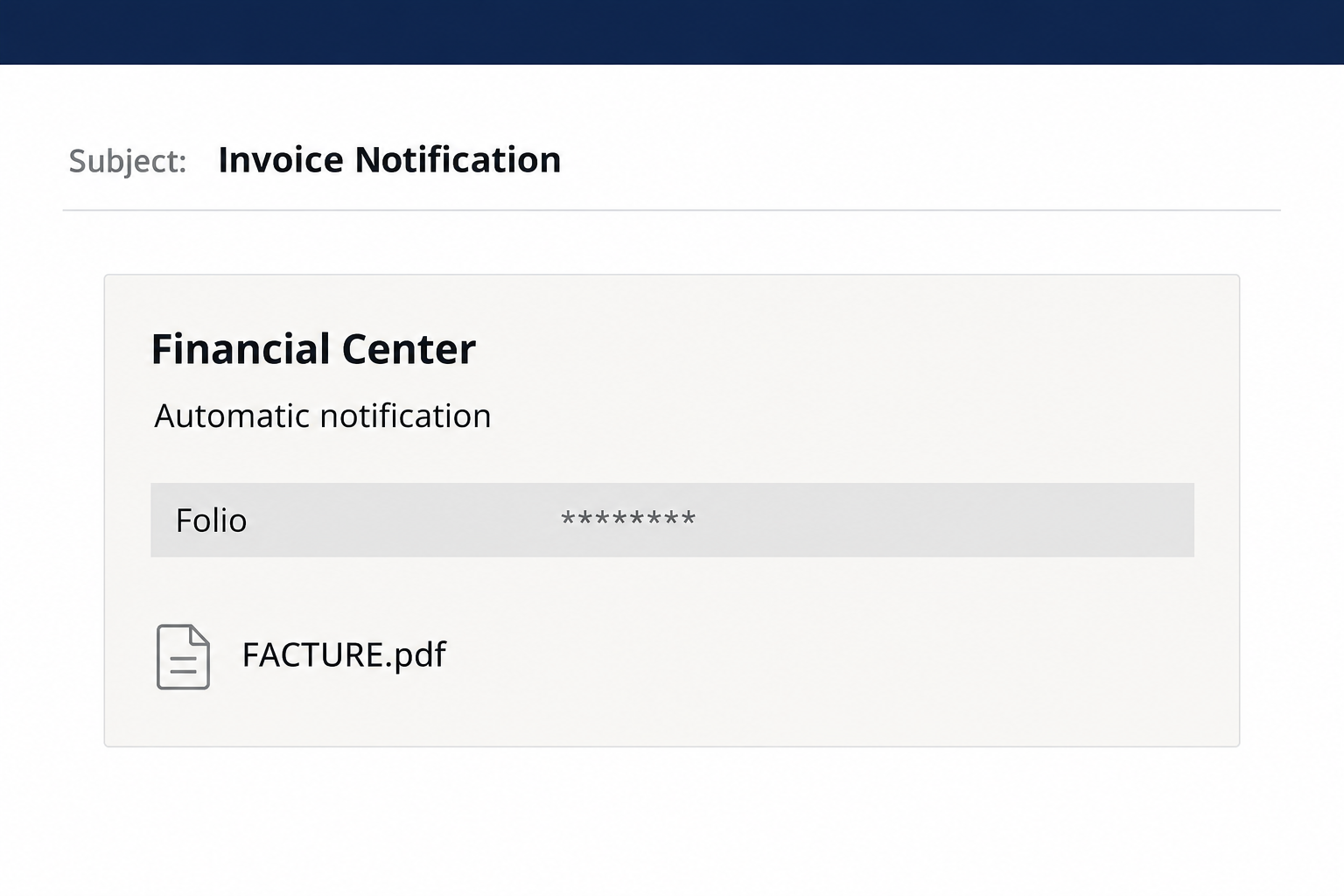
The reported email called itself a Financial Center automatic notification. It said an administrative document had been generated for the recipient’s account and offered a PDF link.
The subject referred to Invoice 45722. The body displayed folio 862557, while the alleged PDF used a different reference, FACTURE 736547.
Different references can be normal in accounting. An invoice number, a folio, and a filename may all identify different parts of the same workflow.
Here, though, there was no authenticated portal or known billing contact connecting those identifiers with an actual account. The references made the message look filed without establishing where it belonged.
The supposed invoice was a link, not an attached document
The French word “facture” means invoice. But the label in this message described the link, not a PDF the recipient could independently identify as an attached file.
The email’s understated footer encouraged readers to check details through their usual platform. The visible path to the supposed file sent them somewhere else.
The captured destination at obw3sixfive[.]cc showed a Gmail-like pop-up claiming the session had expired. It requested an email password rather than showing an invoice.
Neither Google’s involvement nor a real Financial Center sender was established. The archived specimen shows a false login form, not a successful account takeover.
The request changes as you move from email to browser
The original notice presented a document task: identify and open a file. The destination raised a new issue: prove access to an email account.
Before assuming the second screen belongs to the service that supposedly issued the invoice, ask these three questions:
- Do you actually hold an account with the organization that supposedly generated the document?
- Can you find a matching notice through a portal you normally use?
- Is the password being requested by your genuine mail provider or by the outside page?
Those checks give you a route with no need to reopen the linked form. They are especially useful when the message names a department rather than an identifiable company.
How the Financial Center Invoice Email Scam Works
Step 1: The subject gives a vague notice an administrative purpose
The email begins with invoice language, which makes it easier to place at a glance. The body calls the item an administrative document instead of stating exactly what you owe.
Someone who receives many genuine statements may assume a billing employee or portal generated it. A neat reference line encourages that assumption without naming a known service.
The message does not have to imitate your bank closely if you already expect automated paperwork. “Financial Center” sounds like an internal function at many kinds of businesses.
Instead of guessing which business it represents, look for your own records. If you cannot identify the supposed platform without trusting the sender, the listed folio is not enough.
Step 2: The numbered link looks like something you can open and file
A file ending in .pdf can look self-explanatory. Someone sorting an inbox may decide to open it first and figure out the amount, vendor, or due date afterward.
But the email displays a link with a PDF label. The words visible in the mail reader do not establish whether the link points to a PDF.
The subject, filename, and folio may look organized precisely because they are formatted differently. A real workflow would offer a way to tie those references to the right account.
Ask a known vendor or client through your established route. You do not need to follow the alleged attachment to ask a billing question.
Step 3: The browser treats a fake session expiry as a new obstacle
The observed destination showed a Gmail-style modal over blurred content. That made the change in task seem temporary, as though an expected document would appear after sign-in.
Nothing in the link established a Google account session. A page can tell you a session ended without having any ability to see whether you were ever signed in.
The background does not authenticate the foreground form. The outside address in the archived capture is not where Google signs users in to Gmail.
If the site claims your session expired, close it and open your account independently. The legitimate service can tell you whether you need to sign in again.
Step 4: A request to see a document becomes a request for a real password
The password requested at the destination was for the mailbox. It was not a password for an encrypted invoice or a code for logging into a known billing portal.
An email password can expose correspondence and connected services. A separate invoice password would ordinarily be limited to decrypting or opening a particular file.
A browser that has already displayed the recipient’s address is not proof of identity. The appearance of a prefilled address does not turn the prompt into a trusted sign-in.
You can verify the supposed invoice by going back to an established billing source. Do not submit a password just to see whether a document will appear afterward.
Step 5: A stolen mailbox could make later financial messages convincing
If credentials are submitted and misused, an intruder may learn which vendors, transfers, or contracts are genuinely being discussed. That knowledge can lend credibility to a later email.
For example, a real bill might be followed by an unusual request to change payment instructions. Familiar invoice details are not independent authorization for that change.
The FBI’s business email compromise guidance recommends confirming changed payment information through a known channel. That helps even if everyone involved recognizes the named vendor.
The archived Financial Center sample does not show any of those follow-up events. They explain why you need to act promptly if you gave the page a working password.
What to Do if You Have Fallen Victim to This Scam
-
If the email only arrived, report it through your mail service. Keep the original message if your organization needs to inspect the source or routing information.
Do not send the document link to coworkers for them to decide whether it is safe. Forward it in the manner requested by your own security team.
-
If you opened the page without entering anything, close it. Note the approximate time, what you saw, and whether any file downloaded.
The observed sample showed a form rather than delivering a verified invoice. A download in your own encounter is a separate matter, so do not open it for a test.
-
If you entered your email password, go directly to your actual provider. Secure the account without using the prompt in the original document flow.
The Google compromised-account guide explains how to check security activity and unfamiliar devices. If your employer manages the account, contact its help desk as well.
Say whether you approved an authentication request or supplied a code. A password reset alone does not show which sessions or account changes need to be reviewed.
-
Review what was accessible through the mailbox. Check recovery information, sign-ins, connected apps, and forwarding settings for changes you do not recognize.
If it is a business mailbox, ask authorized staff to review unusual messages, delegates, and recent financial threads. Preserve evidence until they say it is safe to remove.
-
If an unusual payment was made, contact your bank and finance team. Give them the verified invoice record, relevant correspondence, and details of the transfer.
Ask whether there is still time to stop or dispute it. Report what actually changed, distinguishing a real original payment request from a later instruction.
-
Check the original billing task after you secure the account. Use your own ledger, portal, or verified contact to determine whether any genuine invoice needs attention.
Do not rely on a supposed security alert sent by the same contact as corroboration. Independent confirmation should come from a source you already recognize.
How to Tell a Real Invoice Notice From a Link With a Filename
Compare identifiers against a record you control
Check an invoice number in the system where your organization stores invoices. If you do not find it, look at your expected vendors or verify with your usual contact.
Folio numbers can be meaningful to a real organization, but they need context. A number repeated by a stranger who provided it in the first place does not authenticate it.
Some firms label documents in more than one language. The French word in this specimen is useful for recognizing it, not proof that all French-labeled invoices are suspicious.
Know how a real portal handles electronic documents
An established provider may require sign-in. Open the portal independently before treating an outside screen as part of that process.
Use your password manager as one clue, not as an authority. The absence of a suggested login can reflect an unfamiliar domain or a setup issue, both worth checking independently.
Ask the recipient what they expected to see. If the answer is a document but the page shows a mailbox login, that gap is worth investigating before anything is entered.
Keep the accounting and security decisions separate
The email may trigger no genuine bill at all. Even if a real bill happens to exist, the original message has not proved that its link is safe.
Protect any account first, then locate the legitimate document. That order avoids returning to the disputed site simply because you still have a task to complete.
The reference numbers belong in your report, not in your login
If you report this specimen, provide the three references and say where each appeared. A search for one number alone might miss another copy of the same message.
Do not copy a password or a code into the report. The approximate time, account involved, and appearance of the prompt are enough to explain what happened.
A change in the numbers could also be legitimate when a real invoice is corrected. Ask your provider to describe the change using the information already in its records.
Do not treat a matching number as permission to follow the link. A message can copy one genuine reference while sending the reader somewhere unrelated.
An ordinary-looking footer can point you toward the right check
The footer in this email said information could be checked through the usual platform. Take that idea literally by opening the provider yourself, not by trusting the email’s link.
If employees use several vendor portals, ask which one generated the document. An automated notice that never establishes the issuing organization cannot answer that question by itself.
The presence of a folio and date is useful only once you know where those details are meant to be recorded. Keep the unknown sender out of that determination.
Do not turn a document problem into an account problem
An expected invoice can usually be requested again. If a known provider can confirm it, ask for a copy through the same channel your organization used before.
If accounts payable cannot find any relationship, it can record the attempted impersonation without creating a new vendor. There is no need to add banking details or open a portal.
If someone on your team already dealt with the email, ask what they actually saw. A file label, a browser page, and submitted credentials describe different parts of the incident.
Once a verified invoice is available, direct staff to that version. Otherwise an unresolved accounting task can send a second employee back to the original message.
Frequently Asked Questions
Is “Financial Center” the name of a confirmed sender?
The message used that display name without establishing who actually generated the notice. Verify the organization through a known service or contact before treating it as your provider.
Is the file labeled FACTURE 736547 a real invoice?
The label appeared over a link in the captured message. Its documented destination was a false sign-in, not evidence of a real PDF associated with the listed reference.
Why are the invoice number, folio, and filename different?
A genuine system can use separate identifiers for different purposes. In this email, no independent account record tied them together, so the numbers did not authenticate the document.
Did my Gmail session really expire?
A message on an unrelated page cannot establish the status of your Google session. Check by opening Google through the route you already use.
Does receiving this message mean my device was infected?
The recorded behavior was a page asking for a password. Receiving the email is not evidence of software installation, and any separately opened download needs its own assessment.
Should I check directly with my company’s finance team?
Yes, if you think the notice concerns your work. Give your team the references and explain what you saw without sending colleagues to the same form.
The Bottom Line
Do not use the Financial Center link to read an invoice or sign in to your mail. Verify the document through your actual billing records or a known contact.
If you supplied a password, secure the mailbox before pursuing the invoice. Review any related payment changes separately through your genuine finance process.

Join the discussion
0 commentsShare your experience or ask a question about this article.
Community experiences
Did this happen to you?
Your experience could help someone recognize the same scam. Submit a private report for our team to review.
I experienced this tooReports are reviewed before publication. Sharing publicly is always your choice.
Discussion
Start the conversation
Have a question or something useful to share? Add the first comment.