

The Flixy TV Smart Stick sounds like the kind of product people want to believe in.
A tiny device. A quick plug-in setup. Thousands of channels. No cable bill. No subscriptions. Movies, sports, shows, and entertainment supposedly unlocked for one low price.
That is the pitch.
But the real question is simple: does Flixy TV Smart Stick actually deliver what the ads suggest, or is it just another cheap streaming gadget wrapped in aggressive marketing?
After looking at the claims, the pricing, the refund complaints, and the way this product is promoted, the warning signs are hard to ignore.
This review breaks down what Flixy TV Smart Stick really is, how the sales funnel works, why the “free entertainment” promise is misleading, and what to do if you already bought one.
What Is the Flixy TV Smart Stick?
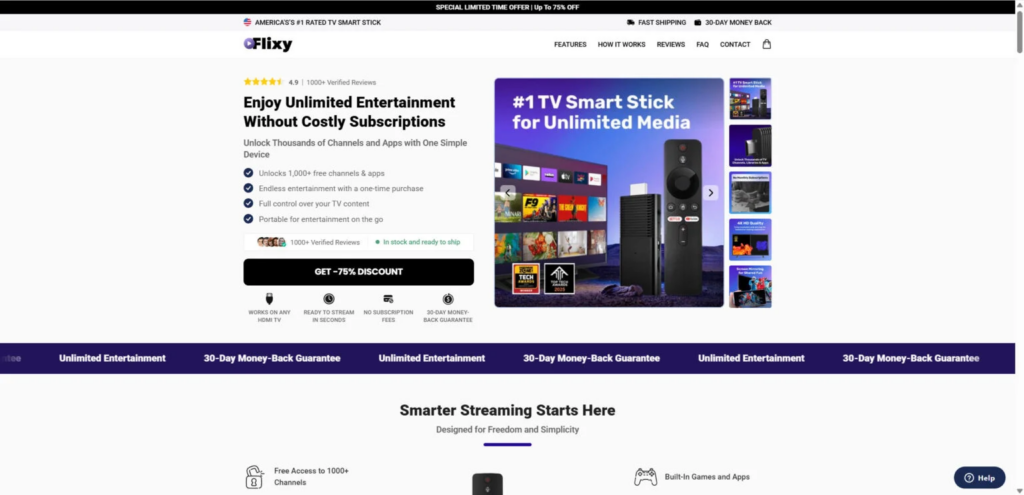
Flixy TV Smart Stick is advertised as a plug-and-play streaming device that connects to your TV through HDMI. The marketing presents it as a simple way to turn almost any television into a smart TV.
The ads typically claim that buyers can get:
- Access to 1,000+ channels
- Movies, shows, sports, and apps
- No monthly subscription fees
- Fast and easy installation
- 4K or even 8K-style streaming claims
- A portable device for travel
- “AI-powered” or “smart” navigation
At first glance, that sounds impressive. It appeals directly to people who are tired of expensive cable bills and too many streaming subscriptions.
But that is also exactly why this type of product works so well as a sales trap.
The device is not magically unlocking Netflix, Disney+, Hulu, Max, ESPN, or premium sports channels for free. Those services still require paid accounts. The “free channels” angle usually refers to free apps, free streaming services, or public content that anyone can already access on other devices.
The Big Problem: The Marketing Makes It Sound Like More Than It Is
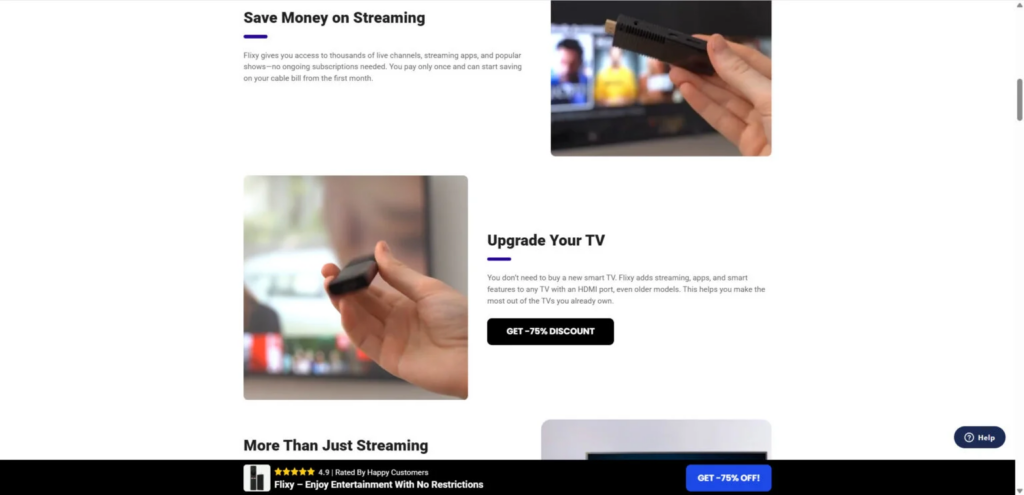
The main issue with Flixy TV Smart Stick is not that a cheap Android TV stick exists.
Cheap streaming sticks are real. Some work acceptably for basic use. The problem is when a generic device is sold as a breakthrough product that can replace paid streaming services, cable, and premium entertainment.
That is where the red flags begin.
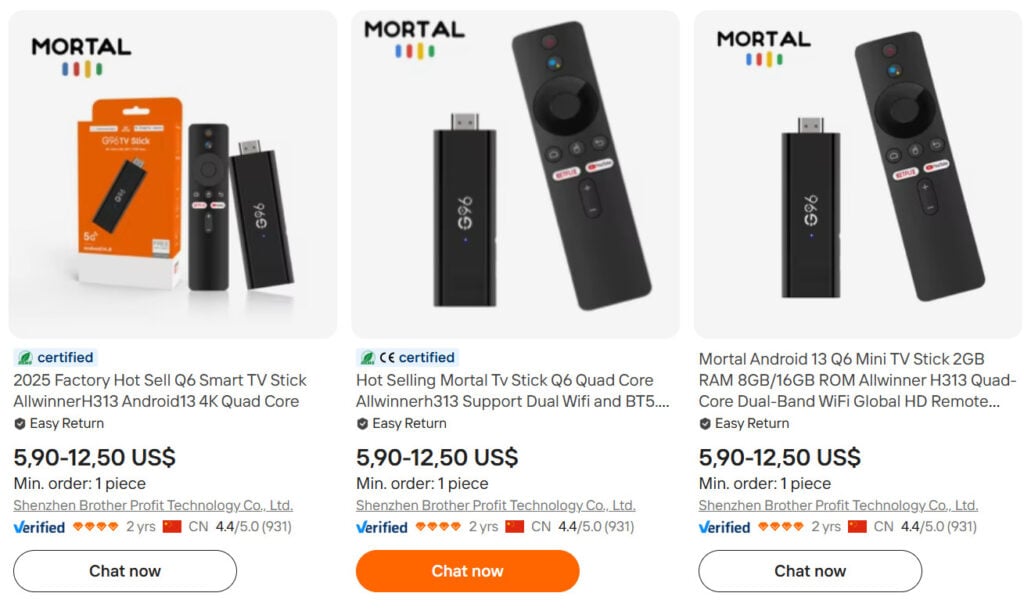
We identify Flixy as a generic Android-style TV stick, similar to low-cost models sold through wholesale marketplaces, then resold under a new brand name at a much higher price. The claimed “1,000+ channels” are mostly free apps or content sources, while paid services still require subscriptions.
Flixy does not appear to be a secret streaming loophole. It looks like a cheap stick sold with big promises.
Red Flags Around the Flixy TV Smart Stick
1. “No Subscriptions” Does Not Mean Free Netflix
This is one of the biggest tricks in the advertising.
A seller can say there are “no subscriptions” for the device itself. That does not mean premium streaming platforms are free.
Netflix still costs money. Disney+ still costs money. Hulu still costs money. Sports packages still cost money. Paid TV apps do not become free because you plugged in a third-party HDMI stick.
So when Flixy-style ads suggest you can replace multiple paid services with one tiny device, be careful. That claim is usually worded to make people assume more than the product can legally or technically provide.
2. The “1,000+ Channels” Claim Is Misleading
The phrase “1,000+ channels” sounds huge, but it often means very little.
Many free streaming apps already offer large libraries of free channels. You can access many of them through common devices like Roku, Fire TV, Chromecast, smart TVs, phones, laptops, and tablets.
So the number itself does not prove that Flixy offers anything special.
A long list of free apps is not the same as free premium entertainment.
3. 4K and 8K Claims Are Suspicious
Cheap Android TV sticks often struggle with speed, stability, app compatibility, WiFi performance, and smooth playback.
Limited hardware, including 1GB RAM and 8GB storage, which is not the kind of setup normally associated with smooth high-end streaming performance.
That matters because “4K” and “8K” claims look impressive in ads, but actual performance depends on the processor, memory, WiFi quality, app support, TV compatibility, and internet speed.
A weak device can claim support for high resolutions and still perform badly in real life.
4. Fake Urgency and Countdown Discounts
Many products like this rely on pressure.
You may see messages such as:
- “75% off today only”
- “Limited stock available”
- “Offer ends soon”
- “Your discount expires in 10 minutes”
- “Thousands sold this week”
These tactics are designed to stop you from researching the product. The goal is to make you click before you think.
5. Reviews May Not Be Reliable
A product page can show glowing reviews, five-star ratings, and customer photos. That does not mean the reviews are real.
Scammy product funnels often use generic names, stock-style photos, repeated wording, and “verified buyer” labels that are impossible to verify.
A better test is to search for independent complaints, refund issues, duplicate product names, identical images on other websites, and listings for similar devices on wholesale platforms.
How the Flixy TV Smart Stick Sales Funnel Works
This type of operation usually follows a predictable pattern.
Step 1: The Product Is Rebranded
A cheap Android TV stick is sourced from a manufacturer or wholesale supplier. The seller gives it a new name, creates a polished product page, and presents it as a unique invention.
The product may not be completely fake. Buyers may receive a physical device.
But receiving a device does not mean the advertising was honest.
Step 2: The Ads Target Frustrated Streaming Customers
The ads usually target people who are tired of:
- Cable bills
- Streaming subscriptions
- Sports package costs
- App overload
- Smart TV limitations
That frustration is real. The product uses it.
Instead of clearly explaining what the stick can and cannot do, the ads push the idea that one small device can solve everything.
Step 3: The Website Creates Pressure
The sales page uses urgency, discounts, countdown timers, and “almost sold out” language.
This is not accidental. It is conversion psychology.
The less time you spend researching, the more likely you are to buy.
Step 4: Upsells May Increase the Order Total
Some buyers of aggressively marketed gadgets report ending up with more units, accessories, warranties, or add-ons than they expected.
That pattern is important. A bad product is one problem. A bad checkout and refund process is another.
Step 5: Refunds Become Difficult
This is where many buyers get stuck.
The site may advertise a money-back guarantee, but customers may later face:
- Slow replies
- Partial refund offers
- Return shipping demands
- Vague return instructions
- Delays until the refund window expires
- Support agents who avoid direct answers
Is Flixy TV Smart Stick a Scam?
Based on the red flags, Flixy TV Smart Stick should be treated as a high-risk dropshipping product with misleading advertising.
The device may exist. It may plug into your TV. It may run some apps.
But the sales pitch appears to exaggerate what it can do.
The most concerning claims are the ones suggesting that buyers can get unlimited entertainment, premium-style channels, or major paid services without subscriptions. That is not how legitimate streaming works.
A legal streaming stick gives you access to apps. It does not give you paid subscriptions for free.
What You May Actually Receive
If you order Flixy TV Smart Stick, you may receive a generic Android-based streaming stick.
It may allow you to:
- Connect to WiFi
- Open basic apps
- Browse some free content
- Use certain streaming platforms if compatible
- Log into paid services you already subscribe to
But it likely will not:
- Unlock paid channels for free
- Replace every streaming subscription
- Deliver reliable 8K streaming
- Perform like a premium Fire TV, Roku, Chromecast, or Apple TV
- Provide the magical cable-cutting experience shown in the ads
That gap between expectation and reality is the core issue.
What To Do If You Already Bought Flixy TV Smart Stick
1. Save Everything Immediately
Do not delete emails, receipts, order confirmations, tracking numbers, screenshots, ads, or checkout pages.
Save:
- The product page
- The advertised claims
- Your order confirmation
- Any upsell pages
- Customer support messages
- Refund policy screenshots
- Payment confirmation
- Shipping information
This evidence matters if you file a dispute.
2. Contact the Seller Once
Send a clear refund request.
Keep it short:
“Hello, I am requesting a full refund for this order because the product was not as advertised. Please provide return instructions and a prepaid return label.”
Do not argue endlessly.
If they stall, move to the next step.
3. Dispute the Charge
Contact your payment provider.
Use clear language such as:
- “Product not as described”
- “Misleading advertising”
- “Seller refusing refund”
- “Unauthorized additional items added”
- “Return process not being honored”
If you paid by credit card, ask about a chargeback. If you paid through PayPal, open a dispute through the Resolution Center.
4. Do Not Accept a Tiny Partial Refund Too Quickly
Some sellers offer small refunds to make the complaint disappear.
Be careful. Accepting a partial refund may weaken your ability to recover the full amount later, depending on the payment provider and case status.
5. Be Careful With Return Shipping
Do not spend a large amount returning a cheap item overseas unless your payment provider tells you it is required.
If the seller misrepresented the product, push for a prepaid return label.
6. Report the Product
You can report deceptive ads or suspicious sales pages to:
- Your credit card provider
- PayPal, if used
- The platform where you saw the ad
- The FTC
- BBB
- Consumer review platforms
Reports help create a record and warn other buyers.
Better Alternatives to Flixy TV Smart Stick
If you want a real streaming device, use a known brand.
Consider:
- Amazon Fire TV Stick
- Roku Streaming Stick
- Google Chromecast
- Apple TV
- A smart TV with built-in apps
These devices still require paid subscriptions for paid services, but they are backed by known companies, regular software updates, app support, and clearer refund policies.
The honest version is simple: a good streaming stick can make watching apps easier. It cannot legally make paid content free.
The Bottom Line
Flixy TV Smart Stick is not the streaming miracle the ads make it sound like.
It appears to be a generic Android TV stick promoted with exaggerated claims, fake urgency, questionable discounts, and promises that can easily mislead buyers.
The biggest red flag is the suggestion that one small device can unlock huge amounts of entertainment without monthly costs. That is the hook. That is also where consumers need to slow down.
You are not buying a secret replacement for Netflix, Disney+, Hulu, cable, or live sports packages.
At best, you are buying a basic streaming stick.
At worst, you are paying an inflated price for a cheap gadget and then fighting through a frustrating refund process.
If you want reliable streaming, buy from a reputable brand. If you already bought Flixy and feel misled, document everything and dispute the charge quickly.
Frequently Asked Questions About Flixy TV Smart Stick
Is Flixy TV Smart Stick legit?
Flixy TV Smart Stick appears to be a real physical product, but the marketing around it raises serious concerns. The issue is not simply whether the device exists. The issue is whether the advertising honestly represents what the device can do.
Does Flixy TV Smart Stick give you free Netflix, Disney+, Hulu, or sports?
No. A streaming stick does not give you free access to paid streaming services. You still need valid subscriptions for premium platforms.
Why does the website say there are no monthly fees?
That usually means there is no subscription fee for the device itself. It does not mean paid streaming apps become free.
Can Flixy replace cable?
Not in the way the ads may suggest. It may let you access apps and free streaming content, but it does not legally unlock premium cable channels or paid sports networks for free.
Is Flixy TV Smart Stick just a cheap Android TV stick?
Flixy appears to be a rebranded low-cost Android-style streaming stick sold with inflated marketing claims.
Why are the discounts always so high?
Large “limited-time” discounts are commonly used to create urgency. The goal is to make buyers feel they must purchase immediately before researching.
What should I do if my order total was higher than expected?
Save screenshots, contact the seller once, then contact your bank or payment provider. Explain that the order total was not what you intended or that extra items were added.
Should I return the device?
Only follow return instructions that are clear and reasonable. If the seller requires expensive return shipping or avoids giving instructions, contact your payment provider before spending more money.
What is the safest way to pay for products like this?
Use a credit card or PayPal because they usually provide better dispute options. Avoid debit cards, wire transfers, crypto, or gift cards.
What is the best alternative?
Use a known device such as Amazon Fire TV Stick, Roku, Chromecast, or Apple TV. They will not give you paid content for free, but they are more reliable and transparent.








