Every day, Roblox players see the same tempting promises repeated in chat, on TikTok, in YouTube Shorts, and in Discord servers that feel “official” for about five seconds.
A milestone event giveaway. A “limited-time” celebration. A generator that “just needs your username.” A “verification step” that “protects against bots.”
It all sounds exciting, especially if you are a kid and everyone in the server is talking about it.
But here’s the truth you deserve upfront: there is no legitimate free Robux giveaway website, no Robux generator, no hack, and no shortcut that a random site can safely deliver. Every site promoting “free Robux” is built to benefit the scammers, not the players.
This article breaks down how these scams work, why they spread so fast, what the most common traps look like, and exactly what to do if you clicked one of these links.
Scam Overview
“Free Robux” scams are one of the oldest and most persistent scams in the Roblox ecosystem.
They never disappear. They simply evolve.
When one domain gets reported, a new one appears. When a platform cracks down on certain links, scammers shift to Discord invites. When players get smarter, scammers make the pages look cleaner, more official, and more convincing.
The story changes, but the underlying mechanics stay the same: the site promises Robux, then pushes you into steps that generate money, data, or access for scammers.
Why the “free Robux” promise works so well
Robux is emotional.
It unlocks outfits, game passes, private servers, limited items, and status. In many games, it feels like power. That makes it the perfect bait.
Scammers know three things:
Many players want Robux right now, not later
Kids are more likely to trust what they see in a game chat or a trending video
Even skeptical adults can get curious when something looks polished
So scammers build a funnel that catches curiosity and turns it into profit.
The biggest lie: “Robux can be generated”
Robux is part of Roblox’s economy. It does not appear from nowhere.
Legitimate Robux comes from:
Buying Robux through Roblox
Redeeming official gift cards
Earning Robux through Roblox systems (developer products, game passes, marketplace sales)
Roblox-approved programs and promotions
A random third-party site cannot “generate” Robux for you.
If a site claims it can, one of these things is happening:
The site is trying to earn affiliate money from you
The site is trying to harvest your personal information
The site is trying to trick you into a paid subscription or trial
The site is trying to steal your Roblox login
The site is trying to push malware or risky extensions
The site is trying to manipulate you through Discord
All of these outcomes benefit the scammers.
None benefit you.
The most common scam format: username, then “do a task”
This is the highest volume version because it scales easily.
It usually looks like this:
Enter your Roblox username
Pick an amount like 1,000 or 5,000 Robux
Watch a fake loading bar that says “connecting”
See a message: “Complete a quick task to verify”
Get pushed to app installs, surveys, or sign-ups
This is not verification.
It is the money step.
Scammers use affiliate links and offerwalls. When you complete an offer, they may get paid a commission. You usually get nothing, or you get stuck in an endless loop of “one more task.”
Even if you never type your Roblox password, you can still be harmed through:
Paid trials that convert into subscriptions
Spam to email and phone
Browser notification abuse
Risky downloads
The spam-in-Roblox-chat version is exploding again
A major reason these scams keep working is distribution.
Scammers push links where players already are: inside Roblox public servers.
Players report patterns like:
Repeated chat messages across multiple games
Copy-paste claims like “I just got Robux” or “this site is legit”
Messages posted at a steady rhythm that feels automated
Accounts that are hard to report because they leave quickly
Sometimes “ghost” messaging behavior where the sender is not obvious
This is not normal marketing.
Legitimate platforms do not need to spam children inside game chats.
Spam is a huge red flag because it tells you the operation is built on volume, not trust.
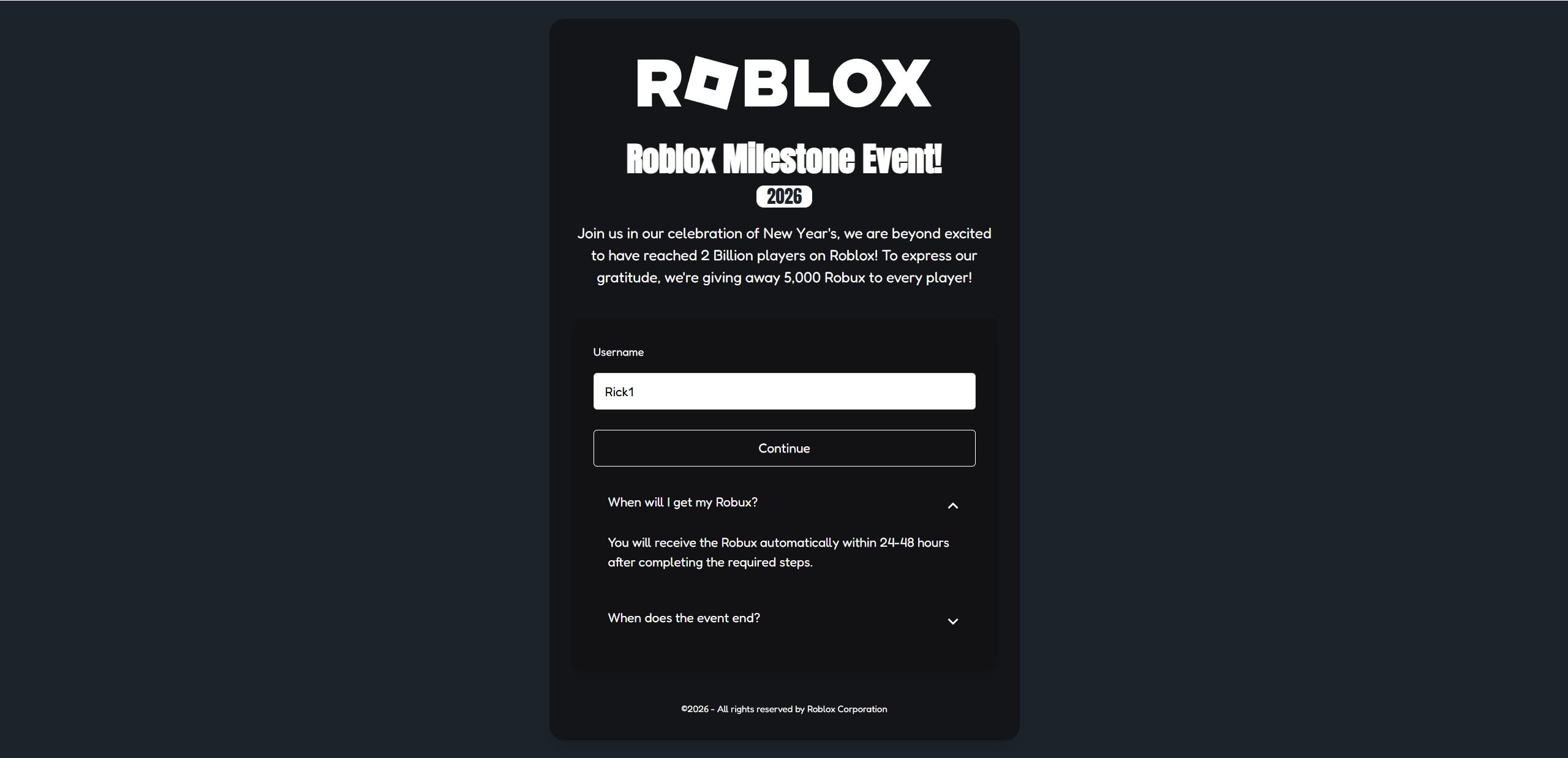
The milestone event scam page is a modern favorite
Another common version is the “Roblox Milestone Event” scam page.
It often looks professional and uses:
A big ROBLOX logo
A headline like “Roblox Milestone Event”
A year badge such as 2026
A story about Roblox “celebrating” a milestone
A claim like “5,000 Robux to every player”
An FAQ that says you will receive Robux within 24 to 48 hours
This is designed to feel official and timely.
The site usually asks for your username, then shows a “claim steps” screen that instructs you to complete an offer.
Again, the goal is not to give you Robux.
The goal is to get you to complete revenue-generating actions.
The Discord-based free Robux scam is the most dangerous variant
Some scams skip offerwalls and push you into Discord instead.
They do this because Discord lets scammers:
Talk to victims directly
Create fake “staff” roles and tickets
Apply pressure in real time
Use social engineering to extract access or money
Send “verification” links that steal sessions or credentials
Common Discord scam tactics include:
“Join the event server to claim”
“Open a ticket for payout”
“Verify your Roblox account”
QR code login traps
Fake support agents guiding kids step-by-step
Requests to download a “verification tool”
If a “free Robux” site pushes you to Discord, treat it as a major escalation in risk.
Why some people claim “it worked”
This is where many players get confused.
You might see someone say, “It worked for me.”
That does not prove legitimacy.
Here are common reasons those claims exist:
Bots and fake accounts post “success” messages to create social proof
People confuse unrelated Robux activity with a payout
Some scams pay a tiny number of users to bait reviews and referrals
Users post “it works” to convince friends to use their referral code
Scammers do not need everyone to believe.
They need just enough people to click and follow steps.
The real business model behind free Robux sites
Free Robux scams typically monetize in a few predictable ways.
1) Affiliate commissions
You complete offers and the scammer gets paid.
You might install apps, sign up for subscriptions, or submit personal info. The affiliate network pays the publisher. The publisher is the scammer.
2) Subscription traps
A “quick offer” asks for a card for a free trial.
Later, it becomes a paid subscription. The user does not always notice.
Even a small charge like $1 is enough to start a billing relationship.
3) Data harvesting
Emails, phone numbers, addresses, and device data are valuable.
Scammers and shady marketers can sell that data or use it for future scams.
4) Account theft
If you enter a password on a fake Roblox login page, your account can be taken over.
Then it can be used to spam your friends and spread the scam.
5) Malware and risky downloads
Some funnels push extensions, APKs, or “tools.”
That can lead to device compromise, not just Roblox account risk.
The bottom line of the overview
Every “free Robux” site depends on one core trick: making players believe there is a reward waiting at the end of a few steps.
But the steps are the product.
You are not claiming Robux.
You are generating profit for scammers.
How The Scam Works
Most free Robux scams follow a funnel.
The funnel is designed to convert curiosity into action, then action into money, access, or data.
Below is a step-by-step breakdown of how these scam sites typically work, including the most common branches: the affiliate scheme, the Roblox chat spam path, and the Discord scam path.
Step 1: You see a message that triggers curiosity
This is the entry point.
The message can appear in several places:
Roblox public server chat
TikTok or YouTube Shorts “proof” clips
Discord posts or direct messages
Comment sections under Roblox content
The language is always designed to bypass logic:
“Free Robux now”
“Working generator”
“Claim 5,000 Robux”
“Milestone event reward”
“Use this code”
“Not a scam, it works”
The goal is not to convince you with evidence.
The goal is to make you click before you think.
Step 2: The scam page mimics trust
Once you land on the site, everything is designed to look safe.
Common trust-building elements include:
Clean, modern layout
Roblox-style fonts and colors
Big ROBLOX branding
Fake “event” framing
Short FAQ sections that answer your doubts
The site may even include a fake footer that looks corporate.
Visual polish is cheap.
Trust is the expensive thing, so scammers manufacture the appearance of it.
Step 3: The username input creates commitment
Most scams ask for your Roblox username early.
This is a psychological move.
It does two things:
It feels safe because you are not entering a password
It creates a sense that the process has started
Once you enter your username, the page may:
Display your avatar
Display your name on the next screen
Show a “claim steps” flow
Show a progress bar
This is designed to hook you emotionally.
You feel like you are already halfway there.
Step 4: The fake “processing” animation builds belief
Almost all free Robux sites use fake animations:
“Connecting to Roblox”
“Checking eligibility”
“Generating Robux”
“Loading reward”
None of this is real.
It is theater that creates a sense of legitimacy.
Scammers know that if you watch a progress bar fill up, you are more likely to keep going.
Step 5: You hit the real trap: “verification” or “required steps”
This is where the scam converts you into profit.
The page will claim you must complete one of the following:
A quick offer
A human verification
A simple app install
A survey
A Discord join and ticket
A login to “confirm”
A small payment “to prevent bots”
There are three main branches here.
Branch A: Username plus task affiliate scheme
This is the most common and scalable version.
What it looks like
You are shown a list of offers with buttons like “Get.”
Offers might include:
Install a browser and open it
Install an app and keep it for a certain time
Complete a survey
Sign up for a subscription trial
Provide personal details for a “reward”
What is actually happening
The scammer is using affiliate links.
If you complete an offer, the affiliate network may pay them.
You usually get nothing.
Sometimes the scam page is configured to never credit you, even if you complete the offer correctly.
That creates a loop:
You do an offer
You are told it did not count
You do another offer
You are told to do one more
The scam does not need you to finish.
It needs you to keep trying.
Why it can cost real money
Some offers include free trials that turn into paid subscriptions.
If a kid uses a parent’s card, the damage can be serious.
If you ever see a “verification” offer that asks for payment details, stop immediately.
Branch B: Roblox chat spam to scam site funnel
This branch is all about scale.
How it works
Bots or scripted accounts flood public servers with repeated messages.
They rotate games and servers to maximize reach.
Sometimes they vanish quickly to avoid reports.
The messages create social pressure by claiming:
“I just got Robux”
“This is legit”
“Use my code”
“It worked instantly”
These messages often come in waves.
It’s not one person.
It’s a campaign.
Why it’s effective
Kids assume anything in-game is part of the game.
Scammers exploit that trust.
They want players to treat the link like normal gameplay chatter.
Branch C: Discord “claim your Robux” scams
This is the highest risk branch because it involves live manipulation.
What it looks like
The milestone or generator site says something like:
“Join Discord to receive your reward”
“Open a ticket to claim”
“Verify to unlock payout”
Once inside Discord, scammers may:
Present fake staff roles
Use ticket bots to mimic real support
Send “verification” links
Ask you to scan a QR code
Ask you to “connect your Roblox account”
Push you to download files
The common Discord traps
Fake login pages: You enter Roblox credentials, account gets taken
Session theft: QR code tricks can steal access without a password
Download traps: “Tools” can be malware
Payment pressure: “Small fee to unlock reward”
Trade manipulation: “Send items to verify ownership”
This is not support.
It is a social engineering setup.
Step 6: The scam delays you with timelines and excuses
Many scams promise delivery within 24 to 48 hours.
That timeline is not for you.
It is for them.
It buys time so that:
You stop questioning immediately
You wait instead of reporting
You return and complete more steps
You tell friends you are “getting paid soon”
Delay is a control mechanism.
Step 7: Some variants pivot into phishing after you are invested
A common escalation is:
Username entry first
Offers next
Then a prompt to “log in to Roblox to finish”
At that point, many victims comply because they feel invested.
This is how accounts get stolen.
If you ever see a Roblox login page that does not come from Roblox, stop.
Step 8: The scam spreads through referrals and copycat videos
Many scams use referrals.
They encourage you to share to “unlock” rewards or “boost” payouts.
Even without explicit referrals, kids often share out of excitement.
That spreads the scam organically, which makes it harder to stop.
Step 9: The outcomes are predictable
Most users end up with one or more of these outcomes:
No Robux received
Time wasted on endless tasks
Email and phone spam increases
Browser notifications become aggressive
Subscription charges appear
Account takeover attempts
Discord manipulation and pressure
Malware risk if downloads were involved
The only consistent winner is the scammer.
How to Spot Free Robux Scam Sites
Free Robux scam sites often look polished, modern, and convincing. That is the point. The safest mindset is simple: if a site promises free Robux outside Roblox, it’s a scam. Still, there are clear signs you can spot in seconds.
The “too good to be true” promise is the first giveaway
Scam pages usually lead with a big, emotional claim like:
“5,000 Robux for every player”
“Roblox Milestone Event reward”
“Limited-time giveaway”
“Free Robux generator”
“Claim Robux instantly”
Roblox does not hand out mass Robux giveaways through random websites. If the page promises a huge amount to everyone, it’s bait.
It asks for your username first
A common pattern is:
Enter your username
Pick a Robux amount
Click Continue
This step is designed to feel safe because it is not asking for a password. But it’s a trap that creates commitment and makes the next steps feel “official.”
If a site starts with “username only,” assume it’s setting you up for tasks, fake verification, or phishing.
Fake “verification” or “required steps”
This is the clearest red flag.
Legitimate Roblox rewards do not require you to:
Complete surveys
Install apps
Sign up for subscriptions
Download files
Enable notifications
Join Discord to “claim”
Enter a code from a third-party site
If a page says “complete a quick offer to verify,” you are looking at a scam funnel.
Offer lists with “Get” buttons are a bad sign
Many scam pages show a list of tasks that look like this:
App install with a “Get” button
Browser install with a “Get” button
Survey with a “Get” button
Trial with a “Get” button
That is an affiliate offerwall. It exists to generate revenue, not to give you Robux.
A timer, urgency, or “limited slots” language
Scam sites push urgency because it shuts down critical thinking.
Look for pressure lines like:
“Offer ends in 10 minutes”
“Only today”
“Limited redemptions”
“Act fast”
“Last chance”
Real Roblox announcements don’t rely on panic.
A 24 to 48 hour payout promise
“Robux in 24-48 hours” is a classic delay tactic.
It keeps you waiting instead of reporting, and it encourages you to come back and do more tasks. It sounds realistic, but it’s just stalling.
The domain looks unrelated to Roblox
Most scam domains are:
New
Random
Slightly “Roblox-like”
Full of extra words like promo, event, claim, rewards, generator
If it is not an official Roblox domain, do not trust it.
Roblox chat spam is often the distribution method
If you found the site because of Roblox public server chat spam, treat it as high risk immediately.
Common signs of spam campaigns:
Repeated messages across many games
Copy-paste phrasing from “different users”
Messages posted at a steady, automated pace
Accounts that disappear quickly after posting
Legitimate promotions do not spread through bot spam in children’s game chats.
Discord “claim” instructions are a major escalation
If a page says you must join Discord to receive Robux, it is almost always dangerous.
Discord scams often use:
Fake staff roles
Ticket systems
“Verification” links
QR code login traps
Requests to download tools
Robux is not distributed through random Discord servers.
The page uses fake social proof
Scam sites try to make you feel like everyone is winning.
Watch for:
A fast-moving chat feed that looks automated
Repetitive “I got Robux” messages
A fake “recent payouts” panel
Generic reviews that say “works” without details
This is manufactured trust, not real proof.
Quick checklist you can memorize
If you want a simple rule set, use this:
If it promises free Robux off Roblox, it’s a scam
If it asks for tasks, downloads, surveys, or Discord, it’s a scam
If it uses chat spam or urgency, it’s a scam
If it claims a “generator” or “milestone giveaway,” it’s a scam
If you want, I can also write a short version of this section specifically for parents, plus a quick “10-second red flag test” box you can place near the top of the article.
What To Do If You Have Fallen Victim to This Scam
If you clicked a free Robux link, do not panic.
Most people can recover quickly by taking the right steps in the right order.
Use this checklist. Do not skip steps that match what you did.
1. If you entered your Roblox password, change it immediately
Do this first.
Change your Roblox password right now
Enable Roblox two-step verification
Log out of other sessions if Roblox allows it
Check account email and phone to confirm they are still yours
Review recent transactions and trades
If anything looks unfamiliar, take screenshots.
2. Secure your email account next
Your email is the key to password resets.
Change the email password linked to Roblox
Enable two-step verification on your email
Check for suspicious forwarding rules or filters
Review recent login activity in your email provider
This step prevents a lot of repeat takeovers.
3. Review your Robux balance, purchase history, and trades
Look for:
Robux spent that you do not recognize
Trades you did not initiate
Items missing from inventory
New friends added without your action
Messages sent from your account that you did not write
If you see activity, your account may be compromised.
4. Remove browser notification permissions
Many scam pages ask you to “allow notifications.”
If you clicked allow, you may now get spam popups.
Go into your browser settings and:
Find Notifications permissions
Remove any unknown domains
Block future requests
This is one of the quickest ways to reduce ongoing harassment.
5. Remove suspicious browser extensions and downloads
If you installed anything because the site told you to:
Uninstall it
Remove new browser extensions you do not recognize
Clear site data for the scam domain
Run a trusted security scan on your device
If a file was downloaded from Discord, delete it and do not run it.
6. Check for subscriptions or charges if you entered payment details
If you used a card for a “quick offer” or free trial:
Check bank and card statements for new charges
Look for subscriptions that renew automatically
Cancel any subscription you did not intentionally start
Contact your bank or payment provider if charges are unauthorized
Ask about dispute options for misleading digital offers
Act quickly. The sooner you act, the easier it is to stop repeat billing.
7. If Discord was involved, lock down Discord security
If you joined a server or clicked “verification” links:
Leave the suspicious Discord server
Enable two-step verification on Discord
Review “Authorized Apps” and remove anything unfamiliar
Do not scan QR codes for login
Do not download “verification tools”
If someone claiming to be staff asks for money, trades, or downloads, disengage.
8. Teach the simple rule that prevents this from happening again
If a child was involved, keep it calm.
Kids hide mistakes when they fear punishment, and that makes scams worse.
Use a clear rule:
Never click free Robux links in chat
Never trust Robux giveaways on random sites
Never follow “verification” steps for Robux
Ask a parent or adult before entering usernames anywhere
A calm conversation prevents repeat incidents better than anger.
9. Report the spam where you found it
Reporting reduces spread.
Report Roblox chat spam messages and accounts if visible
Report TikTok or YouTube videos that push scam links
Report Discord servers that run “verification” scams
Warn friends not to click
Even if one report feels small, patterns matter.
10. Save evidence if you need to recover money or accounts
If money was lost or the account was compromised, save:
Screenshots of the scam page
Screenshots of offer steps
Payment receipts or statement lines
Discord messages and usernames
Roblox transaction history screenshots
Evidence helps with disputes and platform support.
Is Your Device Infected? Scan for Malware
If your computer or phone is slow, showing unwanted pop-ups, or acting strangely, malware could be the cause. Running a scan with Malwarebytes Anti-Malware Free is one of the most reliable ways to detect and remove harmful software. The free version can identify and clean common infections such as adware, browser hijackers, trojans, and other unwanted programs.
Malwarebytes works on Windows, Mac, and Android devices. Choose your operating system below and follow the steps to scan your device and remove any malware that might be slowing it down.
Malwarebytes for WindowsMalwarebytes for MacMalwarebytes for Android
Run a Malware Scan with Malwarebytes for Windows
Malwarebytes stands out as one of the leading and widely-used anti-malware solutions for Windows, and for good reason. It effectively eradicates various types of malware that other programs often overlook, all at no cost to you. When it comes to disinfecting an infected device, Malwarebytes has consistently been a free and indispensable tool in the battle against malware. We highly recommend it for maintaining a clean and secure system.
Download Malwarebytes
Download the latest version of Malwarebytes for Windows using the official link below. Malwarebytes will scan your computer and remove adware, browser hijackers, and other malicious software for free.
(The above link will open a new page from where you can download Malwarebytes)
Install Malwarebytes
After the download is complete, locate the MBSetup file, typically found in your Downloads folder. Double-click on the MBSetup file to begin the installation of Malwarebytes on your computer. If a User Account Control pop-up appears, click “Yes” to continue the Malwarebytes installation.
Follow the On-Screen Prompts to Install Malwarebytes
When the Malwarebytes installation begins, the setup wizard will guide you through the process.
You’ll first be prompted to choose the type of computer you’re installing the program on—select either “Personal Computer” or “Work Computer” as appropriate, then click on Next.
Malwarebytes will now begin the installation process on your device.
When the Malwarebytes installation is complete, the program will automatically open to the “Welcome to Malwarebytes” screen.
On the final screen, simply click on the Open Malwarebytes option to start the program.
Enable “Rootkit scanning”.
Malwarebytes Anti-Malware will now start, and you will see the main screen as shown below. To maximize Malwarebytes’ ability to detect malware and unwanted programs, we need to enable rootkit scanning. Click on the “Settings” gear icon located on the left of the screen to access the general settings section.
In the settings menu, enable the “Scan for rootkits” option by clicking the toggle switch until it turns blue.
Now that you have enabled rootkit scanning, click on the “Dashboard” button in the left pane to get back to the main screen.
Perform a Scan with Malwarebytes.
To start a scan, click the Scan button. Malwarebytes will automatically update its antivirus database and begin scanning your computer for malicious programs.
Wait for the Malwarebytes scan to complete.
Malwarebytes will now scan your computer for browser hijackers and other malicious programs. This process can take a few minutes, so we suggest you do something else and periodically check the status of the scan to see when it is finished.
Quarantine detected malware
Once the Malwarebytes scan is complete, it will display a list of detected malware, adware, and potentially unwanted programs. To effectively remove these threats, click the “Quarantine” button.
Malwarebytes will now delete all of the files and registry keys and add them to the program’s quarantine.
Restart your computer.
When removing files, Malwarebytes may require a reboot to fully eliminate some threats. If you see a message indicating that a reboot is needed, please allow it. Once your computer has restarted and you are logged back in, you can continue with the remaining steps.
Once the scan completes, remove all detected threats. Your Windows computer should now be clean and running smoothly again, free of trojans, adware, and other malware.
If your current antivirus allowed this malicious program on your computer, you may want to consider purchasing Malwarebytes Premium to protect against these types of threats in the future. If you are still having problems with your computer after completing these instructions, then please follow one of the steps:
Malwarebytes for Mac is an on-demand scanner that can destroy many types of malware that other software tends to miss without costing you absolutely anything. When it comes to cleaning up an infected device, Malwarebytes has always been free, and we recommend it as an essential tool in the fight against malware.
Download Malwarebytes for Mac.
You can download Malwarebytes for Mac by clicking the link below.
When Malwarebytes has finished downloading, double-click on the setup file to install Malwarebytes on your computer. In most cases, downloaded files are saved to the Downloads folder.
Follow the on-screen prompts to install Malwarebytes.
When the Malwarebytes installation begins, you will see the Malwarebytes for Mac Installer which will guide you through the installation process. Click “Continue“, then keep following the prompts to continue with the installation process.
When your Malwarebytes installation completes, the program opens to the Welcome to Malwarebytes screen. Click the “Get started” button.
Select “Personal Computer” or “Work Computer”.
The Malwarebytes Welcome screen will first ask you what type of computer are you installing this program, click either Personal Computer or Work Computer.
Click on “Scan”.
To scan your computer with Malwarebytes, click on the “Scan” button. Malwarebytes for Mac will automatically update the antivirus database and start scanning your computer for malware.
Wait for the Malwarebytes scan to complete.
Malwarebytes will scan your computer for adware, browser hijackers, and other malicious programs. This process can take a few minutes, so we suggest you do something else and periodically check on the status of the scan to see when it is finished.
Click on “Quarantine”.
When the scan has been completed, you will be presented with a screen showing the malware infections that Malwarebytes has detected. To remove the malware that Malwarebytes has found, click on the “Quarantine” button.
Restart computer.
Malwarebytes will now remove all the malicious files that it has found. To complete the malware removal process, Malwarebytes may ask you to restart your computer.
After scanning, delete any detected threats. Your Mac should now be free from adware, unwanted extensions, and other potentially harmful software.
If your current antivirus allowed a malicious program on your computer, you might want to consider purchasing the full-featured version of Malwarebytes Anti-Malware to protect against these types of threats in the future. If you are still experiencing problems while trying to remove a malicious program from your computer, please ask for help in our Mac Malware Removal Help & Support forum.
Run a Malware Scan with Malwarebytes for Android
Malwarebytes for Android automatically detects and removes dangerous threats like malware and ransomware so you don’t have to worry about your most-used device being compromised. Aggressive detection of adware and potentially unwanted programs keeps your Android phone or tablet running smooth.
Download Malwarebytes for Android.
You can download Malwarebytes for Android by clicking the link below.
In the Google Play Store, tap “Install” to install Malwarebytes for Android on your device.
When the installation process has finished, tap “Open” to begin using Malwarebytes for Android. You can also open Malwarebytes by tapping on its icon in your phone menu or home screen.
Follow the on-screen prompts to complete the setup process
When Malwarebytes will open, you will see the Malwarebytes Setup Wizard which will guide you through a series of permissions and other setup options. This is the first of two screens that explain the difference between the Premium and Free versions. Swipe this screen to continue. Tap on “Got it” to proceed to the next step. Malwarebytes for Android will now ask for a set of permissions that are required to scan your device and protect it from malware. Tap on “Give permission” to continue. Tap on “Allow” to permit Malwarebytes to access the files on your phone.
Update database and run a scan with Malwarebytes for Android
You will now be prompted to update the Malwarebytes database and run a full system scan.
Click on “Update database” to update the Malwarebytes for Android definitions to the latest version, then click on “Run full scan” to perform a system scan.
Wait for the Malwarebytes scan to complete.
Malwarebytes will now start scanning your phone for adware and other malicious apps. This process can take a few minutes, so we suggest you do something else and periodically check on the status of the scan to see when it is finished.
Click on “Remove Selected”.
When the scan has been completed, you will be presented with a screen showing the malware infections that Malwarebytes for Android has detected. To remove the malicious apps that Malwarebytes has found, tap on the “Remove Selected” button.
Restart your phone.
Malwarebytes for Android will now remove all the malicious apps that it has found. To complete the malware removal process, Malwarebytes may ask you to restart your device.
When the scan is finished, remove all detected threats. Your Android phone should now be free of malicious apps, adware, and unwanted browser redirects.
If your current antivirus allowed a malicious app on your phone, you may want to consider purchasing the full-featured version of Malwarebytes to protect against these types of threats in the future. If you are still having problems with your phone after completing these instructions, then please follow one of the steps:
Restore your phone to factory settings by going to Settings > General management > Reset > Factory data reset.
After cleaning your device, it’s important to protect it from future infections and annoying pop-ups. We recommend installing an ad blocker such as AdGuard. AdGuard blocks malicious ads, prevents phishing attempts, and stops dangerous redirects, helping you stay safe while browsing online.
FAQ
Are there any legitimate free Robux giveaway sites?
No. Any website promising free Robux, a Robux generator, a Robux hack, or “5,000 Robux for every player” is fake. Real Robux only comes through official Roblox methods like purchases, gift cards, and Roblox’s own earning systems.
Why do these sites look so official and professional?
Because appearance is part of the scam. Scammers copy Roblox branding, use clean layouts, and add fake FAQ sections to lower your suspicion and push you into the next step.
If a site only asks for my username, is it safe?
Not really. Asking for a username is a trust trick. It personalizes the scam, makes you feel committed, and leads you into “required steps” that generate money or data for scammers. It can also escalate into phishing later.
What is the most common free Robux scam pattern?
The most common pattern is:
Enter username
Pick an amount of Robux
Watch a fake loading bar
“Complete a quick task to verify”
Get pushed into app installs, surveys, subscriptions, or downloads
That “verification” step is the scam’s profit engine.
Why do they force “verification” tasks like surveys or app installs?
Because scammers earn affiliate commissions when you complete offers. You think you’re earning Robux, but you are actually generating revenue for the scammer. You usually never get paid.
Can these “quick offers” cost real money?
Yes. Many offers include free trials that convert into paid subscriptions. Some require payment details up front. Even small charges can turn into recurring billing. Always check statements if a card was used.
Why do they say “you’ll get Robux in 24-48 hours”?
It’s a stalling tactic. The delay keeps you hoping, reduces immediate reporting, and encourages you to come back and complete more tasks. It also makes the scam feel more “real” because it sounds like a processing window.
What is the Roblox chat spam version of the scam?
This is when public servers get flooded with repeated messages claiming a site is giving free Robux. The messages often look automated, repeat across games, and may come from accounts that leave quickly or are difficult to report. It’s designed for scale, not legitimacy.
Why are some spam messages posted by accounts that are not visible?
Scam campaigns often use bots that join and leave quickly, rotate accounts, or use scripted behavior. Regardless of the exact technique, legitimate promotions do not behave this way. Treat it as a strong warning sign.
How does the Discord version of the scam work?
Some scam sites push you into Discord to “claim” Robux. Inside, scammers may use fake staff roles, ticket bots, and verification steps to:
Steal logins through fake Roblox pages
Trick users with QR code login traps
Push downloads disguised as “tools”
Pressure victims into sending money or items
If a Robux site leads to Discord, the risk level increases.
Can I lose my Roblox account from this?
Yes, especially if you:
Entered your Roblox password on any non-Roblox page
Logged in through a fake verification link
Scanned a QR code for login
Installed unknown files or extensions
Account takeovers can lead to stolen Robux, lost items, and spam sent to friends.
I clicked the site but didn’t enter my password. What should I do?
If you only visited, risk is lower. Still do these quick steps:
Close the page
Do not allow notifications
Remove any extensions you installed
Clear site data for that domain if you want extra safety
If you completed offers or entered payment info, also check subscriptions and statements.
What should I do if I entered my Roblox password?
Act immediately:
Change your Roblox password
Change your email password linked to Roblox
Enable 2-step verification on both
Review trades, purchases, and account settings
The faster you act, the better the outcome.
What is the safest way to get Robux?
Only use official Roblox methods: buying Robux directly through Roblox, redeeming official gift cards, or earning Robux through legitimate Roblox systems. Any site promising free Robux is a scam funnel and should be avoided.
The Bottom Line
Sites promising free Robux are not misunderstood “reward platforms.”
They are scams.
There is no giveaway, no generator, no hack, and no legitimate third-party website that can safely deliver free Robux to everyone. The most common version uses the username then “do a task” affiliate scheme. Other versions spread through Roblox chat spam and push victims into Discord manipulation.
The outcome is always the same: scammers make money, and players take the risk.
If you want to stay safe, treat every free Robux link as harmful by default. Do not click. Do not enter your username. Do not follow steps. Do not join the Discord.
And if you already clicked, you can still recover by securing Roblox, securing email, removing notification permissions, checking for subscriptions, and taking calm, practical action.
Thomas is an expert at uncovering scams and providing in-depth reporting on cyber threats and online fraud. As an editor, he is dedicated to keeping readers informed on the latest developments in cybersecurity and tech.