


If you have ever wanted Robux badly enough to search “free Robux” at 2 a.m., you are not alone.
Every day, Roblox players see the same tempting promises repeated in chat, on TikTok, in YouTube Shorts, and in Discord servers that feel “official” for about five seconds.
A milestone event giveaway. A “limited-time” celebration. A generator that “just needs your username.” A “verification step” that “protects against bots.”
It all sounds exciting, especially if you are a kid and everyone in the server is talking about it.
But here’s the truth you deserve upfront: there is no legitimate free Robux giveaway website, no Robux generator, no hack, and no shortcut that a random site can safely deliver. Every site promoting “free Robux” is built to benefit the scammers, not the players.
This article breaks down how these scams work, why they spread so fast, what the most common traps look like, and exactly what to do if you clicked one of these links.
Scam Overview
“Free Robux” scams are one of the oldest and most persistent scams in the Roblox ecosystem.
They never disappear. They simply evolve.
When one domain gets reported, a new one appears. When a platform cracks down on certain links, scammers shift to Discord invites. When players get smarter, scammers make the pages look cleaner, more official, and more convincing.
The story changes, but the underlying mechanics stay the same: the site promises Robux, then pushes you into steps that generate money, data, or access for scammers.
Why the “free Robux” promise works so well
Robux is emotional.
It unlocks outfits, game passes, private servers, limited items, and status. In many games, it feels like power. That makes it the perfect bait.
Scammers know three things:
- Many players want Robux right now, not later
- Kids are more likely to trust what they see in a game chat or a trending video
- Even skeptical adults can get curious when something looks polished
So scammers build a funnel that catches curiosity and turns it into profit.
The biggest lie: “Robux can be generated”
Robux is part of Roblox’s economy. It does not appear from nowhere.
Legitimate Robux comes from:
- Buying Robux through Roblox
- Redeeming official gift cards
- Earning Robux through Roblox systems (developer products, game passes, marketplace sales)
- Roblox-approved programs and promotions
A random third-party site cannot “generate” Robux for you.
If a site claims it can, one of these things is happening:
- The site is trying to earn affiliate money from you
- The site is trying to harvest your personal information
- The site is trying to trick you into a paid subscription or trial
- The site is trying to steal your Roblox login
- The site is trying to push malware or risky extensions
- The site is trying to manipulate you through Discord
All of these outcomes benefit the scammers.
None benefit you.
The most common scam format: username, then “do a task”
This is the highest volume version because it scales easily.
It usually looks like this:
- Enter your Roblox username
- Pick an amount like 1,000 or 5,000 Robux
- Watch a fake loading bar that says “connecting”
- See a message: “Complete a quick task to verify”
- Get pushed to app installs, surveys, or sign-ups
This is not verification.
It is the money step.
Scammers use affiliate links and offerwalls. When you complete an offer, they may get paid a commission. You usually get nothing, or you get stuck in an endless loop of “one more task.”
Even if you never type your Roblox password, you can still be harmed through:
- Paid trials that convert into subscriptions
- Spam to email and phone
- Browser notification abuse
- Risky downloads
The spam-in-Roblox-chat version is exploding again
A major reason these scams keep working is distribution.
Scammers push links where players already are: inside Roblox public servers.
Players report patterns like:
- Repeated chat messages across multiple games
- Copy-paste claims like “I just got Robux” or “this site is legit”
- Messages posted at a steady rhythm that feels automated
- Accounts that are hard to report because they leave quickly
- Sometimes “ghost” messaging behavior where the sender is not obvious
This is not normal marketing.
Legitimate platforms do not need to spam children inside game chats.
Spam is a huge red flag because it tells you the operation is built on volume, not trust.
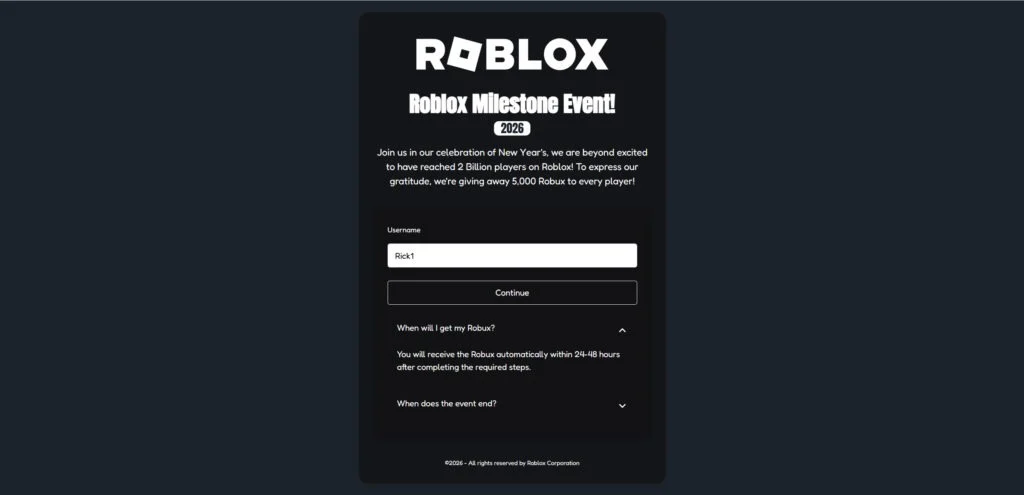
The milestone event scam page is a modern favorite
Another common version is the “Roblox Milestone Event” scam page.
It often looks professional and uses:
- A big ROBLOX logo
- A headline like “Roblox Milestone Event”
- A year badge such as 2026
- A story about Roblox “celebrating” a milestone
- A claim like “5,000 Robux to every player”
- An FAQ that says you will receive Robux within 24 to 48 hours
This is designed to feel official and timely.
The site usually asks for your username, then shows a “claim steps” screen that instructs you to complete an offer.
Again, the goal is not to give you Robux.
The goal is to get you to complete revenue-generating actions.
The Discord-based free Robux scam is the most dangerous variant
Some scams skip offerwalls and push you into Discord instead.
They do this because Discord lets scammers:
- Talk to victims directly
- Create fake “staff” roles and tickets
- Apply pressure in real time
- Use social engineering to extract access or money
- Send “verification” links that steal sessions or credentials
Common Discord scam tactics include:
- “Join the event server to claim”
- “Open a ticket for payout”
- “Verify your Roblox account”
- QR code login traps
- Fake support agents guiding kids step-by-step
- Requests to download a “verification tool”
If a “free Robux” site pushes you to Discord, treat it as a major escalation in risk.
Why some people claim “it worked”
This is where many players get confused.
You might see someone say, “It worked for me.”
That does not prove legitimacy.
Here are common reasons those claims exist:
- Bots and fake accounts post “success” messages to create social proof
- People confuse unrelated Robux activity with a payout
- Some scams pay a tiny number of users to bait reviews and referrals
- Users post “it works” to convince friends to use their referral code
Scammers do not need everyone to believe.
They need just enough people to click and follow steps.
The real business model behind free Robux sites
Free Robux scams typically monetize in a few predictable ways.
1) Affiliate commissions
You complete offers and the scammer gets paid.
You might install apps, sign up for subscriptions, or submit personal info. The affiliate network pays the publisher. The publisher is the scammer.
2) Subscription traps
A “quick offer” asks for a card for a free trial.
Later, it becomes a paid subscription. The user does not always notice.
Even a small charge like $1 is enough to start a billing relationship.
3) Data harvesting
Emails, phone numbers, addresses, and device data are valuable.
Scammers and shady marketers can sell that data or use it for future scams.
4) Account theft
If you enter a password on a fake Roblox login page, your account can be taken over.
Then it can be used to spam your friends and spread the scam.
5) Malware and risky downloads
Some funnels push extensions, APKs, or “tools.”
That can lead to device compromise, not just Roblox account risk.
The bottom line of the overview
Every “free Robux” site depends on one core trick: making players believe there is a reward waiting at the end of a few steps.
But the steps are the product.
You are not claiming Robux.
You are generating profit for scammers.
How The Scam Works
Most free Robux scams follow a funnel.
The funnel is designed to convert curiosity into action, then action into money, access, or data.
Below is a step-by-step breakdown of how these scam sites typically work, including the most common branches: the affiliate scheme, the Roblox chat spam path, and the Discord scam path.
Step 1: You see a message that triggers curiosity
This is the entry point.
The message can appear in several places:
- Roblox public server chat
- TikTok or YouTube Shorts “proof” clips
- Discord posts or direct messages
- Comment sections under Roblox content
The language is always designed to bypass logic:
- “Free Robux now”
- “Working generator”
- “Claim 5,000 Robux”
- “Milestone event reward”
- “Use this code”
- “Not a scam, it works”
The goal is not to convince you with evidence.
The goal is to make you click before you think.
Step 2: The scam page mimics trust
Once you land on the site, everything is designed to look safe.
Common trust-building elements include:
- Clean, modern layout
- Roblox-style fonts and colors
- Big ROBLOX branding
- Fake “event” framing
- Short FAQ sections that answer your doubts
The site may even include a fake footer that looks corporate.
Visual polish is cheap.
Trust is the expensive thing, so scammers manufacture the appearance of it.
Step 3: The username input creates commitment
Most scams ask for your Roblox username early.
This is a psychological move.
It does two things:
- It feels safe because you are not entering a password
- It creates a sense that the process has started
Once you enter your username, the page may:
- Display your avatar
- Display your name on the next screen
- Show a “claim steps” flow
- Show a progress bar
This is designed to hook you emotionally.
You feel like you are already halfway there.
Step 4: The fake “processing” animation builds belief
Almost all free Robux sites use fake animations:
- “Connecting to Roblox”
- “Checking eligibility”
- “Generating Robux”
- “Loading reward”
None of this is real.
It is theater that creates a sense of legitimacy.
Scammers know that if you watch a progress bar fill up, you are more likely to keep going.
Step 5: You hit the real trap: “verification” or “required steps”
This is where the scam converts you into profit.
The page will claim you must complete one of the following:
- A quick offer
- A human verification
- A simple app install
- A survey
- A Discord join and ticket
- A login to “confirm”
- A small payment “to prevent bots”
There are three main branches here.
Branch A: Username plus task affiliate scheme
This is the most common and scalable version.
What it looks like
You are shown a list of offers with buttons like “Get.”
Offers might include:
- Install a browser and open it
- Install an app and keep it for a certain time
- Complete a survey
- Sign up for a subscription trial
- Provide personal details for a “reward”
What is actually happening
The scammer is using affiliate links.
If you complete an offer, the affiliate network may pay them.
You usually get nothing.
Sometimes the scam page is configured to never credit you, even if you complete the offer correctly.
That creates a loop:
- You do an offer
- You are told it did not count
- You do another offer
- You are told to do one more
The scam does not need you to finish.
It needs you to keep trying.
Why it can cost real money
Some offers include free trials that turn into paid subscriptions.
If a kid uses a parent’s card, the damage can be serious.
If you ever see a “verification” offer that asks for payment details, stop immediately.
Branch B: Roblox chat spam to scam site funnel
This branch is all about scale.
How it works
Bots or scripted accounts flood public servers with repeated messages.
They rotate games and servers to maximize reach.
Sometimes they vanish quickly to avoid reports.
The messages create social pressure by claiming:
- “I just got Robux”
- “This is legit”
- “Use my code”
- “It worked instantly”
These messages often come in waves.
It’s not one person.
It’s a campaign.
Why it’s effective
Kids assume anything in-game is part of the game.
Scammers exploit that trust.
They want players to treat the link like normal gameplay chatter.
Branch C: Discord “claim your Robux” scams
This is the highest risk branch because it involves live manipulation.
What it looks like
The milestone or generator site says something like:
- “Join Discord to receive your reward”
- “Open a ticket to claim”
- “Verify to unlock payout”
Once inside Discord, scammers may:
- Present fake staff roles
- Use ticket bots to mimic real support
- Send “verification” links
- Ask you to scan a QR code
- Ask you to “connect your Roblox account”
- Push you to download files
The common Discord traps
- Fake login pages: You enter Roblox credentials, account gets taken
- Session theft: QR code tricks can steal access without a password
- Download traps: “Tools” can be malware
- Payment pressure: “Small fee to unlock reward”
- Trade manipulation: “Send items to verify ownership”
This is not support.
It is a social engineering setup.
Step 6: The scam delays you with timelines and excuses
Many scams promise delivery within 24 to 48 hours.
That timeline is not for you.
It is for them.
It buys time so that:
- You stop questioning immediately
- You wait instead of reporting
- You return and complete more steps
- You tell friends you are “getting paid soon”
Delay is a control mechanism.
Step 7: Some variants pivot into phishing after you are invested
A common escalation is:
- Username entry first
- Offers next
- Then a prompt to “log in to Roblox to finish”
At that point, many victims comply because they feel invested.
This is how accounts get stolen.
If you ever see a Roblox login page that does not come from Roblox, stop.
Step 8: The scam spreads through referrals and copycat videos
Many scams use referrals.
They encourage you to share to “unlock” rewards or “boost” payouts.
Even without explicit referrals, kids often share out of excitement.
That spreads the scam organically, which makes it harder to stop.
Step 9: The outcomes are predictable
Most users end up with one or more of these outcomes:
- No Robux received
- Time wasted on endless tasks
- Email and phone spam increases
- Browser notifications become aggressive
- Subscription charges appear
- Account takeover attempts
- Discord manipulation and pressure
- Malware risk if downloads were involved
The only consistent winner is the scammer.
How to Spot Free Robux Scam Sites
Free Robux scam sites often look polished, modern, and convincing. That is the point. The safest mindset is simple: if a site promises free Robux outside Roblox, it’s a scam. Still, there are clear signs you can spot in seconds.
The “too good to be true” promise is the first giveaway
Scam pages usually lead with a big, emotional claim like:
- “5,000 Robux for every player”
- “Roblox Milestone Event reward”
- “Limited-time giveaway”
- “Free Robux generator”
- “Claim Robux instantly”
Roblox does not hand out mass Robux giveaways through random websites. If the page promises a huge amount to everyone, it’s bait.
It asks for your username first
A common pattern is:
- Enter your username
- Pick a Robux amount
- Click Continue
This step is designed to feel safe because it is not asking for a password. But it’s a trap that creates commitment and makes the next steps feel “official.”
If a site starts with “username only,” assume it’s setting you up for tasks, fake verification, or phishing.
Fake “verification” or “required steps”
This is the clearest red flag.
Legitimate Roblox rewards do not require you to:
- Complete surveys
- Install apps
- Sign up for subscriptions
- Download files
- Enable notifications
- Join Discord to “claim”
- Enter a code from a third-party site
If a page says “complete a quick offer to verify,” you are looking at a scam funnel.
Offer lists with “Get” buttons are a bad sign
Many scam pages show a list of tasks that look like this:
- App install with a “Get” button
- Browser install with a “Get” button
- Survey with a “Get” button
- Trial with a “Get” button
That is an affiliate offerwall. It exists to generate revenue, not to give you Robux.
A timer, urgency, or “limited slots” language
Scam sites push urgency because it shuts down critical thinking.
Look for pressure lines like:
- “Offer ends in 10 minutes”
- “Only today”
- “Limited redemptions”
- “Act fast”
- “Last chance”
Real Roblox announcements don’t rely on panic.
A 24 to 48 hour payout promise
“Robux in 24-48 hours” is a classic delay tactic.
It keeps you waiting instead of reporting, and it encourages you to come back and do more tasks. It sounds realistic, but it’s just stalling.
The domain looks unrelated to Roblox
Most scam domains are:
- New
- Random
- Slightly “Roblox-like”
- Full of extra words like promo, event, claim, rewards, generator
If it is not an official Roblox domain, do not trust it.
Roblox chat spam is often the distribution method
If you found the site because of Roblox public server chat spam, treat it as high risk immediately.
Common signs of spam campaigns:
- Repeated messages across many games
- Copy-paste phrasing from “different users”
- Messages posted at a steady, automated pace
- Accounts that disappear quickly after posting
Legitimate promotions do not spread through bot spam in children’s game chats.
Discord “claim” instructions are a major escalation
If a page says you must join Discord to receive Robux, it is almost always dangerous.
Discord scams often use:
- Fake staff roles
- Ticket systems
- “Verification” links
- QR code login traps
- Requests to download tools
Robux is not distributed through random Discord servers.
The page uses fake social proof
Scam sites try to make you feel like everyone is winning.
Watch for:
- A fast-moving chat feed that looks automated
- Repetitive “I got Robux” messages
- A fake “recent payouts” panel
- Generic reviews that say “works” without details
This is manufactured trust, not real proof.
Quick checklist you can memorize
If you want a simple rule set, use this:
- If it promises free Robux off Roblox, it’s a scam
- If it asks for tasks, downloads, surveys, or Discord, it’s a scam
- If it uses chat spam or urgency, it’s a scam
- If it claims a “generator” or “milestone giveaway,” it’s a scam
If you want, I can also write a short version of this section specifically for parents, plus a quick “10-second red flag test” box you can place near the top of the article.
What To Do If You Have Fallen Victim to This Scam
If you clicked a free Robux link, do not panic.
Most people can recover quickly by taking the right steps in the right order.
Use this checklist. Do not skip steps that match what you did.
1. If you entered your Roblox password, change it immediately
Do this first.
- Change your Roblox password right now
- Enable Roblox two-step verification
- Log out of other sessions if Roblox allows it
- Check account email and phone to confirm they are still yours
- Review recent transactions and trades
If anything looks unfamiliar, take screenshots.
2. Secure your email account next
Your email is the key to password resets.
- Change the email password linked to Roblox
- Enable two-step verification on your email
- Check for suspicious forwarding rules or filters
- Review recent login activity in your email provider
This step prevents a lot of repeat takeovers.
3. Review your Robux balance, purchase history, and trades
Look for:
- Robux spent that you do not recognize
- Trades you did not initiate
- Items missing from inventory
- New friends added without your action
- Messages sent from your account that you did not write
If you see activity, your account may be compromised.
4. Remove browser notification permissions
Many scam pages ask you to “allow notifications.”
If you clicked allow, you may now get spam popups.
Go into your browser settings and:
- Find Notifications permissions
- Remove any unknown domains
- Block future requests
This is one of the quickest ways to reduce ongoing harassment.
5. Remove suspicious browser extensions and downloads
If you installed anything because the site told you to:
- Uninstall it
- Remove new browser extensions you do not recognize
- Clear site data for the scam domain
- Run a trusted security scan on your device
If a file was downloaded from Discord, delete it and do not run it.
6. Check for subscriptions or charges if you entered payment details
If you used a card for a “quick offer” or free trial:
- Check bank and card statements for new charges
- Look for subscriptions that renew automatically
- Cancel any subscription you did not intentionally start
- Contact your bank or payment provider if charges are unauthorized
- Ask about dispute options for misleading digital offers
Act quickly. The sooner you act, the easier it is to stop repeat billing.
7. If Discord was involved, lock down Discord security
If you joined a server or clicked “verification” links:
- Leave the suspicious Discord server
- Enable two-step verification on Discord
- Review “Authorized Apps” and remove anything unfamiliar
- Do not scan QR codes for login
- Do not download “verification tools”
If someone claiming to be staff asks for money, trades, or downloads, disengage.
8. Teach the simple rule that prevents this from happening again
If a child was involved, keep it calm.
Kids hide mistakes when they fear punishment, and that makes scams worse.
Use a clear rule:
- Never click free Robux links in chat
- Never trust Robux giveaways on random sites
- Never follow “verification” steps for Robux
- Ask a parent or adult before entering usernames anywhere
A calm conversation prevents repeat incidents better than anger.
9. Report the spam where you found it
Reporting reduces spread.
- Report Roblox chat spam messages and accounts if visible
- Report TikTok or YouTube videos that push scam links
- Report Discord servers that run “verification” scams
- Warn friends not to click
Even if one report feels small, patterns matter.
10. Save evidence if you need to recover money or accounts
If money was lost or the account was compromised, save:
- Screenshots of the scam page
- Screenshots of offer steps
- Payment receipts or statement lines
- Discord messages and usernames
- Roblox transaction history screenshots
Evidence helps with disputes and platform support.
Is Your Device Infected? Run a Free Malware Scan
Slow performance, constant pop-ups, or strange behavior? These are classic signs of a malware infection. The fastest way to find out is to scan your device with Malwarebytes Free — one of the most trusted malware removal tools available.
The free version detects and removes the most common threats, including:
- Adware — the cause of those annoying pop-ups
- Browser hijackers — unwanted redirects and changed homepages
- Trojans and spyware — hidden programs stealing your data
- Potentially unwanted programs (PUPs) — software you never asked for
👉 Select your device below — Windows, Mac, or Android — then follow the simple steps to download Malwarebytes, scan your system, and remove any threats it finds. The scan usually takes 5 to 20 minutes.
Run a Malware Scan with Malwarebytes for Windows
Malwarebytes is one of the most popular and trusted anti-malware tools for Windows — and it’s completely free for removing infections. It catches threats that many antivirus programs miss, including adware, browser hijackers, and trojans. Follow the steps below to scan and clean your PC in just a few minutes.
Download Malwarebytes
Click the button below to download the latest version of Malwarebytes for Windows from the official source. The free version is all you need — it will scan your computer and remove adware, browser hijackers, and other malicious software at no cost.
Download MalwarebytesOfficial installer for Windows 11 and 10. Your download starts right away.Want real-time protection? See Malwarebytes Premium Malwarebytes Free for WindowsScans and removes malware at no cost
-
Install Malwarebytes
When the download finishes, open your Downloads folder and double-click the MBSetup file. If Windows shows a User Account Control pop-up, click “Yes” to allow the installation.

Follow the On-Screen Prompts to Install Malwarebytes
The setup wizard will walk you through a few quick screens:
-
Choose where you’re installing the program — “Personal Computer” or “Work Computer” — then click Next.

-
Malwarebytes will now install on your device. This usually takes under a minute.

-
When installation is complete, the “Welcome to Malwarebytes” screen will open automatically.

-
On the final screen, click Open Malwarebytes to launch the program.

-
Enable “Scan for Rootkits”
Before scanning, turn on rootkit detection so Malwarebytes can find even the most hidden threats. Click the Settings gear icon on the left side of the screen.

In the settings menu, find “Scan for rootkits” and click the toggle so it turns blue.

Done? Click “Dashboard” in the left pane to return to the main screen.
Start the Scan
Click the blue Scan button. Malwarebytes will automatically update its virus database and start checking your computer for malware.

-
Wait for the Scan to Finish
The scan checks your entire system for browser hijackers and other malicious programs, so it can take 5 to 20 minutes depending on your computer. Feel free to do something else — just check back occasionally to see the progress.

-
Quarantine the Detected Threats
When the scan is done, you’ll see a list of everything Malwarebytes found — malware, adware, and potentially unwanted programs. Click the “Quarantine” button to remove all of them at once.

Malwarebytes will now remove the malicious files and registry entries and move them safely into quarantine.

-
Restart Your Computer
Some threats can only be fully removed after a reboot. If Malwarebytes asks you to restart, click Yes. Once you’re logged back in, Malwarebytes has finished removing the threats it found.

That’s it — your Windows PC is now clean of trojans, adware, and other malware, and should be back to running smoothly.
If you are still having problems with your computer after completing these instructions, then please follow one of the steps:
- Run a computer scan with ESET Online Scanner
- Ask for help in our Windows Malware Removal Help & Support forum.
Run a Malware Scan with Malwarebytes for Mac
Malwarebytes for Mac is a free on-demand scanner that removes the malware other security software tends to miss — adware, browser hijackers, and unwanted programs included. Cleaning an infected Mac with Malwarebytes has always been completely free, and it’s our go-to recommendation. Follow the steps below to scan and clean your Mac in just a few minutes.
-
Download Malwarebytes for Mac
Click the button below to download the latest version of Malwarebytes for Mac.
Download MalwarebytesOfficial installer for macOS. Your download starts right away.Want real-time protection? See Malwarebytes PremiumMalwarebytes Free for MacScans and removes malware at no cost -
Open the Malwarebytes setup file
When the download finishes, open your Downloads folder and double-click the setup file to begin the installation.

-
Follow the On-Screen Prompts to Install Malwarebytes
The Malwarebytes for Mac Installer will guide you through a few quick screens. Click “Continue” and keep following the prompts until the installation completes.



When the installation is complete, Malwarebytes opens to the Welcome to Malwarebytes screen. Click “Get started“.
-
Select “Personal Computer” or “Work Computer”
Malwarebytes will ask what type of computer you’re installing it on. Click either Personal Computer or Work Computer, whichever applies.

-
Start the Scan
Click the “Scan” button. Malwarebytes will automatically update its detection database and begin checking your Mac for malware.

-
Wait for the Scan to Finish
Malwarebytes will scan your Mac for adware, browser hijackers, and other malicious programs. This can take a few minutes, so feel free to do something else — just check back occasionally to see the progress.

-
Quarantine the Detected Threats
When the scan is done, you’ll see a list of everything Malwarebytes found. Click the “Quarantine” button to remove all the threats at once.

-
Restart Your Mac
Malwarebytes will now remove all the malicious files it found. Some threats can only be fully removed after a reboot — if Malwarebytes asks you to restart, allow it. Once you’re logged back in, your Mac is clean.

That’s it — your Mac is now free of adware, rogue browser extensions, and other potentially harmful software.
If you are still experiencing problems while trying to remove a malicious program from your computer, please ask for help in our Mac Malware Removal Help & Support forum.
Run a Malware Scan with Malwarebytes for Android
Malwarebytes for Android automatically detects and removes dangerous threats like malware and ransomware so you don’t have to worry about your most-used device being compromised. Aggressive detection of adware and potentially unwanted programs keeps your Android phone or tablet running smooth.
-
Download Malwarebytes for Android.
You can download Malwarebytes for Android by clicking the link below.
Get Malwarebytes for AndroidOpens Google Play in a new tab.Want real-time protection? See Malwarebytes Premium for AndroidMalwarebytes for AndroidScans your phone and removes malware at no cost -
Install Malwarebytes for Android on your phone.
In the Google Play Store, tap “Install” to install Malwarebytes for Android on your device.

When the installation process has finished, tap “Open” to begin using Malwarebytes for Android. You can also open Malwarebytes by tapping on its icon in your phone menu or home screen.

-
Follow the on-screen prompts to complete the setup process
When Malwarebytes will open, you will see the Malwarebytes Setup Wizard which will guide you through a series of permissions and other setup options.
This is the first of two screens that explain the difference between the Premium and Free versions. Swipe this screen to continue.
Tap on “Got it” to proceed to the next step.
Malwarebytes for Android will now ask for a set of permissions that are required to scan your device and protect it from malware. Tap on “Give permission” to continue.
Tap on “Allow” to permit Malwarebytes to access the files on your phone.
-
Update database and run a scan with Malwarebytes for Android
You will now be prompted to update the Malwarebytes database and run a full system scan.

Click on “Update database” to update the Malwarebytes for Android definitions to the latest version, then click on “Run full scan” to perform a system scan.

-
Wait for the Malwarebytes scan to complete.
Malwarebytes will now start scanning your phone for adware and other malicious apps. This process can take a few minutes, so we suggest you do something else and periodically check on the status of the scan to see when it is finished.

-
Click on “Remove Selected”.
When the scan has been completed, you will be presented with a screen showing the malware infections that Malwarebytes for Android has detected. To remove the malicious apps that Malwarebytes has found, tap on the “Remove Selected” button.

-
Restart your phone.
Malwarebytes for Android will now remove all the malicious apps that it has found. To complete the malware removal process, Malwarebytes may ask you to restart your device.
That’s it — your Android phone is now clean — no more malicious apps, adware, or browser redirects.
If you are still having problems with your phone after completing these instructions, then please follow one of the steps:
- Restore your phone to factory settings by going to Settings > General management > Reset > Factory data reset.
- Ask for help in our Mobile Malware Removal Help & Support forum.
Stay Protected: Block Ads and Malicious Sites
Now that your device is clean, keep it that way. Most infections start with a malicious ad or a fake download button — so blocking them at the source is your best defense.
We recommend AdGuard, which blocks malicious ads, phishing pages, and dangerous redirects before they can reach you.
👉 Download AdGuard and browse safely
FAQ
Are there any legitimate free Robux giveaway sites?
No. Any website promising free Robux, a Robux generator, a Robux hack, or “5,000 Robux for every player” is fake. Real Robux only comes through official Roblox methods like purchases, gift cards, and Roblox’s own earning systems.
Why do these sites look so official and professional?
Because appearance is part of the scam. Scammers copy Roblox branding, use clean layouts, and add fake FAQ sections to lower your suspicion and push you into the next step.
If a site only asks for my username, is it safe?
Not really. Asking for a username is a trust trick. It personalizes the scam, makes you feel committed, and leads you into “required steps” that generate money or data for scammers. It can also escalate into phishing later.
What is the most common free Robux scam pattern?
The most common pattern is:
- Enter username
- Pick an amount of Robux
- Watch a fake loading bar
- “Complete a quick task to verify”
- Get pushed into app installs, surveys, subscriptions, or downloads
That “verification” step is the scam’s profit engine.
Why do they force “verification” tasks like surveys or app installs?
Because scammers earn affiliate commissions when you complete offers. You think you’re earning Robux, but you are actually generating revenue for the scammer. You usually never get paid.
Can these “quick offers” cost real money?
Yes. Many offers include free trials that convert into paid subscriptions. Some require payment details up front. Even small charges can turn into recurring billing. Always check statements if a card was used.
Why do they say “you’ll get Robux in 24-48 hours”?
It’s a stalling tactic. The delay keeps you hoping, reduces immediate reporting, and encourages you to come back and complete more tasks. It also makes the scam feel more “real” because it sounds like a processing window.
What is the Roblox chat spam version of the scam?
This is when public servers get flooded with repeated messages claiming a site is giving free Robux. The messages often look automated, repeat across games, and may come from accounts that leave quickly or are difficult to report. It’s designed for scale, not legitimacy.
Why are some spam messages posted by accounts that are not visible?
Scam campaigns often use bots that join and leave quickly, rotate accounts, or use scripted behavior. Regardless of the exact technique, legitimate promotions do not behave this way. Treat it as a strong warning sign.
How does the Discord version of the scam work?
Some scam sites push you into Discord to “claim” Robux. Inside, scammers may use fake staff roles, ticket bots, and verification steps to:
- Steal logins through fake Roblox pages
- Trick users with QR code login traps
- Push downloads disguised as “tools”
- Pressure victims into sending money or items
If a Robux site leads to Discord, the risk level increases.
Can I lose my Roblox account from this?
Yes, especially if you:
- Entered your Roblox password on any non-Roblox page
- Logged in through a fake verification link
- Scanned a QR code for login
- Installed unknown files or extensions
Account takeovers can lead to stolen Robux, lost items, and spam sent to friends.
I clicked the site but didn’t enter my password. What should I do?
If you only visited, risk is lower. Still do these quick steps:
- Close the page
- Do not allow notifications
- Remove any extensions you installed
- Clear site data for that domain if you want extra safety
If you completed offers or entered payment info, also check subscriptions and statements.
What should I do if I entered my Roblox password?
Act immediately:
- Change your Roblox password
- Change your email password linked to Roblox
- Enable 2-step verification on both
- Review trades, purchases, and account settings
The faster you act, the better the outcome.
What is the safest way to get Robux?
Only use official Roblox methods: buying Robux directly through Roblox, redeeming official gift cards, or earning Robux through legitimate Roblox systems. Any site promising free Robux is a scam funnel and should be avoided.
The Bottom Line
Sites promising free Robux are not misunderstood “reward platforms.”
They are scams.
There is no giveaway, no generator, no hack, and no legitimate third-party website that can safely deliver free Robux to everyone. The most common version uses the username then “do a task” affiliate scheme. Other versions spread through Roblox chat spam and push victims into Discord manipulation.
The outcome is always the same: scammers make money, and players take the risk.
If you want to stay safe, treat every free Robux link as harmful by default. Do not click. Do not enter your username. Do not follow steps. Do not join the Discord.
And if you already clicked, you can still recover by securing Roblox, securing email, removing notification permissions, checking for subscriptions, and taking calm, practical action.

Join the discussion
1 commentShare your experience or ask a question about this article.
Discussion
Thank you so much