


It usually starts with a page that looks surprisingly clean.
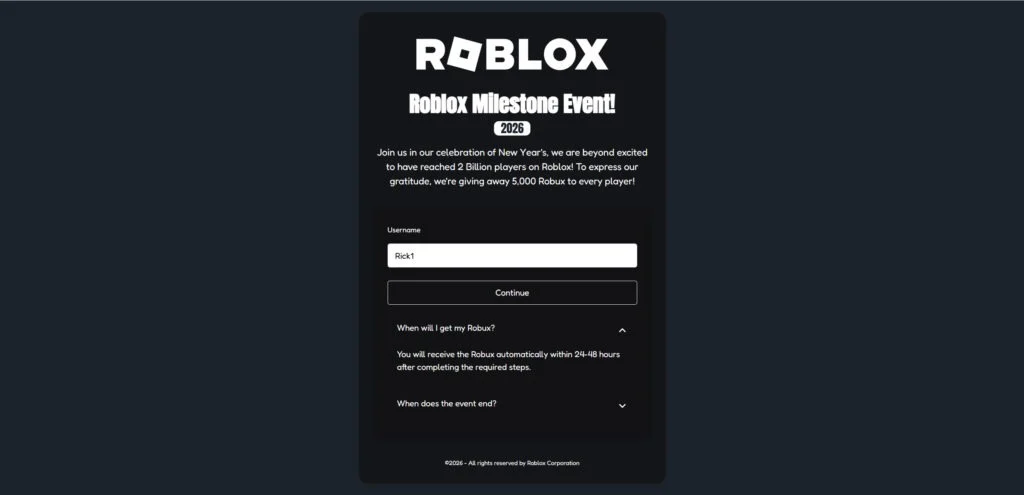
A big ROBLOX logo at the top. A bold headline like “Roblox Milestone Event!” A year stamped underneath, often tied to New Year’s, a holiday, or some viral “big moment.” Then the hook: “We’re giving away 5,000 Robux to every player.”
If you play Roblox, that sentence is hard to ignore.
Not because you believe it instantly, but because a tiny part of you wonders, “What if it’s real?” Scammers understand that moment of curiosity better than anyone. They design these “milestone event” scam sites to feel official, urgent, and safe, especially to younger players.
This article explains what Roblox Milestone Event scam sites are, how they work, why they keep coming back with new names, and what to do if you clicked, entered your username, joined a Discord, or completed any “required steps.”
Scam Overview
Roblox Milestone Event scam sites are fake giveaway pages that pretend Roblox is celebrating a major achievement and rewarding players with free Robux.
They often claim milestones like:
- A massive player count milestone
- A special New Year’s celebration
- An anniversary event
- A limited-time promotion tied to a big update
The exact story changes, but the goal stays the same.
They want you to do something that makes the scammer money.
Sometimes they make money through affiliate offers. Sometimes through Discord scams. Sometimes through phishing. Sometimes through all of the above, layered together in a way that feels like “steps” to claim a prize.
What these scam pages typically look like
Most Roblox Milestone Event scam sites share a familiar design pattern:
- A large ROBLOX header and branding
- A headline like “Roblox Milestone Event” with a year or badge
- A short story about Roblox “celebrating” and “giving back”
- A promise of a specific Robux amount like 1,000, 2,500, or 5,000 Robux
- A username field and a big “Continue” button
- An FAQ accordion with reassuring answers like “When will I get my Robux?”
On the surface, this feels professional. That’s intentional.
A scam site does not need to look shady to be dangerous. In fact, the best performing scam pages look polished because they are built to convert.
The “username” trick and why it matters
One reason these sites seem believable is that they often ask only for your username at first.
A player thinks, “I’m not giving my password, so it’s safe.”
That is exactly what the scam wants you to think.
Your Roblox username can still be used to:
- Make the process feel real and personalized
- Populate a fake “profile” screen showing your avatar
- Create the illusion that a reward is being prepared for you
- Push you toward the next step, which is where the real trap begins
It is a psychological setup.
The moment you see your username on the page, you feel invested. You feel like you started the claim process. That makes it easier for the scammer to push you into “required steps” without you backing out.
The affiliate offer model behind many milestone scams
A huge number of milestone event scam sites use affiliate marketing and offerwalls.
Here’s the core idea:
- The scam page promises Robux
- You are told to complete “a quick offer” to verify you are real
- The offer is usually an app install, a survey, or a sign-up
- The scammer gets paid for your completion
- You do not get Robux
Even when the offer is “free,” it can still cost you in other ways:
- Your email address and personal data
- Your time and attention
- A subscription that quietly charges later
- A flood of spam and unwanted notifications
In short, the scammer earns money even if you earn nothing.
And because affiliate networks pay per action, scammers can scale this fast. They do not need every user to complete an offer. They just need enough.
The “Discord scam” model
Another common branch of Roblox Milestone Event scams uses Discord.
Instead of sending you directly to offers, they push you toward a Discord server with a pitch like:
- “Join our official event Discord to claim your Robux”
- “Verify your account to receive the reward”
- “Open a ticket to get paid”
This is where things can get dangerous quickly.
Discord-based scams often attempt to:
- Get you to “verify” by logging into a fake page
- Trick you into scanning a QR code that steals your session
- Get you to run a “verification tool” or download
- Pressure you into sending a trade, gift card, or payment
Some Discord scams are built around fake “support staff” who speak confidently and guide kids step-by-step into giving access away.
They rely on conversation, trust, and authority.
The giveaway story is just the bait.
Why these milestone event scams spread so effectively
These scam sites spread in multiple ways:
- Roblox chat spam in public servers
- TikTok and YouTube Shorts showing “proof”
- Discord invites shared in comment sections
- “Sponsored” looking posts in forums or communities
- Fake screenshots and fake testimonials
A lot of the content is designed to look like it comes from a normal player.
It rarely does.
Scammers use bots, fake accounts, and mass posting because it is cheap and it works.
The fake FAQ is part of the scam
Many milestone event scam sites include an FAQ section that feels reassuring.
It might say things like:
- “You will receive Robux automatically within 24-48 hours”
- “This is a limited event, act now”
- “No password required”
- “We are partnered”
The FAQ is not there to help you.
It’s there to reduce the exact doubts that would stop you from clicking.
It’s designed to answer your inner questions before you even ask them.
Red flags that consistently show up
If you remember nothing else, remember these warning signs. Roblox Milestone Event scam sites almost always have several of them:
- They promise free Robux for everyone
- They create urgency with a countdown or limited-time language
- They ask for your username to “start”
- They require “verification” steps that lead to offers, downloads, or Discord
- They do not link to official Roblox announcements
- They do not appear on official Roblox channels
- They rely on social media clips instead of official sources
A real Roblox event does not need hidden steps on random websites.
It would be announced clearly, publicly, and consistently through Roblox’s own platforms.
Why there is no such thing as “free Robux” from random sites
This is the simplest truth and the hardest one for kids to accept.
Robux is not a coupon code that any website can generate.
Robux comes from Roblox’s ecosystem. If a random site claims it can give you Robux just for entering a username, that is not a gift.
That is bait.
If money is being made in that flow, it is almost always being made by the scammers, not by you.
How The Scam Works
Roblox Milestone Event scam sites vary in details, but most follow a predictable funnel. The funnel is designed to take a curious click and turn it into profit for the scammer.
Below is a step-by-step breakdown with clear subheadings, so it’s easy to recognize the pattern in the wild.
Step 1: The hook arrives where players already are
Scammers don’t usually wait for you to search.
They push the link into places where Roblox players spend time:
- Roblox public servers via chat spam
- TikTok and YouTube Shorts with “proof” videos
- Discord servers and DMs
- Comment sections under Roblox content
The message is simple and emotionally powerful:
“You can get Robux right now.”
Sometimes it’s wrapped in a fake celebratory story, like a milestone event. Sometimes it’s framed as a limited-time giveaway. Sometimes it’s disguised as “official news.”
The purpose is the same.
Get you to click quickly, before you stop and think.
Step 2: The landing page mimics official Roblox branding
Once you click, the first job of the scam page is credibility.
That’s why the design often includes:
- A big ROBLOX logo
- Dark, clean layouts that feel modern
- Simple text and minimal clutter
- A professional looking “event” headline
- A specific Robux amount like 5,000 Robux
The page wants you to relax.
It wants you to feel like you’re still inside a trusted world.
But you are not.
You are on an external site controlled entirely by the scammer.
Step 3: You enter your username and the page “personalizes” the trap
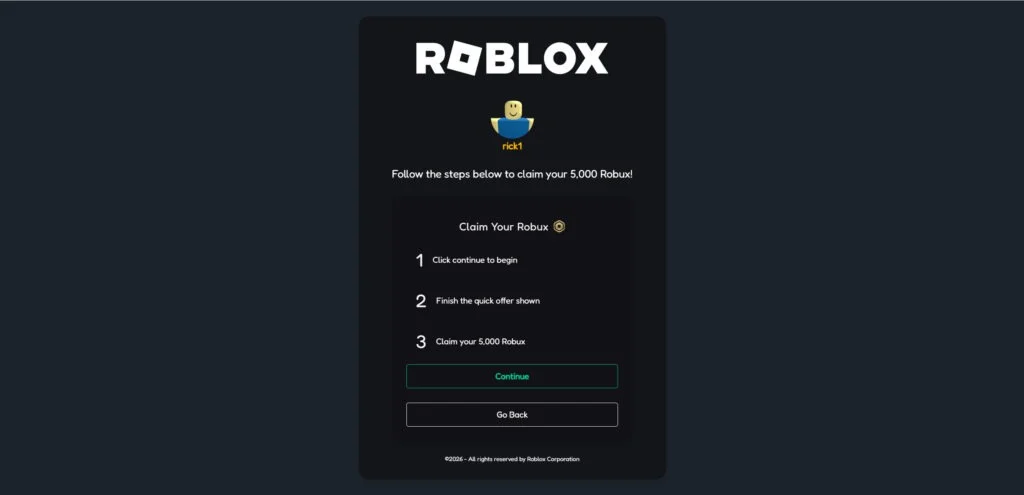
Many of these sites start by asking only for your Roblox username.
This does two important things:
- It feels safe because there is no password request
- It creates commitment because you “started the claim”
After you enter the username, the page may show:
- Your avatar
- Your username at the top
- A “claim steps” panel
- A progress bar
- A message like “Follow the steps below to claim your 5,000 Robux”
This is where many kids get emotionally locked in.
They see their identity reflected back to them, so it feels legitimate.
It isn’t.
It’s a conversion tactic.
Step 4: The “required steps” appear, and this is where the scam profits
After username entry, the site usually introduces steps like:
- Click continue to begin
- Finish the quick offer shown
- Claim your Robux
That middle step is the real business model.
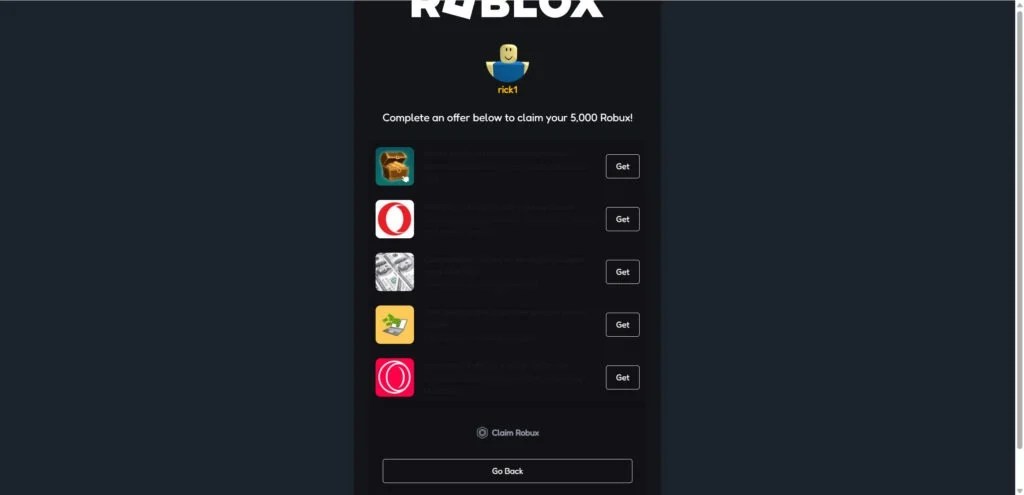
It sounds harmless. It sounds like verification. It sounds like a small hurdle.
In reality, it’s how the scammer makes money.
There are two main paths here.
Path A: Affiliate offers and offerwalls
This is the most common.
The page displays a list of offers, often with app icons and “Get” buttons, and messaging like:
- “Complete an offer below to claim your 5,000 Robux”
- “Finish one quick offer”
- “Required for verification”
- “Anti-bot protection”
Offers often include:
- Installing an app and opening it
- Completing a survey
- Signing up for a service
- Entering your email and confirming
- Downloading a browser extension
Here’s what happens behind the scenes.
The scammer is using affiliate links.
When you complete an offer, the affiliate network may pay the scammer a commission. Depending on the offer type and country, that commission can range from cents to multiple dollars.
The player receives nothing.
Or the player receives an endless loop of new “required steps.”
Why offer completions often never “count”
Many victims say, “I did the offer and it still says I need to do it.”
That can happen for a few reasons:
- The offer required more steps than the user realized
- The affiliate network did not credit the action properly
- The user did not meet the offer’s hidden requirements
- The scam page is intentionally ignoring completion signals
In scam funnels, that last bullet matters most.
Even if your completion tracks properly, the scam page can still keep you stuck. It’s not built to deliver Robux. It’s built to keep you doing offers.
The subscription trap inside “quick offers”
Some offers look innocent but contain a costly trick.
A “free trial” that asks for a card can become a paid plan automatically. Sometimes the user does not notice the small print.
If a child uses a parent’s card, the damage can grow quietly.
This is one reason these scams are not just “annoying spam.”
They can create real financial harm.
Path B: Discord event scams
Some milestone event pages pivot to Discord instead of offers.
They might say:
- “Join Discord to verify”
- “Open a ticket to claim”
- “Connect your account”
Once inside Discord, scammers can escalate.
Common Discord scam methods include:
- Fake staff roles and automated ticket bots
- “Verification” websites that steal login sessions
- QR code login scams
- Requests to download “event tools”
- Pressure to trade items or send a “small fee” first
Discord scams work because they feel personal.
A scam website is easy to doubt. A “support agent” chatting with you can feel convincing, especially to kids.
Step 5: The scam reinforces trust with fake timelines and fake certainty
Many sites include lines like:
- “You will receive Robux within 24-48 hours”
- “Automatically sent after completing steps”
- “Event ends soon”
This language is designed to keep you from quitting.
It creates a waiting period where users stop questioning and start hoping.
During that time, users might:
- Complete more offers
- Invite friends
- Share the link
- Return daily to “check progress”
That continued engagement is exactly what scammers want.
Step 6: Some variants pivot into phishing
Not every milestone scam uses phishing, but many do.
They may eventually push a step like:
- “Log in to Roblox to verify”
- “Connect your account”
- “Confirm eligibility”
If the page you log into is fake, your credentials are stolen.
A stolen Roblox account can be used for:
- Draining Robux
- Trading away limited items
- Spamming scam links to friends
- Locking you out by changing email and password
For a scammer, a compromised account is valuable because it becomes part of their distribution system.
They can use your account to scam more people.
Step 7: The scam spreads again through the victim’s network
Scammers love when victims share.
A common pressure tactic is:
- “Share with 3 friends to unlock reward”
- “Invite users to increase your payout”
- “Use referral code for bonus”
This turns victims into promoters.
Even when the scam does not explicitly ask for sharing, kids often do it naturally, because they are excited and want to help friends.
That is how these campaigns grow.
Step 8: The exit is always the same
Eventually, users end up in one of these outcomes:
- They realize it’s fake and leave
- They get stuck in endless verification loops
- They get spammed by notifications and emails
- They get charged by a trial or subscription
- They compromise an account by entering login details
- They get pulled into a Discord manipulation flow
Notice what’s missing.
They do not get free Robux.
The only consistent winner is the scammer.
Why scammers keep choosing “milestone events” as the story
Milestone events are believable because they sound celebratory and official.
They also create natural urgency:
- New Year’s
- “Huge player milestone”
- “Limited-time claim window”
- “Event ends soon”
Scammers love themes that feel plausible without being easy to verify in the moment.
A kid sees “Milestone Event 2026” and thinks, “Maybe Roblox is doing something big.”
That uncertainty is exactly what scammers exploit.
The core truth across all variants
Whether the site uses:
- The username plus affiliate offer funnel
- The Discord “verification” funnel
- A fake login funnel
The business logic is the same.
There is no free Robux.
Only scammers make money.
What To Do If You Have Fallen Victim to This Scam
If you clicked a Roblox Milestone Event page, entered your username, completed offers, joined a Discord, or typed any login details, don’t panic.
Most people can secure their accounts and limit damage quickly.
Use this as a calm checklist. Go step-by-step.
1. If you entered your Roblox password anywhere, change it immediately
This is the most urgent scenario.
Do this right now:
- Change your Roblox password to a new, unique password you have never used anywhere else
- Log out of other sessions if Roblox gives you that option
- Enable 2-step verification in Roblox security settings
- Confirm the email on your Roblox account is still yours
- Review recent logins and account changes
If you reuse passwords, also change any other accounts that used the same password, especially your email account.
2. Secure your email account, because it is the real key
If a scammer gets into your email, they can reset your Roblox password.
Protect it:
- Change your email password
- Turn on 2-step verification for your email
- Check for suspicious forwarding rules or filters
- Review recent login activity in your email provider
This single step can prevent many account takeovers.
3. Check your Roblox transactions and inventory
Look for signs of theft or unauthorized activity:
- Robux spent that you don’t recognize
- Trades you didn’t initiate
- Items missing from inventory
- New friends or messages sent from your account
- Security settings changed
If you see suspicious activity, document it with screenshots.
4. Remove notification permissions and suspicious browser add-ons
Scam sites often push browser notifications.
If you allowed notifications:
- Open your browser settings
- Find site notification permissions
- Remove or block any unknown domains related to the scam page
Also check for new browser extensions you didn’t install intentionally.
Remove anything suspicious.
5. If you completed offers or entered personal information, expect spam
If you entered:
- Phone number
- Address
- Any personal details
You may see an increase in spam and scam attempts.
Protect yourself by:
- Using spam filters
- Being cautious with future messages
- Avoiding links sent to you unexpectedly
If a child was involved, explain this simply so they don’t click future bait.
6. If money was involved, check statements and cancel subscriptions fast
If a “quick offer” required a card or payment, act immediately:
- Check bank and card statements for charges
- Look for subscriptions that may renew
- Cancel any trial you did not want
- Contact your bank or payment provider if you see unauthorized charges
- Ask about dispute options for misleading digital offers
Write down dates and amounts.
Keep screenshots if possible.
7. If you joined a Discord server, leave and review your Discord security
Discord scams can continue even after you leave the website.
Do this:
- Leave the suspicious Discord server
- Do not click verification links, QR codes, or downloads shared there
- Enable 2-step verification on Discord
- Review authorized apps in Discord settings and remove anything unfamiliar
If someone in Discord asked you to download a file, do not run it.
Delete it and scan the device with trusted security software.
8. Talk to kids calmly, without blame
If this happened to a child, the response matters.
A calm approach leads to better safety in the future.
Say things like:
- “These pages are designed to trick people.”
- “You did the right thing by telling me.”
- “If you see free Robux links again, ask first.”
Then set one clear rule:
Never claim free Robux through outside websites.
9. Report the scam link and the spam source
Wherever you saw it, report it.
- If it was in Roblox chat, report the message and the user if visible
- If it was in a YouTube comment, report as scam
- If it was on TikTok, report the account and video
- If it was a Discord invite, report it in Discord
Reporting won’t erase scams instantly, but it reduces reach.
10. Save evidence if you need support
If your account was compromised or you were charged money, save:
- Screenshots of the scam page
- Screenshots of the offers and “required steps”
- Transaction evidence
- Any emails related to subscriptions
- Discord messages if relevant
Evidence helps if you need to talk to a payment provider or platform support.
Is Your Device Infected? Run a Free Malware Scan
Slow performance, constant pop-ups, or strange behavior? These are classic signs of a malware infection. The fastest way to find out is to scan your device with Malwarebytes Free — one of the most trusted malware removal tools available.
The free version detects and removes the most common threats, including:
- Adware — the cause of those annoying pop-ups
- Browser hijackers — unwanted redirects and changed homepages
- Trojans and spyware — hidden programs stealing your data
- Potentially unwanted programs (PUPs) — software you never asked for
👉 Select your device below — Windows, Mac, or Android — then follow the simple steps to download Malwarebytes, scan your system, and remove any threats it finds. The scan usually takes 5 to 20 minutes.
Run a Malware Scan with Malwarebytes for Windows
Malwarebytes is one of the most popular and trusted anti-malware tools for Windows — and it’s completely free for removing infections. It catches threats that many antivirus programs miss, including adware, browser hijackers, and trojans. Follow the steps below to scan and clean your PC in just a few minutes.
Download Malwarebytes
Click the button below to download the latest version of Malwarebytes for Windows from the official source. The free version is all you need — it will scan your computer and remove adware, browser hijackers, and other malicious software at no cost.
Download MalwarebytesOfficial installer for Windows 11 and 10. Your download starts right away.Want real-time protection? See Malwarebytes Premium Malwarebytes Free for WindowsScans and removes malware at no cost
-
Install Malwarebytes
When the download finishes, open your Downloads folder and double-click the MBSetup file. If Windows shows a User Account Control pop-up, click “Yes” to allow the installation.

Follow the On-Screen Prompts to Install Malwarebytes
The setup wizard will walk you through a few quick screens:
-
Choose where you’re installing the program — “Personal Computer” or “Work Computer” — then click Next.

-
Malwarebytes will now install on your device. This usually takes under a minute.

-
When installation is complete, the “Welcome to Malwarebytes” screen will open automatically.

-
On the final screen, click Open Malwarebytes to launch the program.

-
Enable “Scan for Rootkits”
Before scanning, turn on rootkit detection so Malwarebytes can find even the most hidden threats. Click the Settings gear icon on the left side of the screen.

In the settings menu, find “Scan for rootkits” and click the toggle so it turns blue.

Done? Click “Dashboard” in the left pane to return to the main screen.
Start the Scan
Click the blue Scan button. Malwarebytes will automatically update its virus database and start checking your computer for malware.

-
Wait for the Scan to Finish
The scan checks your entire system for browser hijackers and other malicious programs, so it can take 5 to 20 minutes depending on your computer. Feel free to do something else — just check back occasionally to see the progress.

-
Quarantine the Detected Threats
When the scan is done, you’ll see a list of everything Malwarebytes found — malware, adware, and potentially unwanted programs. Click the “Quarantine” button to remove all of them at once.

Malwarebytes will now remove the malicious files and registry entries and move them safely into quarantine.

-
Restart Your Computer
Some threats can only be fully removed after a reboot. If Malwarebytes asks you to restart, click Yes. Once you’re logged back in, Malwarebytes has finished removing the threats it found.

That’s it — your Windows PC is now clean of trojans, adware, and other malware, and should be back to running smoothly.
If you are still having problems with your computer after completing these instructions, then please follow one of the steps:
- Run a computer scan with ESET Online Scanner
- Ask for help in our Windows Malware Removal Help & Support forum.
Run a Malware Scan with Malwarebytes for Mac
Malwarebytes for Mac is a free on-demand scanner that removes the malware other security software tends to miss — adware, browser hijackers, and unwanted programs included. Cleaning an infected Mac with Malwarebytes has always been completely free, and it’s our go-to recommendation. Follow the steps below to scan and clean your Mac in just a few minutes.
-
Download Malwarebytes for Mac
Click the button below to download the latest version of Malwarebytes for Mac.
Download MalwarebytesOfficial installer for macOS. Your download starts right away.Want real-time protection? See Malwarebytes PremiumMalwarebytes Free for MacScans and removes malware at no cost -
Open the Malwarebytes setup file
When the download finishes, open your Downloads folder and double-click the setup file to begin the installation.

-
Follow the On-Screen Prompts to Install Malwarebytes
The Malwarebytes for Mac Installer will guide you through a few quick screens. Click “Continue” and keep following the prompts until the installation completes.



When the installation is complete, Malwarebytes opens to the Welcome to Malwarebytes screen. Click “Get started“.
-
Select “Personal Computer” or “Work Computer”
Malwarebytes will ask what type of computer you’re installing it on. Click either Personal Computer or Work Computer, whichever applies.

-
Start the Scan
Click the “Scan” button. Malwarebytes will automatically update its detection database and begin checking your Mac for malware.

-
Wait for the Scan to Finish
Malwarebytes will scan your Mac for adware, browser hijackers, and other malicious programs. This can take a few minutes, so feel free to do something else — just check back occasionally to see the progress.

-
Quarantine the Detected Threats
When the scan is done, you’ll see a list of everything Malwarebytes found. Click the “Quarantine” button to remove all the threats at once.

-
Restart Your Mac
Malwarebytes will now remove all the malicious files it found. Some threats can only be fully removed after a reboot — if Malwarebytes asks you to restart, allow it. Once you’re logged back in, your Mac is clean.

That’s it — your Mac is now free of adware, rogue browser extensions, and other potentially harmful software.
If you are still experiencing problems while trying to remove a malicious program from your computer, please ask for help in our Mac Malware Removal Help & Support forum.
Run a Malware Scan with Malwarebytes for Android
Malwarebytes for Android automatically detects and removes dangerous threats like malware and ransomware so you don’t have to worry about your most-used device being compromised. Aggressive detection of adware and potentially unwanted programs keeps your Android phone or tablet running smooth.
-
Download Malwarebytes for Android.
You can download Malwarebytes for Android by clicking the link below.
Get Malwarebytes for AndroidOpens Google Play in a new tab.Want real-time protection? See Malwarebytes Premium for AndroidMalwarebytes for AndroidScans your phone and removes malware at no cost -
Install Malwarebytes for Android on your phone.
In the Google Play Store, tap “Install” to install Malwarebytes for Android on your device.

When the installation process has finished, tap “Open” to begin using Malwarebytes for Android. You can also open Malwarebytes by tapping on its icon in your phone menu or home screen.

-
Follow the on-screen prompts to complete the setup process
When Malwarebytes will open, you will see the Malwarebytes Setup Wizard which will guide you through a series of permissions and other setup options.
This is the first of two screens that explain the difference between the Premium and Free versions. Swipe this screen to continue.
Tap on “Got it” to proceed to the next step.
Malwarebytes for Android will now ask for a set of permissions that are required to scan your device and protect it from malware. Tap on “Give permission” to continue.
Tap on “Allow” to permit Malwarebytes to access the files on your phone.
-
Update database and run a scan with Malwarebytes for Android
You will now be prompted to update the Malwarebytes database and run a full system scan.

Click on “Update database” to update the Malwarebytes for Android definitions to the latest version, then click on “Run full scan” to perform a system scan.

-
Wait for the Malwarebytes scan to complete.
Malwarebytes will now start scanning your phone for adware and other malicious apps. This process can take a few minutes, so we suggest you do something else and periodically check on the status of the scan to see when it is finished.

-
Click on “Remove Selected”.
When the scan has been completed, you will be presented with a screen showing the malware infections that Malwarebytes for Android has detected. To remove the malicious apps that Malwarebytes has found, tap on the “Remove Selected” button.

-
Restart your phone.
Malwarebytes for Android will now remove all the malicious apps that it has found. To complete the malware removal process, Malwarebytes may ask you to restart your device.
That’s it — your Android phone is now clean — no more malicious apps, adware, or browser redirects.
If you are still having problems with your phone after completing these instructions, then please follow one of the steps:
- Restore your phone to factory settings by going to Settings > General management > Reset > Factory data reset.
- Ask for help in our Mobile Malware Removal Help & Support forum.
Stay Protected: Block Ads and Malicious Sites
Now that your device is clean, keep it that way. Most infections start with a malicious ad or a fake download button — so blocking them at the source is your best defense.
We recommend AdGuard, which blocks malicious ads, phishing pages, and dangerous redirects before they can reach you.
👉 Download AdGuard and browse safely
FAQ
What is a “Roblox Milestone Event” scam site?
A Roblox Milestone Event scam site is a fake giveaway page that pretends Roblox is celebrating a major milestone and “giving away” free Robux to everyone. The page usually copies Roblox branding, asks for your username, then forces “required steps” that make money for scammers.
Are Roblox Milestone Event giveaways real?
Not on random websites. Real Roblox events are announced through official Roblox channels and do not require you to complete off-site offers, join random Discord servers, or “verify” through third-party pages to receive Robux.
Why do these sites ask only for my username at first?
It’s a trust trick. Asking only for a username feels safe and makes the page look legitimate. It also personalizes the scam by showing your avatar or name, which makes you more likely to continue to the next steps where the real trap begins.
If they don’t ask for my password, is it still dangerous?
Yes. These scams often profit through affiliate offers, subscriptions, downloads, notification spam, or Discord manipulation. Some variants eventually pivot into phishing by showing a fake Roblox login page later in the process.
What are the “required steps” and why do they exist?
The “required steps” are the scam’s business model. They often include:
- Installing apps
- Completing surveys
- Signing up for trials
- Enabling notifications
- Joining Discord and “verifying”
- Downloading tools or extensions
Those steps generate affiliate revenue, harvest data, or set up future account compromise attempts. They are not needed to give Robux.
Why do many pages promise delivery in 24-48 hours?
It’s delay and hope. A waiting window reduces complaints, keeps victims engaged, and encourages them to return and complete more offers. It also makes the scam harder for kids to recognize immediately because they assume the payout is “processing.”
Can these scams charge me money?
Yes. Some offers involve free trials that convert to paid subscriptions. Others push direct payments, small fees, or “verification charges.” Always check card statements if anyone entered payment details during the “quick offer” step.
What is the Discord version of this scam?
Some milestone scam sites push you to a Discord server to “claim” the Robux. Inside Discord, scammers often use fake staff roles, ticket bots, or verification links to trick users into logging in, scanning QR codes, downloading files, or sending payments.
Can my Roblox account get hacked from this?
It can. The biggest risk is if you enter your Roblox password on any external page, connect your account through a fake login, or fall for Discord “verification.” Even without a password, scammers can still pressure users into risky steps that lead to compromise.
I clicked the page and entered my username. What should I do?
If you only entered a username and left, risk is lower, but you should still:
- Close the page
- Do not allow notifications
- Remove any suspicious extensions if installed
- Clear site data for that domain if you want extra safety
If you continued into offers or Discord, follow stronger steps like securing accounts and checking for charges.
What should I do if I entered my Roblox password?
Do this immediately:
- Change your Roblox password
- Change your email password (the one linked to Roblox)
- Enable 2-step verification on both Roblox and your email
- Review Roblox settings, devices, and recent transactions
Acting quickly can prevent a full takeover.
How do I know a Milestone Event page is fake?
Common red flags include:
- Promises like “5,000 Robux for every player”
- Off-site “verification” steps
- Offer lists with “Get” buttons
- Discord “claim” instructions
- No official Roblox announcement linking to it
- Urgency and countdown language
- Random domain names that are not Roblox-owned
What is the safest way to get Robux?
Only use official Roblox methods, like buying Robux directly through Roblox or redeeming official gift cards. Any external site promising “free Robux” through required steps is a high-risk scam funnel and should be avoided.
The Bottom Line
Roblox Milestone Event scam sites are built to feel exciting, official, and urgent, but the structure is always the same.
They promise free Robux, ask for your username to make it feel real, then push you into “required steps” that earn money for scammers through affiliate offers, subscriptions, Discord manipulation, or account theft attempts.
There is no free Robux in these flows.
Only scammers make money.
If you see a “Milestone Event” page claiming everyone gets 5,000 Robux, treat it as unsafe. Don’t click. Don’t enter your username. Don’t follow steps. Don’t join the Discord.
And if you already interacted with it, you can still recover. Lock down Roblox and email security, remove browser permissions, check for charges, and take it one calm step at a time.

Join the discussion
0 commentsShare your experience or ask a question about this article.
Discussion
Start the conversation
Have a question or something useful to share? Add the first comment.