

Roblox is one of the most popular online gaming platforms, with millions of active users. Its virtual currency, Robux, is highly coveted by players who use it to purchase upgrades and accessories in the game. Unfortunately, the demand for Robux has given rise to scams that aim to steal personal information and spread malware under the guise of giveaways. One prevalent example is the Roblox 30,000 Robux giveaway scam.
An Overview of the Roblox 30k Robux Scam
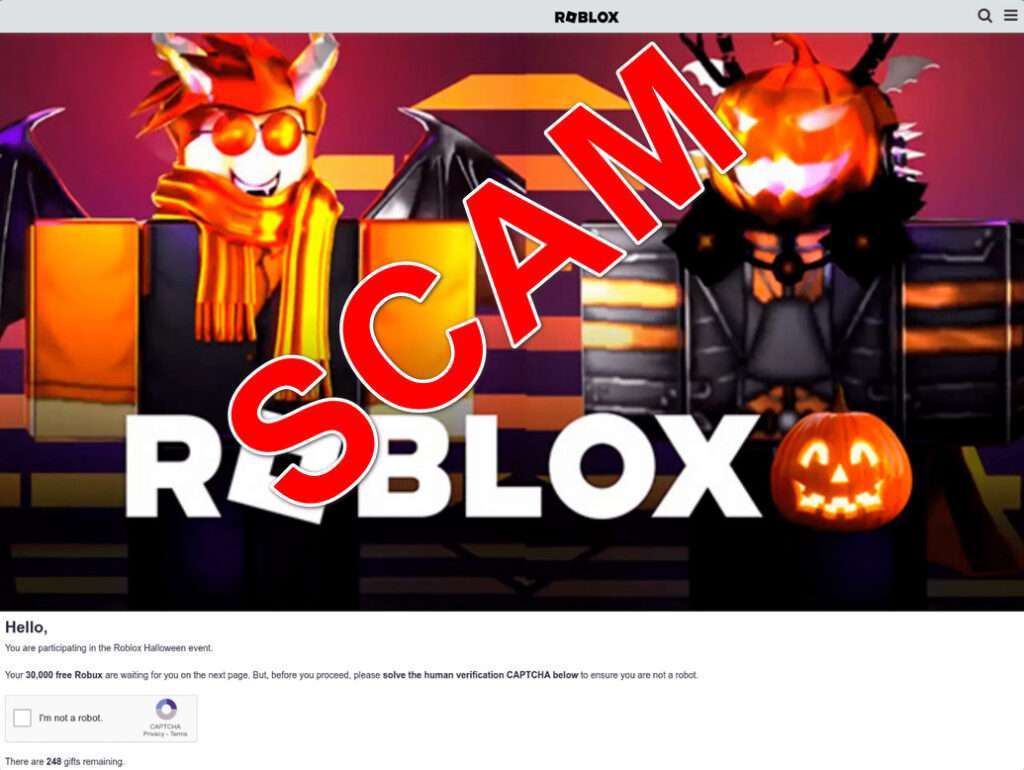
This scam typically begins with users receiving an unsolicited message on platforms like WhatsApp, inviting them to participate in a Roblox Robux giveaway. The message contains a link that redirects to a scam website disguised as a genuine domain.
Based on the user’s detected language and location, the site displays localized content meant to further entice victims. For Spanish speakers, this may be a page with Halloween themes and events. For Portuguese speakers, it could be a Dia das Crianças promotion page.
To advance through the scam, users have to complete a CAPTCHA that pretends to be a security verification step. They are then instructed to share the link with their own contacts to unlock the Robux reward. The page uses fake progress bars and timers to pressure victims into spreading the scam widely.
At the final stage, users are asked to provide personal information, Roblox login details, or download files. This last step often uses more urgent messaging and countdowns to rush victims into obeying without thinking critically.
In summary, this scam employs social engineering techniques and preyed on people’s desire for free Robux to extract data, spread malware, and expand its reach. Its localized content and the appearance of legitimacy make it more convincing and dangerous.
How Does the Roblox 30k Robux Scam Actually Work?
The operators behind this scam have crafted a multi-stage strategy designed to slowly manipulate users into spreading the scam and giving up sensitive information. Here is a deep dive into how each step functions:
1. The Initial Hook – Direct Messages
The first contact comes as a direct message to the target’s WhatsApp, Facebook Messenger, or other platforms. The message may even come from a compromised account of someone already in the target’s contacts list. This increases the likelihood that the target will find it credible enough to click the link.
The text often addresses the user directly by name and mentions the huge Robux reward to capture attention. Phrases like “You just won 30,000 Robux!” create excitement and lead many to tap the link without any suspicion.
2. Landing on Scam Websites
The link redirects users away from official Roblox domains to separate scam websites. While the URL may look legitimate at first glance, closer inspection reveals oddities for fraudulent sites.
For example, misspellings, extra subdomains, or top-level domains that don’t fit Roblox are red flags. However, most users won’t notice this in their haste to claim the promised reward.
3. Localized Content and Themes
Analyzing the victim’s language, location, and IP address allows the scam sites to customize the content. Leveraging cultural events and holidays like Halloween or Children’s Day builds legitimacy and increases persuasion for specific demographics.
Visuals related to the tailored themes reinforce the deceit. This extra context helps assure users the giveaway is real and prevent doubts about the scam site’s authenticity.
4. The Fake CAPTCHA Test
Once hooked, users are directed to complete a CAPTCHA to verify they aren’t bots before proceeding. CAPTCHAs are ubiquitous on the internet, so this seems like a normal security measure.
In reality, it further engages the user and locks them into finishing the process. The simple act of spending time to complete it makes leaving the page less likely. The choice architecture nudges victims closer to the scam’s end goals.
5. Spreading Through Social Circles
After the CAPTCHA, victims are shown social proof elements like a counter of people who have successfully completed the giveaway steps. Pressure to share the link is applied through messaging like “Unlock 30,000 Robux by sharing this message!”
Gamifying the experience with a sharing progress bar satisfies the user’s need for fairness. Emotional triggers related to exclusivity and belonging give the false perception that only select people can access this reward.
This phase spreads the scam virally through WhatsApp groups and social media. Victims are led to believe they must recruit more people to receive their Robux, but they are spreading malware and driving traffic to scam sites.
6. Coercing Personal Data and Downloads
At the final stage, users likely feel invested and crave the payoff for their effort. The scam site prompts them to take urgent action to claim their Robux, such as:
- Filling out forms with personal data
- Entering Roblox usernames and passwords
- Downloading fake game launchers or mods
- Enabling browser notifications
Timers, counters, and visuals conveying loss urgency pressure victims into complying without considering risks. Once personal data or downloads are obtained, users are often blocked from the site entirely.
How to Spot This Scam
While this scam comes in different forms across platforms, there are some common red flags you can watch for:
- Unsolicited messages – Legitimate giveaways won’t directly message you out of nowhere. Be wary of any offers for free Robux through direct messages.
- Strange links – Analyze any included links carefully. Odd spellings, subdomains, and URLs not associated with Roblox should raise alarms.
- Requests for personal info – No legitimate Roblox giveaway will ask for account credentials, download malware, or harvest data.
- Poor spelling/grammar – Sloppy messages with errors indicate scam attempts rather than real businesses.
- Sense of urgency – Scammers use pressures like limited time offers and countdowns to create hasty reactions.
- Localized content – Personalized themes and holidays specific to you reveal the scam’s adaptive tactics.
- Progress bars – Beware sharing tasks disguised as ways to unlock rewards, especially via social media.
- No mention on Roblox’s official channels – Real giveaways are promoted on the Roblox site and social media, not just direct messages.
- Too good to be true – If it seems fake, it probably is. Trust your instincts when evaluating sketchy offers.
How to Spot This Scam on WhatsApp
WhatsApp is one of the main platforms scammers use to distribute this Roblox scam. Here are some tips to identify and avoid it on WhatsApp:
- Be wary of any unexpected or unsolicited messages about giveaways, especially from unknown numbers. Legitimate giveaways won’t message you out of the blue.
- Look for messages that address you directly by name and claim you won a huge amount of Robux. This is a common scam formula used for personalization and urgency.
- Scan the message for urgency cues demanding quick action such as “claim your Robux now!” or “offer expires soon.” This pressures victims to click without thinking.
- Check the message link carefully. Hover over it and look for odd or suspicious URLs that don’t match official Roblox site formats. Don’t click directly.
- Notice poor grammar, spelling errors, and other sloppy mistakes scammers often make while impersonating legitimate businesses.
- Beware of links purportedly connected to local cultural events or holidays based on your location. This scam relies on localized content.
- Ask yourself why Roblox would reach out directly via WhatsApp rather than through official channels or your linked email.
- Reverse image search any photos used which often turn up as stock imagery stolen by scammers.
- Search online to confirm if a supposed promotion actually exists on Roblox’s official website or social media.
- When in doubt, report the message to WhatsApp as spam/scam. Also warn the contact if their account may be compromised.
What to Do If You’re the Victim of a Roblox Robux Scam
If you engaged with a suspicious Roblox Robux giveaway offer and supplied any sensitive information, here are important steps to take right away:
Scan Devices for Malware
If you downloaded any files, scan your computer and phone thoroughly with Malwarebytes to detect and remove malware. Also check for unknown browser extensions that may have been installed without consent.
Cybercriminals frequently use malware to harvest data, launch further attacks, and maintain access to compromised devices. Removing malicious software is crucial for preventing continued risks.
Change Passwords and Enable 2FA
For any sites or accounts you entered credentials into, immediately change your password and enable two-factor authentication (2FA) if available.
With your username and password, scammers can take over your social media, email, or even financial accounts. Updating passwords locks them out, while 2FA adds an additional layer of security when logging in from new devices.
Contact Banks About Unauthorized Activity
Check bank and credit card statements closely for any unauthorized access, transfers, or transactions. Report any suspicious activity to your financial institutions right away so they can attempt to recover funds and block further damage.
Scammers who obtain banking information frequently steal what they can quickly. Early notification to banks can limit losses from any linked accounts compromised.
Reset Social Media Accounts
Social platforms like Roblox, Facebook, and Instagram are common targets for scammers armed with login credentials. Go through and reset passwords for any linked social media accounts.
Also scrub profiles of any unwanted content the scammers may have posted, such as Roblox scam links sent to friends lists under your account. Enabling login approvals adds protection.
Warn Contacts Who Received the Scam Link
Well-meaning users who spread the scam link to friends and family often don’t realize it endangers others. Doing your due diligence to notify them about the scam can prevent them from also falling victim.
Let them know if the link came from your compromised account so they don’t blame you. Provide information to help them avoid the scam and reset passwords if they also engaged with the content.
Monitor Accounts and Credit Closely
Keep vigilant in the coming months about any suspicious activity that may indicate compromised accounts or identities. Roblox scammers frequently sell data to other bad actors to commit identity theft.
Ongoing monitoring with tools like dark web scans helps detect if your information appears for sale on cybercriminal markets. Act quickly at the first sign of fraud to prevent major headaches.
Report the Scam
To help prevent the scam from spreading, report it to platforms that were abused, like WhatsApp and Roblox. You can also submit details through scam reporting tools like ReportFraud.ftc.gov from the FTC and BBB ScamTracker.
The more awareness spread about current scam tactics, the faster authorities can work to get fraudulent sites shut down. Your information contributes to protecting others from falling for the same traps.
Is Your Device Infected? Run a Free Malware Scan
Slow performance, constant pop-ups, or strange behavior? These are classic signs of a malware infection. The fastest way to find out is to scan your device with Malwarebytes Free — one of the most trusted malware removal tools available.
The free version detects and removes the most common threats, including:
- Adware — the cause of those annoying pop-ups
- Browser hijackers — unwanted redirects and changed homepages
- Trojans and spyware — hidden programs stealing your data
- Potentially unwanted programs (PUPs) — software you never asked for
👉 Select your device below — Windows, Mac, or Android — then follow the simple steps to download Malwarebytes, scan your system, and remove any threats it finds. The scan usually takes 5 to 20 minutes.
Run a Malware Scan with Malwarebytes for Windows
Malwarebytes is one of the most popular and trusted anti-malware tools for Windows — and it’s completely free for removing infections. It catches threats that many antivirus programs miss, including adware, browser hijackers, and trojans. Follow the steps below to scan and clean your PC in just a few minutes.
Download Malwarebytes
Click the button below to download the latest version of Malwarebytes for Windows from the official source. The free version is all you need — it will scan your computer and remove adware, browser hijackers, and other malicious software at no cost.
Download MalwarebytesOfficial installer for Windows 11 and 10. Your download starts right away.Want real-time protection? See Malwarebytes Premium Malwarebytes Free for WindowsScans and removes malware at no cost
-
Install Malwarebytes
When the download finishes, open your Downloads folder and double-click the MBSetup file. If Windows shows a User Account Control pop-up, click “Yes” to allow the installation.

Follow the On-Screen Prompts to Install Malwarebytes
The setup wizard will walk you through a few quick screens:
-
Choose where you’re installing the program — “Personal Computer” or “Work Computer” — then click Next.

-
Malwarebytes will now install on your device. This usually takes under a minute.

-
When installation is complete, the “Welcome to Malwarebytes” screen will open automatically.

-
On the final screen, click Open Malwarebytes to launch the program.

-
Enable “Scan for Rootkits”
Before scanning, turn on rootkit detection so Malwarebytes can find even the most hidden threats. Click the Settings gear icon on the left side of the screen.

In the settings menu, find “Scan for rootkits” and click the toggle so it turns blue.

Done? Click “Dashboard” in the left pane to return to the main screen.
Start the Scan
Click the blue Scan button. Malwarebytes will automatically update its virus database and start checking your computer for malware.

-
Wait for the Scan to Finish
The scan checks your entire system for browser hijackers and other malicious programs, so it can take 5 to 20 minutes depending on your computer. Feel free to do something else — just check back occasionally to see the progress.

-
Quarantine the Detected Threats
When the scan is done, you’ll see a list of everything Malwarebytes found — malware, adware, and potentially unwanted programs. Click the “Quarantine” button to remove all of them at once.

Malwarebytes will now remove the malicious files and registry entries and move them safely into quarantine.

-
Restart Your Computer
Some threats can only be fully removed after a reboot. If Malwarebytes asks you to restart, click Yes. Once you’re logged back in, Malwarebytes has finished removing the threats it found.

That’s it — your Windows PC is now clean of trojans, adware, and other malware, and should be back to running smoothly.
If you are still having problems with your computer after completing these instructions, then please follow one of the steps:
- Run a computer scan with ESET Online Scanner
- Ask for help in our Windows Malware Removal Help & Support forum.
Run a Malware Scan with Malwarebytes for Mac
Malwarebytes for Mac is a free on-demand scanner that removes the malware other security software tends to miss — adware, browser hijackers, and unwanted programs included. Cleaning an infected Mac with Malwarebytes has always been completely free, and it’s our go-to recommendation. Follow the steps below to scan and clean your Mac in just a few minutes.
-
Download Malwarebytes for Mac
Click the button below to download the latest version of Malwarebytes for Mac.
Download MalwarebytesOfficial installer for macOS. Your download starts right away.Want real-time protection? See Malwarebytes PremiumMalwarebytes Free for MacScans and removes malware at no cost -
Open the Malwarebytes setup file
When the download finishes, open your Downloads folder and double-click the setup file to begin the installation.

-
Follow the On-Screen Prompts to Install Malwarebytes
The Malwarebytes for Mac Installer will guide you through a few quick screens. Click “Continue” and keep following the prompts until the installation completes.



When the installation is complete, Malwarebytes opens to the Welcome to Malwarebytes screen. Click “Get started“.
-
Select “Personal Computer” or “Work Computer”
Malwarebytes will ask what type of computer you’re installing it on. Click either Personal Computer or Work Computer, whichever applies.

-
Start the Scan
Click the “Scan” button. Malwarebytes will automatically update its detection database and begin checking your Mac for malware.

-
Wait for the Scan to Finish
Malwarebytes will scan your Mac for adware, browser hijackers, and other malicious programs. This can take a few minutes, so feel free to do something else — just check back occasionally to see the progress.

-
Quarantine the Detected Threats
When the scan is done, you’ll see a list of everything Malwarebytes found. Click the “Quarantine” button to remove all the threats at once.

-
Restart Your Mac
Malwarebytes will now remove all the malicious files it found. Some threats can only be fully removed after a reboot — if Malwarebytes asks you to restart, allow it. Once you’re logged back in, your Mac is clean.

That’s it — your Mac is now free of adware, rogue browser extensions, and other potentially harmful software.
If you are still experiencing problems while trying to remove a malicious program from your computer, please ask for help in our Mac Malware Removal Help & Support forum.
Run a Malware Scan with Malwarebytes for Android
Malwarebytes for Android automatically detects and removes dangerous threats like malware and ransomware so you don’t have to worry about your most-used device being compromised. Aggressive detection of adware and potentially unwanted programs keeps your Android phone or tablet running smooth.
-
Download Malwarebytes for Android.
You can download Malwarebytes for Android by clicking the link below.
Get Malwarebytes for AndroidOpens Google Play in a new tab.Want real-time protection? See Malwarebytes Premium for AndroidMalwarebytes for AndroidScans your phone and removes malware at no cost -
Install Malwarebytes for Android on your phone.
In the Google Play Store, tap “Install” to install Malwarebytes for Android on your device.

When the installation process has finished, tap “Open” to begin using Malwarebytes for Android. You can also open Malwarebytes by tapping on its icon in your phone menu or home screen.

-
Follow the on-screen prompts to complete the setup process
When Malwarebytes will open, you will see the Malwarebytes Setup Wizard which will guide you through a series of permissions and other setup options.
This is the first of two screens that explain the difference between the Premium and Free versions. Swipe this screen to continue.
Tap on “Got it” to proceed to the next step.
Malwarebytes for Android will now ask for a set of permissions that are required to scan your device and protect it from malware. Tap on “Give permission” to continue.
Tap on “Allow” to permit Malwarebytes to access the files on your phone.
-
Update database and run a scan with Malwarebytes for Android
You will now be prompted to update the Malwarebytes database and run a full system scan.

Click on “Update database” to update the Malwarebytes for Android definitions to the latest version, then click on “Run full scan” to perform a system scan.

-
Wait for the Malwarebytes scan to complete.
Malwarebytes will now start scanning your phone for adware and other malicious apps. This process can take a few minutes, so we suggest you do something else and periodically check on the status of the scan to see when it is finished.

-
Click on “Remove Selected”.
When the scan has been completed, you will be presented with a screen showing the malware infections that Malwarebytes for Android has detected. To remove the malicious apps that Malwarebytes has found, tap on the “Remove Selected” button.

-
Restart your phone.
Malwarebytes for Android will now remove all the malicious apps that it has found. To complete the malware removal process, Malwarebytes may ask you to restart your device.
That’s it — your Android phone is now clean — no more malicious apps, adware, or browser redirects.
If you are still having problems with your phone after completing these instructions, then please follow one of the steps:
- Restore your phone to factory settings by going to Settings > General management > Reset > Factory data reset.
- Ask for help in our Mobile Malware Removal Help & Support forum.
Stay Protected: Block Ads and Malicious Sites
Now that your device is clean, keep it that way. Most infections start with a malicious ad or a fake download button — so blocking them at the source is your best defense.
We recommend AdGuard, which blocks malicious ads, phishing pages, and dangerous redirects before they can reach you.
👉 Download AdGuard and browse safely
Frequently Asked Questions
What is the Roblox 30,000 Robux giveaway scam?
This is a scam where users receive messages on platforms like WhatsApp inviting them to participate in a fake Roblox Robux giveaway. The message contains a malicious link that leads to a scam website designed to steal personal information and spread malware.
How do scammers carry out this scam?
Scammers use social engineering techniques to manipulate users. They send direct messages that seem personalized and make the giveaway appear legitimate. The sites use CAPTCHAs, progress bars, timers, and other tricks to pressure victims into sharing data and spreading the scam.
What are red flags of this scam?
Red flags include receiving unsolicited messages about giveaways, suspicious links that don’t lead to official Roblox sites, requests to complete CAPTCHAs or share links before receiving Robux, and demands for personal information or downloads.
What should I do if I engaged with this scam?
If you entered any information, change passwords immediately and enable two-factor authentication where possible. Scan devices for malware, monitor financial accounts for fraud, reset social media, and warn contacts who may have received the scam link.
How can I avoid Roblox scams in the future?
Avoid clicking direct message links altogether. Seek out official giveaways through Roblox directly. Never provide your Roblox credentials outside of the official game site or app. Use caution sharing personal data online.
How can I report this scam to help others?
Report it to the involved platforms so they can take down fraudulent sites. Submit details to the FTC and BBB scam reporting tools. Spread awareness about the scam tactics on neighborhoods apps and social media.
Who is most likely to fall victim to this scam?
Young Roblox gamers are frequent targets, as well as parents who want to get Robux for their kids. But anyone eager to get something for free can be vulnerable to these scams.
In Conclusion
The prevalence of free Robux scams highlight why vigilance is so necessary when engaging online. While the lure of desired freebies is strong, it’s important to think critically rather than impulsively click links.
When in doubt, err toward skepticism instead of blindly trusting unsolicited messages. Seek out official giveaway sources, and never provide your Roblox credentials outside the actual game login flow.
With personalized content and social engineering techniques, Roblox giveaway scams now appear more convincing than ever. But understanding their deceptive formulas helps equip users to spot and avoid the red flags. Share awareness with family and friends, especially young gamers who use Roblox regularly.
Staying alert to the latest scam tactics allows us to take proactive precautions. But even careful users can fall victim sometimes. Implementing the right response steps quickly after engagement can greatly reduce scam damage. Monitor closely for signs of further misuse, and explore additional protections like identity theft services if your personal information was compromised.
With knowledge and caution on your side, you can safely enjoy the Roblox platform and community without becoming another statistic for opportunistic scammers. Don’t let them discourage you from the legitimate fun and connection the game facilitates among its millions of players worldwide.

Join the discussion
0 commentsShare your experience or ask a question about this article.
Discussion
Start the conversation
Have a question or something useful to share? Add the first comment.