


You have followed the same creator for months. A new post catches your attention, and the next instruction is one you barely need to think about.
“Link in bio.” Three ordinary words can send you somewhere very different from the place you expected. Check the destination before taking its next instruction.
Overview
A familiar profile does not verify the next website
Link-in-bio scams use social profiles to lead followers to fraudulent offers, copied login pages, or risky downloads. The initial post can appear ordinary.
A bio link is not inherently dangerous. Creators and businesses legitimately use profile links and link-hub services to organize shops, articles, and other destinations.
The problem is treating the profile’s reputation as proof that every linked page and request is trustworthy. The destination still needs its own check.
A genuine creator account can also be compromised. An old profile with familiar posts is stronger context than a new clone, but it is not a permanent guarantee.
The destination can ask for something the post never mentioned
You might expect a giveaway form and find a social-account login instead. Or a supposedly free prize may suddenly require a delivery payment.
The change matters. A creator’s product recommendation does not authorize an unrelated page to collect your password, authentication code, or payment information.
FTC phishing guidance explains how familiar identities and convincing messages can lure people into supplying sensitive information.
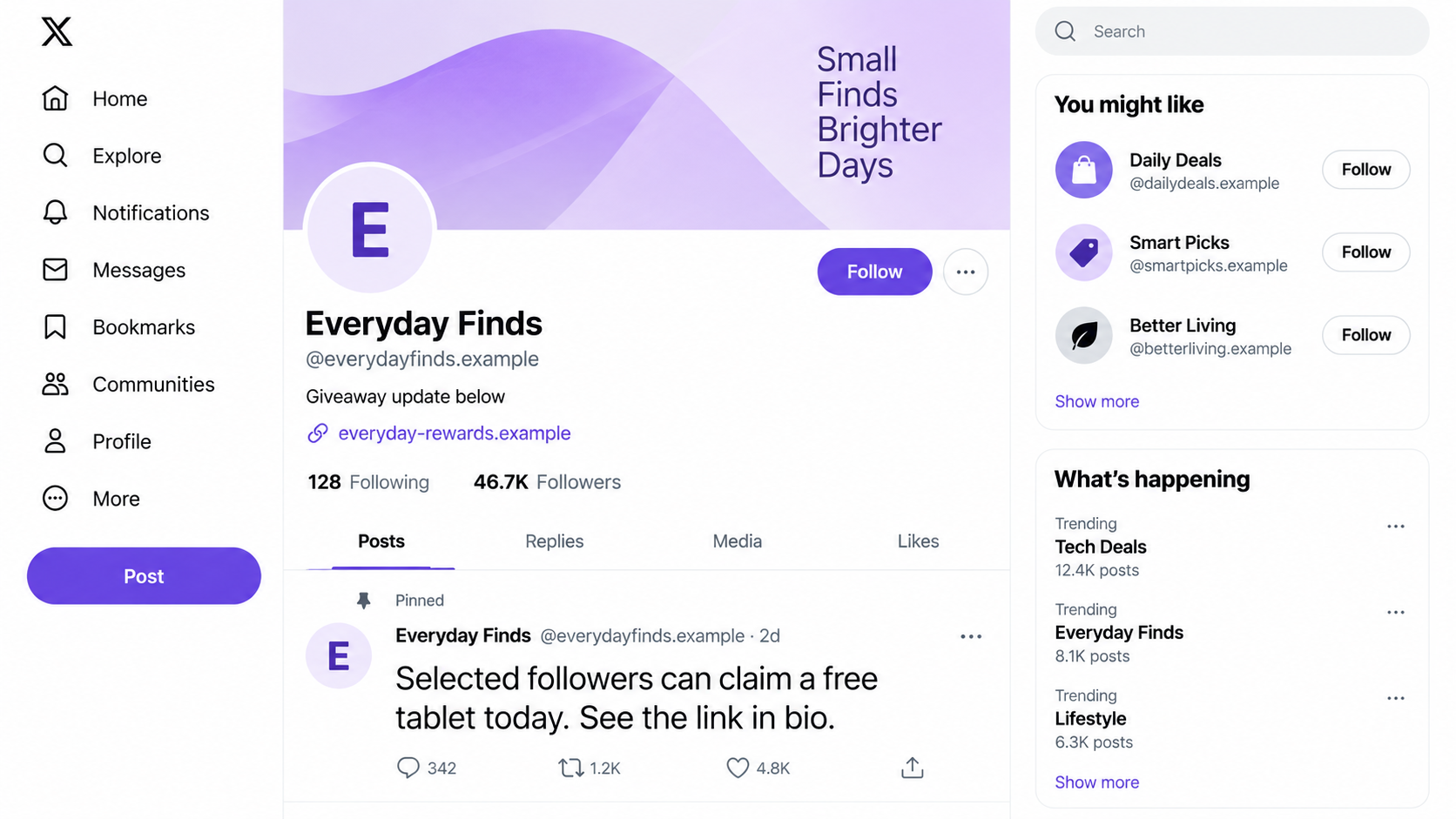
The illustration shows a fictional giveaway profile and example domain. It does not identify a real creator or prove that a specific account was compromised.
Check the offer and the destination separately
Before acting on a bio link, establish what you expect to do there. A sudden new request should make you pause rather than continue automatically.
Requests worth stopping for include:
- Signing into a social account to view a supposedly public offer.
- Providing a verification code to claim a prize.
- Paying a release or activation fee for an unexpected reward.
- Connecting a crypto wallet to receive an unexplained benefit.
- Installing an extension to access a giveaway or special feature.
- Moving into private messages with an unverified representative.
Do not confuse a normal external shop or login with automatic fraud. Verify its identity and purpose before giving it information or permission.
Why a Familiar Profile Can Hide a Different Destination
A social profile and its linked website are controlled in different places. Knowing the first does not tell you who controls the second.
A link hub adds another step. It can present several buttons under a familiar name, while each button sends you to a separate organization.
That arrangement is useful, not inherently suspicious. But the hub’s neat layout does not certify the businesses or forms listed inside it.
A link can also change while older posts remain unchanged. The post you remember liking might no longer point toward the offer it originally promoted.
Think of a hypothetical recipe creator whose profile suddenly advertises a crypto bonus. The odd change should be checked, not accepted because you like their recipes.
There may be an innocent explanation. Perhaps it is a new sponsorship. Independent confirmation lets you distinguish that from a clone or unauthorized account change.
Do not rely only on comments beneath the suspicious post. They can reflect excitement about the same promise rather than experience with the linked service.
Nor does a familiar photograph prove identity. Profile details that are public can be copied without giving the copier permission to represent the creator.
How the Link-in-Bio Scam Works
Step 1: An account supplies a reason to leave the feed
The post promises something that needs a separate page: a prize, exclusive deal, application, investment, or account-related tool.
The account may imitate a known person or use a genuine profile under unauthorized control. In either case, its apparent identity encourages trust.
Compare the claim with the account’s established activity. An unexpected topic does not prove compromise, but it gives you a concrete reason to investigate.
Do not rush because the post says only selected followers qualify. Selection language can make checking feel like risking an opportunity.
Step 2: The bio link keeps the familiar identity visible
The profile’s name, image, and link label remain in view while you decide to continue. A matching name on the linked page can reinforce that familiarity.
A label such as “official giveaway” describes what the poster wants you to believe. It is not a verification performed by the social platform.
Read the actual web address where possible. A creator’s name inside a domain is not proof that the creator owns or endorses it.
When the address is shortened, do not assume either safety or fraud. It hides information you may need to verify before following the offer.
Step 3: A link hub or redirect introduces another website
You may pass through a clean-looking menu before reaching the actual form. The menu can make several unrelated destinations appear part of one trusted experience.
Check the final page, not only the first link. Its owner, account requirements, and payment purpose matter more than the button’s appearance.
If you cannot establish where the offer leads, leave it. You do not need to keep clicking merely to satisfy the sender’s instructions.
A security tool’s warning is a reason to stop. An absence of warnings, however, should not be treated as proof that a new offer is honest.
Step 4: The page asks for credentials, money, or permissions
This is where a social recommendation can become a financial or account-security incident. The page asks you to do something with consequences beyond viewing content.
A copied login may use familiar colors and buttons. Open the genuine service yourself rather than entering credentials into an unexpected page.
If a giveaway asks for an authentication code, question why receiving a prize requires access to your account. Do not supply the code to find out.
For payments, establish the seller and the transaction. A small delivery charge can still expose card information to an unverified recipient.
Step 5: The offer moves into a private conversation
The page or profile may direct you to a representative in another app. The representative can repeat the creator’s name while adding new requirements.
Private messaging is not itself fraudulent. But it should not replace confirming the representative’s relationship with the genuine business or creator.
Do not accept “the creator sent me” as verification. Check through an established contact route outside the conversation that introduced this person.
Keep the original post and profile address. If the private instructions differ from the public offer, that discrepancy is important evidence.
Step 6: The first response creates another opportunity for misuse
Depending on what you supplied, the attacker may have a password, payment details, personal information, or a new permission connected to an account.
These exposures are not interchangeable. A person who only viewed the page needs a different response from someone who entered a code or installed software.
Do not panic and buy a supposed emergency fix from the same sender. Stop interacting and address the exact information or access involved.
If a social account is taken over, its audience can become the next target. Friends may trust messages from the account you previously used normally.
How to Check a Bio Offer Without Following Its Script
Confirm the creator through an established channel
Compare the profile with the creator’s long-standing website or another established account. Look for confirmation of the particular offer, not merely the person’s existence.
A second profile created by the same impersonator is not independent confirmation. Prefer contact information and links you knew before the new promotion appeared.
If confirmation is unavailable, do not pay or submit credentials. You can decline an unverified offer without accusing the genuine creator of misconduct.
Keep the domain and the service name separate
A login screen saying “Instagram” does not make its web address Instagram’s. The displayed service name can be copied more easily than control of its established domain.
Likewise, a shopping page can use a creator’s portrait while belonging to an unrelated seller. Identify the merchant that takes the order.
A secure connection protects data in transit to that website. It does not establish that the website deserves the data in the first place.
Ask what the next action actually authorizes
Viewing a public promotion should not be confused with handing over account access. Read permission and authentication screens rather than accepting the page’s summary.
Consider a form asking to manage your account when you only wanted to enter a contest. That is a different action with different consequences.
Close the form if requested access exceeds what you intended. Check the actual service’s permission guidance before deciding whether that access is necessary.
What to Do If You Fell Victim to a Link-in-Bio Scam
Work from what happened after the click. The goal is to contain the actual exposure, not assume that every unfamiliar website requires the same emergency response.
- If you only opened the page, leave it.
Close the destination and do not respond to further prompts. Note the profile and address if you want to report the suspicious offer.
Opening a page alone does not establish that your device or account was hacked. Investigate any downloads, permissions, or unusual activity separately.
- If you entered a password, secure the genuine account.
Open the official app or known website directly. Change the exposed password and any reused copies, then review unfamiliar sign-ins.
Check the recovery email, phone number, and authentication settings. A changed password is less useful if an attacker still controls a recovery route.
- If you supplied a code, describe the exact request.
Use the affected service’s recovery process and explain what the code authorized. Keep the original authentication wording and time.
For TikTok, consult its phishing guidance. The platform says it does not ask users to share passwords or verification codes.
- If you paid or supplied card details, contact the provider.
Report the suspicious recipient, amount, and promised product or prize. Ask about appropriate transaction disputes and protection for the exposed payment information.
Do not pay a second charge to unlock a refund. Preserve the page’s offer and payment instructions before they disappear.
- If you approved connected access, review permissions.
Use the genuine account’s security settings to examine connected applications and unfamiliar sessions. Revoke access you do not recognize or no longer need.
Ask the platform for help if you cannot identify what was authorized. Deleting the suspicious browser tab does not necessarily undo an account permission.
- If you installed something, address the device exposure.
Remove untrusted extensions or software and review permissions they requested. Seek reputable cleanup help if remote access or unfamiliar behavior was involved.
Follow MalwareTips’ Windows removal guide or Android cleanup guide where relevant. Device cleanup does not resolve stolen credentials or payments automatically.
Use our Malwarebytes guide for a device scan when installation or suspicious behavior occurred. It cannot recover payments or authenticate the offer.
Our AdGuard guide covers reducing unwanted advertising exposure. It is an extra layer, not a guarantee that a bio promotion is genuine.
- Report the offer and warn the real creator.
Report the profile, post, and destination through the relevant platforms. Send the genuine creator a concise warning through an independently verified contact route.
Do not accuse the creator of running the scam merely because their identity was copied. Keep that distinction clear when warning other followers.
- Preserve evidence without sharing private information.
Save the profile address, final destination, messages, receipts, and a short timeline. Redact your financial and identity details from public warnings.
If money or identity information was taken, seek the appropriate fraud or identity-recovery process. Ignore unsolicited recovery specialists requesting another fee.
If Your Own Bio Link Was Changed
Check account sessions, recovery details, connected apps, and recent profile changes. Secure the account before simply replacing the suspicious link.
A changed link may be only one sign of unauthorized access. Review posts, messages, and administrative roles that could allow the attacker to return.
Warn followers through channels you still control. Explain which offer and destination were unauthorized without repeating a clickable malicious link.
For business accounts, notify anyone who helps manage the profile. Shared access and reused credentials need attention across the people responsible for it.
Keep records of the altered link and affected posts. They can help platform support understand the incident after you remove the harmful material.
Frequently Asked Questions
Is a link-in-bio service itself a scam?
No. Link hubs are legitimate tools. Each linked destination and request needs checking, particularly when a promotion asks for money, credentials, or account permissions.
Can a familiar creator account share a malicious link?
Yes, if the account is compromised or its identity is copied. Verify the specific offer through another established channel rather than relying on familiar posts.
Does a shortened URL mean the offer is fraudulent?
No. Shorteners are legitimate, but they can obscure the destination. If you cannot verify where an offer leads, do not submit sensitive information.
Did clicking the link automatically hack my phone?
That cannot be concluded from a click alone. Check what you entered, downloaded, installed, or approved, and respond to that particular exposure.
Should a giveaway need my social-account password?
Do not enter an existing account password into an unexpected giveaway page. Verify the promotion independently and open the real service directly for account actions.
Can a security scan confirm a creator’s offer is genuine?
No. A scan can help with device threats, but it cannot establish the creator’s authorization, a seller’s promises, or the legitimacy of a payment request.
The Bottom Line
Do not hand over credentials, codes, or release fees because a profile says “link in bio.” A trusted-looking account does not authenticate the next page.
Verify both the offer and its destination. If either remains uncertain, leave the request and use the genuine service for any account or payment action.

Join the discussion
0 commentsShare your experience or ask a question about this article.
Discussion
Start the conversation
Have a question or something useful to share? Add the first comment.