

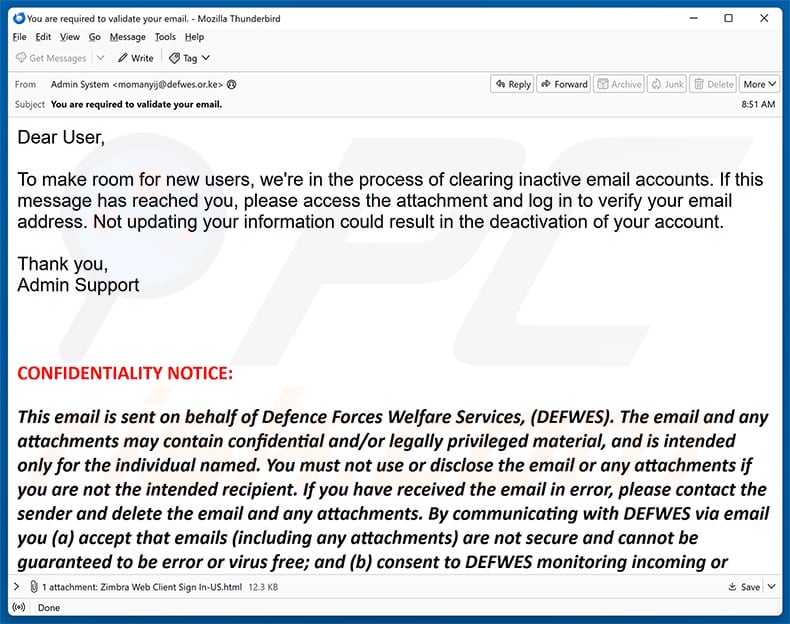
An administrator says old mailboxes are being removed to create space for new users. Your address supposedly survives only if you verify it immediately.
The Clearing Inactive Email Accounts scam sounds procedural rather than dramatic. That ordinary tone makes the attached file easier to trust than it deserves.
Overview
The notice invents a cleanup that no provider identifies
The message claims an email service is clearing inactive accounts, yet it never names the service responsible for the alleged maintenance.
That omission lets one template reach people using corporate mail, school systems, private hosting, and many unrelated webmail platforms.
Its greeting says “Dear User,” while the signature offers only “Admin Support,” leaving no accountable department, case number, or verifiable policy.
The sender shown in the captured sample used an unrelated address while the body borrowed language from an entirely different organization.
A real administrator already knows which platform it operates and can publish changes through that platform’s authenticated control panel.
The attached webpage is the center of the trap
Instead of sending the recipient to a recognizable provider domain, the email attaches a file named “Zimbra Web Client Sign In-US.html.”
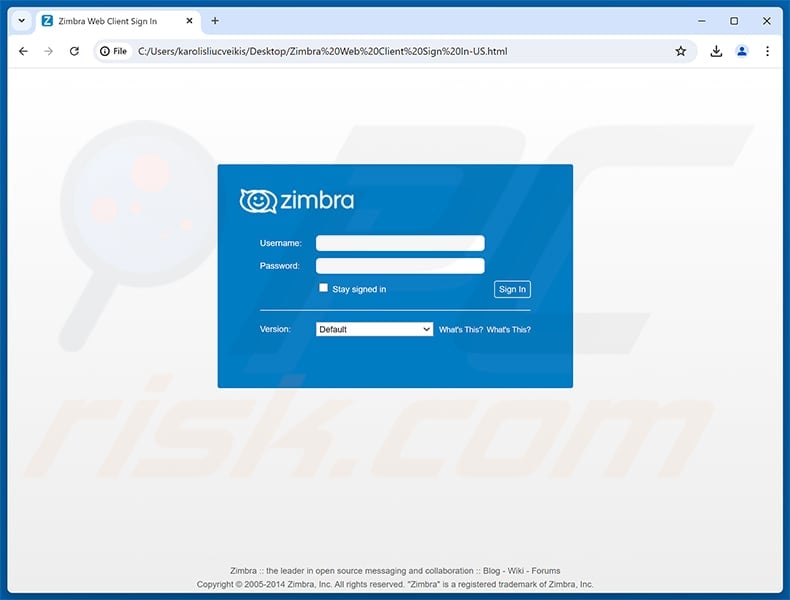
Opening that file launches a browser and draws a Zimbra-styled login form from code stored inside the attachment.
The address bar begins with a local file path, not a legitimate Zimbra host or the recipient’s actual mail server.
This presentation can feel safer because no obviously strange website appears before the form becomes visible.
The observed attachment is a credential-harvesting page. Typing a username and password supplies the phisher with the mailbox keys.
Reading the email is different from submitting the form
Merely receiving or previewing this captured message does not hand over a password and does not prove the computer is infected.
The decisive action is entering credentials into the false Zimbra panel, although any unexpected file should still be treated cautiously.
Zimbra is a legitimate collaboration platform and did not create or authorize this campaign.
The scam succeeds by copying a familiar sign-in screen, not by compromising every genuine Zimbra installation.
- The message never identifies the supposed email provider.
- Account deactivation is used to create urgency.
- Verification is hidden inside an unsolicited HTML attachment.
- The displayed sign-in page opens from a local file path.
- The form asks for both username and password.
- Zimbra branding is copied without authorization.
- Reading the notice alone does not surrender credentials.
- Submitted details can expose many connected accounts.
How the Clearing Inactive Email Accounts Scam Works
Step 1: A vague maintenance story reaches many kinds of inboxes
The opening claim does not depend on a bank, retailer, or specific subscription, so almost anyone with email can imagine being affected.
“Making room for new users” provides a simple explanation that sounds technical without offering any measurable storage limit or published migration plan.
The recipient is told the account may be deactivated, placing years of messages, contacts, receipts, and recovery links inside the threatened loss.
Because the notice avoids a precise deadline, the reader may assume the danger is immediate and act during the first anxious moment.
Bulk delivery means the criminal does not need to know whether an address is genuinely inactive, recently used, or attached to Zimbra.
Step 2: An attachment replaces the suspicious external button
People have learned to distrust links, but an HTML document can still look like an ordinary file supplied by a help desk.
The filename includes “Zimbra Web Client Sign In,” telling the recipient what to expect before the browser even opens.
HTML attachments are webpages packaged as files. They can contain forms, scripts, images, and instructions just like material loaded online.
Email gateways may flag them, but the format can bypass a reader’s instinct to inspect a remote destination before clicking.
No trustworthy administrator needs an attached replica of a login portal to confirm activity on an account it already manages.
Step 3: The local page imitates an established webmail product
Once opened, the file presents blue Zimbra branding, username and password fields, a version selector, and a familiar “Sign In” button.
Those design elements create recognition, while the browser’s file address quietly reveals that the screen is not the normal hosted service.
A local page can still transmit information outward when its form or script connects to an attacker-controlled destination.
The visual interface therefore tells the user almost nothing about who will receive the submitted values.
Password managers may refuse to fill the form because its origin does not match the genuine domain, which is a valuable warning.
Step 4: The phisher captures the mailbox credentials
After the user types a username and password, the attachment can send those entries to infrastructure selected by its operator.
The form may display an error, ask for the password twice, close, or redirect elsewhere after collecting the information.
A rejection does not mean the password remained private. Some phishing forms deliberately reject the first entry to collect alternate credentials.
The attacker can attempt access within seconds, often before the recipient decides the verification page behaved strangely.
If the password was reused, automated tests can extend the incident beyond email into shopping, cloud storage, social media, and workplace systems.
Step 5: Inbox access becomes a route into other services
Email is commonly the recovery channel for accounts that appear unrelated to the original phishing message.
An intruder can search for invoices, tax records, identity documents, reservation details, cryptocurrency notices, and conversations with financial staff.
Password-reset messages may then allow the criminal to take over services protected by stronger or completely different passwords.
The compromised address can also send convincing requests to colleagues and family because replies arrive inside an existing trusted relationship.
Quiet changes to forwarding rules can keep copies of future mail flowing to the attacker after the visible password is replaced.
Step 6: The stolen account supports a second wave of deception
Contacts may receive fake emergencies, altered payment instructions, shared-document lures, or requests to buy gift cards from the familiar address.
Business mailboxes are especially valuable because message history reveals approval chains, supplier names, recurring payments, and the language colleagues normally use.
The criminal may delete sent items and security notices, making the account appear normal while monitoring replies.
Stolen credentials can also be sold, separating the original phisher from later fraud and complicating the timeline.
That is why recovery must include sessions, rules, applications, and linked accounts rather than stopping after one password change.
Why the HTML Attachment Can Look Convincing
A webpage does not need to live on the web
Browsers can render HTML stored on a computer, so the absence of a remote address at first glance is not evidence of legitimacy.
The file may reproduce logos and layout without contacting the real service at all.
Look for “file:” in the address bar, a drive letter, a Downloads path, or another local location where a provider domain should appear.
An authentic login normally begins from a bookmarked service, an organization’s known portal, or a web address confirmed by its administrator.
Familiar branding is easy to copy
Logos, colors, labels, and button shapes are public material that can be saved and reused inside a counterfeit form.
Even an accurate copyright line proves only that the criminal copied more of the original page.
Brand recognition should prompt a domain check, not replace one.
If the organization truly uses Zimbra, employees should compare the page with the address they visit every day rather than trusting visual similarity.
The attachment removes useful context
Normal authentication pages may display an organization name, single sign-on route, security key option, or known custom hostname.
The attached imitation lacks the authenticated relationship between that organization and its mail server.
It cannot prove which account policy applies, who initiated the cleanup, or where the password travels.
That missing context matters more than polished graphics because authorization comes from verifiable infrastructure, not appearance.
What Attackers Can Do With a Stolen Mailbox
Reset passwords for connected accounts
Many services treat access to email as proof that the person requesting a reset owns the account.
The intruder can search stored messages to discover which banks, stores, travel sites, and social networks are connected.
Recovery attempts may happen gradually, allowing the criminal to prioritize accounts containing money or valuable personal information.
Impersonate the owner inside existing conversations
Replies sent within a genuine thread inherit its history and can look more credible than an unexpected message from a new address.
An attacker might change an invoice bank account, request a confidential document, or claim the owner cannot speak by telephone.
Recipients should verify financial or sensitive requests through a separate contact method, even when the conversation looks familiar.
Build a detailed personal profile
Years of correspondence can reveal addresses, relatives, medical appointments, employment information, travel dates, signatures, and copies of identification.
That information strengthens identity theft and makes later scams sound unusually well informed.
Deleting a few visible messages does not undo data already copied from the inbox.
Preserve hidden access
Forwarding rules, delegated users, application passwords, recovery addresses, and authorized third-party applications can outlive an ordinary password change.
Some attackers register their own multi-factor method or mark their session as trusted.
A complete security review should remove every unfamiliar persistence mechanism and end all active sessions.
How to Check an Account Warning Safely
Start from the service you already use
Open the provider through a bookmark, saved application, or manually typed address, then inspect notifications inside the authenticated account.
Do not use the attachment to reach the place where the attachment’s claim is supposedly verified.
If no warning exists after a normal login, the unsolicited notice has no independent support.
Ask the real administrator through another channel
Workplace and school users should contact the help desk using an internal directory, known telephone extension, or established ticketing system.
Forward the message as an attachment when requested so defenders can preserve headers and examine its code safely.
Do not reply to the sender, because that address may be forged, compromised, or monitored by the attacker.
Inspect the file without interacting
Security staff can examine the HTML source in an isolated environment to identify form destinations, encoded scripts, and external requests.
Ordinary recipients should not experiment with the file or submit invented credentials, because interaction confirms attention and may trigger different behavior.
Preserve the original message until the responsible team confirms it has the evidence needed.
Treat provider identity as a fact to prove
A genuine notice should name the service, account, policy, and independently accessible place where the issue appears.
Generic words such as “Admin Support” do not identify an organization.
The more serious the threatened consequence, the more important it becomes to verify through a route the message did not supply.
What to Do if You Have Fallen Victim to This Scam
- Stop interacting with the attachment. Close the page, disconnect from unfamiliar prompts, and retain the original email for investigation rather than reopening the file.
- Change the mailbox password from a trusted device. Visit the real provider directly, create a unique replacement, and update every account where the old password was reused.
- End every active session. Use the provider’s security controls to sign out everywhere, remove unknown devices, and revoke application passwords or connected apps you do not recognize.
- Inspect mailbox persistence. Review forwarding, filters, delegates, recovery addresses, signatures, sent mail, deleted items, and rules that could hide warnings or copy future messages.
- Enable strong multi-factor authentication. Prefer a security key or authenticator application, then save recovery codes somewhere outside the affected inbox.
- Contact the responsible administrator. Business and school users should report the attachment quickly so neighboring accounts, logs, and organization-wide forwarding rules can be checked.
- Protect linked services. Prioritize banking, shopping, cloud storage, payroll, tax, and social accounts discovered through that mailbox, especially where email controls password recovery.
- Scan when exposure went beyond the form. If other files downloaded or scripts ran, use Malwarebytes and the operating system’s antivirus. AdGuard can reduce malicious advertising exposure afterward.
- Warn contacts about impersonation. Tell likely recipients not to trust unusual payments, documents, or emergencies sent from the address during the compromise window.
- Preserve and report evidence. Save full headers, the filename, screenshots, security alerts, login history, and fraudulent transactions for the provider and relevant authorities.
How to Prevent Similar Attachment Phishing
Block risky file types where practical
Organizations can quarantine HTML attachments from external senders or deliver them only after specialized analysis.
Exceptions should be narrow because ordinary business communication rarely requires a standalone login page inside an email file.
Use phishing-resistant authentication
Security keys and passkeys validate the real website origin, making them substantially harder to surrender through a copied local form.
Authenticator codes offer useful protection but can still be relayed by advanced phishing systems.
Train around actions rather than appearance
Employees should learn that no logo, footer, or confidentiality notice authorizes a password request.
The important questions are who initiated the action, which domain receives the credential, and whether the account shows the same warning independently.
Keep recovery details current
An unused recovery telephone number or inaccessible backup address can delay containment when an attacker changes account settings.
Review those details before an emergency and store recovery codes securely offline.
Frequently Asked Questions
Is the Clearing Inactive Email Accounts message genuine?
No. The examined email uses an unnamed cleanup story and an attached counterfeit Zimbra form to collect usernames and passwords.
Does opening the HTML attachment automatically steal my password?
Opening the observed file displays the phishing page. The main credential risk begins when information is typed and submitted, though unexpected files still warrant caution.
Why does the browser show a file path instead of a website?
The webpage is stored inside the attachment and rendered locally. Local display does not prevent its code from sending submitted data outward.
Is Zimbra responsible for this campaign?
No. Zimbra is a legitimate platform whose branding is copied by the phisher. Genuine installations use administrator-controlled domains, not unsolicited attached login replicas.
What if I entered a password that was already changed?
Review sessions and account settings anyway, because the attacker may have used the credential before replacement or created another route for access.
Do I need antivirus if I only read the email?
Reading the message alone does not indicate infection. Scan if you downloaded additional material, executed content, enabled permissions, or noticed unexpected system behavior.
The Bottom Line
The Clearing Inactive Email Accounts scam turns a routine maintenance story into a password request hidden inside an HTML attachment.
Its copied Zimbra screen cannot authenticate the sender or the cleanup claim. Verify account notices through the real service and never sign in through unsolicited files.
Anyone who submitted credentials should secure the mailbox completely, examine connected services, and alert contacts before the stolen identity is used again.

Join the discussion
0 commentsShare your experience or ask a question about this article.
Discussion
Start the conversation
Have a question or something useful to share? Add the first comment.