

The parcel is supposedly on hold, and another failed attempt could send it back. A bright yellow button offers the fastest way to prevent that outcome.
Delivery problems do happen, which is precisely why this message feels believable. The difference emerges when the sender, link, and requested login are examined together.
Overview
The message creates a return-to-sender deadline
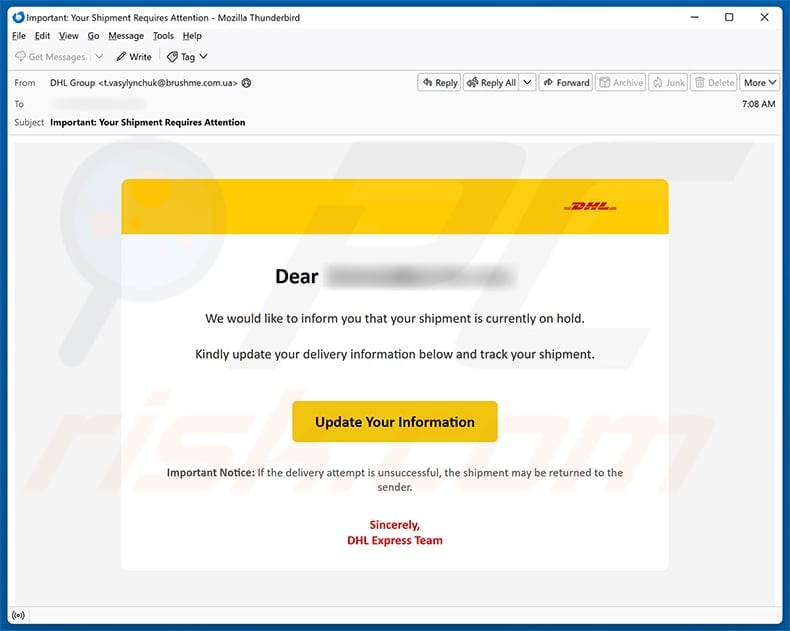
The subject says “Important: Your Shipment Requires Attention,” giving the notification immediate weight before the recipient sees any supporting information.
The body claims a DHL Express shipment is on hold and asks the recipient to update delivery information.
It warns that an unsuccessful attempt may cause the parcel to be returned, turning a routine address question into a potential loss.
The notice does not provide a dependable tracking number, merchant identity, delivery address, or account-specific explanation that can be verified independently.
The button becomes the only apparent path to learn more, a structure designed to concentrate attention on the malicious link.
The sender and destination do not belong to DHL
The observed email came from an address unrelated to DHL, despite using the company’s logo, colors, and Express signature.
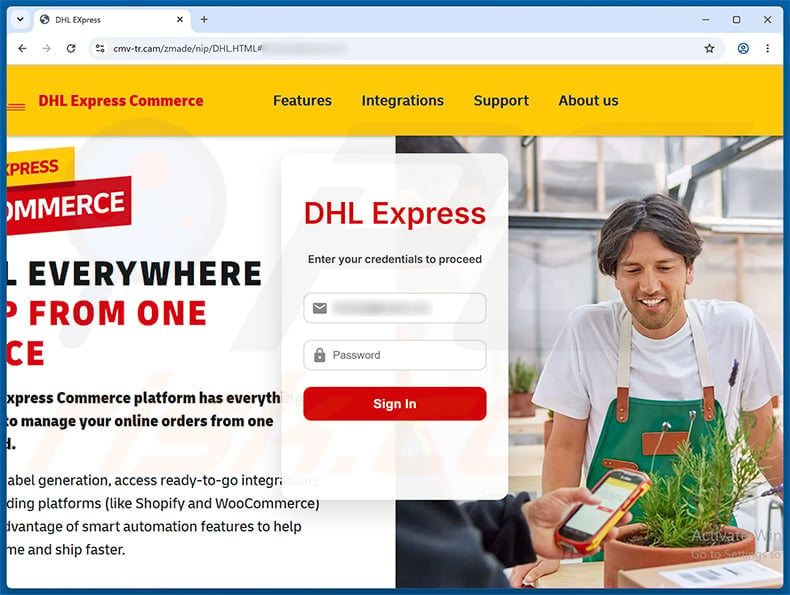
Its button led to cmv-tr[.]cam, a domain that is not part of DHL’s official web presence.
The destination copied the DHL Express Commerce appearance and displayed a sign-in form asking for an email address and password.
HTTPS can encrypt the submission while still delivering credentials securely to a criminal. A padlock never proves the site represents the brand shown.
DHL is being impersonated and has no involvement with the fraudulent page.
Stolen DHL credentials can support shipment and identity abuse
A genuine DHL account may contain names, delivery addresses, telephone numbers, shipment history, business contacts, and saved preferences.
An intruder could study active deliveries, gather personal data, or attempt changes where account features and shipment rules permit them.
If the victim reused the same password elsewhere, the attacker can test it against email, retail, cloud, and financial services.
Business DHL access may reveal customer or supplier information valuable for additional impersonation.
- The email announces a shipment problem without verifiable parcel details.
- A return-to-sender warning pressures the recipient to act quickly.
- The sending address is unrelated to DHL.
- The button points to cmv-tr[.]cam rather than an official DHL domain.
- The page imitates DHL Express Commerce and requests credentials.
- The message does not prove the recipient has a relevant shipment.
- DHL did not create or authorize the phishing campaign.
- Merely receiving the email does not install malware.
How the Scam Works
Step 1: The attacker sends a notification broad enough to match anyone
The email avoids naming a retailer or describing the parcel because those details would exclude recipients who recognize a mismatch.
Instead, it relies on the high probability that someone recently ordered goods, manages company shipments, or expects a gift.
People who have no parcel may delete it. The campaign only needs a small fraction of well-timed deliveries to appear accurate.
An address leaked from an old database is enough to begin; no DHL breach is required.
The recipient’s imagination supplies the purchase the scammer never knew about.
Step 2: Fear of losing the parcel narrows the decision
“On hold” suggests the package is already nearby but cannot move without the recipient.
The return warning adds a deadline without naming one, making every delay feel risky.
That combination encourages action before the user checks the merchant account, original tracking notice, or official DHL application.
Legitimate delivery issues can be verified using a known tracking number entered independently at dhl.com.
A vague threat should never outrank information from the original order record.
Step 3: The email uses visual familiarity as proof
Yellow branding, the DHL logo, a clean white card, and a formal closing create a recognizable corporate presentation.
None of those elements is protected from copying inside an email. Criminals can reproduce public logos and style rules easily.
The From field provides better evidence, yet many interfaces shorten or hide it behind a display name.
Expand the sender information and examine the domain character by character.
Even then, verify the destination separately because compromised legitimate mailboxes can send polished phishing messages.
Step 4: The link crosses into an unrelated domain
The button label says “Update Your Information,” but the actual destination uses cmv-tr[.]cam.
That address does not become trustworthy because a DHL logo appears after loading.
Lookalike domains may use extra words, unusual country-code endings, hyphens, misspellings, or redirect services.
The safest technique is not deciding whether the unfamiliar URL looks close enough. Open the official site independently and ignore the supplied route.
If a real hold exists, the carrier’s own tracking record should display it.
Step 5: A counterfeit commerce portal requests the login
The fake page is styled after DHL Express Commerce, a business context that can make authentication seem normal.
It asks for an email address and password, which may be interpreted as DHL account credentials or a familiar reused combination.
Submitted data is captured by the phishing operator. The form does not need to validate a shipment because no parcel stands behind the message.
The page may reject the first password, request another, or redirect to genuine DHL content after submission.
Those outcomes do not mean the attempt failed. Treat every value entered as compromised.
Step 6: The criminal tests the credentials and gathers context
Successful DHL access can expose profile details and shipment information useful for realistic follow-up contact.
If direct access fails, the captured email and password may still work against another service because many users reuse credentials.
Attackers can automate those tests rapidly, often before the victim notices a security email.
The resulting data can support address scams, payment requests, fake customs messages, or identity verification attempts.
One form submission can therefore create several distinct risks.
Step 7: Follow-up messages demand money or more information
The victim may later receive a small redelivery fee, customs charge, insurance request, or call from a supposed courier agent.
Previously collected address and shipment details make that approach more persuasive.
A small first payment can reveal valid card data before the criminal attempts larger charges.
Never continue a delivery conversation through contact details supplied by the original suspicious message.
Return to the merchant and carrier accounts through saved or typed addresses each time.
Red Flags That Expose the Fake DHL Notification
No usable tracking number anchors the claim
A legitimate shipment has a number that can be checked independently without opening a protected document or surrendering an email password.
This message offers urgency but withholds the strongest fact a customer could verify.
Search the original retailer confirmation rather than trusting a number that arrives only in a new email.
The sending address conflicts with the displayed brand
The visible DHL name is decorative when the actual mailbox belongs to an unrelated domain.
Free email services, unknown companies, and random subdomains should immediately end the interaction.
Remember that the text before @ can say anything. Ownership is determined by the complete domain after it.
The action request remains deliberately vague
“Update your delivery information” does not specify whether the problem concerns street, apartment, postcode, telephone number, customs data, or access instructions.
Vagueness lets the same email reach every country and every type of customer.
Real notices usually explain what failed and how that information relates to a particular shipment.
The login page is reached through the wrong web address
A copied portal can reproduce buttons, fonts, and logos, but it cannot place itself on DHL’s official domain.
Read the hostname from right to left and identify the registered domain before any slash.
Do not treat words such as secure, express, delivery, or dhl inside a longer unrelated address as proof.
What Criminals Can Do With Delivery Account Data
Build a detailed identity profile
Shipment history can connect a person’s name with home, office, telephone number, merchants, and frequently used recipients.
That combination supports believable impersonation and answers to weak identity-check questions.
Target valuable or time-sensitive parcels
Information about active shipments may reveal electronics, business supplies, documents, or gifts worth pursuing.
Actual redirection ability varies by service and shipment controls, but exposure should still be reported promptly.
Attack connected business processes
Companies may use shipping accounts alongside purchasing, invoicing, and warehouse workflows.
An intruder who learns names and routines can craft supplier fraud that appears operationally informed.
Reuse the captured password elsewhere
Credential stuffing often causes more damage than access to the service named in the phishing page.
A unique DHL password limits that expansion, while multi-factor authentication adds another barrier.
How to Verify a DHL Delivery Problem Safely
Begin with the seller’s order page
Open the account where the purchase was made and compare the listed carrier, tracking number, shipping date, and destination.
If no order matches, the unsolicited DHL claim has no foundation.
Type the DHL address yourself
Use dhl.com or the known regional DHL site reached from a bookmark, not a search advertisement or email button.
Enter the tracking number manually and review the official status.
Contact support through an independent route
Use telephone numbers and forms published on the official DHL website.
Never call a number embedded in a suspicious email, text, pop-up, or sponsored result without verifying it first.
Ask the sender of the parcel
A genuine merchant can confirm which carrier received the order and whether an address issue was reported.
Contact that merchant through your existing account or receipt, not by replying to the new warning.
What to Do If You Fell Victim to This Scam
- Stop using the counterfeit page. Close it, record the URL if safely visible, and do not attempt another login or payment.
- Change the exposed credentials immediately. Use a clean device and the official DHL website, then replace the password anywhere else it was reused.
- End unauthorized sessions. Review account activity, signed-in devices, profile changes, delivery preferences, and connected applications.
- Enable multi-factor authentication. Secure both DHL and the related email account, because email controls password resets and security alerts.
- Check active shipments. Contact DHL and each relevant merchant through official channels to identify changed addresses, holds, redirections, or unexpected activity.
- Protect financial information. If card or banking data was entered, telephone the issuer using the number on the card and request fraud controls.
- Warn the workplace when applicable. Business users should notify security, logistics, purchasing, and finance teams before the stolen context supports secondary fraud.
- Scan if content downloaded. Run Malwarebytes and the operating system’s antivirus after any downloaded or executed file. AdGuard can reduce exposure to malicious links but cannot restore credentials.
- Report and preserve. Keep the email with headers, page screenshots, domain, times, account alerts, and transactions for DHL, the host, and fraud authorities.
How to Reduce Delivery Phishing Risk
Keep one record of expected parcels
An order list containing merchant, carrier, tracking number, and arrival window removes the ambiguity that vague phishing notices exploit.
Household members and office reception teams can use the same method for unexpected deliveries.
Use unique passwords for shipping services
A password manager can generate and store credentials that are never reused.
If one phishing page captures a unique password, other accounts remain protected while the incident is contained.
Enable carrier notifications deliberately
Configure alerts from inside the official DHL account or application, then learn how genuine messages identify shipments.
Do not enroll through links delivered by unsolicited advertisements or messages.
Treat every payment request as a new verification event
Even after a real shipping delay, open the carrier and merchant independently before paying customs, storage, insurance, or redelivery charges.
Fraudsters can insert themselves into genuine circumstances using stolen context.
Frequently Asked Questions
Is the DHL Shipment On Hold email a scam?
The examined message is phishing. It comes from an unrelated sender and directs recipients to cmv-tr[.]cam, not an official DHL service.
Is cmv-tr.cam a DHL domain?
No. The domain is unrelated to DHL. A copied DHL interface hosted there does not become legitimate because it uses HTTPS or familiar branding.
Does DHL ask for an email password to update delivery details?
No legitimate carrier needs the password to your personal or work mailbox. Authenticate only through an official account page opened independently.
What if I am genuinely expecting a DHL parcel?
Check the tracking number from the merchant’s original confirmation at dhl.com. A real order can coincide with an unrelated mass phishing message.
Can opening the message alone infect my device?
Simply receiving or reading this email does not install malware. Danger begins with the phishing link, submitted data, granted permissions, or downloaded content.
Should I pay a later redelivery or customs fee?
Verify every charge through official tracking and support. Do not continue through the original message, even if a follow-up contains accurate personal information.
The Bottom Line
The DHL Shipment On Hold email weaponizes a common delivery worry and a return-to-sender threat to push recipients toward a counterfeit commerce login.
The unrelated sender and cmv-tr[.]cam destination settle the question. DHL branding on the page is copied decoration, not proof of ownership.
Verify parcels through the original order and dhl.com. If credentials were submitted, secure the account, email, shipments, and reused passwords immediately.

Join the discussion
0 commentsShare your experience or ask a question about this article.
Discussion
Start the conversation
Have a question or something useful to share? Add the first comment.