

A package notice lands at exactly the right moment. It says a shipment is moving, and one orange button promises the documents needed to follow it.
The message borrows the rhythm of a delivery update, but the route behind that button has nothing to do with checking a parcel.
Overview
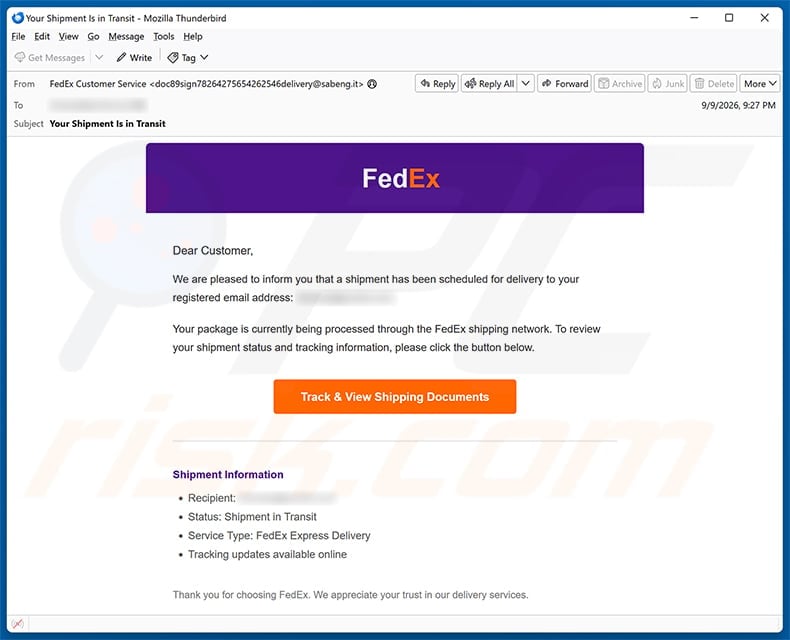
The email claims a FedEx Express shipment is already in transit
The subject reads “Your Shipment Is in Transit,” and the body says delivery was scheduled to the recipient’s registered email address.
A short shipment panel lists the recipient, status, service type, and online tracking availability.
Those details imitate the compact format customers expect from logistics notifications, even though the message supplies no trustworthy tracking number.
The central button says “Track & View Shipping Documents,” merging two plausible actions into one urgent click.
Anyone waiting for an online order may assume the message relates to a real purchase and investigate before checking the sender.
The link does not open an official FedEx tracking page
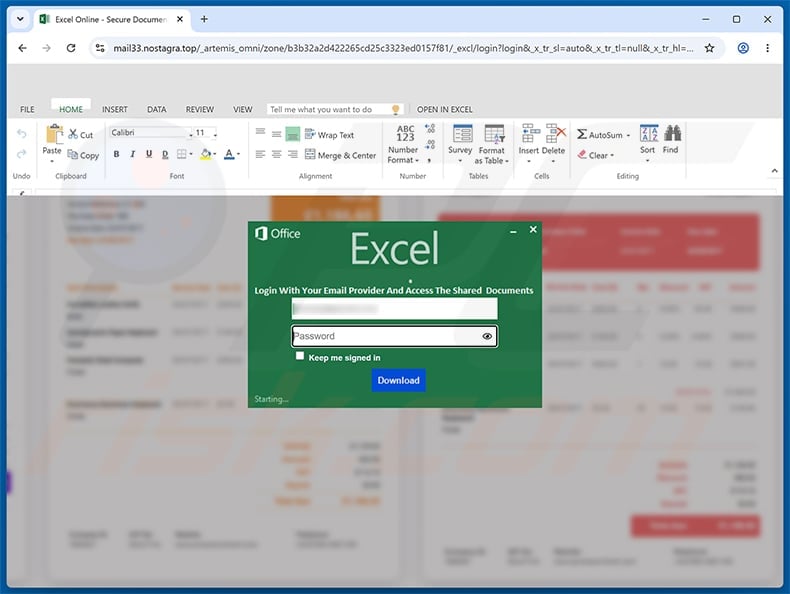
The observed button led to mail33.nostagra[.]top, an unrelated domain with no legitimate connection to FedEx.
Instead of showing a parcel journey, the page imitated a shared Microsoft Excel Online document and displayed an account sign-in prompt.
That transition is a major contradiction. FedEx tracking does not require the password for a personal Microsoft, Google, Yahoo, or other email account.
The spreadsheet disguise suggests the shipping documents are protected, giving the unexpected login screen a ready-made explanation.
Everything entered there is exposed to the phishing operator rather than used to retrieve a shipment.
The real target is the email account, not delivery information
Email credentials provide access to order confirmations, invoices, contacts, private conversations, and password-reset links.
An attacker can search the inbox for financial services, impersonate the victim, or identify merchants where valuable purchases are pending.
Business mailboxes may reveal suppliers, payment schedules, customer files, and conversation threads suitable for invoice fraud.
FedEx is a legitimate carrier and is not responsible for this impersonation campaign.
The malicious page may disappear quickly, but stolen passwords remain useful anywhere they were reused.
- The subject claims a shipment is already moving.
- The email uses FedEx colors and a familiar delivery layout.
- It provides generic shipping details rather than verifiable tracking data.
- The button opens an unrelated domain, not fedex.com.
- The destination imitates Microsoft Excel Online instead of FedEx tracking.
- The page asks for an email password to view supposed documents.
- FedEx does not need personal mailbox credentials to track a package.
- Reading the email alone does not infect the device.
How the Scam Works
Step 1: Mass delivery makes the timing look personal
Scammers do not need to know whether every recipient expects a package. Online shopping ensures that many people will be waiting for something on any given day.
The message stays vague so the reader supplies the missing order, merchant, and delivery date from memory.
An office recipient may assume the parcel belongs to purchasing, reception, or another employee.
That uncertainty encourages clicking to discover context, which is the exact behavior the email was written to provoke.
Real tracking alerts normally contain enough identifying information to verify the shipment without surrendering unrelated account credentials.
Step 2: The design creates recognition before scrutiny
FedEx purple and orange colors, a corporate footer, and Express terminology create a quick visual match with the real company.
Brand recognition happens faster than careful reading, especially on a phone where the sender’s full address may be collapsed.
The examined sender address did not belong to FedEx, yet its display context could still look like customer service at a glance.
Spelling quality should never be the primary test. Modern phishing messages can be grammatically polished and professionally formatted.
The reliable checks are sender domain, destination domain, account context, and independent verification through the carrier’s official tools.
Step 3: A document button broadens the pretext
“Track & View Shipping Documents” sounds more important than a simple status check.
Documents can imply customs forms, invoices, receipts, commercial paperwork, or delivery instructions, making authentication seem reasonable to business recipients.
The label also prepares the viewer for the spreadsheet-themed page that appears next.
No legitimate reason connects a public courier notice with an email-provider password requested by an unknown document host.
Hover over the button on a computer, or long-press it on a phone, to preview the real destination without opening it.
Step 4: The fake Excel page changes brands deliberately
The destination resembles Microsoft Excel Online, even though the email presented itself as a FedEx communication.
That brand switch is not accidental. Shared Office documents are common in shipping and purchasing workflows, so the page supplies a plausible second layer.
The victim may believe FedEx placed records into a protected spreadsheet and that their usual mailbox account will grant access.
In reality, a legitimate Microsoft sign-in should occur only on a verified Microsoft domain reached through a trusted route.
A logo inside a webpage cannot identify who receives the submitted password.
Step 5: The form captures credentials and may conceal success
The false login can collect the address, password, provider choice, IP address, browser details, and time of submission.
Some kits request the password twice, claiming the first attempt failed while recording both entries.
Afterward, the victim may be redirected to fedex.com or a harmless document, leaving the impression that the link simply malfunctioned.
Attackers can test credentials within minutes, so waiting for an explicit compromise alert wastes valuable recovery time.
Any password submitted on the unrelated page must be considered exposed, even if the screen produced an error.
Step 6: Mailbox access unlocks the victim’s wider identity
The criminal can read delivery notices, confirm addresses, inspect saved attachments, and reset accounts that rely on the compromised inbox.
They may add forwarding rules that copy future mail while leaving the visible inbox mostly unchanged.
Existing conversations can be hijacked with requests for revised payment details or another fraudulent document.
If the same password protects retail, social, or financial accounts, automated credential-stuffing attempts can expand the incident quickly.
This is why recovery must include session revocation, rule inspection, and password changes beyond the mailbox itself.
Step 7: The parcel story evolves after the first compromise
The attacker may follow with a customs fee, failed-delivery payment, address confirmation, or telephone call using information found in the account.
Each new contact appears more convincing because it references real orders or personal data.
A compromised business mailbox can also distribute the same FedEx lure internally, where colleagues already trust the sender.
Victims should warn contacts through another channel before fraudulent replies become part of established conversations.
The original email is only the doorway. Subsequent impersonation can cause greater financial damage.
How to Tell a Real FedEx Alert From This Phishing Message
Verify tracking without the email
Open a fresh browser window and type fedex.com yourself, then enter the tracking number from the retailer’s genuine order record.
If the message supplies no usable number, check the merchant account where the purchase was placed.
Do not search the sender’s telephone number or click sponsored support results, because additional impersonation can appear there.
The official tracking result should explain any required action without asking for the password to your email account.
Inspect the sender beyond its display name
Expand the From field and look at the complete address, including every character after the @ symbol.
Extra words, misspellings, free-mail services, or unrelated business domains are warning signs.
Also compare Reply-To and Return-Path information when available. Attackers sometimes place a respectable display address above a different response route.
A matching-looking sender is not enough if the button still points outside FedEx.
Demand consistency across the entire journey
A FedEx notification should lead to a FedEx-controlled service, not an unrelated mail host followed by an imitation Microsoft form.
Every unexplained brand change adds another entity that must be verified.
The message, destination, requested credential, and claimed task should form one logical chain.
Here they do not: parcel tracking becomes spreadsheet access, then becomes a request for a mailbox password.
Treat generic personalization as a clue
“Dear Customer” and a blurred or generic recipient field do not connect the notice to a particular order.
A real merchant confirmation usually identifies the seller, order, shipment, or tracking code in a way the buyer can cross-check.
Scammers avoid specific facts because the same template is delivered to thousands of addresses.
Do not let a correct email address impress you. The sender already needed that address to deliver the message.
What Happens After a Password Is Stolen
Security alerts may be hidden
The attacker can delete sign-in warnings, mark them read, or route them to a concealed folder.
Checking only the visible inbox may therefore miss important evidence.
Review trash, archive, spam, forwarding, filters, and recent login history from the provider’s security dashboard.
Order information can support further fraud
Receipts reveal merchants, delivery addresses, spending patterns, and the names of people receiving gifts.
That knowledge makes later calls and messages sound unusually informed.
Contact retailers directly if the account contained valuable pending orders or saved payment information.
Password reuse multiplies the exposure
Criminal tools can test the captured email and password across major services automatically.
Change reused credentials everywhere, beginning with financial accounts, cloud storage, shopping, social media, and workplace systems.
Each account needs a distinct password stored in a reputable password manager.
Business compromise requires organizational response
An employer may need to preserve logs, revoke tokens, reset sessions, inspect endpoints, notify partners, and meet regulatory duties.
Prompt reporting gives defenders more evidence and more opportunities to stop fraudulent mail.
Hiding the mistake helps the attacker, not the employee or organization.
What to Do If You Fell Victim to This Scam
- Close the fake page immediately. Do not submit another password, download a viewer, telephone a number, or continue through additional verification screens.
- Change the exposed password on a clean device. Begin with the email account and replace the same or similar password everywhere else it was used.
- Terminate active access. Use the provider’s security controls to sign out all sessions, remove unfamiliar devices, and revoke unknown applications or app passwords.
- Enable multi-factor authentication. Prefer an authenticator application or hardware security key, then verify that recovery details still belong to you.
- Inspect the mailbox deeply. Review forwarding addresses, inbox rules, delegates, sent mail, deleted items, login history, and password-reset messages.
- Protect delivery and retail accounts. Check pending orders, addresses, stored cards, and recent activity through merchant websites opened independently.
- Tell your employer and contacts. Report the exact time and actions taken, then warn others about messages sent from your account during the exposure window.
- Run security scans when appropriate. Use Malwarebytes and the operating system’s antivirus if a file downloaded or executed. AdGuard can reduce future malicious redirects, but it cannot recover passwords.
- Preserve and report evidence. Keep the original email with headers, screenshots, URLs, transaction records, and support messages for FedEx, your provider, and fraud authorities.
Safer Habits for Delivery Notifications
Begin from the purchase record
The merchant account or original confirmation is a stronger starting point than an unsolicited delivery email.
Use the tracking number recorded there and compare carrier, destination, and shipment date.
Separate delivery action from account authentication
A carrier may ask for delivery preferences, but it does not need the password for the mailbox that received an alert.
When credentials appear unexpectedly, stop and navigate independently.
Use layered protection
Unique passwords and multi-factor authentication limit the value of a single stolen credential.
Mail filtering, browser protection, AdGuard, and endpoint security add barriers, but none replaces careful domain verification.
Slow down during busy shopping periods
Holiday volume and multiple simultaneous orders make vague notices more effective.
Maintain a simple order list with merchant, carrier, tracking number, and expected date so unexpected claims are easier to reject.
Frequently Asked Questions
Is the FedEx Shipment Scheduled for Delivery email genuine?
The examined campaign is phishing. Its button opens an unrelated domain and counterfeit Excel login rather than a FedEx tracking page.
Why does the fake page look like Microsoft Excel?
Shipping documents sound plausible inside a spreadsheet. The extra disguise gives scammers a reason to request an email password after the FedEx-branded message.
Can FedEx require my email password to track a parcel?
No. A carrier does not need credentials for your Microsoft, Google, Yahoo, or workplace mailbox to show tracking information.
Am I safe if I clicked but entered nothing?
Close the page and inspect downloads. Risk is lower without submitted credentials, but scan the device if anything downloaded, executed, or requested permissions.
What if I entered the password and then saw real FedEx tracking?
Assume the password was stolen. Redirecting victims to a genuine site is a common way to hide a successful phishing submission.
Should I contact the sender to verify the shipment?
Do not reply. Verify through the retailer and FedEx using contact details obtained independently from their official websites or your genuine order confirmation.
The Bottom Line
This FedEx shipment email is not trying to deliver a package update. It uses delivery anxiety to move victims into a counterfeit document login.
The unrelated domain, brand switch, and request for a mailbox password expose the deception. Verify every shipment from the retailer or FedEx directly.
If you entered credentials, change them now, revoke sessions, inspect mailbox rules, and warn anyone who may receive messages from the compromised account.

Join the discussion
0 commentsShare your experience or ask a question about this article.
Discussion
Start the conversation
Have a question or something useful to share? Add the first comment.