

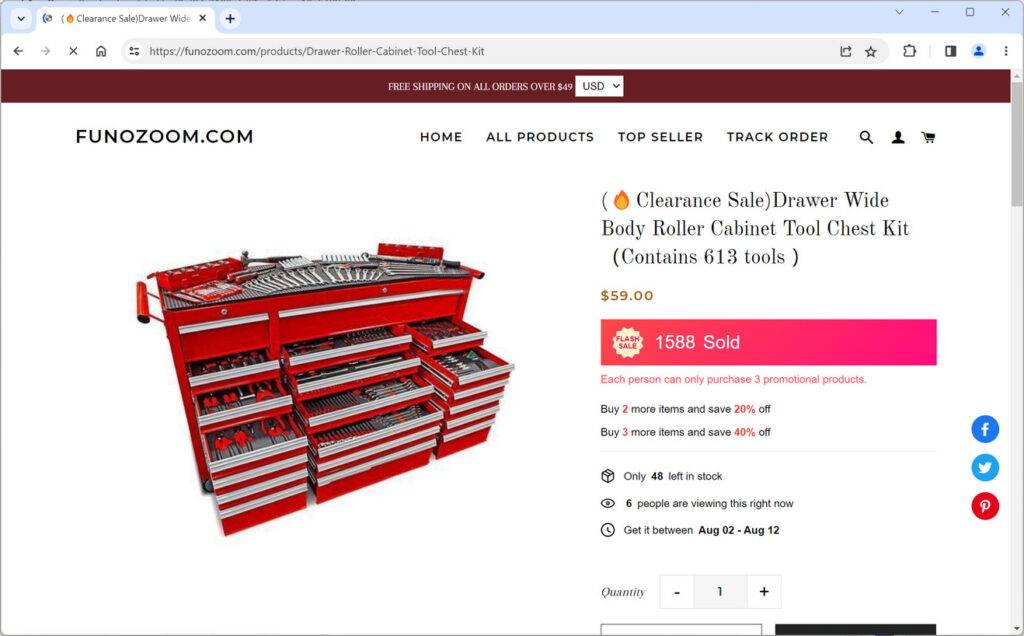
As an avid online shopper, you want to feel confident that the stores you patronize are legitimate businesses that will deliver quality products. However, in today’s crowded e-commerce landscape, it can be challenging to separate trusted retailers from potential scams. One such website that warrants closer inspection is Funozoom.com.
Sicimary Raises Red Flags at First Glance
At first glance, Sicimary presents itself as a store specializing in women’s dresses and clothing. The homepage features high-resolution photos of models wearing various dress styles. However, once you start poking around the site, some questionable elements emerge that should give shoppers pause.
Lack of Company Information Erodes Trust
Most reputable online stores provide background information about their business, such as a company history, contact info, location, and customer service options. Such details build trust by demonstrating that the company is established and accountable.
Sicimary provides none of this standard company information. Their contact page only lists an email address. There are no indications of how long they have been operating, where they are located, or who is behind the business. This lack of transparency is a concerning red flag.
Stolen Product Images Raise Doubts
The attractive product photos on Sicimary initially catch the eye. However, a reverse image search reveals that most of these photos have been taken directly from other websites, like AliExpress and Wholesale7. Sicimary has essentially stolen product images instead of photographing their own inventory. This raises doubts about whether they actually have these dresses in stock.
Plagiarized Website Content Demonstrates No Original Work
Not only are the product photos suspicious, but Sicimary’s website content also appears to be plagiarized from other sites. Their shipping policy, privacy policy, and terms of service include verbatim passages copied from unrelated blogs and e-commerce stores. Sicimary has put little original work into their own website copy.
Amateurish Website Design Signals Lack of Professionalism
For a store supposedly selling high-end women’s fashion, Sicimary’s website design is surprisingly unpolished. Some product images are blurry or pixelated, suggesting they may have been enlarged beyond their original resolution. The homepage banner features a low-quality photo with visible JPEG artifacts. Their logo and branding lack refinement typically seen from upscale retailers. Overall, the amateurish execution signals that this may not be a professional or well-funded operation.
No Social Media Presence Prevents Customer Interactions
Authentic brands strive to engage customers across multiple platforms, including social media. However, Sicimary does not have any social media links or profiles. The absence of Facebook, Instagram, Twitter, or Pinterest accounts prevents customers from evaluating their legitimacy through additional channels. It also cuts off opportunities for customer service interactions.
How to Proceed with Sicimary Orders
With these questionable characteristics in mind, we strongly advise exercising caution before ordering from Funozoom.com. Their lack of transparency, stolen photos, plagiarized content, and missing social media links provide reasonable grounds for skepticism. While not definitive proof of ill intent, these factors should give potential customers pause.
If you have already placed an order through Sicimary, keep a close eye on your credit card statements for any unauthorized charges. Be wary of providing personal or payment information to them again in the future. Also, be prepared for the possibility that products you order may never arrive, arrive late, or differ significantly from the website photos.
Seek Out More Reputable Retailers
There are trustworthy dress and clothing retailers to patronize through safer online shopping experiences. Seek out sites that provide full contact information, detailed shipping and return policies, high-resolution product photos, and links to genuine social media presences. Before handing over your money, look for signs that a business is invested in customer satisfaction and takes pride in their reputation.
The Bottom Line: Proceed with Extreme Caution
While we cannot definitively classify Sicimary as an outright scam without more evidence, consumers are advised to approach with extreme caution. Apply sound judgment when evaluating online retailers, and trust your instincts if something seems too good to be true. Protect yourself by making purchases only through established sites you can thoroughly verify. With some healthy skepticism and research, you can often spot the bad actors hiding among the internet’s dizzying array of e-commerce options.

Reviews & discussion
0 commentsShare a firsthand experience, or ask a question.
Community reviews
funozoom.com
Moderated reader experiences, not an editorial verdict.
Start the conversation
Have a question or something useful to share? Add the first comment.