


A podcast clip seems to capture an unusually candid conversation about the spoonful of gelatin that supposedly changed a famous singer’s body.
The voices, studio mood, and familiar names make the moment feel accidental. The sales journey waiting beyond the clip tells a very different story.

Overview
The podcast conversation was fabricated
The ads falsely make Gary Brecka and Jelly Roll appear to discuss a gelatin weight loss trick during a major podcast interview.
Some versions also insert Dr. Ania Jastreboff, Dr. Steven Gundry, or other recognizable health personalities. Their names provide authority without genuine participation.
Altered video, synthetic speech, misleading captions, and unrelated footage can create a conversation that never occurred in the original recording.
The promised recipe is withheld
The social clip suggests a simple kitchen method. Viewers expect ingredients, timing, and preparation, but the destination begins a long video instead.
Each section delays the recipe while describing metabolism, toxins, hormones, or a newly discovered fat-burning switch. Curiosity becomes time invested.
The presentation eventually promotes Slim Metrix capsules or gummies. Another campaign can replace that product while keeping the gelatin story.
The checkout completes the deception
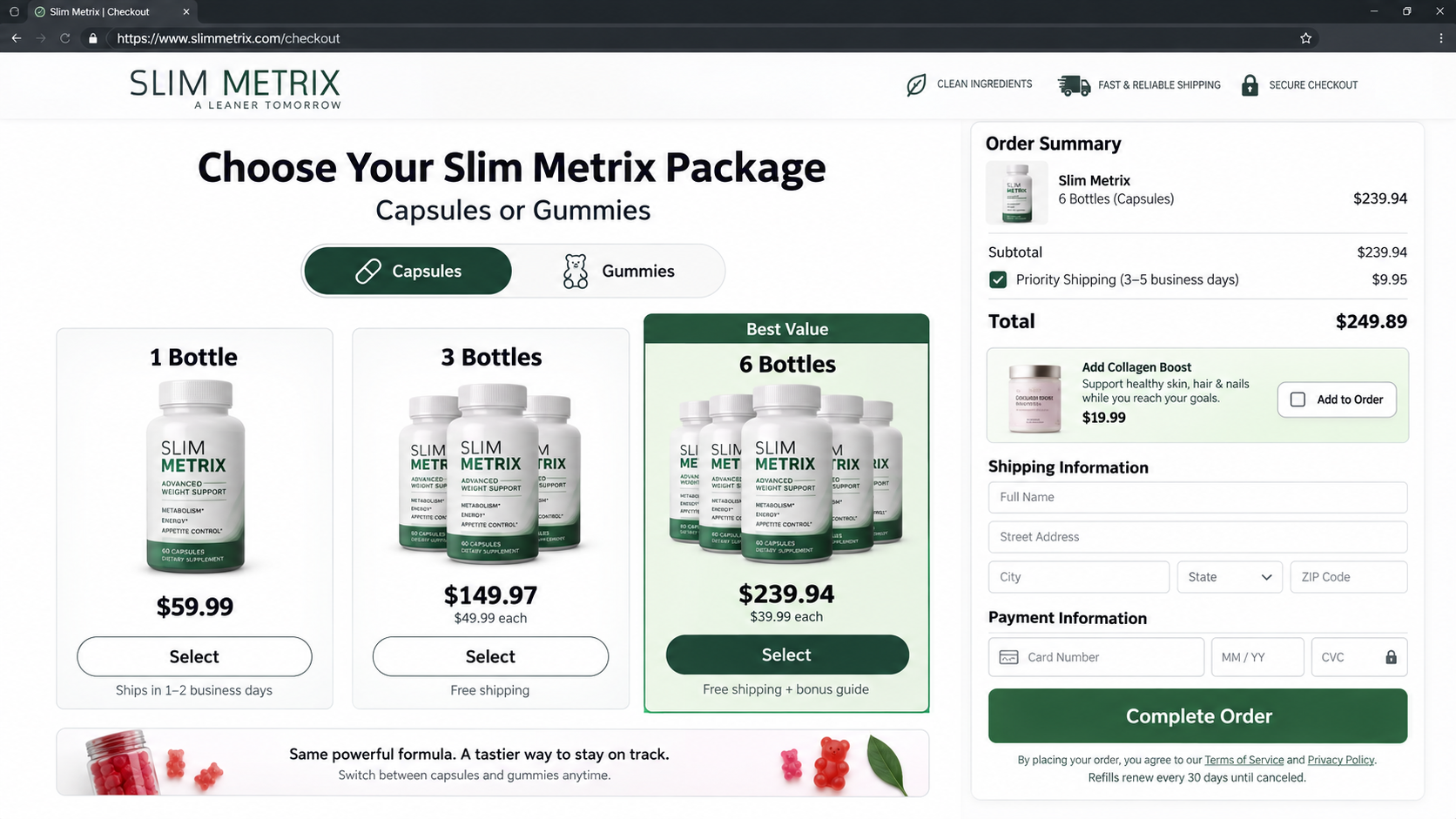
The funnel moves from apparently independent podcast content to an advertorial, then to multi-bottle offers and possible continuing delivery terms.
Weight loss guarantees, celebrity stories, and countdown timers make the product seem validated before ingredients and company details receive meaningful attention.
- The viral podcast clip is edited or AI-generated.
- The named public figures have no verified connection to the offer.
- The free gelatin recipe becomes a supplement pitch.
- The product label can rotate between campaigns.
- Bundles, add-ons, and refills can raise the actual cost.
Gelatin itself is a familiar food ingredient. The scam lies in the false interview, impossible certainty, and checkout concealed behind an apparently helpful recipe.
What the Gelatin Trick Ads Promise
One advertisement may say a spoonful before bed melts stubborn fat. Another combines gelatin with salt, fruit, honey, baking soda, or an unnamed mineral.
The story often claims a celebrity lost dramatic weight without changing food or exercise. Photos from different dates are presented as product evidence.
Viewers are told that doctors overlooked a metabolic switch. The recipe supposedly activates it regardless of age, health, medication, or previous dieting history.
That universal promise should create immediate skepticism. Body weight changes through many interacting factors, and no viral recipe controls them identically for everyone.
The advertisement may say the discovery is too inexpensive for the pharmaceutical industry to support. Moments later, it argues that a costly proprietary formula is essential.
This contradiction is intentional. The homemade hook attracts attention, while the supplement creates the transaction.
How the Gary Brecka and Jelly Roll Gelatin Trick Scam Works
Step 1: A familiar podcast scene establishes authenticity
The clip resembles a casual long-form interview. Microphones, headphones, studio lighting, and interrupted speech make the exchange feel unscripted.
Scammers can start with genuine podcast footage and replace only the audio. They can also generate new mouth movement or use captions to change meaning.
A cropped vertical format hides the original episode title and context. Viewers see recognition without the information needed to verify the moment.
Step 2: The celebrity transformation supplies proof
Jelly Roll’s public weight change becomes the emotional evidence. The advertisement assigns one secret explanation to a personal process it does not document.
Before-and-after images may be genuine photographs taken months apart. Their existence does not connect any supplement or gelatin ritual to the result.
The campaign exploits a common reasoning error: if a real transformation occurred, the inserted sales explanation must also be real.
Step 3: The clip promises a recipe but redirects
A learn-more button leads away from the platform. The new page resembles a wellness article, podcast transcript, or breaking health report.
Instead of listing ingredients, it asks visitors to watch another presentation. Browser controls, transcripts, and navigation may be limited to prevent easy comparison.
Urgent language warns that the interview is being removed. That claim explains the unfamiliar domain and discourages viewers from searching official sources.
Step 4: A long VSL rewrites ordinary biology
The video sales letter describes one hidden cause for slow metabolism. It may involve a hormone, gut bacteria, inflammation, or missing amino acid.
Scientific terms are simplified until one capsule appears able to solve appetite, energy, sleep, and fat storage simultaneously.
Real studies, when mentioned, are not linked or do not test the final branded formula. Ingredient research cannot automatically prove a multi-ingredient product.

Step 5: The homemade trick becomes Slim Metrix
The narrator eventually says ordinary gelatin lacks the proper ratio or supporting compounds. Slim Metrix capsules or gummies become the convenient complete version.
That pivot reveals the purpose of the story. If the campaign truly wanted to share a kitchen recipe, it could do so in a few sentences.
The exact label is disposable. Replacing Slim Metrix with drops, capsules, gummies, or another bottle does not require changing the deepfake interview.
Step 6: The largest package is framed as the sensible choice
One bottle appears expensive, while six bottles display a lower per-unit amount, free shipping, and a best-value ribbon.
The page may suggest several months are necessary before judging results. That converts uncertain effectiveness into pressure for a larger upfront purchase.
Order bumps can add collagen, detox products, shipping insurance, or priority handling. Check whether recurring refills appear beside the final button.
Step 7: Follow-up sales make cancellation exhausting
After checkout, extra pages may offer stronger formulas or discounted second orders. Telephone calls can use the buyer’s weight concerns to push more products.
Refund conversations may focus on extending the trial rather than stopping shipments. Agents can offer partial reimbursement while retaining most of the purchase.
Consumers who believed they made one order may later discover another charge. Written cancellation and statement monitoring are essential.
How to Spot an Altered Podcast Clip
Find the original episode through the podcast’s official channel. Compare clothing, set, guest list, runtime, and the full conversation around the alleged quote.
Search the sentence in quotation marks. Authentic viral statements usually appear in transcripts, reputable coverage, or clips from the original publisher.
Watch mouth edges, teeth, blinking, and facial texture. Generative edits often become unstable during fast speech, head turns, or hand movement.
Listen for sentences with identical volume and pacing. Synthetic voices can sound smooth while lacking breaths, overlaps, laughter, and room acoustics.
Notice whether the host ever responds specifically. Scammers may place a fabricated monologue between genuine reaction shots that could fit any topic.
Captions can misrepresent unaltered audio when videos autoplay silently. Turn on sound and compare the spoken words with the text.
Inspect the account posting the ad. A newly created wellness page with no history is not the public figure’s verified channel.
Finally, follow the money. If every version of the clip ends at one supplement checkout, the seller benefits directly from the alleged revelation.
What Gelatin Can Actually Do
Gelatin is derived from collagen and provides protein, primarily particular amino acids. It is used in foods, capsules, desserts, and cooking.
Protein can contribute to fullness, but a spoonful of gelatin does not override total diet, activity, sleep, medication, hormones, or medical conditions.
Replacing a high-calorie snack with a low-calorie gelatin serving could change intake. That practical substitution is not a hidden fat-burning reaction.
Commercial gelatin desserts may contain sugar. Supplements and flavored gummies can also add ingredients that matter to people managing glucose or allergies.
Rapid weight-loss promises deserve caution. Water changes, measurement timing, clothing, and selective photographs can create dramatic short-term appearances.
Sustainable weight management is individual. A qualified clinician can evaluate unexplained changes, medication effects, metabolic conditions, and safe goals.
No celebrity anecdote determines whether a supplement is appropriate. Public figures do not know a viewer’s history, prescriptions, pregnancy status, or allergies.
When an advertisement says results require no changes and work for everyone, it has abandoned credible health guidance for sales certainty.
Why Story-First Titles Matter in This Campaign
The supplement name is the least durable part of the funnel. Affiliates can swap a bottle image and continue buying advertisements with the same podcast story.
A consumer warning limited to Slim Metrix becomes harder to find when the next checkout displays another label. The fake interview remains the stable identifier.
Search the narrative phrases alongside the celebrity names. Gelatin trick, bedtime scoop, secret podcast, and interrupted interview can reveal connected campaigns.
Compare screenshots rather than trusting colors. Advertorial headers and product packaging change quickly, while sentence order and emotional beats often remain recognizable.
This rotation also fragments complaints. Buyers may describe several brands even though the advertisements, call centers, fulfillment process, and refund obstacles feel identical.
Focusing on the story helps people recognize the next version before paying. It also avoids implying that one discontinued product ended the operation.
Why the Fake Conversation Feels Believable
Podcast audiences expect informal discoveries. A guest can mention a personal routine without the production style of a traditional commercial.
That relaxed format lowers defenses. Viewers feel they overheard useful advice rather than encountered a carefully optimized advertisement.
The clip usually begins with authentic footage. Familiar posture, lighting, and studio sound create a visual foundation for fabricated words.
Short-video platforms remove context naturally. Vertical crops, captions, reaction overlays, and rapid edits look normal even when they hide manipulation.
The gelatin ingredient also feels safe and familiar. A kitchen staple attracts less suspicion than an unknown chemical or prescription claim.
Celebrity weight changes provide a visible result, but the campaign supplies the cause. Viewers rarely see evidence connecting the two.
Comments reinforce the illusion through repeated questions and success stories. Some may be curated, generated, or displayed only inside the advertisement.
The final supplement arrives after repeated agreement. By then, rejecting the product can feel like abandoning an explanation the viewer already accepted.
Pause at the first unsupported connection. A believable studio, real transformation, and ordinary ingredient can coexist with a completely false sales conclusion.
Red Flags in the Viral Gelatin Funnel
- The clip cannot be found on the podcast’s official channel.
- Audio quality changes when the product or recipe is mentioned.
- Subtitles use words not clearly spoken in the video.
- The recipe remains hidden for nearly an hour.
- Several doctors and celebrities appear in one sales presentation.
- A dramatic transformation is credited to one undocumented trick.
- Research references do not test the finished product.
- The largest bundle is selected or emphasized automatically.
- Continuity terms appear in smaller checkout text.
- Support pushes additional products before discussing a refund.
These clues form a coherent commercial design. The false interview attracts trust, the delayed recipe builds commitment, and the checkout captures the payment.
Company, Address, and Fulfillment Checks
Look beyond the Slim Metrix label
Find the legal company in the terms, privacy policy, payment page, receipt, parcel label, and card statement. Note every mismatch.
A temporary brand can vanish after complaints. The legal seller and payment processor matter when demanding cancellation, refund, or billing evidence.
Investigate every business address
Search the street, suite, and postal code. Some campaigns list a virtual mailbox, registered agent, residence, unrelated business, or large fulfillment center.
A warehouse can send mass-produced bottles from multiple brands. Its address does not prove where ingredients originated or who approved the advertisement.
Challenge support before handing over a card
Ask whether refills are automatic, whether gummies and capsules differ, what company appears on statements, and where opened products can be returned.
Unanswered calls, disposable email, changing contact details, and agents who avoid direct questions show that the guarantee may be difficult to use.
Demand product traceability, not slogans
Inspect the Supplement Facts panel, exact amounts, warnings, lot, expiration, manufacturer, and importer. Doctor-formulated and natural are marketing terms.
Products mass-produced overseas can vary in quality and documentation. Missing traceability raises concerns about contamination, substitutions, and accountability after an adverse reaction.
Do not consume a product with a broken seal, damaged container, inconsistent label, or unidentified ingredients. Preserve it for the refund and medical discussion.
What to Do if You Have Fallen Victim to This Scam
- Stop relying on the advertisement. Do not make health decisions from the altered podcast or assume a celebrity’s transformation predicts your result.
- Save the complete funnel. Capture the social clip, advertorial, video claims, checkout, terms, receipt, card descriptor, emails, package, and label.
- Review the final order. Confirm bottle count, product format, shipping, add-ons, telephone purchases, and any recurring refill arrangement.
- Cancel refills in writing. Follow the stated method, keep the sent message, and request a confirmation showing the effective cancellation date.
- Request a full refund. Explain that a fabricated endorsement and promised recipe induced the sale. Avoid accepting unclear verbal settlements.
- Call the card issuer. Dispute unauthorized quantities or renewals and unresolved refunds. Ask how to prevent additional merchant-initiated charges.
- Seek medical advice after reactions. Provide the ingredient panel and lot information, especially when using prescriptions or managing a medical condition.
- Report the deepfake campaign. Notify the advertising platform, impersonated parties, FTC, FDA health-fraud program, and state consumer office.
- Check your device. Run Malwarebytes if the page caused downloads or suspicious redirects. AdGuard can reduce repeat deceptive ads and trackers.
- Expect another sales approach. Reject unexpected refund agents, new miracle offers, and anyone requesting remote access or verification codes.
Is Your Device Infected? Run a Free Malware Scan
Slow performance, constant pop-ups, or strange behavior? These are classic signs of a malware infection. The fastest way to find out is to scan your device with Malwarebytes Free — one of the most trusted malware removal tools available.
The free version detects and removes the most common threats, including:
- Adware — the cause of those annoying pop-ups
- Browser hijackers — unwanted redirects and changed homepages
- Trojans and spyware — hidden programs stealing your data
- Potentially unwanted programs (PUPs) — software you never asked for
👉 Select your device below — Windows, Mac, or Android — then follow the simple steps to download Malwarebytes, scan your system, and remove any threats it finds. The scan usually takes 5 to 20 minutes.
Run a Malware Scan with Malwarebytes for Windows
Malwarebytes is one of the most popular and trusted anti-malware tools for Windows — and it’s completely free for removing infections. It catches threats that many antivirus programs miss, including adware, browser hijackers, and trojans. Follow the steps below to scan and clean your PC in just a few minutes.
Download Malwarebytes
Click the button below to download the latest version of Malwarebytes for Windows from the official source. The free version is all you need — it will scan your computer and remove adware, browser hijackers, and other malicious software at no cost.
Download MalwarebytesOfficial installer for Windows 11 and 10. Your download starts right away.Want real-time protection? See Malwarebytes Premium Malwarebytes Free for WindowsScans and removes malware at no cost
-
Install Malwarebytes
When the download finishes, open your Downloads folder and double-click the MBSetup file. If Windows shows a User Account Control pop-up, click “Yes” to allow the installation.

Follow the On-Screen Prompts to Install Malwarebytes
The setup wizard will walk you through a few quick screens:
-
Choose where you’re installing the program — “Personal Computer” or “Work Computer” — then click Next.

-
Malwarebytes will now install on your device. This usually takes under a minute.

-
When installation is complete, the “Welcome to Malwarebytes” screen will open automatically.

-
On the final screen, click Open Malwarebytes to launch the program.

-
Enable “Scan for Rootkits”
Before scanning, turn on rootkit detection so Malwarebytes can find even the most hidden threats. Click the Settings gear icon on the left side of the screen.

In the settings menu, find “Scan for rootkits” and click the toggle so it turns blue.

Done? Click “Dashboard” in the left pane to return to the main screen.
Start the Scan
Click the blue Scan button. Malwarebytes will automatically update its virus database and start checking your computer for malware.

-
Wait for the Scan to Finish
The scan checks your entire system for browser hijackers and other malicious programs, so it can take 5 to 20 minutes depending on your computer. Feel free to do something else — just check back occasionally to see the progress.

-
Quarantine the Detected Threats
When the scan is done, you’ll see a list of everything Malwarebytes found — malware, adware, and potentially unwanted programs. Click the “Quarantine” button to remove all of them at once.

Malwarebytes will now remove the malicious files and registry entries and move them safely into quarantine.

-
Restart Your Computer
Some threats can only be fully removed after a reboot. If Malwarebytes asks you to restart, click Yes. Once you’re logged back in, Malwarebytes has finished removing the threats it found.

That’s it — your Windows PC is now clean of trojans, adware, and other malware, and should be back to running smoothly.
If you are still having problems with your computer after completing these instructions, then please follow one of the steps:
- Run a computer scan with ESET Online Scanner
- Ask for help in our Windows Malware Removal Help & Support forum.
Run a Malware Scan with Malwarebytes for Mac
Malwarebytes for Mac is a free on-demand scanner that removes the malware other security software tends to miss — adware, browser hijackers, and unwanted programs included. Cleaning an infected Mac with Malwarebytes has always been completely free, and it’s our go-to recommendation. Follow the steps below to scan and clean your Mac in just a few minutes.
-
Download Malwarebytes for Mac
Click the button below to download the latest version of Malwarebytes for Mac.
Download MalwarebytesOfficial installer for macOS. Your download starts right away.Want real-time protection? See Malwarebytes PremiumMalwarebytes Free for MacScans and removes malware at no cost -
Open the Malwarebytes setup file
When the download finishes, open your Downloads folder and double-click the setup file to begin the installation.

-
Follow the On-Screen Prompts to Install Malwarebytes
The Malwarebytes for Mac Installer will guide you through a few quick screens. Click “Continue” and keep following the prompts until the installation completes.



When the installation is complete, Malwarebytes opens to the Welcome to Malwarebytes screen. Click “Get started“.
-
Select “Personal Computer” or “Work Computer”
Malwarebytes will ask what type of computer you’re installing it on. Click either Personal Computer or Work Computer, whichever applies.

-
Start the Scan
Click the “Scan” button. Malwarebytes will automatically update its detection database and begin checking your Mac for malware.

-
Wait for the Scan to Finish
Malwarebytes will scan your Mac for adware, browser hijackers, and other malicious programs. This can take a few minutes, so feel free to do something else — just check back occasionally to see the progress.

-
Quarantine the Detected Threats
When the scan is done, you’ll see a list of everything Malwarebytes found. Click the “Quarantine” button to remove all the threats at once.

-
Restart Your Mac
Malwarebytes will now remove all the malicious files it found. Some threats can only be fully removed after a reboot — if Malwarebytes asks you to restart, allow it. Once you’re logged back in, your Mac is clean.

That’s it — your Mac is now free of adware, rogue browser extensions, and other potentially harmful software.
If you are still experiencing problems while trying to remove a malicious program from your computer, please ask for help in our Mac Malware Removal Help & Support forum.
Run a Malware Scan with Malwarebytes for Android
Malwarebytes for Android automatically detects and removes dangerous threats like malware and ransomware so you don’t have to worry about your most-used device being compromised. Aggressive detection of adware and potentially unwanted programs keeps your Android phone or tablet running smooth.
-
Download Malwarebytes for Android.
You can download Malwarebytes for Android by clicking the link below.
Get Malwarebytes for AndroidOpens Google Play in a new tab.Want real-time protection? See Malwarebytes Premium for AndroidMalwarebytes for AndroidScans your phone and removes malware at no cost -
Install Malwarebytes for Android on your phone.
In the Google Play Store, tap “Install” to install Malwarebytes for Android on your device.

When the installation process has finished, tap “Open” to begin using Malwarebytes for Android. You can also open Malwarebytes by tapping on its icon in your phone menu or home screen.

-
Follow the on-screen prompts to complete the setup process
When Malwarebytes will open, you will see the Malwarebytes Setup Wizard which will guide you through a series of permissions and other setup options.
This is the first of two screens that explain the difference between the Premium and Free versions. Swipe this screen to continue.
Tap on “Got it” to proceed to the next step.
Malwarebytes for Android will now ask for a set of permissions that are required to scan your device and protect it from malware. Tap on “Give permission” to continue.
Tap on “Allow” to permit Malwarebytes to access the files on your phone.
-
Update database and run a scan with Malwarebytes for Android
You will now be prompted to update the Malwarebytes database and run a full system scan.

Click on “Update database” to update the Malwarebytes for Android definitions to the latest version, then click on “Run full scan” to perform a system scan.

-
Wait for the Malwarebytes scan to complete.
Malwarebytes will now start scanning your phone for adware and other malicious apps. This process can take a few minutes, so we suggest you do something else and periodically check on the status of the scan to see when it is finished.

-
Click on “Remove Selected”.
When the scan has been completed, you will be presented with a screen showing the malware infections that Malwarebytes for Android has detected. To remove the malicious apps that Malwarebytes has found, tap on the “Remove Selected” button.

-
Restart your phone.
Malwarebytes for Android will now remove all the malicious apps that it has found. To complete the malware removal process, Malwarebytes may ask you to restart your device.
That’s it — your Android phone is now clean — no more malicious apps, adware, or browser redirects.
If you are still having problems with your phone after completing these instructions, then please follow one of the steps:
- Restore your phone to factory settings by going to Settings > General management > Reset > Factory data reset.
- Ask for help in our Mobile Malware Removal Help & Support forum.
Stay Protected: Block Ads and Malicious Sites
Now that your device is clean, keep it that way. Most infections start with a malicious ad or a fake download button — so blocking them at the source is your best defense.
We recommend AdGuard, which blocks malicious ads, phishing pages, and dangerous redirects before they can reach you.
👉 Download AdGuard and browse safely
Frequently Asked Questions
Did Gary Brecka and Jelly Roll discuss this gelatin trick?
No reliable original podcast footage supports the advertised conversation. The campaign uses altered or synthetic material to create a false endorsement.
Does the ad reveal a real recipe?
It uses a recipe promise as a hook, then delays the details and redirects viewers toward a commercial supplement.
Is Slim Metrix the permanent product behind the ads?
No. Slim Metrix is one destination. The same interview story can sell a different bottle, gummy, capsule, or brand.
Can gelatin cause major weight loss by itself?
Gelatin is a protein ingredient, not a proven universal fat-loss switch. Any benefit depends on broader intake, behavior, health, and context.
How can I verify a podcast endorsement?
Find the episode through official channels, compare the full context, search the exact quote, and confirm any commercial partnership independently.
What if I agreed to recurring refills without realizing it?
Cancel in writing, preserve the checkout language, monitor statements, and dispute charges you did not knowingly authorize.
The Bottom Line
The Gary Brecka and Jelly Roll gelatin trick is a fabricated podcast story built to survive product changes and deliver curious viewers to supplement checkouts.
Verify the original conversation before trusting any clip. A real celebrity journey does not validate an invented recipe, a rotating bottle, or hidden refills.

Join the discussion
0 commentsShare your experience or ask a question about this article.
Discussion
Start the conversation
Have a question or something useful to share? Add the first comment.