


Your build server has a confirmed malware problem, and someone remembers a GitHub deploy key. The next release is approaching, but nobody agrees who should act.
The operator can stop the machine, while another person controls the repository. Sorting out that handoff matters before a hurried repair reaches the wrong project.

Overview
This starts with a credible host incident
This guide concerns deployment access available to a compromised computer. A repository address in a configuration file, by itself, does not establish that usable credentials existed there.
Work from an existing, trustworthy inventory and your incident team’s findings. Do not sign into the affected server to gather a better-looking screenshot or reproduce access.
The useful result is a matched removal record
The immediate deliverable identifies the affected authorization, its responsible owner, the decision taken, and unresolved questions. A renamed local file is not that record.
- Identify the machine and deployment involved without copying secret values.
- Connect the incident report to an established credential identity.
- Have the authorized owner remove the matching exposed access.
- Track service restoration separately from the exposure investigation.
Continuity needs coordination, not an unsafe exception
Notify the release owner when containment will interrupt a deployment. Do not preserve known exposed access merely to meet a publishing deadline.
If you lack the necessary control, send an urgent handoff through an established internal channel. Do not borrow another person’s login or elevate yourself.
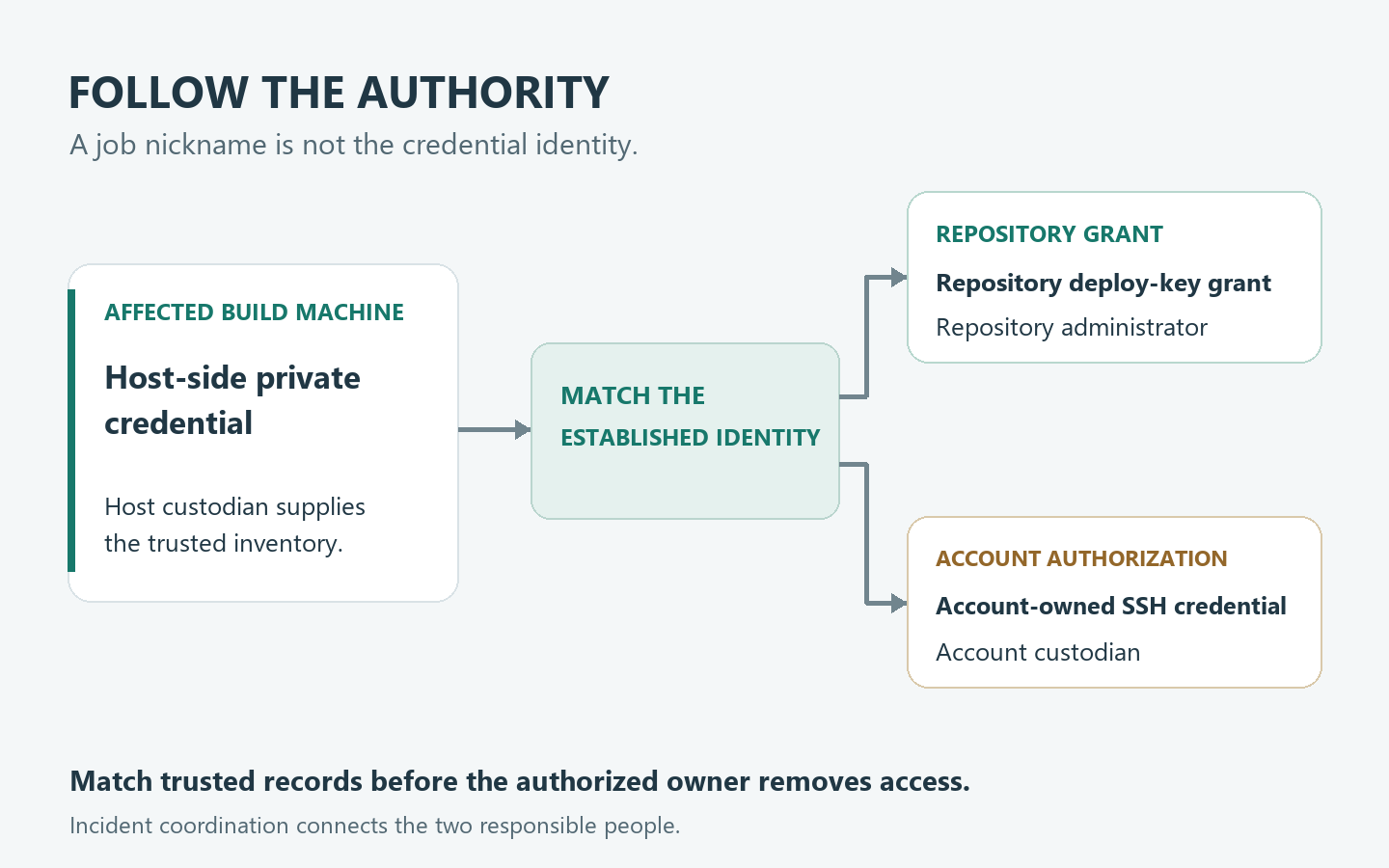
Find the Authorization, Not Just the File
A GitHub deploy key ties server-held private key material to public authorization on one repository, rather than a personal account.
That arrangement gives you two places to account for. Rebuilding one computer changes its local state; it cannot erase a credential copy someone already took elsewhere.
Start by asking what the affected machine actually used. A deployment nickname, repository link, and credential inventory entry answer different questions, even when their names look similar.
An inventory might say that a server prepares documentation, while a separate publishing service handles releases. Do not combine those roles just because both involve the same project.
An SSH key attached to a personal or machine-user account follows that account’s access instead.
Send that case to the account custodian as well as the project owner. Misclassifying it could leave other dependencies outside the investigation.
A credential used to reach a hosting machine is another possible destination. The word SSH describes a connection method, not the service that must revoke its authorization.
Record an unknown type as unresolved rather than converting a filename into a diagnosis. Ask the responsible operator to interpret established records without opening private key material.
Likewise, a source file mentioning GitHub is not an access inventory. It could describe an obsolete job, a public download, or a destination used elsewhere.
The difference matters when volunteers inherit a system with incomplete notes. The person maintaining today’s website may never have configured the old documentation machine.
Build a Two-Person Match Before Removing Anything
The host custodian explains what the affected machine could use. The repository administrator identifies the corresponding authorization under their control.
Neither person should guess the other’s half. A confident message saying that the server was rebuilt does not tell the administrator which entry to remove.
Use nonsecret records already held somewhere trustworthy: the established deployment purpose, responsible team, repository identity, and previously recorded public-key identifier.
Keep that identifier in the restricted incident record, not a public support thread. Never send the private key as an attachment to make matching easier.
| Question to resolve | Host custodian’s record | Authorization owner’s confirmation |
|---|---|---|
| Which deployment belongs to the affected machine? | Identify the intended job and machine. | Confirm the intended project and responsible team. |
| Which established credential identity matches both records? | Provide the approved nonsecret inventory reference. | Compare it with the controlled authorization record. |
| Which legitimate work might this interruption affect? | Identify dependent scheduled work and callers. | Notify the person responsible for release continuity. |
| Which important details remain unconfirmed in this incident? | Separate confirmed exposure from incomplete host records. | Record missing matches without declaring them safe. |
| Which responsible person will close each action? | Assign the host investigation and recovery owner. | Assign removal confirmation and project review separately. |
A friendly label such as publisher can appear in several internal systems. Treat it as a conversation starter, not sufficient evidence for a destructive selection.
When the records disagree, preserve both versions and their origins. Ask whether one predates a migration rather than deciding that the newest-looking screenshot must be correct.
The safe escalation is a specific unresolved match. State which machine, intended project, and existing record are involved, and who can authorize the next decision.
Do not resolve ambiguity by submitting the credential to an online checker. Nor should anybody clone a private repository from the suspect environment as a demonstration.
Two Publishing Jobs With the Same Nickname
The handbook machine and the website machine
Consider a nonprofit with a private volunteer handbook and a separate public website. Both automation entries have the informal name publisher.
In this hypothetical incident, the affected machine’s approved inventory matches the handbook credential. A separate record assigns the website credential to another machine.
The handbook grant permits reading; the website grant permits writing. These are different exposure decisions despite the matching nicknames.
The administrator matches the handbook entry using the established identifier. The incident record does not claim the other machine was checked simply because its job sounds similar.
That leaves two honest conclusions: the handbook authorization needs containment, and the website’s host scope still depends on the incident team’s findings.
The handbook contains draft volunteer schedules and internal contact notes. Its owner should consider those actual contents when deciding who needs a private notification.
A generic announcement that everything was stolen would outrun the evidence. Saying there is no concern because the public website still looks normal would miss the relevant material.
The useful handoff names the handbook owner and the affected time window. It asks what information needs protection, without attaching the handbook to the ticket.
Change one detail, and the review changes
Now suppose the affected host held the other credential instead. The release owner needs a different assignment from the handbook’s information custodian.
They should examine the relevant publishing decisions and outputs through the established incident process. They should not announce a tampered website before finding an actual unauthorized change.
The incident window might overlap a planned correction to donation instructions. The team must distinguish that approved edit from an unexpected alteration, rather than treating every difference as malicious.
Keep the release approval and the published result as separate references. One describes what someone authorized; the other describes what readers received.
If either record is missing, give that gap an owner. Restoring the normal homepage does not settle whether an earlier version was distributed elsewhere.
Permissions Describe Possibilities, Not an Incident Verdict
Deploy keys are read-only by default; write access allows repository pushes. Neither setting establishes what happened during your incident.
The practical distinction is confidentiality versus possible alteration. Missing commits cannot exclude earlier confidential copying.
Conversely, a permission capable of changing content is not a finding that content changed. The project investigation needs an actual discrepancy, its timing, and a responsible reviewer.
Do not inflate repository-specific authority into unrestricted organization administration. Keep conclusions tied to the matched grant and the surrounding evidence.
Ask the owner to describe the repository’s role before choosing an escalation. An internal reference manual, deployment source, and released software can have different downstream users.
For a shared project, identify who can explain expected changes during the window. An unfamiliar author name may belong to a normal automation or delegated release.
Preserve that explanation alongside the original observation instead of deleting the concern from the incident notes. A later reviewer should understand why it was resolved.
Why Changing Another Credential May Not Settle This One
Removing the creator from the repository does not revoke its deploy key. A former volunteer’s departure is not containment.
The deploy-key lifecycle reference also distinguishes the credential originally used to create it. Those creation relationships are not interchangeable.
- A personal access token’s deletion deletes its created deploy key; regenerating that token does not.
- Revoking the creating OAuth app token deletes its deploy key.
- Revoking a GitHub App user access token does not delete its created deploy key.
- Uninstalling or deleting the creating GitHub App leaves an installation-token-created deploy key intact.
These are explanatory conditions, not instructions to experiment with parent credentials. Such changes may interrupt unrelated work while failing to answer your specific matching question.
If the creation method is unknown, leave that field unresolved. The authorized administrator can still address the identified exposed repository entry directly.
Keep any account or application recovery action as a separate incident item. One person’s password change should not be relabeled as confirmation of every project’s containment.
When the Operator Uses CircleCI
CircleCI’s project-key guidance places its inventory under Project Settings, SSH Keys. Its deploy-key and user-key procedures specifically apply to github-type organizations.
It distinguishes repository-side removal for deploy keys from account-side removal for user keys. Additional SSH keys require identifying their actual target system.
That is a useful check when the operator and maintainer are looking at different controls. Removing a CI-side entry alone is not the complete service-side handoff.
Follow the procedure for the integration actually in use, not instructions borrowed from a different provider. Have the incident team plan replacement and recovery on trusted infrastructure.
A stopped job may simply have lost its local configuration. Its failure does not demonstrate that another copy of the old credential has lost authorization.
What to Do About the Exposed Deployment Access
-
Name the incident and responsible people. Record the affected host, known exposure window, intended deployment, and contact responsible for each side.
Use established internal communication from a trusted computer. If an organization manages the system, its responders should direct evidence preservation and containment.
-
Match the old identity before selecting removal. Compare the approved inventory with the intended authorization, not merely the job nickname or a remembered filename.
Escalate an incomplete match immediately rather than hiding it inside a completed checklist. Tell the administrator what is known and which source remains unavailable.
-
Remove the matched old repository grant. The authorized administrator opens repository Settings, selects Deploy keys in the sidebar’s Security section, and uses Delete on the matched old entry.
Follow GitHub’s current repository review instructions. Record the completed action independently from any host repair, without sweeping unrelated entries into the change.
-
Route account-owned credentials to their custodian. For a personal account key, GitHub’s SSH-key review uses profile Settings, then SSH and GPG keys.
Give the appropriate owner the established matching reference. Do not assume that an empty personal list explains an authorization held somewhere else.
-
Confirm the control-plane result without an access probe. Have the responsible administrator independently review the intended list and record the removed entry’s established identity.
A colleague should be able to reconcile that confirmation with the original request. Do not authenticate with the exposed key to prove that it fails.
-
Assign the necessary consequence review separately. Give the relevant information or release owner the incident window, actual project purpose, and unresolved evidence gaps.
Keep sensitive records inside the authorized response process. Publishing raw logs or internal content can create another disclosure while trying to explain the first.
-
Restore only through an approved recovery plan. Prepare legitimate replacement access on trusted infrastructure after its owner approves the required scope.
Do not return new credentials to an unresolved host. Record who may resume deployment work and what investigation continues afterward.
What a Useful Closure Record Actually Says
Keep the removal statement narrow enough for another administrator to verify. Identify the intended project, established old credential reference, responsible operator, action time, and confirmer.
Separate confirmed removal, host recovery, and possible earlier exposure into distinct fields. Their completion dates can differ without making the incident record contradictory.
For example, the authorization owner may finish containment while responders are still reviewing the machine. The release owner may remain responsible for explaining an uncertain output.
Likewise, an outage message should say which legitimate service is paused and who owns recovery. It need not expose the private incident inventory to everyone receiving updates.
If a previously unknown dependency fails later, preserve its error and notify its owner. Restore it through the recovery process instead of re-enabling exposed access.
Close an action when its specified outcome is confirmed, not when a chat conversation becomes quiet. Keep unresolved scope visible for the next shift or volunteer.
Frequently Asked Questions
What if I cannot see the repository settings?
Send the established project owner an urgent, restricted handoff. Missing authority is a reason to involve the responsible administrator, not to borrow credentials or abandon containment.
Can matching job names identify the correct entry?
Use the preincident inventory and responsible custodian to resolve the identity. Shared nicknames cannot distinguish the handbook example from its separate website deployment.
Should I send the private key to support?
Keep private key material out of messages and attachments. Share the approved nonsecret reference through your organization’s incident channel, and let the authorized owner perform the comparison.
Does a failed deployment confirm successful revocation?
The job can fail for unrelated configuration or connectivity reasons. Confirm the intended authorization change in its controlling service rather than treating a failed build as proof.
Must the public website be taken down immediately?
Let the incident and release owners decide from the actual scope and findings. A deployment credential concern alone does not establish that visitors received altered content.
Can removing access recover something already copied?
Containment and past disclosure are separate outcomes. Ask the information owner to assess affected material and necessary notifications while the team closes the old authorization.
The Bottom Line
Have the authorized owner remove the matched exposed grant from trusted equipment. Keep that confirmation separate from the affected host’s cleanup and the project’s consequence review.
If you cannot make the change yourself, send the specific handoff now. Coordinate the interruption and restore legitimate deployment only through a trusted recovery plan.

Join the discussion
0 commentsShare your experience or ask a question about this article.
Community experiences
Did this happen to you?
Your experience could help someone recognize the same scam. Submit a private report for our team to review.
I experienced this tooReports are reviewed before publication. Sharing publicly is always your choice.
Discussion
Start the conversation
Have a question or something useful to share? Add the first comment.