


You used a computer with your iPhone, then learned that the computer had malware. Suddenly, an ordinary charging or backup session feels much less ordinary.
The useful questions concern what you allowed, what might already be elsewhere, and which decisions you can make without returning to that computer.
Overview
The incident begins with the computer
A credible malware finding on a laptop deserves attention. It does not, by itself, establish that your iPhone is infected or that someone stole its contents.
Start with the actual report and your connection history. A family member’s confirmed detection is different from an alarming webpage claiming that every connected device needs repair.
Earlier copies and later connections need separate answers
Think in two directions: information that might already be on the computer, and whether you want that computer involved in your phone’s future use.
Changing a permission cannot call back a separate copy. Likewise, finding a copy does not tell you who viewed it or whether an attacker obtained it.
Your deliverable is a small, usable incident record
You do not need to reconstruct every tap before taking precautions. Preserve the difference between something remembered, something documented, and something nobody currently knows.
- Identify the affected computer and its responsible owner.
- Separate your recollection from existing, safely available records.
- Choose the phone-side action within your authority.
- Give unresolved copy questions to the incident handler.
Keep the Suspect Computer Out of Your Investigation
Do not reconnect your iPhone to the affected computer to reproduce a prompt, check a backup, or see whether the problem has disappeared.
For power, use a trusted USB power adapter. Apple’s accessory guidance says charging through an adapter does not require unlocking.
That gives you a practical way to keep using your phone while the computer’s owner handles the incident. Avoid experimenting with the suspect computer’s ports.
Do not ask a friend to connect their phone as a comparison. Another person’s device is not a diagnostic tool for an unresolved incident.
If the phone belongs to an employer or school, contact its support team before changing settings. Explain the connection and the computer involved, without sending private files.
Reconstruct the Session Without Repeating It
The most useful opening question is whether this was genuinely the first connection to that particular computer. A borrowed cable and a borrowed computer are different clues.
According to Apple’s computer-trust instructions, choosing Don’t Trust blocks the computer’s access to device content. Your iPhone can remember an earlier approval.
Write down what you recall before asking everyone else. Independent recollections are easier to compare when one confident person’s account has not replaced everyone else’s uncertainty.
Be specific about the task: charging before a flight, importing vacation pictures, or making a backup before a repair. The intended task helps identify useful witnesses.
Intention is not a record of completion. Saying that you meant to charge the phone should not become a confident claim that nothing else happened.
Nor should a vague memory of pressing Continue become a detailed account of which screen appeared. Preserve the uncertainty instead of filling it with likely-looking instructions.
A remembered request can concern a different control. Wired accessory approval and computer trust are separate questions; do not infer one permission from the other.
Apple Account verification uses trusted devices for sign-in codes. That account role is different from this computer’s pairing relationship with your iPhone.
If you already saved a relevant screenshot before the incident, retain its context privately. Do not circulate photographs containing contact details, device identifiers, or verification codes.
Two Columns Prevent One Setting From Becoming a False All-Clear
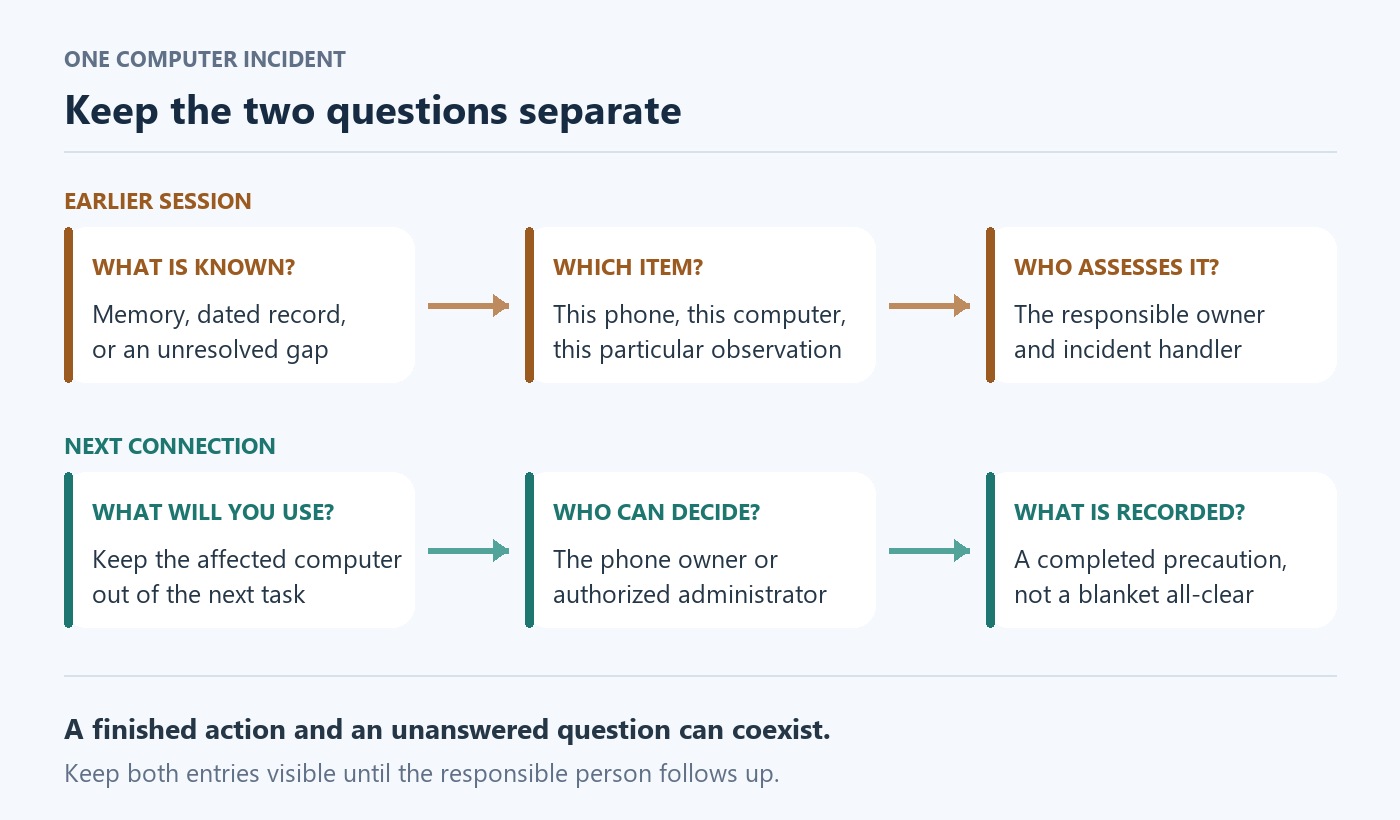
The diagram above is a conceptual worksheet, not an Apple interface. Its two lanes help you keep a completed precaution separate from an unfinished investigation.
| Question | Useful entry | Who owns the next decision? |
|---|---|---|
| What do you want to happen next? | The phone-side precaution, its completion time, and any unresolved management restriction. | The phone owner or its authorized administrator. |
| What can you establish about earlier use? | A particular remembered session, an existing copy record, or an explicitly unknown interval. | The computer owner and their incident handler. |
| What new information would change the assessment? | A reliable record tied to this phone and this computer, rather than a similar device name. | The person who can assess that record safely. |
Give entries ordinary descriptions rather than a combined risk score. A score can hide whether you are discussing a known document, an uncertain date, or a completed action.
Keep each observation’s original source attached. Your sister remembering an import and a technician identifying a particular copy are useful, but they are not the same evidence.
A precise unknown also helps: nobody knows whether the laptop was used between Monday and Wednesday. That is more informative than describing the entire week as compromised.
When new information arrives, update the relevant entry without rewriting the original recollection. Record who supplied it and whether they corrected an earlier assumption.
Decide Whether to Clear Computer Trust
For a previously trusted computer, clearing remembered trust is a reasonable precaution during an unresolved incident. On a managed phone, involve its administrator first.
A genuinely first-time connection with trust declined does not, alone, require this reset. Reconsider if the history subsequently changes.
Apple documents this route on the iPhone: Settings > General > Transfer or Reset iPhone > Reset > Reset Location & Privacy.
This clears remembered computer trust across the list, not just one laptop. Formerly trusted computers will require a new trust choice.
It also resets location and app privacy settings. Apps stop using Location Services until permission is granted again, as Apple’s privacy guidance explains.
Make this choice deliberately, especially if another legitimate computer is part of your routine. Plan any interruption before starting, rather than during an urgent task.
Handle subsequent requests thoughtfully rather than approving everything automatically. Take time to identify the app and its purpose before making another permission decision.
Read the selected reset label carefully before confirming anything. This task does not call for erasing the iPhone, resetting networking, or trying neighboring options for reassurance.
If management prevents the action, stop and contact the administrator. A missing control is not permission to remove management or use an unofficial utility.
Record the action you actually completed, not a stronger conclusion. Your note should not announce that the computer is clean or that every earlier copy disappeared.
Work Out What a Copy Record Actually Describes
Apple distinguishes syncing from a computer backup, which is stored on the Mac or PC. An iCloud backup is a different location.
Its backup-method explanation helps with terminology. For the incident, identify the particular item being discussed instead of treating every use of backup as equivalent.
Someone might remember copying several pictures into a folder. Someone else might remember a progress bar. Ask what they actually observed before combining those accounts.
A photo visible in a shared album has an additional possible route. Its presence does not identify this laptop as the source of that sharing.
Similarly, a recent cloud record cannot answer a question about a different destination. Ask the computer owner about that destination rather than interpreting unrelated evidence more confidently.
Apple’s encrypted-backup documentation describes dated records and a lock indicating encryption. Use an already-existing trusted record, not a new connection to obtain one.
Encryption can also change which sensitive categories a backup includes. Do not publish a guessed inventory of everything exposed or share a backup to settle the question.
Leave deeper examination to the authorized incident handler. Do not search for encryption passwords, extract pairing records, or upload the phone’s data to an online checking service.
Three Connection Histories, Three Different Decisions
These fictional situations change one material detail at a time. They illustrate decisions, not tested attacks, actual device findings, or estimates of how often theft occurs.
A first-time borrowed computer, with the request declined
A traveler briefly uses a hotel colleague’s laptop for power. She remembers declining the request and has never used that particular computer before.
Later, its owner reports confirmed malware. Her useful starting statement includes those two observations, not an invented account of a backup she never saw.
She stops using that computer and records the approximate connection time. She does not need to prove her memory by arranging another session.
Suppose the owner then says someone else used a similar-looking laptop. The device identity now needs clarification, preferably from their existing records rather than the traveler’s phone.
The important correction concerns which machine was involved. It would be unhelpful to change several unrelated phone settings while leaving that basic question unresolved.
If she later remembers using the same laptop months earlier, the original first-time assumption changes. She should tell the owner instead of defending the earlier account.
A household laptop with a known earlier backup record
A student used the family laptop on Sunday before a phone repair. On Wednesday, the laptop owner receives a confirmed malware finding.
The family already has a Monday record associated with the student’s phone. A vacation picture also appears in an album shared with several relatives.
These observations should not be collapsed into one story. The Monday item and the album image need their own descriptions and people able to explain their origins.
The student asks the laptop owner to retain the existing record for the incident handler. She does not ask a relative to open its contents and browse.
She also tells the handler whether the repair appointment involved particularly sensitive documents. Describing a category is enough initially; attaching the actual documents would create another unnecessary copy.
The malware detection time is Wednesday, but that alone does not date the beginning of the incident. The handler should assess the relevant interval without assumed precision.
If the Monday record concerns an old replacement phone instead, correct the device match. A familiar family name is insufficient when several devices share it.
The household needs an owner for both follow-ups: the student’s phone decision and the laptop owner’s assessment. Neither person should assume the other finished everything.
If the laptop must remain unavailable, discuss an alternative for the student’s upcoming repair with the repair provider. Do not reconnect merely to avoid an inconvenient delay.
An old work-computer relationship with an uncertain last use
An employee remembers regularly using an office computer last year. The organization now reports an incident, but the employee cannot remember the final connection date.
He should identify the workstation and contact IT through the established channel. A similar desk location or reused computer name may need clarification.
He can supply travel dates or an existing support ticket if relevant. He should not invent an exact session time because an incident form expects one.
Personal recollection and the organization’s investigation may eventually narrow the interval differently. Keep both accounts labeled until the responsible team reconciles them.
If the phone is managed, explain that before requesting changes. The team needs to know who controls the phone as well as who controls the workstation.
Do not send colleagues a request to hunt through the computer. A well-intended search can spread personal information and interfere with the organization’s response.
Ask who will tell you whether further action is needed and how that message will arrive. An agreed follow-up prevents an unresolved question from quietly being forgotten.
Until then, keep the workstation out of your phone routine. A supervisor wanting a convenient transfer does not settle the technical incident or authorize a workaround.
Do Not Turn Thirty Days Into a Safety Deadline
Apple’s pairing security guide says unused pairing records expire after more than 30 days on iOS 11 and later.
That interval concerns record use, not days since malware detection.
For the employee above, an uncertain last use remains uncertain. A calendar calculation based on the announcement date would answer the wrong question.
Even a reliable old date would not reconstruct what happened during an earlier incident interval. Avoid using an expiry rule as a substitute for investigating that interval.
What to Do After Your iPhone Used the Computer
-
Keep the affected computer out of further phone use. Choose an alternative for charging or essential tasks before convenience pushes you into another connection.
-
Write a brief factual connection history. Include the equipment identity, intended task, approximate date, and which observations come from memory rather than records.
-
Decide the phone-side precaution with its owner. Use the documented route above when appropriate, understanding its broader effects before proceeding.
-
Identify someone responsible for the computer’s assessment. Give them the relevant history and ask who will handle any existing personal copies.
-
Protect the record without distributing the contents. Share categories and necessary context privately, keeping passwords, codes, and personal files out of ordinary support messages.
-
Record the unresolved question and next contact. A named person and agreed follow-up are more useful than an unsupported statement that everything is now safe.
For example, ask whether the responsible team can establish the relevant computer and interval. Avoid asking them to guarantee that an undocumented event never happened.
If evidence concerns an account as well, tell its responsible provider or administrator. Do not assume a phone setting completes a separate account investigation.
Where the computer contains the only known copy of important information, say so before anyone deletes or rebuilds it. Preservation and incident response need coordination.
There is no need to gather every photograph or message for that conversation. Start with the minimum information that lets the responsible person identify the issue.
Frequently Asked Questions
Does the computer finding mean my iPhone needs erasing?
No, that conclusion needs separate evidence about the phone. Keep the response tied to the reported computer incident rather than escalating uncertainty into an irreversible action.
Should I reconnect just to check what the phone remembers?
No, reproducing the session would add an unnecessary connection. Use your existing recollection and safe records, leaving any remaining uncertainty explicit for the incident handler.
Why does it matter who owns the phone?
The person reporting a computer incident may not control your phone’s settings. Identify the authorized decision-maker instead of following instructions that exceed that person’s responsibility.
Does a lock on an existing record settle the incident?
No, an indicator cannot identify who used information. Ask the responsible handler to assess the particular item and incident.
What if another computer is needed for an urgent task?
Explain the deadline to the appropriate provider or administrator and arrange a trusted alternative. Do not let urgency turn the affected computer into the default solution.
What should I ask a workplace support team?
Identify the workstation, phone ownership, approximate session, and urgent dependency. Ask who owns the follow-up and which existing information they need without requesting a policy bypass.
The Bottom Line
Keep the affected computer away from your iPhone, make a deliberate phone-side permission decision, and give the responsible owner a clear account of earlier use.
Treat existing copies as a separate follow-up, not something a settings change retrieves. Preserve useful information without reconnecting, extracting secrets, or deleting the only copy.
Finish with two honest entries: the precaution completed and the question still assigned for assessment. That is a useful response without claiming an unsupported all-clear.

Join the discussion
0 commentsShare your experience or ask a question about this article.
Community experiences
Did this happen to you?
Your experience could help someone recognize the same scam. Submit a private report for our team to review.
I experienced this tooReports are reviewed before publication. Sharing publicly is always your choice.
Discussion
Start the conversation
Have a question or something useful to share? Add the first comment.