

You get an alarming text that your car has outstanding toll fees in Washington that must be paid immediately to avoid huge late penalties. The message provides a link to quickly settle your “balance” online. But it’s a sneaky scam to trick you into handing over personal information and money.
Scam texts impersonating GoodToGo toll services are on the rise in Washington state. The messages claim you owe unpaid tolls and face steep fines if not resolved promptly. However, the texts and linked websites are completely fake, designed solely to commit identity theft and steal funds.
This article reveals everything you need to know about recognizing GoodToGo toll scams and keeping your information safe. Don’t let these phishing texts send you down the wrong road.
Overview of the GoodToGo Toll Scam
This sophisticated toll scam starts with an alarming text message insisting you have unpaid toll bills requiring instant payment. The message seems credible on the surface, crafted to dupe hurried drivers into clicking malicious links. However, the entire thing is a fraud, with fake texts and websites set up to steal personal information and money.
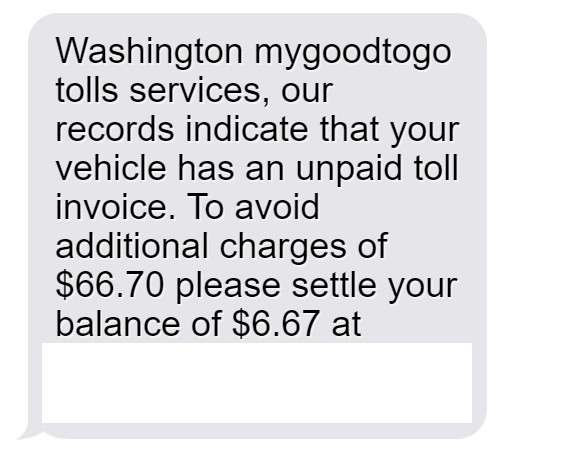
This toll phishing scam typically begins with a text such as:
“Washington mygoodtogo tolls services, our records indicate that your vehicle has an unpaid toll invoice. To avoid additional charges of $66.70 please settle your balance of $6.67 at https://mygoodtogotoll.com.“
The message cites specific unpaid toll balances and escalating late fees. The threat of exorbitant fines provides urgent pressure to visit the link and pay right away before penalties swell.
However, every single element of this text is deceptive and fraudulent. The scammers leverage two common fears – owing money to the government, and consequences for not paying promptly. But their only true goals are identity theft and stealing funds.
Here are the many red flags revealing this as an outright ruse:
- There is no real agency called “mygoodtogo tolls services” – This fictional name is engineered to sound vaguely official. The real toll collector is GoodToGo.
- Toll fees are never communicated via text message – Legitimate notices only come through postal mail. Agencies do not text residents about money owed.
- Threatening steep late fees for urgent payment is a deception tactic – While penalties do apply to tolls, scammers exaggerate the immediacy to panic victims.
- The website URL does not match the official GoodToGo site – mygoodtogotoll.com is a total scam portal made to phish users.
- Toll balances are never extremely low like $6.67 – Most tolls exceed $10, making the small “debt” clearly suspicious.
- The area code on the text is not local to Washington – Scam messages frequently originate from random distant locations.
- The linked text has no way to opt-out – Legitimate services enable you to reply STOP to halt messages.
- Caller ID displays unfamiliar digits – Scammers use spoofed numbers impossible to call back or verify.
The toll scam text looks credible only until you analyze its questionable claims and manipulative techniques. It exploits worries over government debt and penalties to create urgency. However, real agencies don’t engage in sinister text threats and demand rash online payments.
Understanding the inherent red flags in the message allows drivers to detect this scam before getting duped. The false authority, unknown links, exaggerated threats, and other shifty tactics reveal a calculated fraud tailored to deceive. But an informed public that knows these warning signs can steer clear of the traps set by toll phishing crooks. Don’t let an alarming text push you to give up your personal or financial data carelessly. Protect yourself by recognizing the hallmarks of scams trying to reroute you into a hazardous fraudulent site.
How the GoodToGo Toll Scam Unfolds
The GoodToGo scam uses deceptive texts and websites to trick hurried drivers into paying fake toll bills. Here’s exactly how it unfolds:
Step 1: Drivers Receive a Text About Unpaid Tolls
People throughout Washington suddenly get a text out of the blue:
“Washington mygoodtogo tolls services, our records indicate that your vehicle has an unpaid toll invoice. To avoid additional charges of $66.70 please settle your balance of $6.67 at https://mygoodtogotoll.com.”
The alarming notice of escalating late fees scares many into wanting to urgently pay their “bill” online. However, the unpaid toll balances are completely fabricated.
Step 2: The Text Provides a Link to a Fake Website
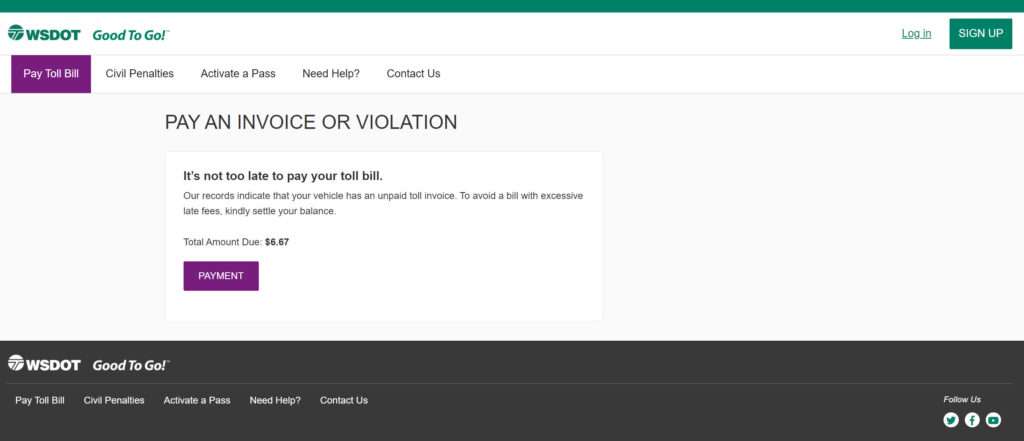
The text includes a URL that leads to a phishing site instead of the official mygoodtogo.com. The fraudulent site is designed to look somewhat like a legit online toll payment portal at first glance.
Those hoping to quickly pay the tolls before fines accrue will click the link, believing it lets them settle the fees and avoid penalties. But in reality it takes them right into the scammers’ trap.
Step 3: The Fake Site Requests Personal and Billing Details
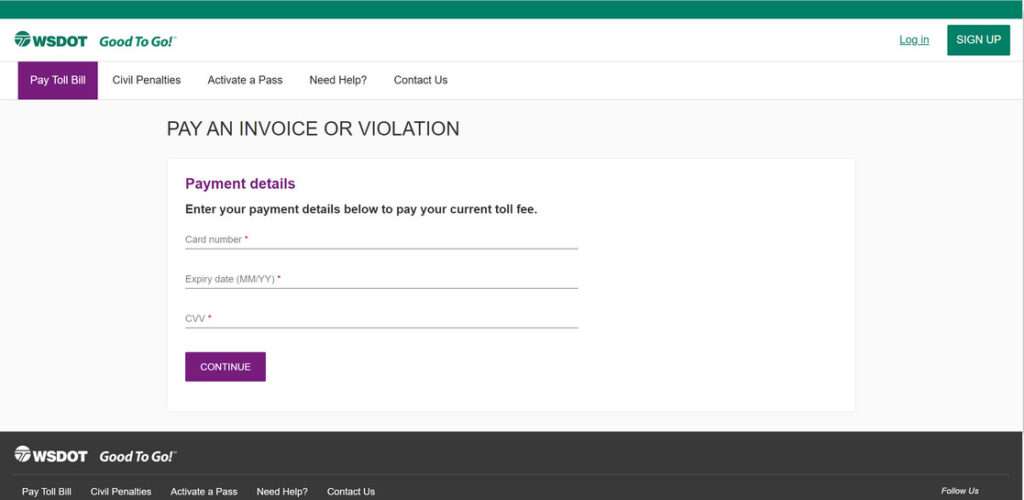
At the phishing site, users see webforms requesting:
- Full name
- Home address
- Email address
- Phone number
- Vehicle information
- Driver’s license number
It also requires credit card details like:
- Card number
- Expiration date
- CVV code
The site claims this info is required to look up and pay your outstanding toll balance. But in reality, it’s all used to steal identities and money.
Step 4: Scammers Use Your Information for Theft and Fraud
Once users submit their private data and credit card info, the scammers immediately put it to criminal use. They will:
- Make unauthorized transactions with your card info
- Open fraudulent accounts in your name with the stolen identity details
- Commit other types of identity theft using the personal data
Meanwhile, the fake site shows a “confirmation” that tolls are paid. But the damage is already done through the stolen information.
How to Identify GoodToGo Toll Scam Texts and Websites
Spotting the deceptive toll scams requires watching for numerous red flags in both texts and sites. Here are the top signs of fraudulent toll messages and portals:
Hallmarks of GoodToGo Scam Text Messages
- Aggressive threats of imminent penalties or fees if tolls aren’t paid extremely quickly
- Phone numbers and links that don’t match the official mygoodtogo.com site
- Strange area codes far from your location
- Poor grammar, spelling errors, and other sender mistakes
- No way to reply STOP to opt-out of more text messages
- Attempting collections via text instead of postal mail
Warning Signs of Fake GoodToGo Websites
- The URL does not match the valid mygoodtogo.com website
- No customer service contact information provided
- Payment pages lack standard security encryptions
- Vague outstanding balance data without trip/toll details
- Confirmations only showing payment without specifics
- Excessively long forms requesting loads of personal info
Legitimate toll notices always arrive by mail, never text, with verifiable letterheads and agency information. Official sites have distinct verifiable traits. Keep watch for any discrepancies you notice while trying to urgently resolve surprise “bills” from peculiar texts. Don’t let scammers rush you off the proper path.
By learning the latest techniques used in toll phishing scams, drivers can steer clear of hazardous traps. Safeguard your journey by using vigilance and verification to avoid handing over your personal data and hard-earned money.
What to Do if You Fell for the GoodToGo Scam
If you already entered your information or paid money on one of the fraudulent toll websites, take these steps right away to minimize damages:
- Contact your credit card provider and bank immediately to report any fraudulent charges or suspicious activity. Ask them to reverse the charges and send you a new card with changed account details so the scammers cannot continue using your payment information.
- Place fraud alerts on your credit reports and sign up for credit monitoring services. This will require you get alerts for any new activity on your credit so you can stay on top of criminal misuse of your identity. Monitor all three credit reports frequently yourself as well for unfamiliar accounts opened in your name.
- Consider placing a credit freeze on your credit reports while you assess the scope of the identity theft. This will restrict access to your credit history and prevent criminals from opening more fraudulent accounts. Assess after a few months if the freeze can be lifted after the scam threat passes.
- Change any passwords that you used on the phishing toll site right away. If you reuse passwords across accounts, the criminals could gain access to your email, banking sites or other sensitive accounts. Enable two-factor authentication wherever possible for added security on accounts.
- File a report about the scam with the FTC to help warn others of new toll phishing tactics. You can also file a local police report about the identity theft and cybercrime. Provide copies to creditors to help remove fraudulent accounts opened by scammers.
- Closely monitor all your financial accounts, not just credit cards, for suspicious transactions, transfers or withdrawals. Scammers who have your information may attempt to drain balances. Alert your banks to suspected fraud.
- Consider signing up for an identity theft protection service, which adds an extra layer of monitoring across your personal information and provides insurance and assistance. This can help restore your peace of mind.
- Check your medical records for any signs of fraud, like bogus treatments or prescriptions. Scammers can use stolen personal data to commit medical identity theft as well.
While falling victim to the toll scam is worrying, take a deep breath and methodically work through each step above to halt the damage and re-secure your identity. Stopping these criminals quickly limits their ability to misuse your data further.
FAQs: How to Identify Fake GoodToGo Toll Scam Texts
1. What is the GoodToGo toll scam?
The GoodToGo scam sends fake texts about unpaid tolls, directing victims to fraudulent websites to steal personal and financial information.
2. How does the GoodToGo toll scam work?
You’ll get a text that your car has unpaid tolls in Washington and you must pay immediately on their site before huge late fees. But it’s a phishing site to steal private data.
3. Are the unpaid tolls in the texts real?
No, the texts about owing toll money are totally fabricated to trick you. Legit unpaid toll notices only come by mail from state transportation agencies.
4. What should I do if I receive a GoodToGo scam text?
Don’t click any links. Contact the real transportation department to check your toll status. Report the scam text to 7726. Watch accounts closely if you shared information.
5. How can I identify the GoodToGo scam texts?
Fake texts have poor grammar, threats of quick penalties, and suspicious links. Real toll info only comes via postal mail.
6. Is mygoodtogotoll.com a valid website?
No, mygoodtogotoll.com is a fraudulent phishing site pretending to collect toll payments but actually stealing data.
7. How do I avoid GoodToGo toll scams?
Don’t click questionable text links. Verify unpaid tolls directly through official channels like the DOT site or mailing address. Never enter personal/financial data on sketchy sites.
8. What if I already submitted details to a fake toll site?
Promptly alert your bank of any fraudulent charges. Put fraud alerts on your credit and monitor closely. Change any passwords reused on the phishing site.
9. Can I get in legal trouble for not paying the fake tolls?
No, you cannot get in any trouble for ignoring the scam texts as they are fabrication, not real tolls. Confirm status officially to address actual unpaid toll fees.
10. What are the best practices to avoid phishing scams?
Watch for bad grammar, threats demanding quick payment, and unknown sender addresses. Verify legitimacy through official channels – not questionable texts or links.
The Bottom Line
The fraudulent GoodToGo texts and websites prey on urgent fears of owing the government money in penalties. But understanding their shifty techniques allows Washington residents to evade the traps.
Legitimate toll agencies do not attempt collections via aggressive text threats. Verifiable mail notices come from official DOT channels. Don’t let these shakedown artists pressure you into reckless payments or giving up valuable personal data.
Stay vigilant against toll and traffic fines scams trying to divert you into dangerous territory. Keep your eyes on the road and delete these frauds from your phone to stay safely ahead.

Join the discussion
0 commentsShare your experience or ask a question about this article.
Discussion
Start the conversation
Have a question or something useful to share? Add the first comment.