

Have you seen ads promoting Google Captchas as a way to earn easy money online? Beware – many of these are actually scams designed to steal your money and personal information.
Overview of the Google Captchas Scam
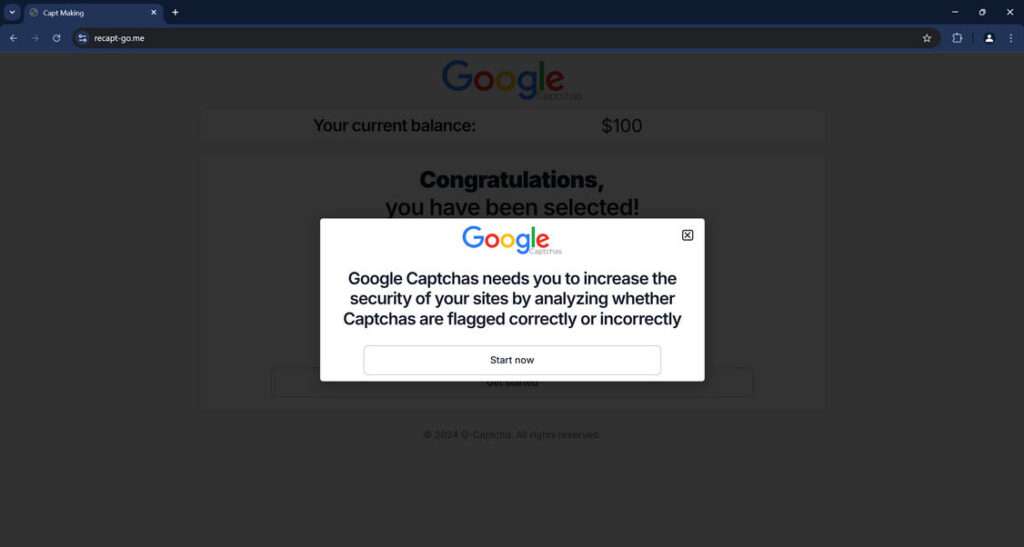
The Google Captchas scam involves fake websites that falsely claim to be associated with Google. These scam sites say that Google has created a new program that pays users to analyze Captchas (those squiggly text images used to verify if you’re a human).
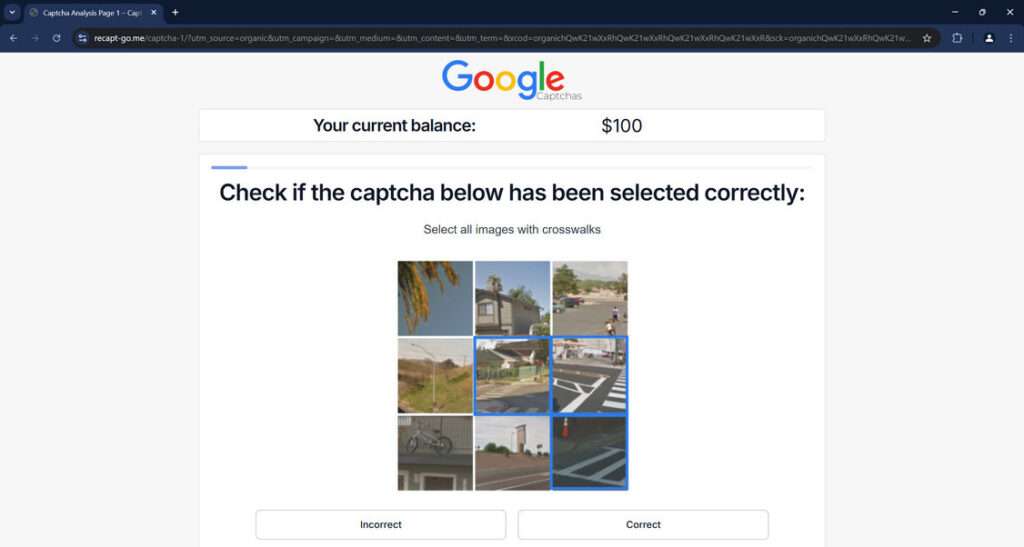
According to the scam sites, Google will pay you to determine if Captchas have been flagged correctly or incorrectly. The sites claim you’ll earn money for each Captcha analysis, with the ability to withdraw your earnings after completing just a few tasks.
However, this is simply a ploy to steal money and personal data from victims. Google has not created any program that pays people to analyze Captchas. The scammers are impersonating Google to seem more legitimate and trick users into handing over money and information.
How the Scam Works
Here are the typical steps used by scammers to perpetrate the Google Captchas scam:
1. Scam Sites Promise Easy Money for Analyzing Captchas
The scam starts with websites that falsely use Google’s logo and claim you can earn money by analyzing Captchas for accuracy. For example, a scam site might say:
“Google Captchas needs you to increase the security of your sites by analyzing whether Captchas are flagged correctly or incorrectly. Your starting balance is $100. Take just 3 analyses and make your first withdrawal!”
The sites make it seem very quick and easy to start earning money. They know that promises of fast cash will attract many victims.
2. Scam Sites Instruct You to Analyze Sample Captchas
If you show interest, the scam sites will have you analyze 3 sample Captchas to demonstrate how it works. After completing this test analysis, the sites will add money to your account balance – often $25 for each Captcha.
So if you analyze 3 test Captchas, your supposed balance might show $180 ($25 x 3 Captchas + original $100 starting balance). This makes victims think they’re already earning money.
3. Scammers Ask for an Upfront “Registration Fee”
Next, the scam sites will instruct you to register your bank account so you can withdraw your earnings. But there’s a catch. You first have to pay a small one-time “registration fee.”
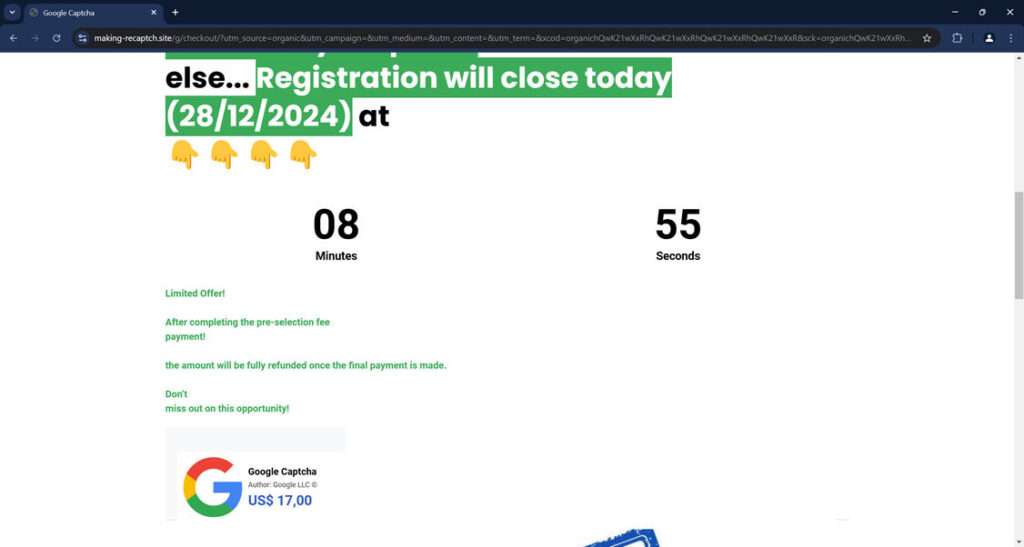
This is usually around $17 and is said to cover costs for verifying your identity and processing payments. The scam sites stress that this fee will be “fully refunded” after you complete additional Captcha analyses.
Of course, the registration fee is never refunded. The scammers simply pocket the money.
4. Scam Sites Require More Captcha Tasks Before Withdrawal
After paying the “registration fee,” victims are instructed to complete more Captcha analysis tasks before being allowed to withdraw earnings.
The scam sites might require anywhere from 10 to 40 additional Captcha analyses, promising victims can withdraw their balance after finishing this work.
But this is just another scheme to waste the victim’s time while scammers collect registration fees from as many people as possible. The fraudsters have no intention of ever paying out earnings.
5. Scammers Take Money and Run
Ultimately, victims complete the required Captcha analyses but are unable to withdraw their supposed earnings. The scam sites either stop responding or make more ridiculous excuses why victims can’t get paid yet.
Meanwhile, the scammers have already collected all the registration fees and disappeared with the money. The scam sites often quickly disappear as well.
By mimicking Google and using fake promises of easy money, scammers can trick many victims before their site is flagged as fraudulent. They can quickly rake in thousands of dollars from registration fees while paying nothing out to users.
Warning Signs of the Google Captchas Scam
Here are some red flags to recognize so you can steer clear of Google Captchas scams:
- Claims you can earn money for analyzing Captchas or completing other simple online tasks. Google does not currently offer any such program.
- Requires an upfront registration fee before allowing you to withdraw earnings. Legitimate sites do not charge you to access your own money.
- Uses high-pressure tactics claiming the offer is limited. Scammers want to rush victims so they don’t have time to realize it’s a scam.
- Promises you’ll earn well above normal market rates for simple online work. Anything that seems too good to be true probably is.
- Site has a name trying to mimic Google or uses spoofed logos. For example “Google Inc” instead of “Google LLC”.
- Poor grammar, spelling errors, or otherwise unprofessional looking site. Scam sites are often hastily put together.
- Requires personal information like credit card details. Google would never ask for such info just to analyze Captchas.
- Website domain is not affiliated with Google. Check that the domain is “google.com” not some lookalike.
If you come across a site showing any of these warning signs, avoid it. Do not enter any personal information or pay a registration fee. Report scam sites to warn others.
Examples of Known Google Captchas Scam Sites
While new scam sites pop up all the time, here are a few that have been actively deceiving victims:
making-recaptch[.]site
This site claims to be run by “Google Captcha” and says you can earn money by analyzing Captchas for errors. It asks for a $17 registration fee before allowing you to withdraw your supposed earnings.
recapt-go[.]me
Similar to making-recaptch[.]site, this fraud site says it will pay you to check Captchas for accuracy. Victims are instructed to analyze sample Captchas then pay a fee to register before withdrawing funds.
There are likely hundreds more scam sites following this same formula. Avoid any site promising easy money for solving Captchas or online microtasks.
Who is Behind the Google Captchas Scam?
These types of scams are often run by organized cybercriminal groups rather than lone scammers. Complex operations using fake sites and mimicking major companies require teamwork and technical skills.
Some known scammer groups behind Captchas scams and similar cons include:
- Eastern European cybercrime rings: Sophisticated hacker networks in Russia, Ukraine and elsewhere run fake sites and phishing schemes to steal money.
- Chinese scam cells: Groups coordinate scams from overseas to target victims worldwide. China-based scammers are active in many frauds.
These scammers are skilled at masking their identity and location using phony names, anonymity services, and indirect payment routes. This makes the crooks hard to track down and prosecute.
Law enforcement worldwide tries to fight back against scam networks through cybercrime task forces and international cooperation. But the sheer volume of scam sites makes it difficult to permanently shut down these criminal groups.
Consequences and Costs of the Captchas Scam
At first glance, losing a $17 registration fee may seem like a small amount. But the Google Captchas scam can have wider reaching consequences:
- Financial loss: Victims could lose much more than just the fee if scammers also steal banking or credit card information provided on scam sites.
- Wasted time: The scam purposefully wastes people’s time completing useless Captcha tasks that never pay off. This takes focus away from legitimate work.
- Damaged credit: If scam sites misuse financial data, victims could end up with fraudulent charges on their accounts, damaging their credit.
- Increased spam: By collecting email addresses, scammers often resell victims’ contact info to shady marketers, resulting in more spam.
- Malware risks: Scam sites could attempt to install malware on victims’ devices to steal data, hijack computers, or spy on users.
- Identity theft: When entering personal data, victims risk scammers stealing their identity to open fraudulent accounts or gain access to existing accounts.
While any one person’s direct financial loss may be limited, the cumulative impact across thousands of victims enables these criminal networks to profit immensely.
How to Report Google Captchas Scam Sites
If you encounter a suspected Google Captchas scam site, take the following steps to report it:
- Notify Google directly via their Spam Report form.
- File a complaint with the Federal Trade Commission at FTC.gov.
- Report the site to the Anti-Phishing Working Group through their website submission form.
- Submit the scam site URL to PhishTank, a collaborative clearinghouse for reporting phishing scams.
- Use your browser’s reporting tool to flag the scam site. In Chrome, right-click the page and select “Report site for abuse.”
- Report fake Google sites via Google’s impersonation reporting page.
- Contact the web domain registrar and file an abuse report about the site misusing their domain.
- Warn friends, family, and online communities about new scam websites to prevent more victims. Share specific site details, not just “Google Captchas scam.”
The more people report these fraudulent sites, the faster they can be shut down to prevent further spread. Legitimate registration fees should always be refundable, and real Google services would never pressure you to pay urgent deadlines.
What to Do if You Are a Victim of the Scam
If you already paid a registration fee to a Google Captchas scam site, take these steps right away to limit damages:
1. Contact Your Bank
Alert your bank or credit card provider that you paid a fee to a scam site misrepresenting Google. Closely monitor your accounts for any further suspicious charges. Consider canceling any compromised cards.
2. Change All Passwords
Reset passwords for all of your online accounts, prioritizing financial accounts and email. Use strong unique passwords for each account. Enable two-factor authentication wherever possible.
3. Place Fraud Alert
Contact one of the three credit bureaus to place a free 90-day fraud alert on your credit file. This requires creditors to verify your identity before issuing new credit.
4. Monitor Credit Reports
Get free copies of your credit reports from Equifax, Experian and TransUnion. Review all activity for any accounts opened fraudulently. Dispute any bogus charges.
5. FTC Identity Theft Report
File an identity theft report with the FTC at IdentityTheft.gov. This helps you deal with credit issues resulting from the scam.
6. Local Police Report
File a report about the scam with your local police department. Get a copy of the police report in case banks or creditors need proof of the scam.
By taking quick action, you can contain the damage caused by sharing your information on scam sites. Don’t let embarrassment or fear prevent you from reporting the scam to authorities who can help protect others.
Frequently Asked Questions about the Google Captchas Scam
1. What is the Google Captchas scam?
The Google Captchas scam involves fake websites that falsely claim Google needs people to analyze Captchas for errors. The sites say you can earn money just by determining if Captchas have been flagged correctly or not. However, it’s a scam designed to steal your money and information.
2. How does the Google Captchas scam work?
The scam sites convince victims they can earn quick money by completing a few sample Captchas. After adding funds to your supposed account balance, the sites instruct you to pay a small “registration fee” before withdrawing earnings. This fee goes straight to the scammers.
3. What are some tactics used in the scam?
Tactics include high-pressure countdowns, too-good-to-be-true offers, mimicking Google’s logo and colors, poor grammar, spelling errors, requests for financial details, and more.
4. What are some example scam site names?
Some known scam sites are making-recaptch[.]site, recapt-go[.]me, google-analytic[.]com, and captcha-work[.]co. Many other copycats exist.
5. Who is behind the Google Captchas scam sites?
Cybercriminal networks and individual scammers often run these sites to quickly collect registration fees before shutting down. Groups may operate out of places like Nigeria, Eastern Europe, or China.
6. What are the costs and consequences of this scam?
Beyond losing the registration fee, consequences can include stolen financial data, wasted time, damaged credit, increased spam, malware risks, and potential identity theft.
7. How do I spot and avoid Google Captchas scams?
Look for red flags like pressure to act fast, promises of easy money, fake Google branding, poor site quality, urgent fees, and requests for personal information.
8. What should I do if I already paid the scam registration fee?
Immediately contact your bank, reset all account passwords, place a fraud alert, monitor your credit, and file reports with the FTC and police.
9. How can I report a Google Captchas scam site?
Report scam sites to Google, FTC, Anti-Phishing Working Group, PhishTank, and the relevant domain registrar. Warn other potential victims.
10. How can I protect myself from online scams in the future?
Be wary of any offers that seem too good be true. Only provide personal info and payment details to established, trusted sites. Research unfamiliar sites thoroughly first.
The Bottom Line
The Google Captchas scam demonstrates how seemingly harmless microtask sites can actually be fronts for collecting fees from unsuspecting victims. Avoid sites that require registration payments just to access your own funds.
Legitimate sites do not pressure users with countdown timers and too-good-to-be-true offers. Carefully research any site asking for financial information or promising easy income analyzing simple online tasks.
Look for warning signs like copycat sites, urgent deadlines, and requests for fees before withdrawal. Only enter your personal details on established, trusted sites with a known reputation.
By being aware of common tactics used in the Google Captchas scam, you can protect yourself and your finances. Report any suspicious sites impersonating Google or major companies. We can disrupt these criminal networks by sharing scam information and refusing to be deceived by their schemes.
Stay vigilant online and don’t let scammers trick you into giving up your hard-earned money.

Join the discussion
0 commentsShare your experience or ask a question about this article.
Discussion
Start the conversation
Have a question or something useful to share? Add the first comment.