

A link arrives with a familiar-looking web address and a reason to sign in again. The page that opens looks like a service you already use.
That moment is easy to dismiss as a routine login problem. In the GTFire phishing scam, even the page’s apparent location helps sell the illusion.
Overview
The address borrows trust from real Google services
GTFire is a phishing campaign that routes people through Google Translate and hosts imitation login pages on Google Firebase infrastructure.
Both services are legitimate. The criminals exploit features available to users; the investigation does not say Google broke into anyone’s account or created the fake pages.
A reader who notices a Google-owned address may assume the entire journey is safe. That assumption is exactly what the campaign uses.
The phishing site then imitates the sign-in for an unrelated organization and asks for credentials. That final form, not the Google service, is the trap.
The scale goes well beyond one suspicious email
Group-IB’s February 2026 investigation mapped stolen credentials associated with more than 1,000 organizations in over 100 countries.
Researchers documented the hosting pattern, redirect chain, fake login forms, and storage of captured data. This is a verified phishing mechanism, not a single person’s guess.
The organization count should not be read as 1,000 breached companies. It describes organizations associated with victims in the exposed campaign data.
Nor does every translate.goog or web.app address indicate fraud. Many ordinary sites use those services without any malicious purpose.
The second password attempt is part of the theft
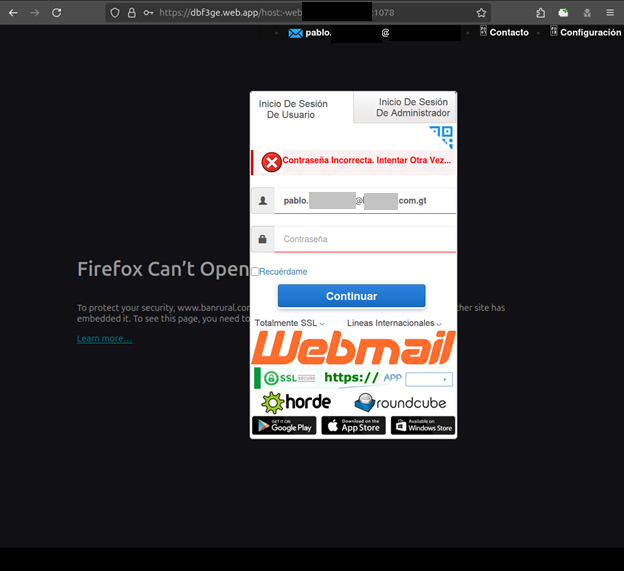
In the captured flow, the imitation login presents an incorrect-password message after the first entry. It collects that entry, then asks the visitor to try again.
The second attempt may catch the correct password if the first was mistyped. Afterward, the visitor may be sent to the real organization’s website.
- The initial message offers a reason to open a link and sign in.
- The link passes through a Google Translate address that looks familiar.
- A Firebase-hosted page displays an imitation login for the chosen brand.
- An invented error prompts a second password submission.
- A redirect to the genuine site can make the incident seem like a glitch.
If a page reached from an unsolicited message suddenly asks you to prove access, start over at your organization’s usual bookmark or app.
How a Trusted Domain Becomes a Misleading Clue
Many phishing warnings tell people to inspect the web address. That advice still matters, but this case shows why a partial address check is not enough.
Google Translate’s website feature can present another website through a translation proxy. A link to that proxy can begin at a Google-controlled domain.
In ordinary use, the feature helps read a foreign-language page. The content being displayed still originates somewhere else and must be judged separately.
The campaign uses this distinction. A message can show a Google-looking starting point while its intended destination is a fraudulent sign-in page.
Firebase is also a real Google hosting product. Many independent developers use it, and an attacker can deploy a page there like any other user.
Seeing web.app in an address confirms a hosting platform, not that a bank, employer, or email provider approved the page’s request.
Group-IB observed fast-changing Firebase subdomains and reusable brand templates. When one page is blocked, the operator can put up another with similar content.
The deception is not a perfect forgery of a Google sign-in. It is the borrowing of a trusted route and host for someone else’s fake form.
That nuance matters when you report it. Google is the abused infrastructure provider; the phishing operator is the actor asking for your password.
How the GTFire Phishing Scam Works
Step 1: A message creates a reason to revisit a login
The contact can arrive in a phishing message. Its exact wording can vary with the impersonated organization, language, and service.
A mailbox warning, document notice, or account verification request fits the pattern because each gives the recipient a familiar reason to sign in.
The email shown later in this article is an illustrative reconstruction, not a captured GTFire lure. The verified research focuses on the redirect and fake login.
Do not assume a sender’s display name proves that the message came from your employer or provider. The name can be set by whoever sent it.
Step 2: The link enters the translation proxy
Instead of pointing directly to a conspicuous lookalike domain, a campaign link can pass through translate.goog and its URL rewriting behavior.
That intermediate layer makes the final destination harder to recognize at a glance and can complicate simple filtering based only on a blocked hostname.
The address may include long encoded parameters. Their presence does not automatically prove maliciousness, but it makes a manual safety decision harder.
Group-IB found that some parameters carried victim-specific information, including email addresses. You do not need to decode them before deciding not to sign in.
The crucial test is whether you intentionally navigated to your normal sign-in page. If you got there through a surprise email, pause.
Step 3: The victim reaches a copied sign-in page
After the redirect chain, a page hosted under a web.app subdomain displays a login styled to resemble the targeted service.
Researchers captured a webmail imitation. The visible form includes a username field, password box, and familiar messaging about a failed password attempt.
That screenshot is evidence of the mechanism, not a screenshot of every brand the campaign copied. Templates can be swapped quickly.
The presence of a logo, security phrase, or familiar interface does not establish that the page is on your organization’s approved sign-in route.
A safe sign-in starts from an existing bookmark, your company’s app launcher, or the address supplied by your own IT team through a known channel.
Step 4: The false error collects a second try
The first password entry is sent to the attacker-controlled collection system. The page then behaves as if the password was simply wrong.
A careful person may retype it more slowly. That is why the prompt is useful to the attacker: it can improve the quality of what they steal.
Group-IB’s analysis describes both attempts being harvested. A page does not need to show a successful login for the theft to have occurred.
If your normal password was entered even once, treat it as exposed. Waiting to see whether the page eventually opens is the wrong recovery test.
Do not enter a one-time code if the page asks for one later. The documented flow centers on passwords, but a code request would be another immediate warning.
Step 5: The final redirect hides the break
After harvesting the entries, the site can send the visitor to the real organization website. The page may now appear to work normally.
That last move turns the earlier failure into a plausible internet hiccup. It also deprives the victim of a lasting, obvious fake page to inspect.
You may remember only that you tried twice and then reached the correct website. A genuine destination at the end does not validate earlier forms.
Researchers found stolen credentials on campaign infrastructure. The sequence is therefore more than a hypothetical warning about what could happen.
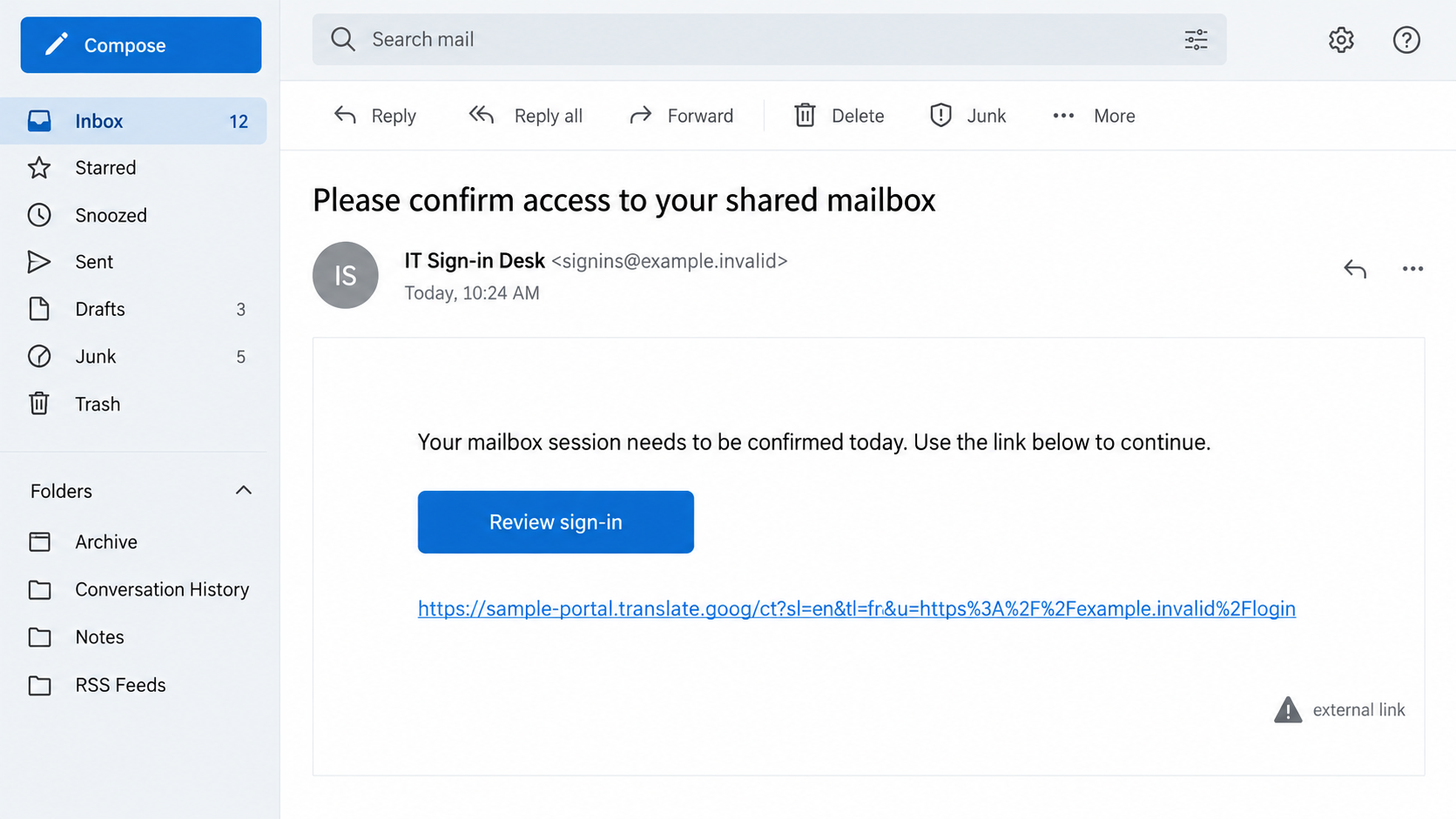
This second image is a fictional, non-functional reconstruction showing the sort of message that could start the journey. It is not a captured GTFire email.
What the Research Shows, and What It Does Not
The investigation shows Google infrastructure being used as a delivery and hosting route for a criminal page. It does not suggest every Google-hosted site is suspect.
It also shows credentials in the operator’s collection system. That is a stronger finding than a screenshot of a suspicious but unsubmitted form.
However, a count of associated organizations cannot tell us how many accounts were later taken over or how much money was lost.
Not every reader of a phishing email clicked. Not every click resulted in a completed form. Those distinctions keep the story honest.
The captured example resembles webmail. A future version could use a different brand, language, or layout while following the same redirect pattern.
The layout of one captured form includes a fake secure-login cue. That cue is part of the imitation, not an independent security check.
A username already filled into the form can also feel reassuring. It may simply have been carried in the phishing link’s encoded parameters.
People who work across several organizations should check each account they accessed with the exposed password, not only the one pictured.
If the email account is affected, review messages sent during the exposure window. Attackers may use an inbox to deceive colleagues or customers.
Ask security staff whether the service supports revoking refresh tokens as well as browser sessions. That detail can matter after a password change.
That is why blocking a single phishing page helps but cannot replace account security and a trustworthy sign-in path.
For organizations, phishing-resistant MFA offers stronger protection than a code that can be typed into a counterfeit page. Passkeys and hardware security keys are examples.
For individuals, the immediate habit is simpler: navigate to the service yourself and ignore login prompts that begin in unexpected messages.
Signs Worth Noticing Before You Type
A message demanding a fresh login for a service you were already using deserves a separate check, especially if it came without a request you initiated.
Read the whole domain, not one reassuring word inside it. A translated page can display someone else’s site under Google-related URL machinery.
When a login page asks for a second attempt, do not assume the first was harmless. A phishing form can always display a chosen error.
A quick redirect to the real website afterward is also not proof of safety. It may be the last step in removing suspicion.
If a colleague received the same message, forward it to your internal security contact as an attachment or use the approved report-phishing button.
Do not forward a clickable lure to the whole office as a warning. That can spread the risky link farther than the attacker managed alone.
Security teams can examine message headers, redirects, and sign-in logs. They should also look for unusual sessions that began shortly after the email arrived.
A password reset alone may not end an active session. Review device and session lists, especially in shared work accounts.
What to Do if You Have Fallen Victim to This Scam
- Stop using the linked page. Open the genuine service through a bookmark or app you already trusted before the message arrived.
- Change the exposed password immediately. If you reused it elsewhere, change those accounts too. Use a new, unique password.
- Tell your organization’s security team. Give them the original message and approximate time. They can inspect sign-ins and revoke sessions.
- Review account activity. Look for unfamiliar devices, forwarding rules, inbox filters, delegated access, and recovery details changed without you.
- Strengthen sign-in protection. Enable phishing-resistant MFA where supported. Do not treat a texted code as permission to trust an unfamiliar page.
- Preserve evidence. Save the message, visible links, screenshots, and any security alerts. Avoid reopening the phishing site to collect more.
- Check for added software or permissions. If the page prompted downloads, a Malwarebytes scan is relevant; AdGuard can reduce exposure to malicious destinations. Neither replaces password recovery.
- Watch for follow-up contacts. Someone with your email address and password may send convincing messages. Verify urgent requests through a separate channel.
If you only viewed the page without entering credentials, close it and report the link. The exposed-password response applies when you actually typed the password.
If you entered a second password attempt, tell your security team that too. The campaign’s false error is designed to collect both entries.
Act quickly without blaming yourself. A polished login reached through familiar infrastructure can fool experienced users, which is why the campaign was built this way.
Frequently Asked Questions
Is Google Translate itself a phishing site?
No. It is a legitimate service whose website feature was abused to obscure a link’s eventual destination in this campaign.
Does a web.app address mean Google approved the login?
No. Firebase hosts websites for independent users. A page’s hosting domain is not an endorsement by Google or the impersonated organization.
Why did the page say my password was wrong?
In the captured GTFire flow, that message prompted another entry while both submissions were collected. It was not reliable account feedback.
Could I have landed on the real website after the phishing page?
Yes. Redirecting to the genuine site after the theft is part of the documented sequence and can make the earlier fake form easier to forget.
Were more than 1,000 organizations breached?
The research links stolen credentials to more than 1,000 organizations. That is not the same as confirming a breach of every organization.
What if I clicked the link but did not type anything?
Report the message and close the page. If you downloaded anything or granted permissions, check the device; otherwise, prioritize future sign-ins through your usual route.
The Bottom Line
The GTFire phishing scam turns two real Google services into a convincing path toward a fake login. A familiar hostname is not enough to authenticate the form.
If you entered a password, treat it as exposed even if the page later opened the real site. Recover the account from an independently opened, trusted address.

Join the discussion
0 commentsShare your experience or ask a question about this article.
Discussion
Start the conversation
Have a question or something useful to share? Add the first comment.