

A text that appears to come from Huntington says your debit card was locked after a suspicious purchase. Seconds later, a caller from the bank’s familiar number offers to stop the transaction.
The Huntington Bank scam can make the alert and call seem to confirm each other. The supposed fraud specialist may be trying to capture the code or transfer that gives away the account.
Overview
Scammers imitate Huntington through texts, calls, and copied login pages
The Huntington Bank scam may begin with a fake fraud alert, account-suspension notice, declined purchase, or Zelle warning. The message provides a link or telephone number that leads back to the operation.
Another version starts with a spoofed call. Caller ID can display Huntington or a genuine bank number even when the caller is elsewhere.
The goal is to make the victim authorize the theft
The impostor may request an online-banking password, card PIN, Social Security number, or one-time verification code. A fake page can collect the same details while appearing to unlock the account.
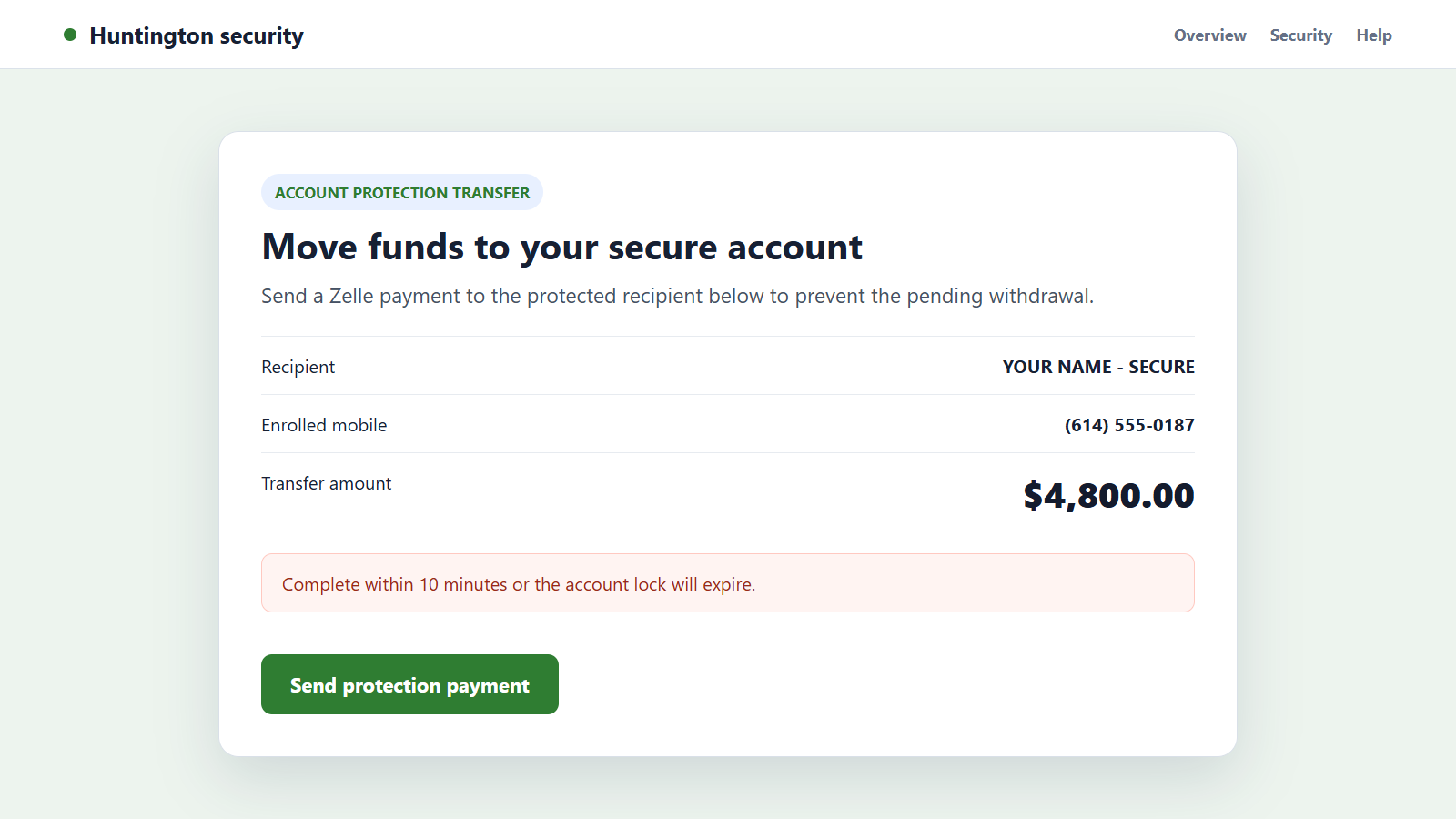
In the pay-yourself version, the caller directs the victim to send money through Zelle to a new recipient supposedly bearing the victim’s own name. The transfer actually goes to an account controlled by the scammer.
A genuine security code can arrive during the fake call
The criminal may already have the username and password from a breach or phishing page. Attempting a login or transaction causes Huntington to send a real code to the customer.
Keep these rules in mind:
- Never share a verification code with an incoming caller.
- Never move money to protect it from fraud.
- Caller ID can be spoofed and is not proof of identity.
- A bank alert should be checked in the official app or website.
- Zelle is intended for people you know and trust.
- A suspicious call should be ended before contacting Huntington independently.
Speed matters after a transfer, but panic helps the criminal. End the conversation first, then contact the bank through a trusted route.
The Main Huntington Bank Scam Stories
A fake text says the card or account is locked
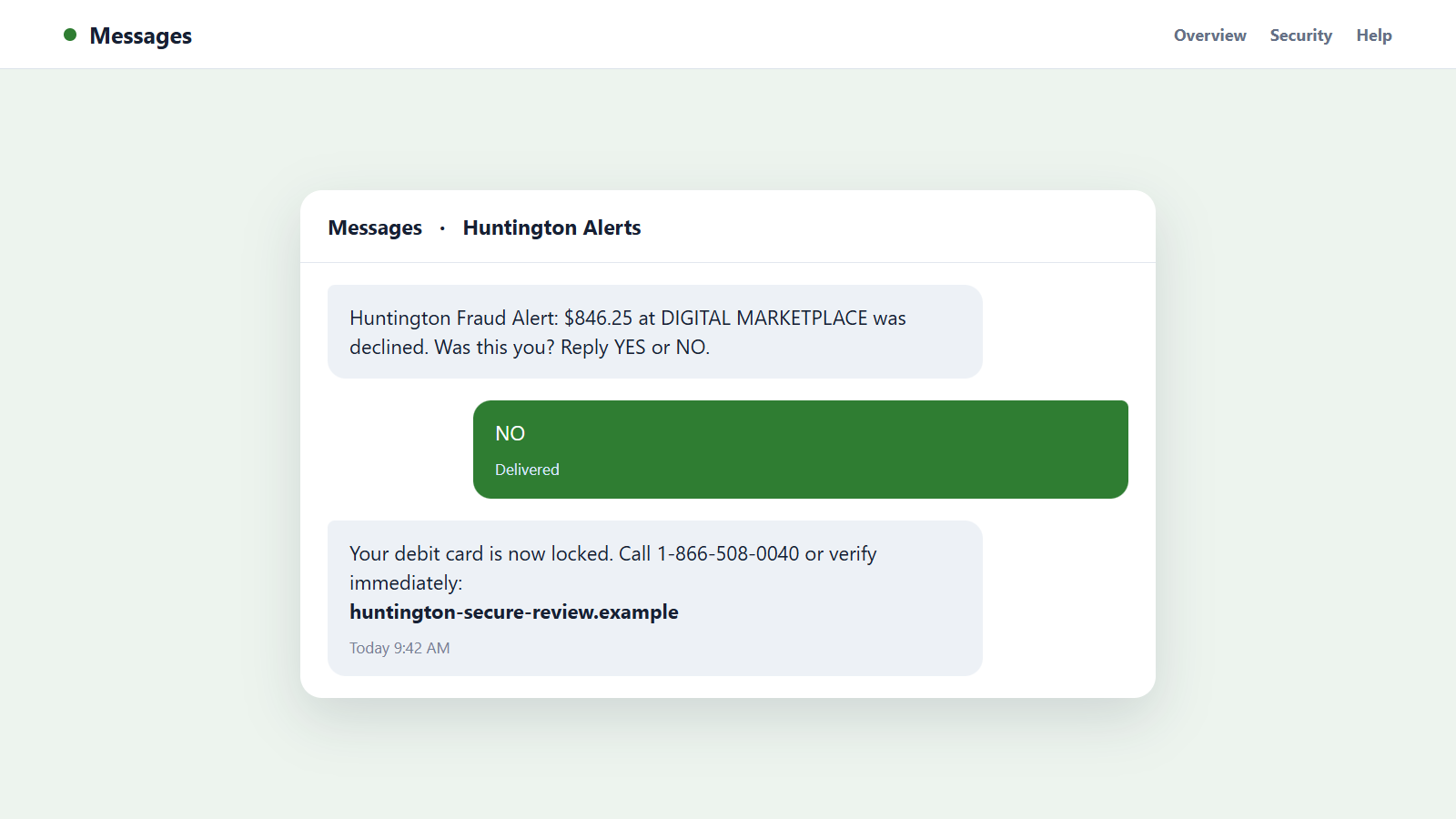
The text lists a purchase, location, or device the customer does not recognize and asks for a yes-or-no reply. Responding confirms that the number is active and can trigger a call from a fake fraud agent.
A link may open a cloned sign-in page that collects online-banking credentials and security answers.
A caller offers to cancel a pending transaction
The impostor says a transfer or purchase must be stopped immediately. To verify the customer, the caller requests a code sent by text.
That code may approve a real login, password reset, digital-wallet enrollment, or transfer initiated by the attacker.
The victim is told to send money to a safe account
The caller claims the account has been compromised and instructs the customer to move funds through Zelle, wire transfer, cash, or cryptocurrency. A recipient may be labeled with the victim’s name to make the transfer look internal.
The FTC is direct about this tactic: someone who says money must be moved to protect it is a scammer.
A fake Huntington representative asks for remote access
Some operations tell the victim to install screen-sharing software so the fraud team can inspect the account. Remote control lets the criminal watch passwords, manipulate what appears on screen, and initiate payments.
A bank does not need control of a customer’s device to investigate a transaction.
Why Bank Impersonation Feels So Urgent
A fraudulent charge is the kind of problem people want to solve immediately. Scammers use that reasonable concern to keep the victim from checking the account independently.
The caller may know recent personal information from data breaches, stolen mail, social profiles, or previous phishing. Correct details make later false statements sound authoritative.
Spoofed caller ID adds another layer. Seeing a number that matches the back of a card feels like strong proof, but the displayed number can be falsified.
A real Huntington verification code can also arrive during the conversation. It proves an account action is being attempted, not that the caller works for the bank.
The criminal may place the victim on hold, play recorded music, or transfer the call to a supposed supervisor. These familiar call-center details are inexpensive to imitate and can make a scripted operation feel established.
Secrecy is another pressure tool. The victim may be told not to discuss the case with branch staff, relatives, or another bank employee because an internal investigation is underway. That instruction isolates the person from anyone likely to challenge the story.
Finally, instant payments are difficult to recover after the recipient accepts them. The scammer uses urgency to push the transfer through before the bank or customer can interrupt it.
How to Verify a Huntington Alert Safely
Do not click the link, reply to the message, or call the number it contains. Open the Huntington app yourself or type the official website address into a fresh browser tab.
Review balances, pending transactions, Zelle recipients, contact details, devices, and security alerts. A screenshot in a text message is not evidence that a transaction exists.
Look for small changes as well as missing money. A new email address, unfamiliar phone number, added recipient, digital-wallet enrollment, or disabled alert can prepare a larger theft that has not happened yet.
If you still need help, call the number printed on your card, shown in the official app, or listed on Huntington’s website. Huntington’s account-monitoring guidance recommends calling the bank directly instead of a number in a text or email.
Read every verification message completely. The text may name the action and warn that no representative will ask for the code.
Ask the genuine representative to review recent login activity and confirm which action triggered any code you received. This connects the suspicious message to a real account event instead of relying on the caller’s explanation.
Do not search for a support number and automatically select the first advertisement. Fraudulent support listings can make a victim call the operation voluntarily.
How the Huntington Bank Scam Works
Step 1: The operation obtains a phone number and partial identity data
The target list may include names, numbers, email addresses, past addresses, or banking clues collected from data breaches and marketing databases.
The scammer may not know whether every person uses Huntington, but mass messaging makes inaccurate guesses inexpensive.
Step 2: A fake fraud alert creates immediate concern
The text names an unfamiliar purchase, Zelle payment, device, or account restriction. It asks the customer to click, reply, or call before the transaction posts.
The victim’s response identifies someone who is worried and available.
Step 3: A spoofed caller takes control of the investigation
The caller claims to be from Huntington security and refers to the alert. A calm, professional script makes the interaction feel like normal fraud prevention.
The displayed number may be copied from a genuine bank contact.
Step 4: Credentials or verification answers are collected
The victim is asked to confirm an online-banking username, password, card data, Social Security number, security answer, or one-time code.
Each answer helps the criminal overcome a real account control.
Step 5: The attacker attempts a real account action
Using the stolen details, the criminal signs in, resets access, adds a recipient, enrolls a digital wallet, or begins a transfer. Huntington may send a genuine code or warning.
The caller misrepresents that message as part of the cancellation process.
Step 6: The victim approves a code or sends the money
Reading the code can authorize the attacker’s action. Following pay-yourself instructions can create a real Zelle transfer directly from the victim’s authenticated session.
The bank records an authorized action even though deception caused it.
Step 7: Funds move through recipient accounts quickly
The receiving account may belong to a money mule or an identity created with stolen records. Money can be moved again soon after arrival.
Each additional transfer makes recovery harder, which is why the operation discourages delays.
Step 8: Follow-up calls continue the pressure
The scammer may claim the first transfer failed, another account is compromised, or a fee is needed to restore access. A second caller may impersonate Zelle, police, or a recovery specialist.
No later caller should be trusted because the person knows details from the original incident.
Company, Address, and Fulfillment Checks
The bank contact must begin from a trusted Huntington channel
End the incoming call and start a new one using the official app, website, statement, or number printed on the card. Do not accept a transfer within the suspicious call.
A real representative can locate a genuine case without relying on the scammer’s callback number.
The web address must belong to Huntington
Lookalike sites may place the brand name before an unrelated domain ending. HTTPS and a copied padlock graphic do not establish ownership.
Open online banking independently rather than editing or trusting a URL sent by text.
The recipient address must match someone you know
Zelle payments go to an enrolled email address or mobile number, not to a protected section of your own bank account. A recipient label can be misleading.
Huntington’s Zelle safety guidance warns about fraud alerts that tell customers to pay themselves.
The promised protection must exist without transferring funds
A bank can restrict cards, investigate transactions, and secure an account without asking the customer to send money to a stranger.
If the solution requires a transfer, gift card, cryptocurrency purchase, or cash withdrawal, it is not a legitimate fraud-protection service.
Warning Signs of a Huntington Bank Impostor
- A text says the account is locked and includes a login link.
- An incoming caller asks for a one-time verification code.
- You are told to move money to protect it.
- The caller wants a Zelle payment to a new recipient with your name.
- The representative requests the full password, card PIN, or Social Security number.
- Remote-access software is required to cancel a transaction.
- The caller refuses to let you contact Huntington independently.
- A second supposed agency joins the call to increase pressure.
The combination of a fraud story, a verification-code request, and instructions to transfer money is a decisive scam pattern.
What to Do if You Have Fallen Victim to This Scam
- Contact Huntington immediately. Use the number on your card or the official app and say that an impostor obtained information or induced a transfer.
- Ask the bank to contain the account. Lock affected cards, review Zelle and wire activity, remove unknown recipients and devices, and stop pending transactions when possible.
- Report the transfer accurately. Explain that fraud or impersonation caused the payment and ask about recall, reversal, or dispute options. Fast reporting provides the best chance of intervention.
- Change online-banking credentials. Use a clean device, create a unique password, reset exposed security answers, and confirm that contact and recovery details are yours.
- Secure the linked email and mobile accounts. Replace reused passwords, enable strong multi-factor authentication, and check for forwarding rules, SIM changes, and unfamiliar sessions.
- Protect your identity. If Social Security or ID details were shared, follow a recovery plan at IdentityTheft.gov and consider credit freezes.
- Scan devices used during the call. Run Malwarebytes after uninstalling any remote-access program the scammer requested.
- Block malicious pages and ads. AdGuard can reduce exposure to known phishing domains and deceptive support advertisements, but it cannot reverse a transfer.
- Preserve and report evidence. Save messages, call logs, recipient details, confirmation numbers, and screenshots. Report the case to Huntington, the FTC, and local police when money was stolen.
- Reject recovery scammers. Do not pay a caller who guarantees the funds can be returned. Work only with the bank, payment network, law enforcement, and a lawyer you selected independently.
Frequently Asked Questions
Can a Huntington scam call display the bank’s real number?
Yes. Caller ID can be spoofed. End the call and dial a trusted number yourself instead of relying on the display or recent-calls list.
Will Huntington ask for a verification code?
Do not give a one-time code to an incoming caller. The code may approve a login, reset, wallet enrollment, or transfer the scammer initiated.
What is the pay-yourself Zelle scam?
An impostor claims you must send money to yourself for protection, but supplies a new recipient controlled by the operation. The payment leaves your account.
What if I clicked the text link but entered nothing?
Close the page and check for downloads or unusual permissions. Verify the account independently and report the phishing message, but the risk is lower if no data was submitted.
Can Huntington reverse a Zelle transfer?
Recovery is not guaranteed because enrolled transfers can move quickly. Report the fraud immediately and ask Huntington which recall, dispute, or investigation options apply.
Should I trust someone who knows my balance or recent transactions?
No. That knowledge may indicate stolen account access or information gathered during the scam. End the call and contact Huntington through an official route.
The Bottom Line
The Huntington Bank scam uses a fake alert, a spoofed caller, and sometimes a genuine security code to make theft look like fraud prevention.
Never share the code or move money to protect it. Open the official account yourself, contact Huntington independently, and report any transfer before the funds can move farther.

Join the discussion
0 commentsShare your experience or ask a question about this article.
Discussion
Start the conversation
Have a question or something useful to share? Add the first comment.