


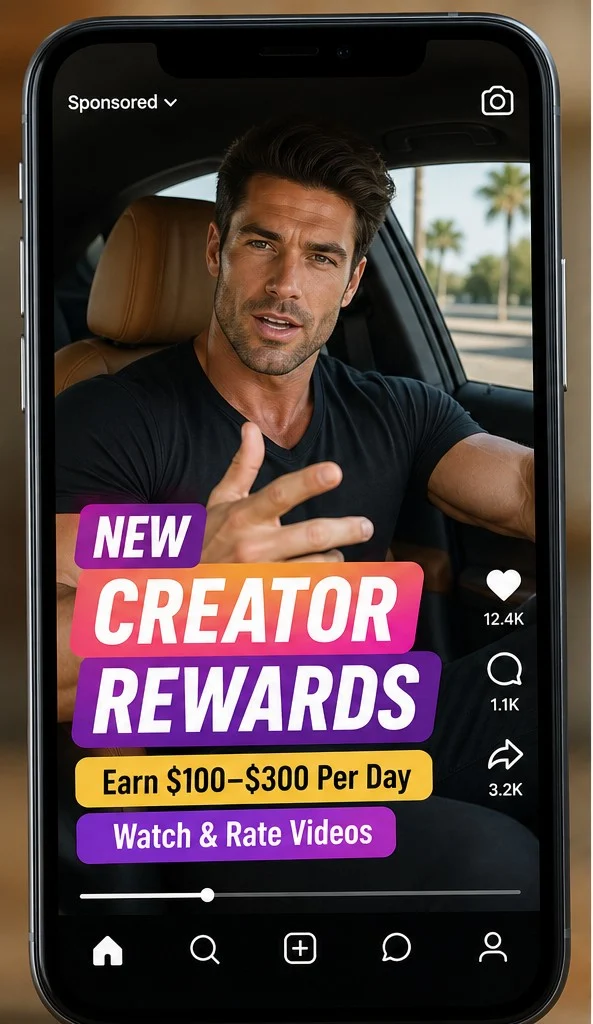
The offer arrives in the place where it claims the work happens. A sponsored Instagram video says regular users can earn $100 to $300 a day by watching clips, rating posts, and helping brands understand what people like.
A few taps later, an earnings balance appears to grow on screen. That number creates a powerful feeling of progress, but the money has not moved from an employer to the viewer. The next button reveals what the campaign was built to sell.
Overview
The ad turns ordinary scrolling into a hidden job
The Instagram Rewards Program scam claims that a private creator or quality-review system pays people to watch and rate content. Some versions borrow the face of a public figure, use an AI-altered spokesperson, or present a confident actor who appears to have inside knowledge.
The activity sounds plausible because real platforms employ moderators, researchers, and contractors. However, those positions involve identifiable employers, applications, contracts, and payroll. A social ad that approves everyone after a quiz is not equivalent to a job offer.
A fake task sequence manufactures earnings before payment
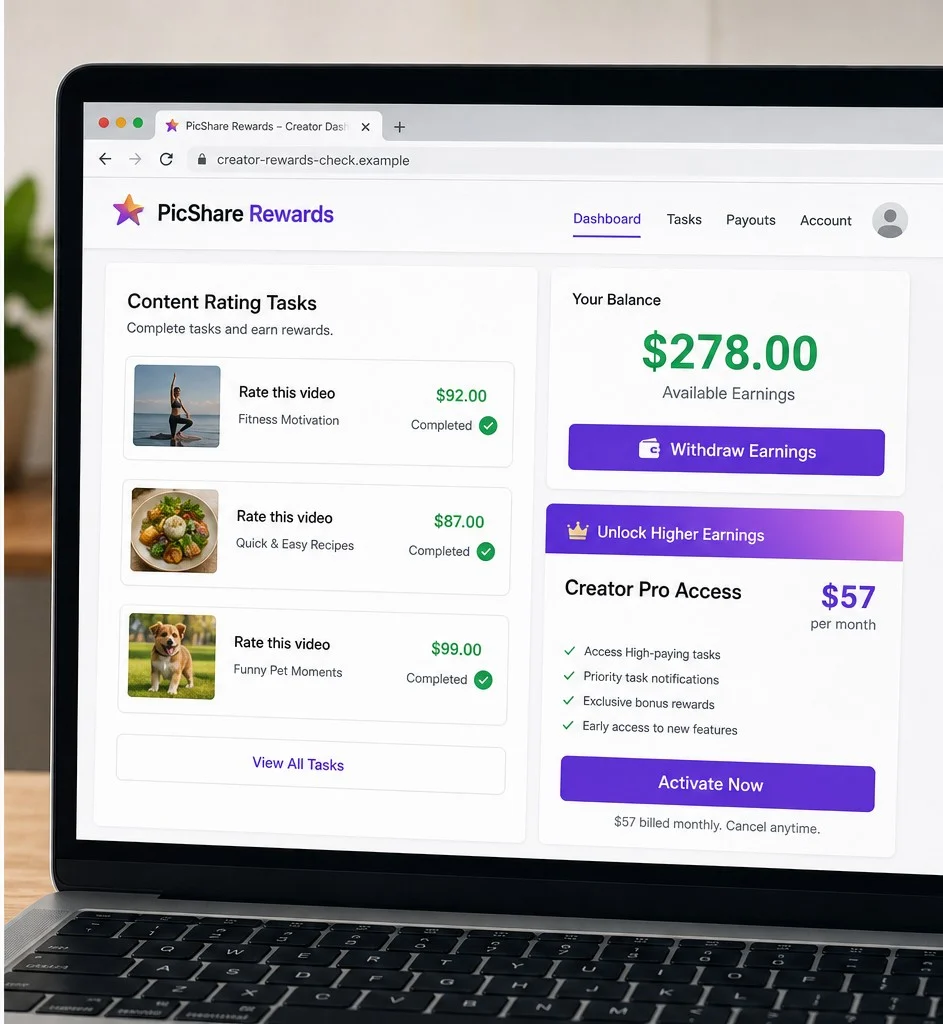
The landing page may imitate Instagram colors while asking the visitor to rate familiar videos, brands, or products. After a few choices, a dashboard displays an impressive balance, sometimes around $278, even though no employer has verified identity, tax status, hours, or work quality.
The balance is not evidence of income. It is text controlled by the website operator. The number lowers resistance when the visitor is later told to buy training, activate an account, or pay for access to higher-paying tasks.
The supposed job becomes a digital product sale
Campaign versions have led to long sales videos and paid programs marketed under names unrelated to Instagram. A checkout platform may process the transaction, but processing a digital product does not mean Meta or Instagram endorses the earnings claim.
The person pays before receiving a real job, a client contract, or independently verified proof that the displayed balance is withdrawable. Additional coaching, memberships, upgrades, and recurring charges can follow the initial purchase.
- Sponsored videos promise $100 to $300 a day for simple ratings.
- A borrowed public figure or polished actor provides false authority.
- The link opens a lookalike task site outside Instagram.
- A quiz displays fabricated earnings before a job exists.
- The withdrawal path leads to paid access or a digital course.
- A legitimate checkout provider does not authenticate the advertising claim.
- Upsells and recurring memberships can increase the total loss.
How Real Platform Work Differs From the Ad
Social media companies do pay employees and contractors for specialized work, and creators can earn through official monetization tools when eligible. Neither model begins by charging an applicant to unlock wages that a public webpage has already pretended to earn.
A real position identifies the employer, job description, rate, tax arrangement, hiring process, supervisor, and payment schedule. A legitimate creator program appears inside the authenticated professional dashboard and explains eligibility. The viral funnel offers none of that accountability before displaying income.
The FTC warns that honest companies do not pay consumers to give positive ratings or likes and that people should never pay to get paid. Those two principles apply directly when an ad calls casual engagement a job and then requests money before withdrawal.
The fake dashboard is especially persuasive because it gives the viewer a personal stake. Losing an imaginary $278 feels worse than declining an unknown $57 course. The user is therefore pushed to see the purchase as unlocking money already earned rather than buying an unproven product.
Verification should begin inside Instagram, not through the advertiser's explanation. Open the official app, review the professional dashboard, and search Meta's help center for the exact program. If the balance and job exist only on an outside domain, they belong to that webpage, not to the Instagram account.
The Quiz, the Fake Balance, and the Paywall
Reported campaign flows have used an outside site to imitate a rewards dashboard. Visitors rate content associated with well-known companies, which creates the impression that major brands are already paying for the opinions. There is no contract or verification connecting those ratings with the named companies.
After several tasks, the page displays a balance such as $278. The amount is conveniently large enough to make a $57 purchase feel small. Yet a webpage can generate that result for every visitor without recording marketable work or receiving funds from an employer.
The funnel can then introduce a lengthy tutorial or testimonial sequence. Familiar motivational figures may be referenced, while the product is sold by a separate business through a digital marketplace. Terms and disclaimers may describe education or hypothetical results rather than guaranteed employment.
That mismatch is decisive. The advertisement promises earnings for tasks, but the contract can sell information about online income. A course may contain digital material and still be marketed through a deceptive job story. Delivery of files does not prove that the displayed wages were real.
Consumers should also distinguish the platform from the seller. A marketplace such as Hotmart can process orders for independent creators. Its presence can provide a receipt and refund channel, but it does not establish that Instagram hired the purchaser, approved the income claim, or funded the dashboard balance.
How the Instagram Rewards Program Scam Works
Step 1: A sponsored reel presents an easy platform job
The video says Instagram needs ordinary people to review posts or help creators. A muscular spokesperson, celebrity lookalike, or AI-edited clip may say the program is new and pays $100 to $300 each day.
The promise fits existing behavior. Viewers already scroll and rate content, so the campaign suggests they have been doing valuable work for free and only need a special link to start collecting money.
Step 2: The click opens an imitation site
The destination uses gradients, icons, and words associated with social media, but the domain is not Instagram.com and the task balance is not inside the user's official account. A brief quiz asks about age, device access, or daily availability.
Almost everyone qualifies. There is no resume, interview, employment verification, or tax paperwork because the page is not evaluating candidates for a real position. It is preparing them for a sales sequence.
Step 3: Familiar rating tasks create emotional ownership
The visitor rates short videos, food, entertainment, or recognizable brands. Each selection appears to add a large amount to an earnings total. Check marks and completion messages make the process feel recorded and valuable.
Nothing shows that the brands requested the research or agreed to pay for it. The website can display the same tasks and result to every visitor, which makes the balance a persuasion device rather than payroll evidence.
Step 4: A withdrawal button exposes the paywall
When the visitor tries to collect the money, the page says account activation, Creator Pro access, or special training is required. The fee is framed as minor compared with the balance waiting above it.
A legitimate employer deducts applicable taxes through lawful processes or pays agreed wages. It does not invent earnings first and then require the worker to buy access to receive them. Paying to withdraw is a classic reversal of the employment relationship.
Step 5: A long sales video reframes the original promise
The next page may stop discussing Instagram tasks and begin selling a broader online-income system. Testimonials, lifestyle images, bonuses, and a countdown shift attention from the promised job to a digital product.
The legal language may also change. Large captions imply reliable daily income, while small print describes examples, actors, education, or results that vary. Read the contract, because the contract is what the seller will cite during a refund dispute.
Step 6: Checkout creates a real charge, not a real wage
The buyer enters card details through a seller or marketplace and receives course access. Order bumps, recurring memberships, or coaching upgrades may appear before or after the first transaction.
The fake balance remains locked or disappears. The purchaser now owns digital content but still has no Instagram employment agreement, no client paying for ratings, and no independent evidence that the original $278 existed.
Step 7: Retargeting and support preserve the sales cycle
Visitors who supplied contact details can receive emails, messages, and advertisements for related systems. Support may focus on using the course rather than answering who funded the original balance or where the Instagram contract is located.
When complaints increase, the campaign can change the spokesperson, task amount, product name, or domain. The durable pattern remains: easy social job, fake balance, paywall, digital product, and upsell.
Company, Address, and Fulfillment Checks
Instagram is the claimed employer, not the seller
The ad uses Instagram's platform and visual language, while the terms and receipt can name a course creator, marketing business, or digital marketplace. Those entities are not made part of Meta because their advertisement appeared in the feed.
Find the legal seller and ask for the written employment or contractor agreement behind the rating work. If support can provide only a course license and refund policy, the transaction was a product sale, not an Instagram job.
A thin company footprint is a serious warning
A credible income opportunity should disclose the business, management, address, tax treatment, and method for resolving disputes. A generic mailbox, privacy-protected domain, or contact form offers little accountability when daily earnings are being promised.
Search the legal entity, not only the marketing label. Compare the seller named in the terms, checkout, card statement, and refund correspondence. Multiple unexplained names make it harder to determine who made the claim and who holds the money.
Support may answer billing questions but avoid the fake balance
A marketplace can help locate an order, and the seller may provide course access. Neither response proves the task dashboard was real. Ask a direct question: which company commissioned the ratings and where is the agreement showing the amount owed?
If the answer changes to training, mindset, affiliate marketing, or future opportunities, the support team has confirmed the mismatch. Save that exchange for the bank and complaint agencies.
Digital fulfillment does not cure deceptive advertising
The seller may deliver videos, PDFs, a member portal, or community access. Those files can be real while the story used to sell them is false. Fulfillment must be judged against what the advertisement promised, not only whether a login arrived.
Trace the chain from ad publisher to landing-page operator, legal seller, checkout provider, and support desk. Each party should have a defined role, and none should be allowed to hide the supposed Instagram employer behind the others.
Warning Signs to Watch For
- The ad promises unusually high pay for ordinary scrolling.
- A celebrity image appears without a verifiable official statement.
- The task site uses a domain outside Instagram.
- Everyone appears to qualify without an application or interview.
- A large earnings balance appears before an employer contract exists.
- The page demands payment before withdrawal.
- The checkout sells education instead of the advertised job.
- Support cannot identify who commissioned or funded the tasks.
The sharpest warning is the fake balance. Money displayed by a seller is not wages. If the only way to reach that number is to pay the same site that created it, the dashboard is pressure, not proof.
What to Do if You Have Fallen Victim to This Scam
- Stop paying to unlock the displayed balance. Do not buy another membership, upgrade, coaching call, or verification package because the dashboard shows money waiting. A number on a webpage is not withdrawable income. Take a screenshot, then close the funnel and make a list of every payment request.
- Cancel the course or membership through the seller and checkout provider. Use the contact details on the receipt, not the social ad. Request cancellation, a refund under the stated policy, and written confirmation that no recurring plan remains. If a checkout platform processed the sale, use its official order-support tools as well.
- Call the card issuer and describe the entire claim. Explain that the purchase followed an advertisement promising payment for watching and rating videos. Identify the advertised earnings, the amount charged, any monthly language, and later upsells. Ask about disputes, merchant blocks, and replacing the card if necessary.
- Secure Instagram, email, and reused passwords. Change credentials entered on the imitation dashboard, starting with the linked email account. Review Instagram login activity, connected apps, recovery information, and direct messages. Enable multi-factor authentication and remove sessions you do not recognize.
- Preserve the social ad and fake earnings trail. Save the account name, sponsored video, public-figure image, destination domain, task quiz, displayed balance, withdrawal button, sales video, checkout, refund policy, receipt, and support correspondence. Evidence from before and after the paywall makes the misleading sequence easier to explain.
- Inspect the device for unwanted software. Remove any app, browser extension, remote-access tool, or notification permission installed during the process. Run Malwarebytes if the funnel delivered downloads, repeated redirects, or unusual prompts, and update the browser and operating system.
- Use an ad blocker without treating it as proof. AdGuard can block many malicious advertising and tracking domains that distribute fake earning systems. It does not authenticate an Instagram job, so verify opportunities through Meta's official professional tools and the named employer.
- Monitor accounts and personal information. Watch the card, payment account, email, and social profile for new charges or takeover attempts. If the page collected identity documents or tax details, follow the recovery guidance at IdentityTheft.gov and consider credit protections.
- Report the ad and ignore recovery scammers. Report the impersonating ad to Instagram, notify the checkout provider about the marketing claim, and file at ReportFraud.ftc.gov. Do not give remote access, one-time codes, or another fee to someone offering to withdraw the fake balance for you.
Frequently Asked Questions
Does Instagram pay users to watch and rate random videos?
Instagram has official creator and business features, but the outside funnel described here is not a verified Instagram job. A legitimate role would identify the employer and would not charge workers to unlock wages.
Is the $278 balance real?
There is no evidence that an employer funded it. A website can generate the same balance for every visitor, and it should not be treated as income unless it appears in a verifiable account under a written agreement.
Why is a public figure shown in the advertisement?
A familiar face supplies instant authority. The image may be borrowed, edited, AI-generated, or presented out of context. Verify endorsements through the person's official channels.
Does a Hotmart or other marketplace checkout make the offer legitimate?
No. A marketplace can process a digital-product sale and provide order support, but it does not prove that Instagram sponsors the advertising claim or owes the purchaser money.
Can I get a refund for the digital program?
Check the receipt and published refund policy immediately, submit a clear written request, and save the response. If the seller refuses and the advertising was materially misleading, ask the payment provider about dispute options.
What if I gave the site my Instagram password?
Change it through the official app, review login activity and connected apps, secure the linked email, enable multi-factor authentication, and report unfamiliar messages or profile changes.
The Bottom Line
The Instagram Rewards Program scam turns familiar scrolling into an imaginary paycheck. A few ratings create a fake balance, and that balance is then used to sell paid access, training, memberships, or upgrades.
Real work produces an identifiable employer and a written path to payment. When an outside webpage creates wages before a job exists and charges you to withdraw them, close the page and keep your real money.

Join the discussion
0 commentsShare your experience or ask a question about this article.
Discussion
Start the conversation
Have a question or something useful to share? Add the first comment.