

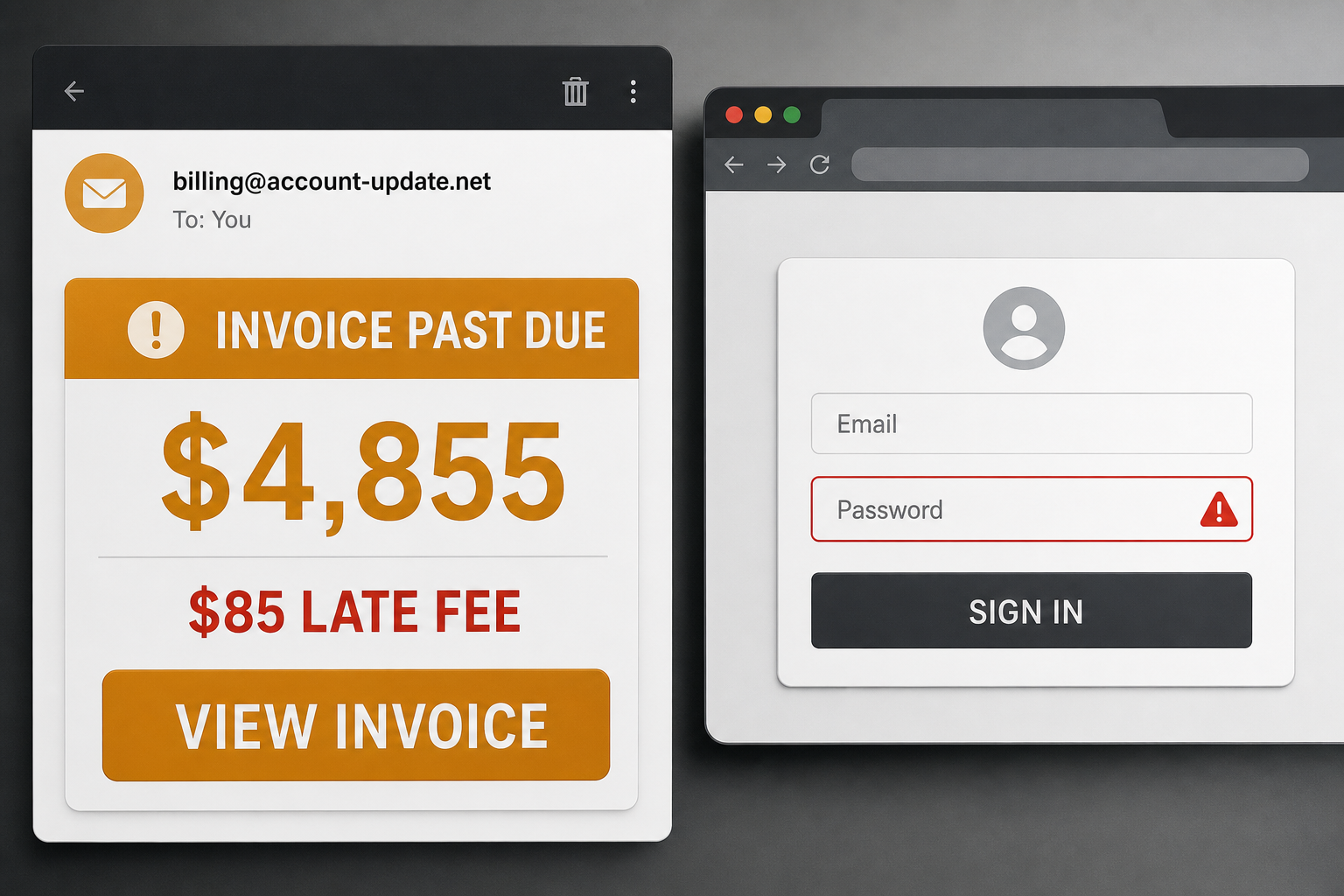
A surprise invoice for $4,855 is enough to make almost anyone stop and look. That reaction is exactly what this phishing email is designed to exploit.
The message threatens an $85 late fee and possible collection action, then sends the recipient to a counterfeit email sign-in page. Its goal is not to collect the invoice—it is to steal the password entered after clicking View Invoice.
Overview
The Invoice Is Past Due email scam is a credential-phishing campaign impersonating Wil-Mar Hydraulics & Machine Inc. The real company is not responsible for the message. Its identity is being used as a familiar business wrapper around a fake invoice alert.
The email claims invoice INV-0847 has an outstanding balance of $4,855.00. It says an additional $85.00 fee will be added unless payment is made within seven days, and it raises the possibility of collections or further action.
Instead of attaching a normal invoice, the message presents a View Invoice button. That button leads to a counterfeit email-provider login. The page may imitate the recipient’s usual webmail branding, but any username and password entered there are sent to the criminals.
The campaign contains a particularly revealing date error. It says the invoice was issued on July 23, 2026, yet describes it as overdue since July 18, 2026—five days before it supposedly existed. The subject also misspells outstanding as OUTSTANDNING.
Those mistakes are useful clues, but a cleaner version of the scam could remove them. The decisive warning sign is the unverified invoice link asking for an email password. A supplier does not need your mailbox credentials to show you a bill.
- Claimed balance: $4,855.00
- Threatened late fee: $85.00
- Fake invoice number: INV-0847
- Pressure window: seven days
- Real objective: steal email-account credentials
Is the Invoice Is Past Due Email Legitimate?
No. This specific message is a confirmed phishing scam. Wil-Mar Hydraulics & Machine Inc is a legitimate business, but it did not send the fake overdue notice and should not be blamed for the impersonation.
If your company genuinely works with the named supplier, contact your established representative using a phone number or address from your own records. Do not use contact details supplied in the suspicious email.
How the Invoice Is Past Due Email Scam Works
Step 1: The email creates a financial emergency
The scammers choose a balance large enough to demand attention but plausible enough for a business invoice. The threatened fee and collection language discourage the recipient from taking time to investigate.
Step 2: Familiar company details lower suspicion
The message borrows the identity of a real company. A copied logo, address or signature can make the email look authentic even when the sending domain and payment story do not match.
Step 3: View Invoice replaces a normal attachment
A cloud-hosted invoice button can feel safer than an attachment. In this scam, it also lets the attacker hide the final destination until the recipient clicks.
Step 4: A fake sign-in page appears
The landing page asks the victim to sign in with an email account before viewing the invoice. It may adapt its colors or wording to resemble a common webmail service, but it is not the provider’s genuine login page.
Step 5: The credentials are captured
When the victim submits a password, the scammer receives it. The page may show an error, request the password again or redirect elsewhere so the theft is not immediately obvious.
Step 6: The mailbox becomes the real prize
A business mailbox can expose invoices, payment discussions, customer data and password-reset links. Criminals may add forwarding rules, monitor conversations or send new payment instructions from the compromised account.
Red Flags You Can Spot Before Clicking
- The email concerns a vendor or invoice you cannot match to your records
- The issue date comes after the date on which the invoice was supposedly overdue
- The subject contains the typo OUTSTANDNING
- The sender uses urgency, late fees and collections to rush a response
- The button leads to a domain unrelated to the named supplier or your email provider
- The invoice page asks for your email password before showing any billing details
Why This Phishing Email Can Be Convincing
Invoice messages arrive every day in accounts payable, management and small-business mailboxes. Employees are used to cloud document links, and many companies genuinely send payment reminders. The scam hides inside that routine.
It also targets two fears at once: losing money through a late charge and damaging a supplier relationship. That emotional pressure can override the normal habit of checking the sender and destination domain.
What to Do If You Received the Email
- Do not click View Invoice or reply to the sender
- Search your accounting system for INV-0847 and the named supplier
- Contact the supplier through an independently verified phone number if the invoice could be relevant
- Report the email as phishing to your mail provider or IT team
- Delete the message after it has been reported
What to Do If You Clicked the Link
If you did not enter a password
Close the page. Clear the site’s cookies and downloaded data, then report the original email. Merely viewing the phishing page does not usually surrender your password, although any file it offered should remain unopened and be scanned.
If you entered your email password
- Use a clean device to change the password immediately
- Sign out of all existing sessions and revoke unfamiliar connected apps
- Enable multi-factor authentication using an authenticator app or security key
- Review recent sign-ins, recovery details and mailbox forwarding rules
- Check sent, deleted and archived folders for activity you did not perform
- Tell your IT and finance teams so they can warn contacts and watch for payment fraud
- Change any other account that reused the same password
If money was sent
Contact the bank or payment provider immediately and ask for the transaction to be recalled or frozen. Preserve the email, headers, payment details and screenshots for the bank and law enforcement.
How Businesses Can Prevent Invoice Phishing
- Require a second-person verification for new payment details or urgent invoices
- Confirm bank-account changes using a known phone number
- Use a password manager, which will not autofill credentials on an unrelated domain
- Protect mailboxes with phishing-resistant multi-factor authentication
- Train finance staff to inspect link destinations and date inconsistencies
- Create a simple internal channel for employees to verify suspicious invoices quickly
Frequently Asked Questions
Does the email install malware?
The primary purpose of this campaign is credential theft through a fake login page. Do not download or open any file a related page may offer, but the central trap is the password form.
Why would an invoice page ask for an email login?
That prompt is the scam. A vendor portal may require its own account, but it should not need the password to your separate Gmail, Outlook or company mailbox.
Can the company name make the message trustworthy?
No. Criminals routinely impersonate real businesses. Verify the sending domain, invoice record and contact route independently.
The Bottom Line
The $4,855 overdue invoice is a confirmed phishing lure, not a legitimate collection notice. Its dates contradict each other, its subject contains a typo and its button leads to a counterfeit email login.
Do not let the $85 late-fee threat make the decision for you. Verify the invoice in your own records, contact the supplier separately and treat any password entered on the linked page as compromised.

Join the discussion
0 commentsShare your experience or ask a question about this article.
Discussion
Start the conversation
Have a question or something useful to share? Add the first comment.