

If you recently got a suspicious text claiming you owe money for unpaid toll road invoices, be warned – it’s a sneaky scam trying to steal your personal information. This article will explain everything you need to know about how the Invoice Tolls By Mail phishing scam works and how to avoid getting tricked.
An In-Depth Look at the Invoice Tolls By Mail Scam
Let’s dive deeper into how scammers are using scam texts and fake websites to trick toll road drivers into giving up personal and financial information. With a clear understanding of the dangers and red flags, you’ll be protected against this fraudulent bill collection scheme.
For starters, know that any text message out of the blue saying you owe unpaid tolls is highly suspicious. Scammers use “bots” to blast out mass texts en masse hoping to get people to click the links and access the phishing sites. So if you’re wondering how the scammers even got your phone number in the first place – they likely didn’t. The texts go out randomly.
The Faked “Late Fee” Urgency Tactic
A key psychological tactic the criminals use in the phishing texts is claiming you must pay immediately to avoid extra late fees building up. This creates a sense of urgency designed to bypass logical thinking so victims pay first and ask questions later.
But there is no rush, because the invoices are completely fabricated. Take a breath, slow down, and verify through official channels. Don’t let scammers pressure you into hasty decisions.
Brand Impersonation Adds Deception
Another reason the Invoice Tolls By Mail scam is so deceptive is because the scammers have designed the texts and websites to closely imitate the branding of real toll authorities.
For example, they match the color schemes, terminology, and logo styles from agencies like EZ Pass in New York or Peach Pass in Georgia to make it all look official. But a closer look reveals small details are off. Don’t go by look alone.
The Sites Ask for Far Too Much Information
Real toll agencies already have your vehicle and payment details on file, so they have no reason to ask for intrusive information like your Social Security Number or date of birth.
But on the phishing sites, the criminals try to collect as much data as possible under the guise of “verifying your account” so they can commit extensive identity theft. Giving up this data is incredibly dangerous.
A Band of International Cyber Criminals May Be Behind It
Though difficult to confirm, computer experts who have investigated these text scams believe they originate from overseas cyber crime groups in countries like Russia, China, or parts of Eastern Europe.
Due to difficulties extraditing and prosecuting foreign hackers, these groups often operate unchecked – which is why they’ve scaled these text scam operations to mass levels. Stay vigilant against any unusual texts or emails demanding you pay money.
No Actual Association with Toll By Mail
Despite what the fake texts and websites may claim, there is no real affiliation with Toll By Mail or any other toll management service. The criminals are just impersonating these agencies to add legitimacy to their phishing scams. Don’t be misled.
You Do Not Owe the Scammers Anything
Rest assured you do not actually have any unpaid toll invoices, fines, or fees owed to these scammers. Their only goal is illegally obtaining private data by deception. You have no financial obligations to fulfill from random text demands.
With this overview of how the Invoice Tolls By Mail scam works, you now have the knowledge needed to recognize these phishing attempts right away and steer clear of the traps. Don’t become another victim!
How the Invoice Tolls By Mail Scam Works
Now let’s dive into the detailed step-by-step mechanics of how the cybercriminals operate this phishing scam:
Step 1: The Initial Scam Text
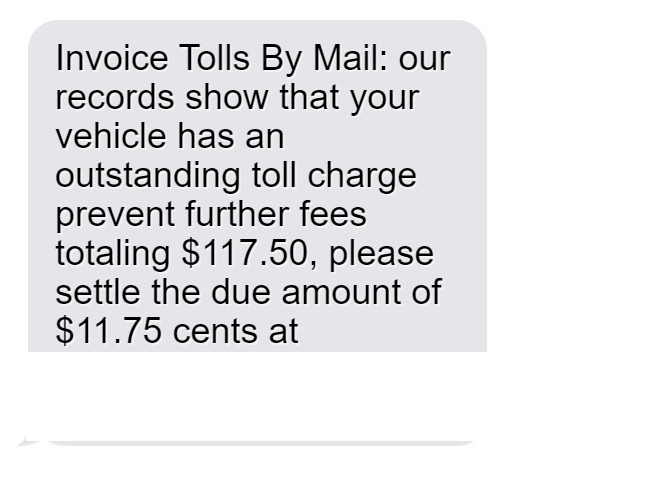
The scam starts with an unsolicited SMS text message sent to your phone stating that your vehicle has unpaid toll road invoices. It claims you must pay now to avoid additional late fees.
Here’s an example of the phishing text:
“Invoice Tolls By Mail: our records show that your vehicle has an outstanding toll charge prevent further fees totaling $117.50, please settle the due amount of $11.75 cents at https://invoicetollsbymail.com”
Of course “invoicetollsbymail.com” is a fake domain name not associated with any real toll authority.
Step 2: Visiting the Fake Invoicing Website
If you click the link in the text, it takes you to the fraudulent website the scammers created for this scam – invoicetollsbymail.com.
The site looks professional with toll authority branding and terminology. There’s even a fake login portal claiming you need to sign in to access your account and pay the invoices. This helps convince victims the site is real.
Step 3: Entering Personal and Financial Information
To “log in” and “pay” your “unpaid invoices”, the site asks you to enter a shocking amount of sensitive personal and financial information, including:
- Full legal name
- Home address
- Email address
- Phone number
- Vehicle info like make, model, plate number
- Driver’s license number
- Credit/debit card number and security code
Step 4: Criminals Steal Your Entered Data
Once you complete the forms and click submit, all your personal and financial details go straight to the scammers. At this point your information is compromised.
The criminals can now use what you entered to steal your identity, make unauthorized purchases, or commit other types of fraud – all while posing as you.
Step 5: The Scammers Disappear
After stealing data from enough victims, the criminals quickly disable the fake website and shut down the phone numbers associated with the scam text messages.
This makes it harder for authorities to track them down. But the damage is already done – countless victims’ information ends up in criminal hands.
What to Do if You Get One of These Scam Texts
If you receive one of these phishing texts, here are the steps experts recommend taking right away:
1. Avoid Clicking Links or Calling Numbers
Do not click, tap, or otherwise engage with any links or phone numbers in SMS messages claiming you owe unpaid tolls. This could compromise your device or information.
2. Report the Message as Spam
On iPhones, forward the text to 7726 to report it to carriers as spam. Android users can forward suspicious texts to SPAM (7726).
3. Contact Your Wireless Carrier
Your phone provider may have guidance on blocking numbers associated with this scam to prevent more fraudulent texts from coming through.
4. Verify Unpaid Tolls Before Paying
If you do have unpaid tolls, always contact the toll authority directly through official channels – never rely on surprise texts. But most likely these are just scams.
5. Monitor Accounts Closely
If you did enter any details into the fraudulent websites, closely monitor bank and credit card statements for any signs of unauthorized activity and report any strange charges.
6. Change Online Account Passwords
Change the passwords on any online accounts that used the same password you entered on the fake website as a precaution. Use strong unique passwords for each account.
7. Place Fraud Alerts on Your Credit
Contact one of the three major credit bureaus to place fraud alerts on your credit file so you’re notified of any suspicious new activity going forward.
8. File Complaints About the Scam
Report fake texts, calls or websites impersonating government agencies to the FTC, FCC, and the toll road authority being impersonated. This helps warn others.
9. Learn to Spot Scam Texts
Learn techniques for identifying scam texts – like poor grammar, unknown links, and threats demanding immediate payment – so you can delete suspicious messages immediately.
The Bottom Line on These Toll Invoice Text Scams
Phishing texts related to unpaid toll invoices aim to trick you into giving up valuable personal data to criminals. But with awareness of how these scams operate, you can spot the red flags instantly and avoid falling victim.
Be skeptical of any urgent texts demanding payment, verify bills directly with sources you trust, and report scam messages to help warn others. Following basic precautions will keep your identity and accounts protected.
Frequently Asked Questions about the Invoice Tolls By Mail Text Scam
1. I got a text saying I have unpaid toll invoices. Is it real?
No, it’s a scam. Criminals are sending these fake texts randomly hoping to fool people. You do not actually have any unpaid toll invoices.
2. How can I tell a fake toll invoice text from a real one?
Real ones only come from numbers you recognize, like an agency you have an account with. Fake ones have grammatical errors, threats of fees, and sketchy links.
3. What happens if I click the link or call the number?
You’ll end up at a fake website asking for personal data that scammers will steal and use to commit identity theft. Never click or call.
4. Could I get in any trouble for ignoring the text?
No. Since these are just scams, there are no consequences for ignoring them. You do not actually owe any tolls or fees.
5. What’s the end goal of the invoice toll scam?
These scammers just want to steal your private data like credit card numbers to commit financial fraud. No actual unpaid tolls exist – it’s all a ruse.
6. What should I do if I entered my information?
Contact your bank immediately to freeze accounts and monitor for fraud. Check your credit reports and file identity theft reports with the FTC if you find suspicious activity.
7. How can I help shut these toll invoice scams down?
Report them to the FTC, FCC, and your wireless carrier. File complaints with the toll road authorities being impersonated. Educate others on recognizing phishing scams.
8. Are text scams like this increasing?
Yes, text scams are on the rise as criminals have learned how effective SMS phishing is at deceiving people and collecting personal data quickly.
9. How can I protect myself from text message scams?
Avoid unknown links and numbers, use spam call/text blocking apps, never give info to unsolicited texts, report suspicious messages, and learn to identify phishing red flags.
10. Who can I contact for more help with text scams?
You can contact the FTC, FCC, your phone carrier, and any business being impersonated in the texts. But never call numbers or click links in suspicious texts.








