

Many people have recently reported seeing ads for bee venom ginger oil detox drops that claim to help with weight loss, digestion, and more. However, consumers should be aware that many of these products are scams designed to trick people into buying ineffective or even dangerous substances.
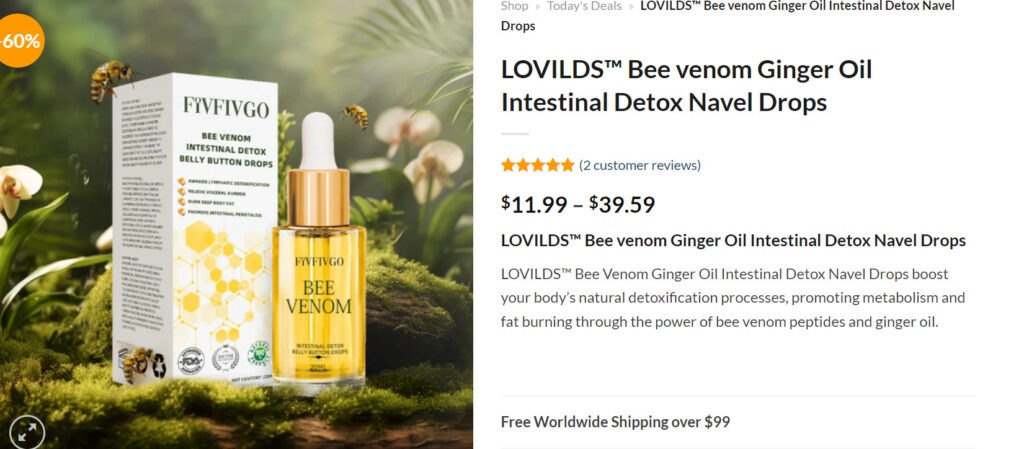
What Are Bee Venom Ginger Oil Drops?
Bee venom ginger oil drops are usually a liquid mixture claiming to contain bee venom, ginger oil, and other ingredients that can be applied to the navel or belly button area.
The advertisements for these drops typically feature dramatic before-and-after photos and testimonials from people who have lost weight, improved digestion, and experienced other health benefits. The ads claim the venom interacts with accupressure points around the navel to “detoxify” the body and trigger fat loss.
However, there is no scientific evidence showing that applying oils or venoms to the navel area can cause weight loss or detoxification. These types of products are not approved by the FDA.
How the Scam Works
The advertisements for detox drops are designed to entice consumers to visit a website and enter their contact information under the pretense of getting a “free trial.” In reality, this signs people up for monthly auto-ship subscriptions of the drops for up to $200 per month or more.
The websites are filled with fake reviews and before-and-after pictures that make false claims about the drops’ effectiveness for weight loss, reduced belly fat, improved digestion, and more.
Once consumers provide their payment information, it can be incredibly difficult to cancel the monthly subscriptions or get refunds. The companies often ignore calls and emails asking to cancel auto-shipments.
Essentially, these drops are a scam meant to charge people repeatedly for products that do not work as advertised. The dramatic claims of health benefits are not supported by any reputable research.
How to Spot Fake Detox Drop Ads
Here are some red flags to watch out for when seeing ads for bee venom ginger oil detox drops or similar products online:
- Claims of extreme weight loss like “30 pounds in 30 days” without diet or exercise
- Promises that the drops will “melt away” or “flush out” fat
- Before-and-after images that look exaggerated or photoshopped
- Claims the drops will detoxify the body or remove toxins
- Personal testimonials with dramatic results from people you can’t verify
- Offers for “free bottles” that require you to pay shipping fees
- Language urging you to act now or buy quickly before the offer expires
- No contact information, address, or company name listed on the website
Reputable companies should be transparent about their products, contact information, and billing practices. Anything pressuring you to buy or making unbelievable claims is a red flag for a scam.
Safely Using Detox and Weight Loss Aids
While “detox drops” are a scam, there are some safe and researched ways to potentially aid health goals like weight loss or improved digestion. However, always consult your doctor before trying:
- Apple Cider Vinegar – Studies show vinegar may boost metabolism and reduce belly fat. Mix with water.
- Probiotics – Healthy gut bacteria may relieve constipation and bloating. Get from foods or supplements.
- Green Tea – Compounds in green tea may slightly boost metabolism. Drink unsweetened teas.
- Fiber – Soluble fiber absorbs water to improve digestion. Get from foods like vegetables, fruits, beans, and oats.
Legitimate products won’t promise unrealistic overnight results. Maintain skepticism about dramatic claims, and report any scams to the FTC to help warn others.
The Bottom Line
Bee venom ginger oil detox drops sold online are predominantly scams making misleading claims about health benefits. Avoid giving payment information to suspicious websites, ignore high-pressure ads, and check with your doctor before trying new supplements. Steer clear of anything promising extreme results without diet and exercise. Protect yourself from online scams by looking for red flags in their claims and marketing tactics.
This article is for educational purposes only and does not constitute professional, financial or legal advice. The content is intended for general information and should not be construed as definitive guidance. Information contained herein is subject to change without notice.  For concerns, please contact us via the provided form.
If you are the owner of the website or product in question and wish to offer clarifications regarding your business or website, please reach out to us through the provided Contact Form.








