


A new iPhone launch creates a perfect mix of excitement and scarcity. When official delivery dates begin to slip, a store promising an iPhone 18 Pro for less money and faster shipping can feel like the answer.
That promise is also powerful bait. Fake Apple stores and fraudulent reservation pages use the real launch to collect card data, irreversible payments, Apple Account credentials, and orders for phones that will never arrive.
Overview
The scam attaches itself to a real product launch
Apple officially announced iPhone 18 Pro and iPhone 18 Pro Max in September 2026. That real event gives fraudulent ads accurate product names, colors, dates, and pricing details to copy.
The fake seller may claim to have priority allocation, canceled carrier orders, employee inventory, or launch-day stock. Familiar facts around the listing make the one false claim, possession of the phone, harder to notice.
Lookalike stores imitate Apple’s checkout
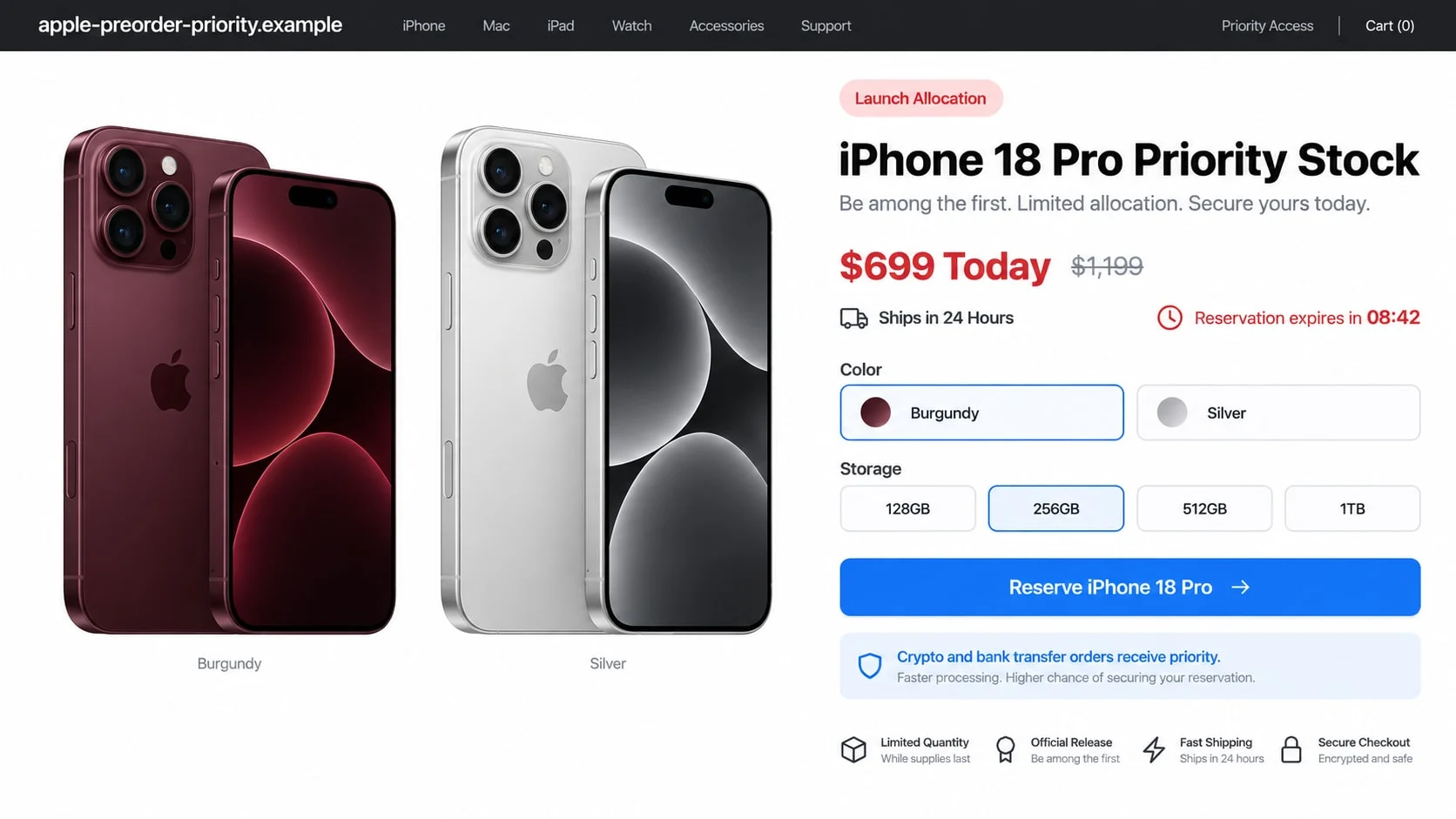
Pages copy Apple’s clean design, product renders, storage choices, trade-in language, and financing terms. The address may include apple, iphone, preorder, priority, or launch without belonging to Apple.
Some campaigns impersonate a carrier or major retailer instead. The same verification rule applies: the visible logo does not establish who controls the domain or receives the payment.
The reservation can expose far more than the order price
A fake checkout collects shipping information and card data. It may also ask the buyer to sign in with an Apple Account, upload an ID for financing, or pay by crypto or bank transfer to secure limited stock.
Potential losses include:
- Payment for a phone that does not exist.
- Unauthorized card purchases and recurring charges.
- Apple Account takeover through a fake sign-in page.
- Identity theft using financing documents and personal data.
- Loss of crypto or bank transfers that cannot be reversed.
- Additional delivery, insurance, and activation fees.
What Fake iPhone 18 Pro Offers May Promise
The most convincing offer does not look completely impossible. It may advertise a small group of canceled preorders, a carrier promotion, or a business allocation that became available after the official launch.
Other pages are more aggressive, listing a new iPhone 18 Pro for $699 or offering a buy-one-get-one deal without a carrier contract. A countdown says the remaining units will be released to other shoppers within minutes.
The scam can also appear as a marketplace listing. A private seller claims to have an unwanted upgrade or extra reservation and asks for a deposit before meeting. The product photographs may come from Apple’s press materials or a legitimate listing.
Giveaway versions say the recipient won the right to buy the phone or only needs to pay a small shipping fee. The card form then starts a subscription, records the payment details, or redirects to more surveys.
Some fake bundles add AirPods, AppleCare, a charger, and a case at no cost. The growing package is meant to keep attention on the savings rather than the seller’s identity.
A marketplace account can look established because it was stolen from a real user. Check whether its recent location, writing style, and sale items suddenly changed before the phone listing appeared.
Apple’s official iPhone 18 Pro announcement describes the real models, launch timing, and availability. Accurate details copied from that page do not make another store authorized.
How the iPhone 18 Pro Preorder Scam Works
Step 1: An advertisement targets launch-day demand
The ad appears in search results, social feeds, video comments, marketplace groups, or a message forwarded by a friend. It promises stock when official stores show longer delivery dates.
Scammers can purchase sponsored placement and use a page that was created for unrelated content. A verified-looking profile or large follower count does not authenticate the destination store.
Step 2: The storefront copies real Apple material
The landing page uses official product names, colors, and high-resolution renders. Navigation links and support text may be copied so closely that the visitor focuses on the deal rather than the address bar.
A padlock beside the address only means the connection is encrypted. It does not mean Apple, a carrier, or any retailer owns the site.
Step 3: Limited stock creates a reservation deadline
The visitor is told that one or two phones remain and several shoppers are viewing the page. A timer reserves the selected color and storage size for a few minutes.
Refreshing may restart the countdown. That behavior reveals a pressure script rather than a genuine inventory hold, but many buyers do not reload once they fear losing the phone.
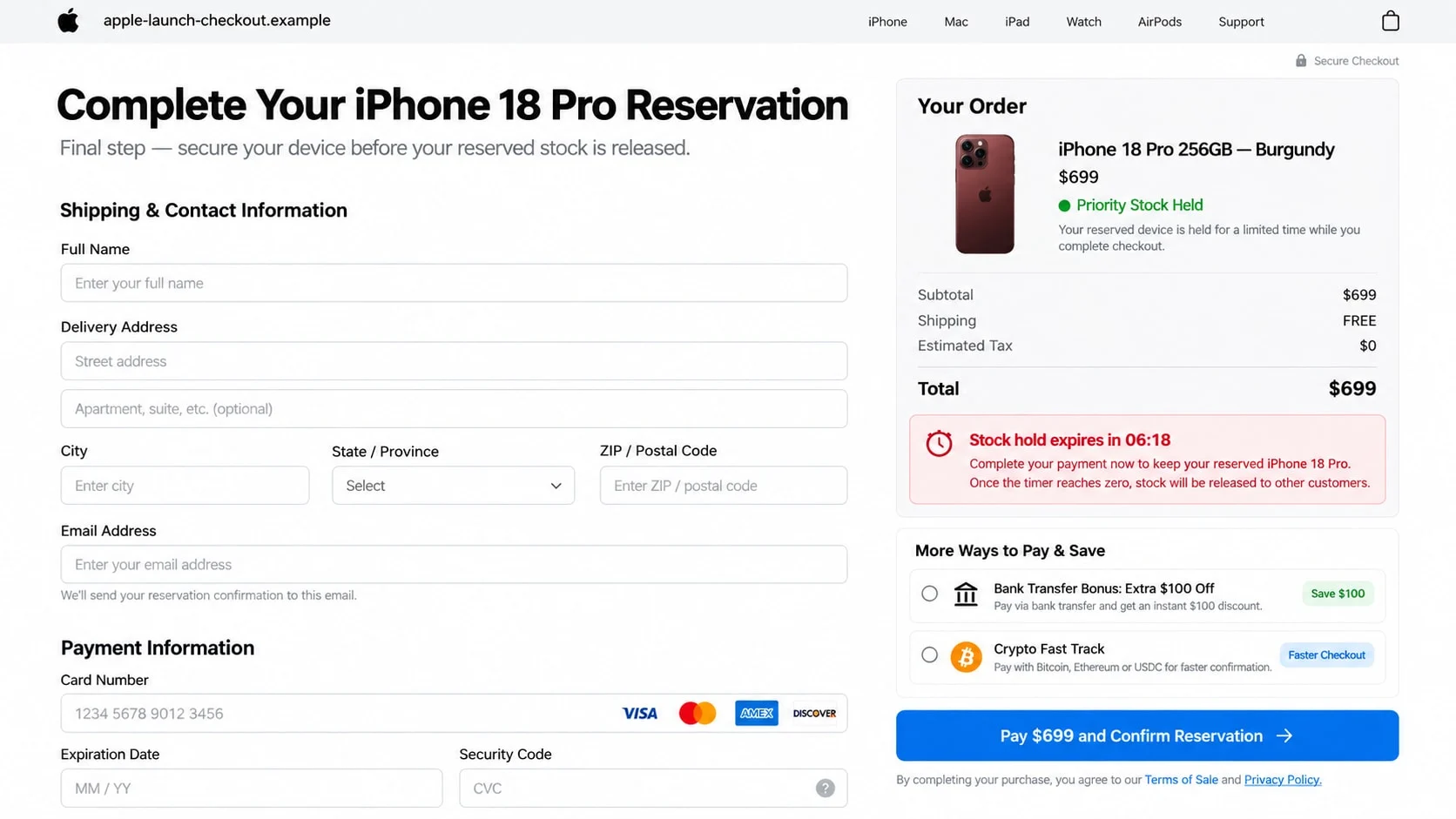
Step 4: Checkout collects payment and account data
The page asks for contact, delivery, and card details. A sign-in prompt may collect an Apple Account password under the pretext of connecting AppleCare, transferring an upgrade, or confirming purchase eligibility.
If the card is declined, the site encourages another attempt. Each card can be captured even when the page displays an error.
Step 5: Irreversible payment is offered as the fastest option
A bank transfer or crypto payment supposedly earns an extra $100 off, faster dispatch, or priority allocation. These methods are attractive to criminals because recovery is difficult after the funds move.
A private seller may use the same tactic for a deposit, then demand the remaining balance before providing a meeting place or tracking number.
Step 6: Fake order updates delay a dispute
The victim receives a professional confirmation and sees an order page move from reserved to processing. A tracking number may be invalid, refer to a cheap parcel, or show delivery somewhere in the same city.
When the delivery date passes, support claims the phone is held for insurance, customs, address verification, or activation. Each explanation can introduce a new fee while keeping the buyer from contacting the bank.
A second message may say the original seller was unauthorized but a partner can finish the order. That partner usually asks for another payment and belongs to the same operation.
Identity, Contact, and Payment Checks
Start with Apple or the carrier independently
Type apple.com yourself or use the Apple Store app already installed on the device. Apple says customers can buy online through apple.com, the Apple Store app, and Apple Store locations.
For a carrier promotion, open the carrier’s official app or website independently. Do not let an ad, direct message, or QR code choose the destination.
Read the complete registered domain
A name such as apple.priority-stock.example belongs to priority-stock.example, not Apple. Hyphens, extra words, and a familiar logo can make a separate domain look connected at a glance.
Search the exact address with terms such as scam, complaints, and reviews. A lack of results is not reassuring for a store created around a recent launch.
Compare the price and terms with official offers
Check the same storage, carrier connection, trade-in requirement, and financing period. A price may look lower because the fake page omits a contract or pretends that a trade-in discount applies to everyone.
Read the return, warranty, and delivery terms. A legitimate high-value seller should identify the business responsible for those promises and provide a verifiable way to contact it.
Keep payment inside a protected channel
Do not move a marketplace conversation to bank transfer, crypto, gift card, or a friends-and-family payment. Keep communication and payment on the platform when its purchase protection requires it.
A credit card may provide stronger dispute rights, but it does not make an unknown store safe. Verify the merchant descriptor and final amount before approval.
Warning Signs in a Fake iPhone 18 Pro Store
- The address is not apple.com or a verified retailer domain.
- The phone costs far less without a trade-in or carrier agreement.
- Every color and storage option is available despite claimed scarcity.
- A reservation countdown resets when the page reloads.
- Crypto or bank transfer receives a special discount.
- The seller asks for an Apple Account password at checkout.
- A one-time code is required by chat or telephone.
- The business name is absent or differs from the card merchant.
- The contact address is a free mailbox or unrelated location.
- Reviews appear only on the seller’s own page.
- Delivery requires a new insurance or activation payment.
- The seller refuses pickup or independent verification.
Correct model details are not evidence. Apple publicly announces specifications and provides product images, giving scammers everything needed to build a convincing listing without possessing a single phone.
Safer Ways to Buy a New iPhone
Use Apple, a carrier, or an established retailer reached through a known address. If a model is temporarily delayed, join an official availability alert instead of searching for secret inventory.
Verify trade-in terms before mailing an old phone. A fake buyer may collect the device and account details while claiming the new phone ships after inspection.
Never remove Activation Lock or share an Apple Account password because a seller says it is needed to transfer service. Account and device setup should happen through official instructions after a legitimate purchase.
For a private sale, meet in a safe public location where the phone can be inspected and activated. Confirm the model, storage, serial information, carrier status, and proof of purchase without publishing identifiers online.
Keep the listing, receipt, and promised delivery date. Documentation helps the payment provider distinguish an ordinary delay from a fraudulent merchant.
Check the package before surrendering a trade-in device. A legitimate trade-in program explains when ownership transfers and how the value changes if the old device is assessed differently.
Be wary of support that moves into a private chat and asks to share the screen. Order verification does not require someone to watch online banking or read a one-time security code.
What to Do if You Have Fallen Victim to This Scam
- Stop paying and save the evidence. Capture the ad, complete domain, listing, checkout, confirmation, merchant name, messages, tracking page, telephone numbers, and wallet or bank destination. Do not pay an activation, customs, or release fee.
- Contact the card issuer, bank, or payment service. Explain that the seller may be fraudulent and ask about a dispute, card replacement, transfer recall, or receiving-bank alert. Act quickly, especially after a bank or crypto transfer.
- Secure the Apple Account. If a password or code was submitted, change the password through Apple’s official settings, review trusted devices and phone numbers, remove anything unfamiliar, and confirm two-factor authentication.
- Protect email and reused credentials. Change any password reused on another service, beginning with email. Review recovery options, forwarding rules, sessions, and recent security alerts.
- Address identity document exposure. If the fake store collected an ID, Social Security number, or financing form, create a recovery plan at IdentityTheft.gov. Consider credit freezes and monitor for new accounts.
- Remove suspicious software. Uninstall any order-tracking app, profile, extension, or remote-support tool supplied by the seller. Run a full Malwarebytes scan to find information stealers and unwanted changes.
- Block known scam pages. AdGuard can reduce exposure to known phishing domains and malicious advertisements. New launch-themed domains appear quickly, so manual address checks are still essential.
- Report the campaign. Report the ad or listing to the platform, the domain to its provider, and the fraud at ReportFraud.ftc.gov. Significant online theft can also be reported at IC3.gov.
- Send Apple impersonation messages to Apple. Apple advises forwarding suspicious email that appears to come from Apple to reportphishing@apple.com. Include the original headers when possible.
- Expect a fake refund. Criminals may return as Apple Support, the bank, or a recovery company. Do not share codes, install remote access, or pay anyone who guarantees recovery.
Frequently Asked Questions
Is the iPhone 18 Pro a real Apple model?
Yes. Apple announced iPhone 18 Pro and iPhone 18 Pro Max in September 2026. A real product does not make every store or preorder advertisement genuine.
Where can I safely buy an iPhone 18 Pro?
Start with apple.com, the Apple Store app, an Apple Store, a verified carrier, or an established authorized retailer. Type the address yourself instead of following an unsolicited ad.
Does Apple offer crypto or bank transfer discounts?
Treat such an offer on an unknown store as a major warning. Verify payment methods and promotions directly through Apple’s official checkout or the named retailer.
Can a valid tracking number still be part of the scam?
Yes. It may belong to a label that was never used, a cheap decoy item, or another parcel delivered in the same area. Confirm destination and parcel details with the carrier.
What if the fake checkout declined my card?
Assume the card data may still have been captured. Contact the issuer, explain where it was entered, and follow its advice about replacement and monitoring.
Can Apple recover a bank transfer or crypto payment?
Apple cannot reverse a payment sent to a fraudulent third party. Contact the bank, exchange, or wallet provider immediately, but understand that recovery may not be possible.
The Bottom Line
The iPhone 18 Pro preorder scam hides inside the excitement of a real Apple launch. Copied product details, polished design, and a stock timer make an unknown seller look like a rare route to faster delivery.
Open Apple or the retailer independently, verify the complete domain, and reject discounts tied to irreversible payment. Missing a launch-day bargain is far cheaper than paying for a phone that never existed.

Join the discussion
0 commentsShare your experience or ask a question about this article.
Discussion
Start the conversation
Have a question or something useful to share? Add the first comment.