

The newest iPhone launch creates a familiar kind of urgency. Stock looks limited, delivery dates keep moving, and a sponsored result promises the exact iPhone 18 Pro configuration you want for hundreds less.
The page can look as polished as a real product launch. The danger sits in the address bar, the impossible price, and the checkout that wants far more than a normal order requires.
Overview
Fake stores appeared around the real iPhone 18 Pro launch
Apple opened pre-orders for the iPhone 18 Pro and iPhone 18 Pro Max on September 12, 2026, with availability beginning September 18 in the first markets. High search interest created ideal conditions for copycat stores and phishing advertisements.
The iPhone 18 Pro pre-order scam uses freshly registered domains, sponsored posts, fake reviews, and copied Apple graphics. Some sites claim access to sold-out models, while others advertise prices that are far below any credible launch offer.
The page is built to steal payment and Apple Account details
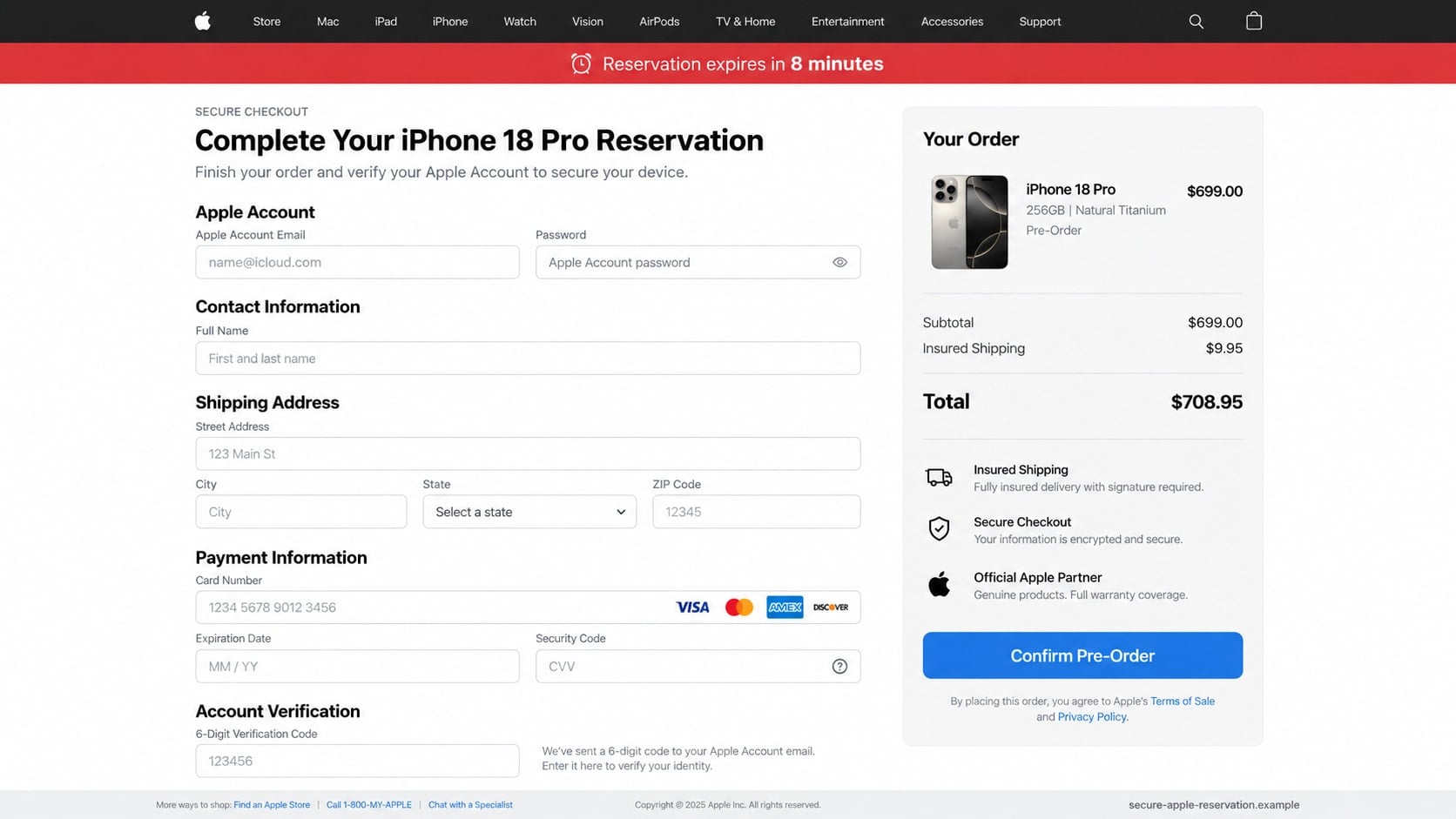
A visitor may be asked to sign in with an Apple Account before checking out. The same page then collects a card number, security code, billing address, telephone number, and a one-time authentication code.
No device needs to exist. The criminal can use the credentials immediately, make card purchases, sell the data, or charge the victim while displaying a fake order confirmation.
Scarcity keeps the buyer from inspecting the seller
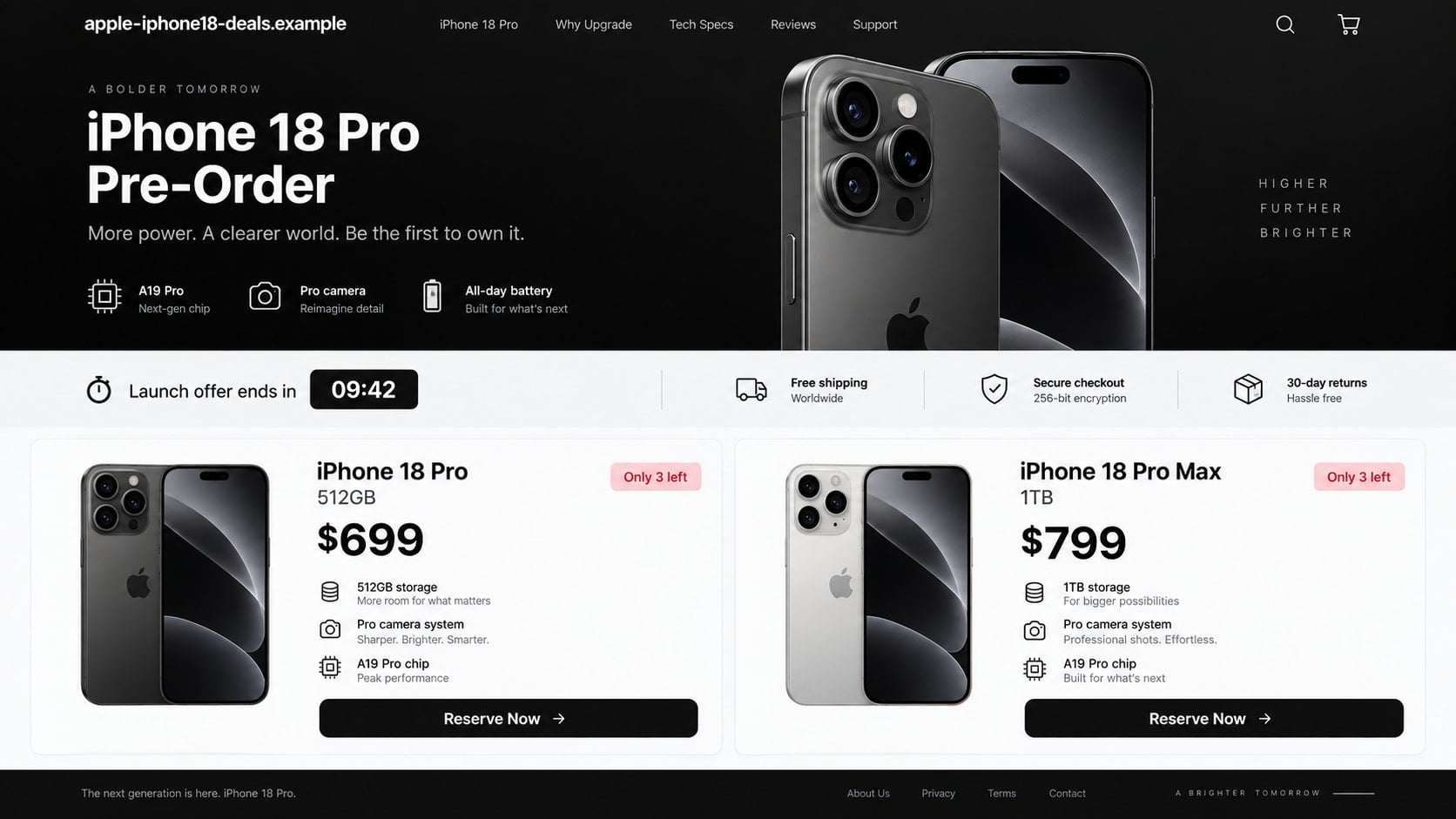
Countdown clocks, “only 3 left” badges, launch-weekend discounts, and delivery promises create the feeling that hesitation will cost the buyer a rare opportunity. The pressure is artificial and can reset whenever the page reloads.
A real pre-order can be exciting without requiring blind trust. Apple and authorized sellers have verifiable domains, published policies, traceable customer support, and prices that can be compared independently.
- The domain adds “Apple,” “iPhone,” “deals,” or “preorder” to an unrelated address.
- A new Pro model is advertised at an implausibly low launch price.
- The site guarantees stock that every established retailer shows as delayed.
- Checkout asks for an Apple Account password or two-factor authentication code.
- Payment is limited to cryptocurrency, wire transfer, gift card, or person-to-person apps.
- The countdown, stock counter, or customer feed repeats when the page reloads.
Why Launch-Week Scams Spread So Quickly
A major product launch compresses attention into a few days. Buyers search model names, storage sizes, colors, trade-in values, and delivery dates, giving criminals many phrases to target with ads and search-optimized pages.
Generative design tools and copied product media make a counterfeit storefront inexpensive to build. A scammer can reproduce navigation, comparison cards, financing language, and support footers without holding a single phone.
New domains also have a short window before reputation systems classify them. A buyer who assumes browser protection will block every dangerous page may see no warning at all during the campaign’s first hours.
Social ads add false social proof. Comments may claim orders arrived early, stock is disappearing, or a coupon worked. Those accounts can be automated, compromised, or controlled by the advertiser.
The product itself provides the perfect emotional lever. Someone who has waited months for a launch may treat a discounted listing as a lucky discovery instead of asking why an unknown store has better stock and pricing than authorized sellers.
How the iPhone 18 Pro Pre-Order Scam Works
Step 1: A sponsored result or social ad promises rare stock
The victim sees an advertisement for an iPhone 18 Pro, iPhone 18 Pro Max, special color, or large storage configuration. The price may be $699 or $799 when the real configuration should cost substantially more.
The ad often uses launch photography and a headline such as “official preorder partner.” A small domain label is easy to miss while the familiar product image receives most of the attention.
Step 2: A cloned product page establishes false credibility
The landing page copies Apple’s minimalist layout or an authorized retailer’s storefront. It includes technical specifications, shipping icons, warranty claims, reviews, and comparison tables that may have been lifted from legitimate pages.
Fake trust seals and security badges are only images. They do not prove authorization, inventory, encryption quality, or a relationship with Apple.
Step 3: Scarcity turns browsing into a rushed reservation
A timer counts down from ten minutes while stock falls from five units to two. Pop-ups say shoppers in nearby cities just completed orders, creating the impression of real-time demand.
The visitor is warned that leaving will release the phone to another buyer. This discourages price checks, domain research, and conversations with someone who might notice the warning signs.
Step 4: Checkout collects credentials and card information
The site asks for an Apple Account email and password to “verify eligibility” or apply a trade-in. It then collects shipping, billing, and card details as if completing an ordinary purchase.
A legitimate third-party store does not need an Apple Account password to sell a phone. Combining account credentials with card data gives the attacker several independent paths to fraud.
Step 5: A real authentication code is requested under a false label
The attacker may attempt to sign in to the victim’s real Apple Account, causing Apple to send a genuine code or approval prompt. The fake checkout says the code confirms the reservation or payment.
Entering it can complete the attacker’s sign-in. The real security message should be read carefully; if it describes an action you did not initiate, deny it and leave the site.
Step 6: The order disappears while the stolen data remains useful
The buyer receives a polished confirmation number and a delivery estimate. Tracking never activates, support stops responding, or the site vanishes after enough cards and payments have been collected.
Unauthorized charges may appear immediately or weeks later. The Apple Account can also be used for purchases, recovery attempts, phishing toward contacts, or access to personal information synchronized with the account.
Identity, Contact, and Payment Checks
Start with the exact domain
Read the address from right to left to identify the registered domain. A page such as apple.iphone18-deals.example belongs to the example domain, not Apple. Brand words placed before an unrelated ending do not change ownership.
Type apple.com or an established retailer’s address yourself. Do not rely on a sponsored result, QR code, or link forwarded through social media.
Compare products, dates, and prices with Apple’s announcement
Apple’s official launch information identifies which models can be pre-ordered, when orders open, and when availability begins. A store advertising an unannounced model or impossible schedule deserves immediate rejection.
Price differences can exist through carriers and trade-ins, but the conditions should be explicit. A huge discount with no contract, eligibility requirement, or credible seller is not a normal launch promotion.
Verify the seller outside its own website
Search for the legal business name, physical address, customer-service number, and authorization claims independently. Do not treat reviews printed on the seller’s page as outside evidence.
Check whether contact information leads to a real business and whether return terms identify a usable address. Newly created social profiles and generic email support add risk rather than reassurance.
Inspect what the checkout asks you to authorize
A phone purchase may require payment and delivery details. It should not require the password to an Apple Account, a device passcode, or a two-factor code generated by an unrelated sign-in.
Prefer payment methods with clear dispute rights. Do not use cryptocurrency, gift cards, wire transfers, or payment-app transfers for an unfamiliar electronics seller.
Fake Pre-Order Pages Versus Real Apple Shopping
The official Apple Store runs on Apple’s domain and in the Apple Store app. Account prompts occur within known Apple interfaces, and the company does not need a customer to reveal a two-factor code to a shop employee or support caller.
A copycat may reproduce Apple’s wordmark, product photos, and navigation almost perfectly. Visual similarity is therefore a weak test. Domain ownership, independently verified policies, and the requested data are more useful.
Scam pages frequently mix details from different generations. A headline may say iPhone 18 Pro while a specification panel lists the wrong chip, camera, color, or storage. Footer dates and product images may also belong to an older model.
Do not use a countdown as evidence that checkout is live. Open the page in a separate private window or revisit it later and the timer often restarts. Real inventory can change, but it does not need a theatrical clock to prevent verification.
What to Do if You Have Fallen Victim to This Scam
- Stop interacting with the site. Do not submit another payment to release shipping, insurance, customs, or a refund. Save the URL, screenshots, confirmation email, order number, and advertisement before closing it.
- Contact the card issuer or bank. Use the number on the card or statement. Explain that card details were entered into a phishing store, ask about replacing the card, and dispute any unauthorized transaction promptly.
- Change the Apple Account password. Go directly to Settings on a trusted Apple device or account.apple.com. Review trusted devices, recovery methods, account details, and recent security notifications.
- Replace reused passwords. Secure email first because it can reset other accounts. Give every important service a unique password and enable multi-factor authentication where available.
- Check the device. If the store downloaded a profile, app, attachment, or browser extension, remove it and run a complete Malwarebytes scan. Do not use the device for sensitive activity until unknown software is gone.
- Use additional blocking. AdGuard can help block many known phishing and tracking domains, but a brand-new launch scam may not be classified immediately. Domain checking remains essential.
- Watch for follow-up messages. A fake store may send delivery problems, customs fees, password resets, or refund offers. Treat every later contact as part of the same compromise until verified independently.
- Report the phishing. Apple accepts suspicious messages at reportphishing@apple.com. Report the advertisement to the platform and submit the fraud to ReportFraud.ftc.gov.
- Monitor identity and financial accounts. If extensive personal data was entered, watch credit reports and consider fraud alerts or freezes. Review card activity even after a replacement is ordered.
Safer Ways to Buy During a High-Demand Launch
Begin at Apple.com, the Apple Store app, a carrier’s known app, or an established retailer address that you type yourself. Bookmark the verified product page before launch rather than searching again under pressure.
Decide your acceptable model, price, and delivery window in advance. A buyer who already knows the official range is less vulnerable to an impossible discount presented as a private allocation.
If stock is delayed, wait for a traceable seller rather than paying an unknown store for certainty. A later delivery is inconvenient; a stolen card and compromised Apple Account can affect many services.
Use a credit card when appropriate because it commonly provides stronger dispute procedures than irreversible payment methods. Review the statement after purchase instead of relying solely on order emails.
Save the seller name and promised delivery date before paying. If the order later changes, those records help distinguish a normal delay from a store rewriting its terms after collecting money.
Be careful with trade-in offers from unknown sites as well. A criminal may collect the serial number, device details, identity documents, and an unlocked phone while claiming the trade-in is required to preserve the pre-order price.
Frequently Asked Questions
Are all iPhone 18 Pro pre-order websites scams?
No. Apple, carriers, and authorized retailers can accept real orders. The risk comes from copycat domains and advertisements pretending to be those sellers. Verify the exact site before entering information.
Why are fake stores offering the phone for $699?
An extreme price creates urgency and attracts searches for launch deals. The scammer does not need to honor the price because there may be no phone, inventory, or fulfillment operation behind the page.
Can a fake page steal my Apple Account even if my card is declined?
Yes. Credentials are captured when submitted, independent of the displayed payment result. A fake decline may even prompt the victim to try additional cards and provide more data.
Should checkout ask for my Apple two-factor code?
Do not enter a code generated for a sign-in you did not initiate. A third-party seller does not need your Apple Account password or authentication code to sell and ship a phone.
What if the fake store sent a tracking number?
A tracking number can be invented, reused, or created for an unrelated low-value shipment. Verify it directly with the carrier and continue the bank dispute if the seller or purchase was fraudulent.
Where can I report an Apple phishing store?
Send relevant phishing messages or screenshots to reportphishing@apple.com, report the ad to its platform, notify the hosting or domain provider when possible, and file a fraud report with the FTC.
The Bottom Line
iPhone 18 Pro pre-order scam sites hide a data-theft operation inside the excitement of a real launch. Copied design, product photography, stock counters, and security badges cannot authenticate a seller.
Start from a domain you know, compare the offer with Apple’s published launch details, and leave any checkout that asks for account passwords or authentication codes. A limited phone can be purchased later; exposed credentials and card details require immediate repair.

Join the discussion
0 commentsShare your experience or ask a question about this article.
Discussion
Start the conversation
Have a question or something useful to share? Add the first comment.