

In this blog post, we will explain what iPhone/iPad survey scams are, how they work, and what to do if you have fallen victim to one. We will also share some tips on how to avoid these scams and protect your personal information.
What are the iPhone/iPad Survey Scams?
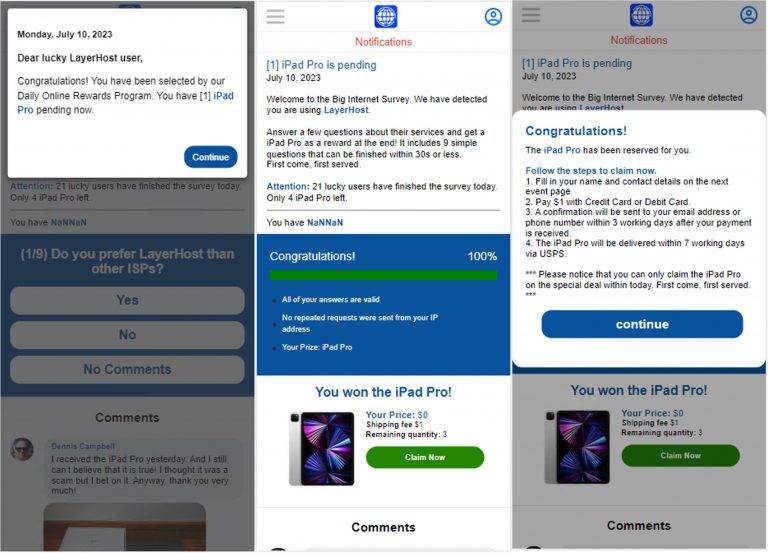
iPhone/iPad survey scams are a type of phishing scam that targets users of Apple devices. The scammers send text messages or emails to random people, claiming that they have won a free iPhone, iPad, or other Apple product. The messages often look like they are coming from a legitimate company or service provider, such as Apple, Netflix, or your mobile carrier.
The messages usually contain a link that supposedly leads to a website where you can claim your prize. However, the link is actually a malicious one that takes you to a fake webpage disguised as a survey. The webpage says that you need to complete a short survey in order to receive your gift. The survey asks for personal information, such as your name, address, phone number, email, and sometimes even your credit card details.
The scammers use this information to steal your identity, access your accounts, or make fraudulent charges on your credit card. They may also sell your information to other criminals or use it to send you more spam and scam messages.
Here are some iPhone/iPad giveaway text messages:
Our sincere apologies for the interruption of your services this weekend, [name]! Here is a compnsation from us: [link] Thanks once again!
[name], we have now tried to contact you several times regarding your TV. Read more here: [link]
Hello [name] we have made multiple attempts to contact you regarding your item. Please visit the link for more information:[link]
How do the iPhone/iPad Survey Scams work?
The iPhone/iPad survey scams work by exploiting the human tendency to be curious and greedy. Many people are tempted by the offer of a free gift, especially if it is something expensive or desirable. They may not pay attention to the details of the message, such as the sender’s name, the URL of the link, or the grammar and spelling errors. They may also think that there is no harm in filling out a simple survey, since they are not asked to pay anything upfront.
However, by clicking on the link and entering their information, they are giving away their personal data to the scammers. The scammers can then use this data for various malicious purposes, such as:
- Impersonating the victim and accessing their online accounts, such as email, social media, banking, or shopping.
- Creating fake accounts or profiles using the victim’s name and photo.
- Sending spam or scam messages to the victim’s contacts, pretending to be them.
- Making fraudulent purchases or transactions using the victim’s credit card or bank account.
- Selling the victim’s information to other scammers or hackers.
What to do if you have fallen victim to an iPhone/iPad Survey Scam?
If you have fallen victim to an iPhone/iPad survey scam, you should take immediate action to limit the damage and protect yourself from further harm. Here are some steps you can take:
- Delete the message and do not click on any links or attachments.
- Contact your bank or credit card company and report any suspicious or unauthorized charges. You may need to cancel your card and request a new one.
- Change your passwords and security questions for all your online accounts, especially those that use the same email or phone number as the one you provided in the survey.
- Monitor your credit reports and statements for any signs of identity theft or fraud.
- Report the scam to the authorities, such as the Federal Trade Commission (FTC), the Internet Crime Complaint Center (IC3), or your local police.
- Warn your friends and family about the scam and advise them not to respond to any similar messages.
- If you suspect your device is infected with malware, run a scan with Malwarebytes Anti-Malware Free.
Conclusion
iPhone/iPad survey scams are a common and dangerous type of phishing scam that targets users of Apple devices. The scammers lure people with fake offers of free gifts and trick them into giving away their personal information. The scammers then use this information to steal their identity, money, or accounts.
To avoid falling for these scams, you should always be careful and skeptical when receiving unsolicited messages that promise something too good to be true. You should also never click on links or attachments from unknown senders or sources. Always verify the authenticity of the message and the website before entering any information. And if you have already fallen victim to an iPhone/iPad survey scam, you should act quickly to report it and protect yourself from further harm.

Join the discussion
0 commentsShare your experience or ask a question about this article.
Discussion
Start the conversation
Have a question or something useful to share? Add the first comment.