

If you are an Amazon customer, you may have received a text message claiming that your annual account fee is past due and that you need to pay immediately or face a fine. This is a scam that tries to trick you into giving away your personal and financial information to fraudsters. In this blog post, we will explain how this scam works, how to spot it, and what to do if you have fallen victim.
What is the Amazon_SMS Warning ‘Your annual account fee is currently past due’ scam?
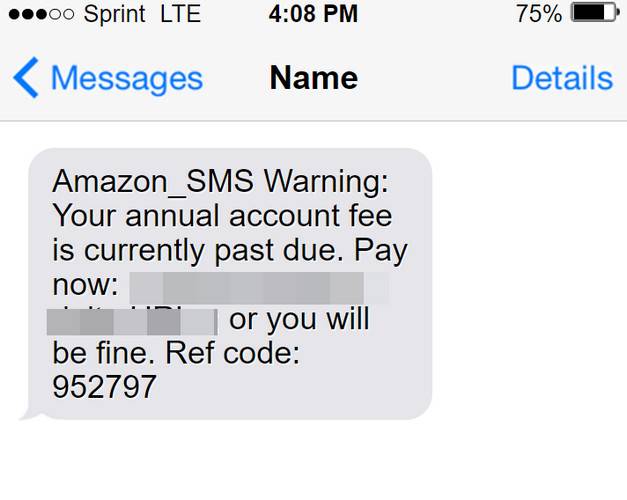
The Amazon_SMS Warning ‘Your annual account fee is currently past due’ scam is a type of phishing attack that uses fake text messages to lure unsuspecting users into clicking on a malicious link. The text message may look like this:
Amazon_SMS Warning: Your annual account fee is currently past due. Pay now: <URL>; or you will be fine. Ref code: 952797
The message may appear to come from a legitimate source, such as Amazon or a courier company, and may use urgent language to pressure you into taking action. However, the link in the message does not lead to the official Amazon website, but to a fake one that mimics its appearance. The fake website will ask you to enter your Amazon login credentials, your credit card details, and other personal information, such as your address, phone number, and social security number. By doing so, you will expose yourself to identity theft, fraud, and other risks.
How does the Amazon_SMS Warning ‘Your annual account fee is currently past due’ scam work?
The scammers behind this scam use various techniques to make their messages look convincing and legitimate. They may:
- Spoof the sender’s number or name to make it look like it comes from Amazon or a trusted partner.
- Use logos, fonts, colors, and layouts that resemble the official Amazon website.
- Use a URL that looks similar to the real one, but with slight variations or typos, such as pays-amazon[.]com instead of amazon.com.
- Use a reference code or an order number to make it seem like the message is related to your account or purchase history.
- Use emotional triggers, such as fear, urgency, or curiosity, to persuade you to click on the link and pay the fee.
However, there are also some signs that can help you identify this scam and avoid falling for it. You should be suspicious if:
- You receive a text message from an unknown or unexpected source.
- The message contains spelling or grammatical errors, or uses unprofessional language.
- The message asks you to click on a link or open an attachment that you are not expecting or that looks suspicious.
- The message asks you to provide sensitive information, such as your password, credit card number, or social security number.
- The message claims that you have to pay a fee or a fine for something that you are not aware of or that does not make sense.
What to do if you have fallen victim?
If you have clicked on the link in the scam message and entered your information on the fake website, you should take immediate action to protect yourself and your account. You should:
- Change your Amazon password and any other passwords that are similar or related.
- Contact your bank or credit card company and report the incident. They may be able to block or reverse any unauthorized transactions.
- Monitor your credit reports and bank statements for any signs of fraud or identity theft.
- Report the scam message to Amazon and to the Federal Trade Commission (FTC) at https://reportfraud.ftc.gov/.
- Delete the message from your phone and do not reply or forward it.
- If you suspect your device is infected with malware, run a free anti-malware scan with Malwarebytes Free.
Conclusion
The Amazon_SMS Warning ‘Your annual account fee is currently past due’ scam is a phishing attack that tries to steal your personal and financial information by sending you fake text messages. You can avoid this scam by being vigilant and cautious when receiving unsolicited messages, by verifying the source and the URL before clicking on any links, and by never sharing your sensitive information with anyone online. If you have fallen victim to this scam, you should act quickly to secure your account and report the incident. Remember, Amazon will never ask you for your password, credit card number, or social security number via text message or email.

Join the discussion
0 commentsShare your experience or ask a question about this article.
Discussion
Start the conversation
Have a question or something useful to share? Add the first comment.