

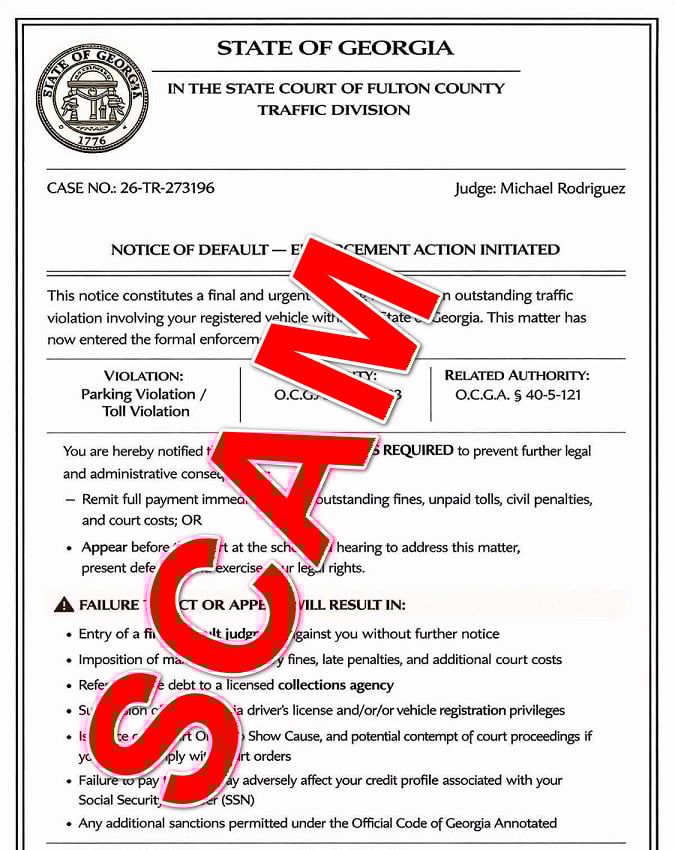
A text message arrives with what looks like an official court notice from the State Court of Fulton County Traffic Division. It names Judge Michael Rodriguez, lists a case number, warns that enforcement action has been initiated, and tells you to scan a QR code to settle the matter.
It is built to feel serious, urgent, and final.
That is exactly what makes it dangerous.
Scam Overview
The Fulton County Judge Michael Rodriguez scam text is a government-impersonation phishing scam that uses fake court paperwork, traffic violation language, and QR code payment traps to pressure people into handing over money and personal information.
In the version shown in your screenshot, the notice is styled as a formal Georgia court document. It includes a state seal, a Fulton County court heading, a traffic division label, a case number, a named judge, statute references, a hearing date, and a QR code with instructions to settle the balance. At a glance, it looks official enough to scare almost anyone.
That is the point.
This scam is not really about collecting a legitimate fine. It is about making you believe you are already in legal trouble so you act before you verify.
Fulton County has already warned residents about this exact type of scheme. The county said the circulating fake notices resemble official local court documents and often include a false case number, a fabricated toll-related violation, a fake hearing date and address, and a QR code labeled “Scan to pay.” Fulton County also said Georgia courts do not send unexpected text messages demanding payment, and courts do not require payment by QR code or text link.
Local reporting on the same Fulton County scam wave said residents were receiving text messages with fabricated court notices for fake toll violations, and county officials stressed that notices to appear in court are sent by mail, not by text message.
Why this scam looks so convincing
This scam works because it borrows the visual language of real legal paperwork.
The notice usually includes:
- a state seal or government-style emblem
- a court or traffic division heading
- a formal case number
- a named judge
- references to state code sections
- a list of harsh legal consequences
- a hearing date and address
- a QR code that promises a quick resolution
Most people do not read court documents every day. They judge them by appearance. If the page looks official and uses the right kind of language, many recipients assume it must be real.
Scammers know this. They are not trying to create a perfect legal document. They are trying to create a believable first impression.
Why the named judge matters
In the version you shared, the notice uses the name Judge Michael Rodriguez.
That detail is there to increase credibility.
A judge’s name makes the message feel personal, specific, and tied to a real process. It also makes the recipient less likely to dismiss the notice as generic spam. Whether the name is fabricated, borrowed, or randomly inserted, it serves the same purpose: authority.
The same tactic has appeared in other Georgia scam waves. Fulton County said the fake notices circulating in the community misuse court titles, seals, and signatures to make the document look legitimate.
Why the “enforcement action initiated” wording is so effective
The language in these scam notices is intentionally aggressive.
It does not say you may have a problem. It says the matter has already entered an enforcement stage. That phrasing creates immediate pressure because it suggests you are already late.
The notice in your image warns about things like:
- final default judgment
- maximum statutory fines
- referral to collections
- suspension of license or registration privileges
- possible effects on your credit profile
This pile-on of consequences is deliberate. It is meant to overwhelm you emotionally.
Georgia agencies have warned that similar text scams commonly threaten license suspension, fines, and credit impacts while directing recipients to fake websites designed to steal money or personal information. The Georgia Department of Driver Services says scammers are sending fake messages alleging upcoming license suspension due to unpaid fines and that DDS will never request payment or personal information through unsolicited text messages.
The QR code is the trapdoor
The QR code is one of the most important parts of this scam.
Many people have learned not to trust random links in text messages. A QR code feels different. It feels more official, more procedural, and more like something you would see on a parking ticket, invoice, or government notice.
But functionally, it does the same thing. It sends you to a website.
Fulton County specifically warned people not to scan QR codes or submit payment through unsolicited text messages.
That is because the QR code usually leads to a fake payment portal that collects:
- credit card number
- expiration date
- CVV
- billing address
- name
- phone number
- email address
- sometimes vehicle information
The payment itself is often small, which lowers suspicion. A victim may think, “I will just pay this and move on.” But the small fee is only bait. The real theft happens when the victim enters card details and identity data.
This scam fits a larger Georgia pattern
Even though your screenshot is framed as a Fulton County court matter, it fits the same statewide pattern Georgia agencies have been warning about.
The Georgia Department of Driver Services says fake texts are circulating that claim unpaid fines will result in license suspension and that the included links lead to fraudulent websites designed to steal money or personal information.
Georgia’s State Road and Tollway Authority, which operates Peach Pass, has also warned customers about fake text messages claiming to be from “Georgia Tolls Services” or “Peach Pass Tolls Services” and directing recipients to click links to settle unpaid toll balances. SRTA says those messages are not from Peach Pass and that the agency will never ask for personal or account information by email or text.
That matters because many of these scams blend together. One version pretends to be a DMV alert. Another pretends to be a toll invoice. Another pretends to be a court hearing notice. The branding changes, but the scam architecture stays the same.
The biggest red flags in the Fulton County version
The version using Judge Michael Rodriguez has several obvious warning signs once you slow down and look at it carefully.
First, it arrives by text, which is already a major problem for something this serious. Fulton County says courts do not send unexpected text messages demanding payment.
Second, it uses a QR code for payment. Fulton County says courts never require payment by QR code or text link.
Third, it tries to rush you by listing extreme consequences and demanding immediate action.
Fourth, it mixes court-language intimidation with a payment shortcut. Real courts do not usually handle serious legal matters by telling random recipients to scan a code from a text image.
Fifth, it is designed to make fear replace verification.
That emotional design is the heart of the scam.
How The Scam Works
Understanding the mechanics makes the scam much easier to spot and avoid.
Step 1: Scammers send the notice to large numbers of people
This is not a personalized legal workflow.
Scammers send these notices in bulk to as many phone numbers as possible. They do not need a high response rate. They only need a small percentage of recipients to panic and engage.
That is why someone can receive one of these notices even if they:
- have no unpaid traffic violations
- have no connection to Fulton County
- have never driven on a toll road
- do not even have a current registration issue
The message is not proof of a real violation. It is proof that your number was reached.
Step 2: The fake notice establishes authority
The scam notice immediately tries to overwhelm skepticism with formality.
It uses:
- court-style headings
- the State of Georgia label
- a traffic division reference
- a case number
- a judge’s name
- statute citations
- a clerk signature block or seal
This is not accidental decoration. Every piece is meant to make the recipient think, “This looks official, so I should take it seriously.”
And to be clear, you should take it seriously. Just not as a real notice. You should take it seriously as a fraud attempt.
Step 3: The notice creates urgency and fear
Once the authority framing is in place, the scam escalates into threat mode.
The recipient is told that immediate action is required and that failing to act may lead to:
- judgment
- fines
- court costs
- debt referral
- suspension of driving privileges
- credit harm
- additional sanctions
This list is there to shut down hesitation.
The scam is designed so the victim never pauses to ask the simple question: Would a real court demand payment this way?
Step 4: The QR code shifts the victim onto the scammer’s site
The QR code is the transition point.
Once scanned, it takes the victim away from the text message and onto a site controlled by the scammers. That site may look like:
- a payment portal
- a citation-resolution page
- a court balance system
- a DMV-style violation page
It often includes a fake citation number, a small amount due, and a button like “Continue” or “Pay Now.”
At that stage, the victim feels like they are already in the process. The farther someone gets into the flow, the less likely they are to stop and verify.
Step 5: The site collects identity data
Before payment, the site may ask for details like:
- full name
- address
- phone number
- ZIP code
- vehicle information
This serves two purposes.
First, it makes the site feel legitimate.
Second, it increases the value of the victim profile. Even if the victim later blocks the card, the scammers still walk away with usable identity information for future fraud.
Step 6: The fake fee captures the card data
Next comes the payment step.
The fee is often small enough to look plausible and unimportant. That is one reason these scams convert well. Victims think they are resolving a hassle, not stepping into a theft funnel.
When the victim enters card details, the scammers collect:
- card number
- expiration date
- CVV
- billing address
At that point, the core theft has already happened.
Step 7: The victim sees a confirmation or an error
Many scam sites show a fake confirmation page to calm the victim down and delay defensive action.
Others show an error and ask the victim to try again, which may lead to another card submission.
Either way, the scammer wins.
The first version buys time.
The second version may produce even more payment data.
Step 8: Fraud begins after the interaction
Once scammers have the card and personal details, several things may happen:
- small test charges appear
- larger fraudulent charges appear later
- the victim gets more scam texts
- the victim gets calls pretending to be bank fraud teams or government offices
- the victim’s identity data is reused in other phishing attempts
That is why the danger does not end when the text is deleted.
What To Do If You Have Fallen Victim to This Scam
If you engaged with the scam, act quickly. Fast action can limit the damage.
1) Contact your card issuer immediately
If you entered your credit card details, call the number on the back of the card right away.
Tell them:
- you entered your card details on a fraudulent payment site
- the site was linked from a scam text
- you want the card blocked and replaced
- you want recent transactions reviewed for fraud
2) Review transactions and dispute anything suspicious
Look for:
- small test charges
- unfamiliar online purchases
- recurring charges
- digital wallet activity you did not authorize
Dispute anything that is not yours as soon as possible.
3) Turn on transaction alerts
Enable alerts for:
- all card purchases
- online transactions
- transactions over $1
This helps you catch fraud quickly, especially in the first few days after the scam.
4) Save screenshots and evidence
Before the message disappears or the site goes offline, save:
- the text message
- the image notice
- the sender number
- the QR code
- the fake website
- any payment confirmation or error screen
5) Do not respond further
Do not reply to the message.
Do not scan the code again.
Do not call any number listed in the fake notice.
6) Verify independently if you are worried about a real case
If the message made you genuinely worry that you might have a real court matter, verify it the safe way.
Use the phone number or website listed on the official Fulton County or Georgia government site, not the contact information inside the text.
7) Monitor your credit and identity activity
If you entered more than just card details, especially your address and other personal data, keep an eye on:
- your credit reports
- new account openings
- strange emails or password reset attempts
- follow-up phishing texts and calls
8) Report the scam
Report the message through your phone’s spam-reporting tools.
You can also forward suspicious texts to 7726 (SPAM) if your carrier supports it.
The Bottom Line
The Fulton County Judge Michael Rodriguez scam text is not a legitimate court notice. It is a pressure-based phishing scam that uses fake legal formatting, a named judge, a false case number, and a QR code to push victims toward a fraudulent payment site.
Fulton County has already warned that Georgia courts do not send unexpected text messages demanding payment, and courts never require payment by QR code or text link. Georgia DDS and Peach Pass have also warned about similar scam messages that threaten license issues or unpaid toll problems while directing victims to fake websites.
If you receive a message like this, do not scan, do not click, and do not pay. Verify independently through official government channels. And if you already entered your card details, contact your issuer immediately and treat the card as compromised.
FAQ
What is the Fulton County Judge Michael Rodriguez scam text?
It is a phishing scam that uses a fake court notice to pressure people into scanning a QR code or visiting a payment site.
Is the Judge Michael Rodriguez text real?
No. It is designed to look like an official Fulton County court notice, but it is part of a scam.
Why does the message look so official?
Scammers use court-style formatting, case numbers, judge names, and legal language to make the notice feel legitimate.
What happens if I scan the QR code?
You may be sent to a fake payment website that asks for personal details and credit card information.
Why is the payment amount usually small?
Small fees make people less suspicious. The real goal is to steal your card details, not just the payment.
What should I do if I entered my card details?
Contact your card issuer immediately, block or replace the card, review transactions, and dispute any unauthorized charges.
How can I verify if I really owe anything?
Do not use the link or QR code in the message. Check directly through official Fulton County court or Georgia government websites.

Join the discussion
0 commentsShare your experience or ask a question about this article.
Discussion
Start the conversation
Have a question or something useful to share? Add the first comment.