

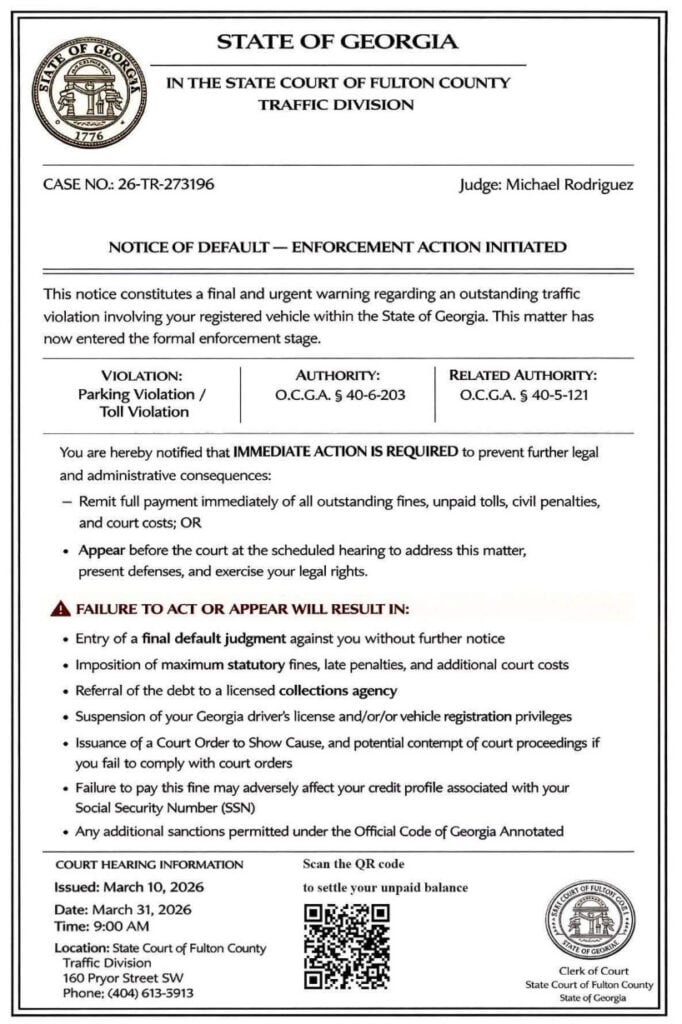
A text message or image lands on your phone claiming a Notice of Default Enforcement Action Initiated has been issued against you. It warns that your ticket, toll, or traffic-related account is now in default and that penalties are already being activated.
It looks formal. It sounds urgent. It feels like something you cannot afford to ignore.
That is exactly why this scam is working.
Scam Overview
The Notice of Default Enforcement Action Initiated text scam is part of a broader smishing wave targeting drivers across the United States. Smishing is phishing by text message, and this version uses legal-style wording, DMV branding, court language, and fake payment portals to frighten people into handing over personal and financial information. Federal and state agencies have warned that these text scams often claim you owe for tickets, tolls, or violations and then pressure you to act immediately through a link or QR code.
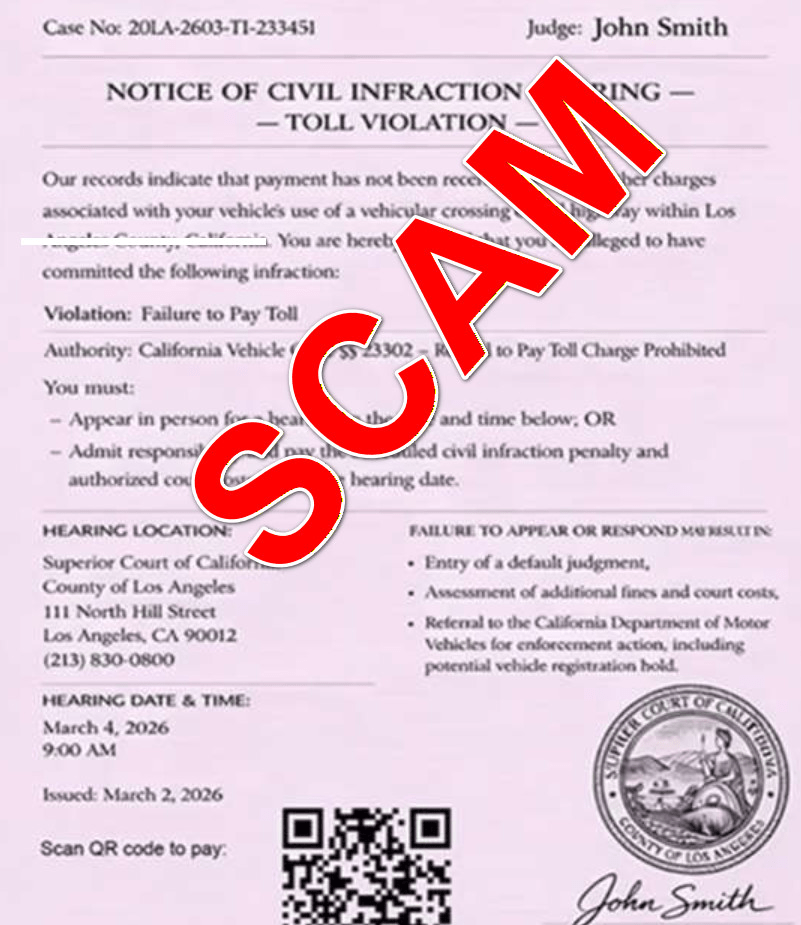
The exact wording changes from one wave to the next. One message may say Final Court-Ordered Mandatory Collection Notice. Another may say Officially Declared Delinquent and in Default. Another may use the phrase Notice of Default Enforcement Action Initiated. But the structure remains remarkably consistent: you are told that a traffic, toll, or registration issue has escalated, that penalties are now active, and that you must pay quickly to avoid worse consequences. New York DMV, California DMV, Colorado DMV, Florida Highway Safety and Motor Vehicles, Iowa DOT, and West Virginia DMV have all issued warnings about text campaigns that use this same formula of fake violations, short deadlines, threatening language, and scam links.
What makes this version especially effective is its tone. It does not ask you whether you recognize the issue. It does not invite you to review your account. It announces that enforcement action has already started. That wording matters. It is meant to make you feel late, cornered, and exposed. Once a person believes they are already in default, they are much more likely to click first and think later.
Why the phrase “default enforcement action initiated” is so persuasive
Scammers choose language that sounds like it came from a legal office, court clerk, or motor vehicle compliance system. The phrase default enforcement action initiated sounds official because it combines three loaded ideas.
First, default suggests that you already failed to respond.
Second, enforcement action suggests the government has moved beyond warning you and is now punishing you.
Third, initiated suggests the process is already in motion and may be difficult to stop.
That combination creates a strong emotional reaction. It pushes people into damage-control mode before they even pause to ask whether the notice is real.
This scam is not really about a ticket
The notice may claim it is about:
- an unpaid traffic violation
- an overdue toll
- a delinquent ticket
- a registration-related penalty
- an unresolved citation
- a court-ordered collection matter
But the specific accusation is usually just a hook.
The real objective is to push you onto a fake website where scammers can collect your personal details and payment information. California DMV says the included links in these messages lead to fake payment pages designed to steal financial information. Iowa DOT says the links direct people to websites that look like agency pages and ask for personal information and credit card numbers. The FTC warns that scam texts about unpaid tolls aim to get you to react quickly, click, and pay through fraudulent channels.
That is why the amount due is often small. A notice that claims you owe $6.99, $9.99, or $14.95 does not feel like a major fraud attempt. It feels like a nuisance fee. Many victims think it is easier to pay than to investigate. Scammers understand this psychology very well. The small amount is not a sign the risk is low. It is the bait that gets you to hand over the real prize: your card number, billing address, CVV, email address, phone number, and sometimes even vehicle information.
Why official-looking documents make people lower their guard
This scam often arrives not just as plain text, but as an image attachment or polished page that looks like a government notice. It may include:
- a state header
- a department name
- a notice ID
- an effective date
- capitalized warning language
- a list of consequences
- a QR code labeled as an official or secure portal
That presentation matters. Most people do not inspect legal formatting closely. They react to the overall impression. If it looks like a state notice and sounds like an enforcement action, it triggers compliance instincts.
QR codes are a major part of the trap
A lot of people have learned not to click strange links in texts. Scammers adapted.
Instead of always using obvious URLs, many notices now use QR codes and call them something like:
- Official Secure Portal
- Scan to Pay
- Resolve Immediately
- Secure Verification Portal
A QR code feels clean, neutral, and procedural. It looks like the kind of thing you would see on parking receipts, invoices, and municipal paperwork. But scanning a QR code is just another way of opening a website. If the destination is fraudulent, the QR code is no safer than a shady link.
That is why official guidance keeps returning to the same advice: do not click, do not scan, and do not use the contact information inside the message. The FTC says not to click links in unexpected texts and to verify through a number or website you already know is real. California DMV says not to open or reply and to use official channels instead. Iowa DOT says not to click live links or paste them into a browser. (Consumer Advice)
Why the threats are so dramatic
These messages rarely stop at one consequence. They pile them on.
Common threat language includes:
- license suspension
- registration hold
- prosecution
- court costs
- collection fees
- credit score damage
- default judgment
- mandatory service fees
- permanent record effects
This stacked-threat tactic is intentional. If a scam only mentions one vague consequence, the recipient may shrug it off. But if the notice threatens your license, your registration, your credit, your wallet, and even possible court action, it becomes much harder to ignore emotionally.
This is a nationwide pattern, not a one-off trick
One reason these scams are so dangerous is that they are not isolated. Multiple states have now warned residents about fake DMV, DOT, toll, and ticket texts, and the wording keeps mutating while the structure stays the same.
New York DMV says the texts come in waves. Iowa DOT says similar scams are occurring in Iowa and across the country. California DMV, Florida, Colorado, and West Virginia have all issued public alerts on similar impersonation messages. The FTC and FCC have both warned consumers about unpaid toll and payment-demand text scams that aim to capture money and personal information. (NY DMV)
That is why a phrase like Notice of Default Enforcement Action Initiated should not be viewed in isolation. It is one skin on a larger scam engine. The same campaign may impersonate the DMV in one state, a toll authority in another, and a general “collection” or “compliance” department somewhere else.
The biggest red flags
If you want to spot this scam quickly, these are the clearest warning signs:
- The message arrives unexpectedly by text.
- It claims immediate legal or administrative consequences.
- It says you must pay quickly to avoid suspension or enforcement.
- It includes a QR code or suspicious link.
- It uses extreme wording like “final,” “default,” “enforcement action,” or “non-negotiable.”
- It asks for payment through a site you did not independently navigate to.
- It asks for personal or financial information in response to a text.
- It gives you very little time to act.
These are not minor details. They are the architecture of the scam. Legitimate agencies may send appointment reminders or account confirmations in some situations, but the state agencies cited above are clear on one point: they do not send unsolicited texts demanding immediate payment or asking for private or financial information in this manner.
How The Scam Works
The Notice of Default Enforcement Action Initiated scam follows a repeatable funnel. Once you understand the steps, the whole thing becomes much easier to recognize.
Step 1: Scammers blast messages to huge numbers of people
These campaigns are not built on real ticket data. They are volume operations.
Scammers send texts to massive lists of phone numbers gathered from marketing databases, leaked records, old lead lists, and other data sources. They do not need a high success rate. Even if only a tiny percentage of recipients click, enough victims will convert to make the campaign profitable.
That is why people receive these texts even if they:
- have no unpaid violations
- have no car registered in their name
- have never driven on a toll road
- do not live in the state named in the message
The message is not evidence that you owe anything. It is evidence that your number was in a batch.
Step 2: The notice is framed as an existing crisis, not a possible issue
A lot of fraud attempts try to lure you into checking an account. This scam goes harder.
Instead of asking whether you want to review a problem, it declares that you are already in default and that enforcement has begun. The phrase Notice of Default Enforcement Action Initiated is effective because it gives you the feeling that the case has progressed beyond warning and into punishment.
This is why people freeze and comply. The wording is built to make delay feel dangerous.
Step 3: A fake legal or administrative identity is established
The notice often impersonates an institution people are trained to take seriously, such as:
- DMV
- Department of Motor Vehicles
- Department of Transportation
- Highway Safety office
- court collections unit
- traffic enforcement office
- state compliance or legal office
It may include a notice ID, statute reference, deadline, or official-looking title. That does not make it real. It simply makes it easier for the message to borrow authority.
Step 4: The message forces a choice between panic and payment
The notice is designed to make “pay now” feel like the easiest route out.
The consequences listed are often so dramatic that recipients stop evaluating the basic question: Would a real agency handle this by surprise text?
Instead, they think:
- “I should just clear this before it gets worse.”
- “It is probably real if it looks this official.”
- “Maybe I missed something in the mail.”
- “I can sort out whether it was valid later.”
That is the point where scams win. They do not need you to believe every word. They just need you to act before you verify.
Step 5: The QR code or link moves you onto the scammer’s turf
Once you scan the code or click the link, the scam stops being a generic message and becomes an interactive trap.
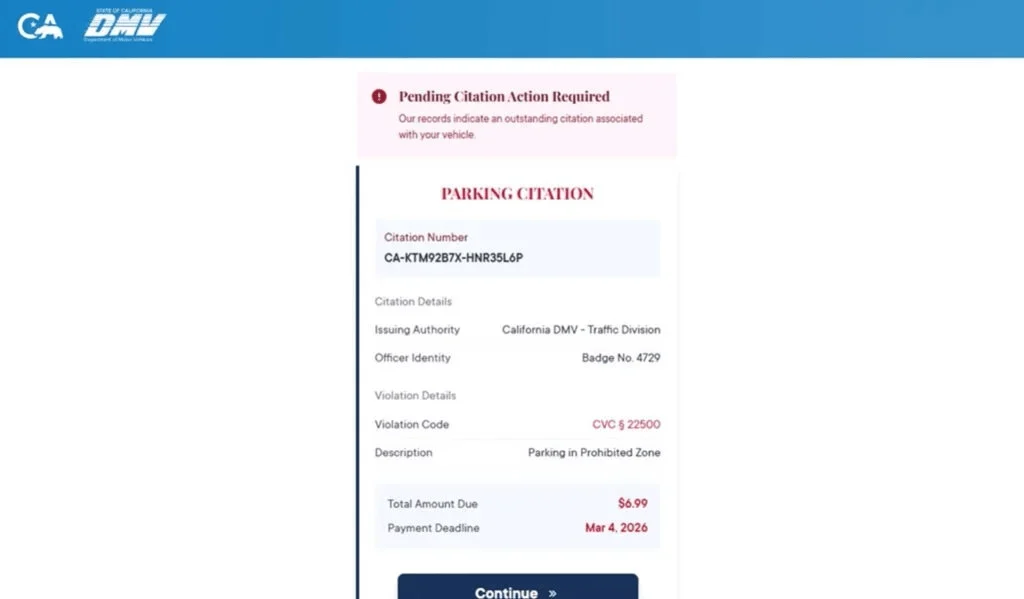
The destination page may look like:
- a DMV portal
- a ticket resolution center
- a toll collection system
- a court payment page
- a compliance portal
It will usually contain just enough structure to feel real:
- a case number
- violation details
- balance due
- payment deadline
- “continue” button
- “resolve now” button
Step 6: The site asks for “verification” details
Before payment, the portal may ask you to confirm information such as:
- full name
- address
- phone number
- email address
- ZIP code
- vehicle details
- driver-related information
This step serves two purposes.
First, it makes the process feel legitimate. People are used to verifying identity when paying tickets or managing DMV-related issues.
Second, it enriches the scammer’s victim profile. Now they do not just have a number that clicked. They may also have your name, address, and contact details.
Step 7: The small-fee payment screen closes the trap
After “verification,” the portal typically presents a balance due. It may look minor enough to feel harmless.
This is where a lot of people let their guard down. They assume that if the amount is small, the risk is small too.
But the small amount is the conversion tactic. The payment page is where you are asked to enter:
- card number
- expiration date
- CVV
- billing address
- billing ZIP code
The scammers may process a small test charge, keep the card data for later use, or sell the data altogether. California DMV says the fake pages are designed to steal financial information. Iowa DOT says the texts seek both personal details and credit card numbers.
Step 8: The portal gives a fake confirmation or a fake failure
Once the card details are captured, the site may do one of two things.
It may show a success page to reassure you that the problem is solved.
Or it may show a failure page and ask you to try again, sometimes encouraging you to use another card.
Both outcomes help the scammer.
A fake success slows down your response because you think the matter is resolved.
A fake failure can produce more card numbers.
Step 9: The stolen information gets monetized
After the interaction, scammers can use the stolen data in several ways:
- test your card with small purchases
- run larger unauthorized transactions later
- sell the card details to other criminals
- use your personal information in future phishing attempts
- target you with more government-impersonation scams
This is why the first visible fraud is not always immediate. Sometimes the damage appears days later, when victims no longer connect the bank alert to the text they received earlier.
Step 10: Follow-up scams often arrive next
Once you have engaged, your number becomes more valuable.
Victims may receive:
- more fake DMV or toll notices
- fake bank fraud alerts
- fake refund offers
- “account verification” requests
- recovery scams that promise to reverse the damage for a fee
Why this formula keeps working
The success of the scam depends on a simple but powerful recipe:
- Pick an institution people fear ignoring.
- Use language that makes the issue sound urgent and already active.
- Present a payment shortcut that feels easier than investigating.
- Use a small fee so the victim does not resist.
- Capture both identity data and payment data.
The phrase Notice of Default Enforcement Action Initiated fits this recipe almost perfectly. It sounds severe, bureaucratic, and final. It tells the victim that the moment for questioning is over. That is what makes it so effective.
What To Do If You Have Fallen Victim to This Scam
If you interacted with the scam, do not waste time blaming yourself. The right move is to act quickly and systematically.
1) Contact your card issuer immediately
If you entered card details on the fake site, call the number on the back of your card right away. Tell them you entered your information on a fraudulent payment page linked from a scam text. Ask them to block the card, issue a replacement, and review recent transactions for suspicious activity.
This is the most important first step because it limits what scammers can do with the stolen card data.
2) Review your transactions closely
Check your recent card activity for:
- small test charges
- online purchases you do not recognize
- recurring subscription charges
- digital-wallet type activity you did not authorize
Dispute anything unfamiliar as soon as you see it. Fast reporting improves your chances of containing the loss.
3) Turn on transaction alerts
Enable real-time alerts for:
- any purchase
- online transactions
- transactions over $1
- international activity, if available
This gives you a chance to spot abuse the moment it starts.
4) If you entered personal data, treat it seriously
If the scam site collected your name, address, phone number, email, or other identifiers, the risk is broader than just your card.
5) Change passwords if there is any chance credentials were exposed
If you typed a password anywhere during the process, or if the scam page prompted you to log in to anything, change that password immediately.
Also:
- change any reused passwords
- turn on two-factor authentication
- review recent account activity
6) Stop all communication with the sender
Do not reply. Do not click again. Do not negotiate.
FTC guidance on these text scams is straightforward: do not click links or respond to unexpected texts. California, Florida, Iowa, and West Virginia also say not to click and not to engage.
7) Save evidence before it disappears
Take screenshots of:
- the text message
- the sender ID or number
- the image notice
- the QR code
- the fake payment site
- any confirmation or error page
Scam domains and pages often vanish quickly once reported. Evidence helps with card disputes, consumer reports, and any later investigation.
8) Report the text and then delete it
The FTC says to use your phone’s report-junk feature or forward the message to 7726 (SPAM), then delete it. Iowa DOT gives the same reporting advice.
You can also report the incident through your state’s official fraud or consumer-protection channels if the message impersonated a local DMV or DOT.
9) Verify any real issue independently
If part of you still worries the notice might reflect a real ticket or toll, do not use any information in the message.
Instead:
- Open the official DMV, DOT, or toll website by typing the address yourself.
- Use contact information published on that official site.
- Check your account only through channels you know are real.
FTC guidance specifically says to contact the agency using a number or site you know is legitimate, not the information in the text.
10) Watch for follow-up scams
After one successful phishing attempt, scammers may circle back with more messages claiming to help, refund, verify, or escalate.
Be especially careful with:
- refund offers
- “fraud prevention” calls
- account-recovery services
- legal threats tied to the original fake notice
These often represent the second phase of the scam.
11) Check devices if you downloaded anything
Most of these scams are focused on data entry and payment theft, not malware installation. But if you downloaded any file, installed any app, or approved any browser prompt, review your device immediately.
12) Tell family members and coworkers about the exact wording
A lot of people ignore generic scam warnings but remember specific phrases.
If you tell someone, “Watch out for any text that says Notice of Default Enforcement Action Initiated,” that may be enough to stop the next victim before they scan the code.
The Bottom Line
The Notice of Default Enforcement Action Initiated text scam is not a real legal notice. It is a fear-based phishing tactic built on fake urgency, official-looking formatting, QR codes, and small payment demands.
This wording is one more variation of the active DMV, toll, and unpaid-ticket smishing wave that the FTC, New York DMV, California DMV, Colorado DMV, Florida Highway Safety and Motor Vehicles, Iowa DOT, and West Virginia DMV have all warned about. Those agencies consistently say the same things: do not click, do not reply, do not trust surprise payment demands by text, and verify independently through official channels.
If you receive a message like this, treat it as hostile by default. Do not scan the code. Do not pay the small fee. Do not assume the formal language means it is legitimate.
And if you already entered your card details, move fast. A quick call to your issuer and a few protective steps now can save you a much bigger problem later.
FAQ
What is the Notice of Default Enforcement Action Initiated text scam?
It is a phishing scam sent by text message or image attachment. Scammers make the notice look like it came from a DMV, court, toll agency, or state enforcement office and claim that your account is in default and enforcement has already started. The goal is to scare you into clicking a link, scanning a QR code, or paying a small fee.
Is the notice real if it includes legal language and a notice ID?
No. Scammers often use formal legal wording, case-style IDs, and official-looking layouts to make the message appear legitimate. Those details are part of the scam and do not prove the notice is real.
Why does the message sound so urgent and final?
Because the scam depends on panic. Phrases like “default,” “enforcement action initiated,” “final notice,” and “immediate penalties” are designed to make you act quickly before you verify anything.
Why is there usually a QR code or payment link?
That is how scammers move you to the fake website. The QR code or link often claims to lead to an official portal, but it usually takes you to a fraudulent payment or “case resolution” page.
Why is the amount due often so small?
Small amounts like $6.99 or $9.99 lower suspicion. Many people will pay a small fee just to avoid stress. The fee is bait. The real target is your credit card details and personal information.
What information are scammers trying to steal?
Usually:
- Full name
- Address and ZIP code
- Phone number and email
- Credit card number
- Expiration date and CVV
- Sometimes vehicle-related details
I scanned the QR code but did not enter anything. Am I still at risk?
Your risk is much lower if you did not submit any information. Close the site, do not return, and watch for follow-up scam messages or calls.
I entered my card details. What should I do right away?
- Call your card issuer immediately
- Report that your details were entered on a fraudulent site
- Freeze or replace the card
- Review recent transactions and dispute anything unfamiliar
- Turn on real-time alerts for new charges
Should I replace my card even if I do not see fraud yet?
Yes. Stolen card details are often used later or sold to other criminals. Replacing the card quickly is the safest move after a phishing scam.
Can a scam like this really suspend my license or place a hold on my registration?
Not through a random text message or fake website. Those threats are used to pressure you into paying. Real enforcement actions come through legitimate channels and can be independently verified.
How do I verify whether I actually owe anything?
Do not use the QR code, link, or phone number in the message. Instead, go directly to the official DMV, toll agency, or court website by typing it yourself, then verify through official portals or customer support.
How do I report this scam?
- Mark the message as spam or junk in your messaging app
- Block the sender
- Forward it to 7726 (SPAM) if your carrier supports it
- Report it through official consumer fraud reporting channels and keep screenshots as evidence
How can I avoid scams like this in the future?
- Do not scan QR codes from unexpected legal or DMV messages
- Be suspicious of any “default” or “enforcement” notice sent by text
- Verify independently through official websites you access yourself
- Treat any surprise demand for fast payment as suspicious until proven otherwise

Join the discussion
0 commentsShare your experience or ask a question about this article.
Discussion
Start the conversation
Have a question or something useful to share? Add the first comment.