

A text message claims you’ve been issued a Traffic Court Summons. It includes a case number, lists penalties, and is signed by Judge Robert Kline. It urges you to act immediately to avoid fines, suspension, or legal action.
It looks official. It feels urgent. It is also a scam.
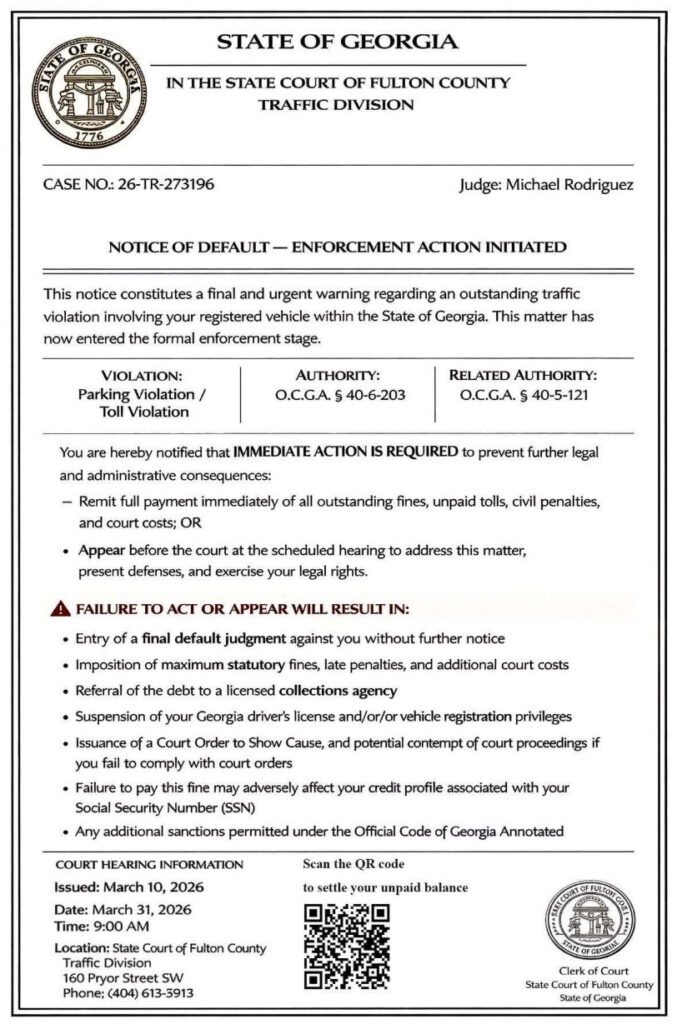
Scam Overview
The Judge Robert Kline text scam is a phishing scheme that impersonates court authorities to trick recipients into paying fake fines or revealing sensitive personal and financial information.
This scam is part of a broader wave of traffic ticket and court summons phishing attacks spreading across multiple states. Scammers reuse the same structure but swap names, locations, and case details to make the message feel local and legitimate.
In this version, the message is framed as a formal court notice, often labeled:
- “Traffic Court Summons”
- “Notice of Default”
- “Final Enforcement Notice”
It typically includes:
- A case number
- A violation description (traffic, toll, or parking)
- A payment deadline
- A list of consequences
- A QR code or link
- A signature line with “Judge Robert Kline”
The key deception
The scam relies on a simple but effective tactic:
It uses a judge’s name to create authority, even though the notice itself is not real.
Most people will not verify whether the judge exists or whether the case number is valid. They see a formal document and assume it must be legitimate.
That assumption is what scammers exploit.
Why the message looks convincing
These scam messages are designed to resemble official court documents.
They often include:
- government-style formatting
- seals or logos
- structured case details
- legal terminology
- formal tone
At a glance, they look credible.
But closer inspection often reveals problems:
- vague or generic violation details
- inconsistent formatting
- unrealistic deadlines
- missing or incorrect court information
The goal is not perfection.
The goal is to look convincing long enough to trigger action.
The role of urgency
Urgency is central to this scam.
The message often includes phrases like:
- “Final notice”
- “Immediate action required”
- “Failure to comply will result in enforcement”
This creates pressure.
When people feel rushed, they are less likely to verify the information.
Instead, they act quickly to avoid consequences.
The QR code and link trap
Most versions of this scam include:
- a QR code
- or a clickable link
These are presented as:
- “Official court portal”
- “Pay now”
- “Resolve immediately”
But they lead to fake websites.
These sites are designed to:
- mimic government systems
- collect personal information
- capture credit card details
This is where the real damage occurs.
Why the payment amount is often small
The scam usually requests a small fee.
This is intentional.
Small amounts reduce suspicion and make people more likely to pay quickly without investigating.
But the payment is not the real goal.
The real objective is to collect:
- credit card details
- personal information
Once that data is captured, it can be used for fraud or sold to other criminals.
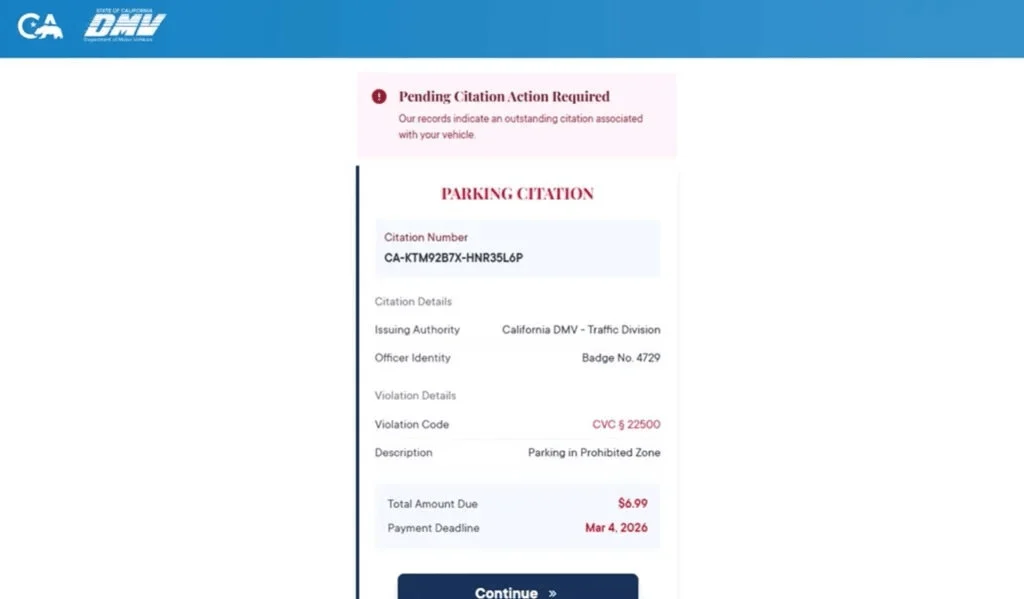
Common red flags
These scam messages share clear warning signs:
- Unexpected text about a court summons
- Urgent demand for immediate payment
- Threats of legal consequences
- Suspicious links or QR codes
- Lack of prior official notice
- Generic or inconsistent details
Legitimate courts do not operate this way.
How The Scam Works
Step 1: Mass message distribution
Scammers send large volumes of messages to random phone numbers.
They do not know if you:
- have a violation
- live in the relevant state
- have any court involvement
They rely on volume.
Step 2: Authority is established
The message uses:
- a judge’s name
- legal language
- formal formatting
This creates a sense of legitimacy.
Step 3: Urgency is introduced
The message emphasizes:
- deadlines
- enforcement actions
- escalating penalties
This pressures the recipient to act quickly.
Step 4: Threat escalation
The notice lists consequences such as:
- fines
- license suspension
- court action
- collections
These threats are believable.
That is why they work.
Step 5: The link or QR code offers a solution
After creating fear, the scam provides a way out:
- “Pay now”
- “Resolve immediately”
This shifts the victim into action mode.
Step 6: Fake website interaction
The link leads to a fraudulent site that mimics a court or payment portal.
It may include:
- a case number
- violation details
- a payment form
The victim believes they are resolving a legitimate issue.
Step 7: Data collection
The site asks for:
- name
- address
- phone number
- credit card details
This is the real objective.
Step 8: Financial and identity theft
After submission:
- the card may be used fraudulently
- data may be sold
- the victim may be targeted again
What To Do If You Have Fallen Victim to This Scam
1) Contact your bank immediately
- Report your card as compromised
- Request a replacement
- Block unauthorized charges
2) Monitor your transactions
Look for:
- unknown charges
- small test payments
- recurring subscriptions
Dispute anything suspicious.
3) Enable alerts
Turn on real-time alerts for all transactions.
4) Stop all interaction
- Do not reply
- Do not click again
- Do not scan the QR code
5) Save evidence
Take screenshots of:
- the message
- the document
- the link
6) Report the scam
- Mark as spam
- Block the sender
- Forward to 7726 (SPAM)
7) Verify through official channels
If you are concerned about a real issue:
- Visit official court or DMV websites
- Do not use the link in the message
8) Watch for follow-up scams
Victims may receive additional scam messages or calls.
Stay cautious.
The Bottom Line
The Judge Robert Kline Traffic Court Summons scam is a phishing attack that uses legal language, a judge’s name, and official-looking documents to create urgency and fear.
It is not a real court notice.
It is a trap designed to:
- steal your payment details
- collect your personal information
- expose you to further fraud
If you receive a message like this:
- Do not click
- Do not pay
- Do not panic
Always verify through official channels you access yourself. That simple step is your best defense.
FAQ
What is the Judge Robert Kline text scam?
It is a phishing scam where criminals send fake “Traffic Court Summons” text messages that appear to come from a court or judge. The goal is to scare people into clicking a link, scanning a QR code, or paying a fake fine.
Is the Judge Robert Kline summons real?
No. These messages are designed to look like official court notices, but they are not legitimate.
Why does the message include a judge’s name?
Scammers use a judge’s name to make the notice feel more credible and serious. It is a way to create authority and reduce suspicion.
What happens if I click the link or scan the QR code?
You are usually taken to a fake website that looks like a court or payment portal. It may ask for your personal details and credit card information.
Why is the payment amount often small?
Small amounts make people less suspicious. Many victims think it is easier to pay a small fee than investigate. The real goal is to steal your card details and personal information.
What information are scammers trying to steal?
Usually:
- Full name
- Address and ZIP code
- Phone number and email
- Credit card number
- Expiration date and CVV
- Sometimes vehicle-related details
I clicked the link but did not enter anything. Am I still at risk?
Your risk is much lower if you did not submit information. Close the page, do not return, and watch for follow-up scam texts or calls.
I entered my card details. What should I do right away?
- Call your card issuer immediately
- Report that your card details were entered on a fraudulent site
- Freeze or replace the card
- Review recent transactions and dispute anything unfamiliar
- Turn on real-time alerts for new charges
Should I replace my card even if I do not see fraud yet?
Yes. Stolen card details are often used later or sold. Replacing the card quickly is the safest move.
Can a real court send a summons like this by random text?
A surprise text demanding fast payment or linking directly to a payment page is a major red flag. Real court matters should always be verified through official court or DMV channels.
How do I verify whether I really owe anything?
Do not use the link or phone number in the message. Go directly to the official court or DMV website by typing it yourself, then verify through official customer support or case lookup tools.
How do I report the scam?
- Mark the message as spam or junk in your messaging app
- Block the sender
- Forward it to 7726 (SPAM) if your carrier supports it
- Report it through official fraud reporting channels and keep screenshots as evidence








