

An email says Kathleen Ryan requested a large payment through PayPal. The sender address may look authentic, the formatting may be familiar, and an urgent note offers a phone number for anyone who does not recognize the transaction.
The Kathleen Ryan PayPal scam works because the message can contain something real: a genuine money-request feature. The debt, support number, and emergency are the parts that should not be trusted.
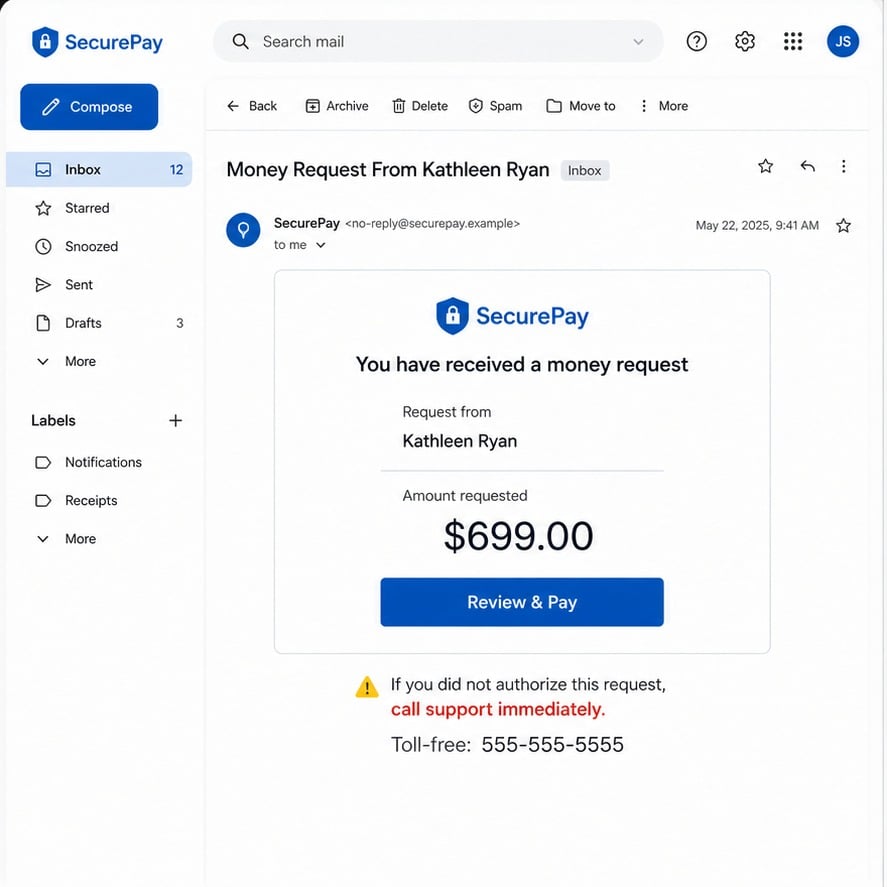
A money request is not proof that the recipient owes money. It is a request created by another account, and a stranger can place alarming text inside the note field.
The scammer wants the recipient to react to the amount and call the number in that note. Once the call begins, the original request becomes a doorway into a tech-support or account-takeover script.
The safest response happens outside the email. Open PayPal independently, inspect activity, decline or report the request, and use support details obtained from the official app or website.
Overview
A real PayPal notification can carry a fraudulent request
PayPal provides legitimate invoicing and money-request tools. A scammer can abuse those tools to send an authentic platform notification for a transaction the recipient never authorized.
That is why the From address alone does not settle the question. The email may originate from PayPal while the person who created the request remains a stranger using false or stolen identity details.
PayPal's own guidance warns that invoice and money-request scams can include alarmist notes and fake customer-service numbers. The platform says not to pay an unexpected request or call a number inside it.
The name Kathleen Ryan is part of the confusion, not the evidence
The campaign circulated with the name Kathleen Ryan attached to the request. A social media user using that name publicly warned that someone was spoofing her PayPal account and told recipients not to send money.
A familiar-sounding personal name can make the request feel like a mistaken purchase or compromised account. The recipient may search the name only after fear has already pushed them toward the phone number.
Do not contact random people who share the name. The correct action is to handle the request inside PayPal and preserve the scam details for the platform.
The phone call is where the larger theft can begin
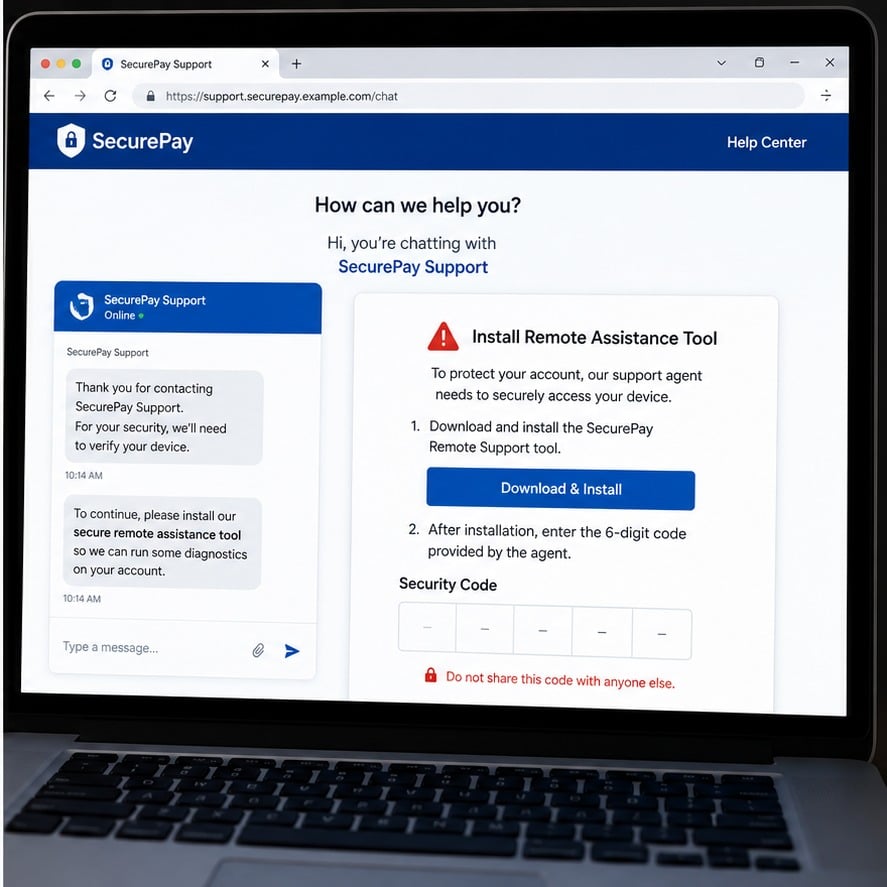
The caller may claim the account is compromised and ask to verify identity, install remote-access software, read a one-time code, move money, or purchase gift cards for a supposed security procedure.
These actions have nothing to do with canceling an invoice. They are methods for gaining control of accounts, devices, or funds while the victim believes support is protecting them.
A legitimate support agent does not need a gift card, cryptocurrency transfer, or remote view of online banking to remove an unwanted money request.
- An unknown account sends a money request through a real payment platform.
- The note claims the recipient purchased an item or faces an urgent charge.
- A phone number inside the request pretends to be official support.
- The caller asks for codes, remote access, gift cards, crypto, or a transfer.
- The original request may remain unpaid, but the caller steals through another method.
- The sender name and number can change while the same script continues.
Why the Email Can Come From a Real PayPal Address
A PayPal user can create an invoice or money request and enter another person's email address. PayPal then sends the platform notification as part of the requested transaction.
That system is useful for legitimate sellers and friends, but it also allows abuse. The email infrastructure can be real even when the request is unauthorized and the note contains a scammer's phone number.
Recipients often assume a message from service@paypal.com means PayPal verified the debt. It means the platform generated a notification. It does not mean PayPal endorses the requester's story.
The amount is chosen to cause alarm without looking impossible. Electronics, cryptocurrency, antivirus renewals, and marketplace purchases are common themes because a recipient may believe an account was hacked.
The note then reframes the scammer's number as the fastest route to safety. Calling it bypasses the careful verification available inside the official app.
Simply receiving or opening the email does not normally transfer money. Risk increases when the recipient pays, follows links, calls the number, shares codes, or installs software.
How to Verify the Request Without Using the Email
Open a new browser tab and type PayPal.com, or use the official PayPal app already installed on the device. Do not use a link or phone number from the unexpected notification.
Check the Activity, invoices, and money-request area. An unauthorized request may appear there because it was sent through the platform, but it should not appear as a completed payment unless money actually moved.
Review the status carefully. Requested, pending, canceled, paid, and refunded mean different things. A request awaiting action is not the same as a debit from the account.
Report or decline the request through PayPal's controls. PayPal advises users to forward suspicious email or website information to phishing@paypal.com and then delete the email.
If the account shows a completed transaction, use the Resolution Center and contact PayPal through the official app or website. Also contact the funding bank or card issuer immediately.
Do not search the phone number and call the first result either. Scammers can place fake support numbers in ads, search listings, forums, and copied help pages.
How the Kathleen Ryan PayPal Scam Works
Step 1: A scammer creates an invoice or money request
The operator uses a payment account to request money from a list of email addresses. The displayed sender name may be stolen, invented, or associated with another person whose account details were abused.
The request describes a purchase the recipient never made. High-value electronics, cryptocurrency, subscriptions, and security products create a believable account-compromise story.
Because the platform delivers the notification, spam filters may treat it differently from an ordinary forged email.
Step 2: An alarmist note directs the recipient to fake support
The note says the recipient must call immediately if the purchase is unauthorized. The number belongs to the scammer, not PayPal.
Urgency discourages the recipient from opening the official app and inspecting activity. The victim feels that a delay could allow the charge to settle.
The name Kathleen Ryan can become part of the search trail, but the real operational asset is the phone number embedded in the request.
Step 3: The fake agent confirms the invented emergency
When the recipient calls, the agent answers with a professional script and may already know the amount and description displayed in the request.
That knowledge does not prove access to PayPal systems. The scammer entered the details and therefore knows exactly what the recipient can see.
The agent may ask for the victim's name, email, phone number, card details, or security code under the pretense of locating the account.
Step 4: Remote access turns a request into device compromise
The caller may tell the victim to install AnyDesk, TeamViewer, Quick Assist, or another legitimate remote-control product. The software itself can be legitimate while the person requesting access is not.
Once connected, the scammer can watch passwords, open banking pages, hide the screen, move files, or manipulate what the victim sees.
No payment service needs remote control of a personal computer to cancel an unwanted money request.
Step 5: The victim is told to move money for safety
The agent may claim the bank account is exposed and instruct the victim to move funds into a safe account. The destination is controlled by the scammer.
Other versions use gift cards, cryptocurrency, wire transfers, cash deposits, or person-to-person payment apps because those methods are difficult to reverse.
A code sent by text may authorize a password reset or transaction. Reading it aloud gives the caller the final step needed to take control.
Step 6: Screen manipulation hides the theft
With remote access, the scammer can alter a webpage, open developer tools, or move money between the victim's own accounts to create the appearance of an accidental refund.
The victim may then be told to return the excess through a different method. Nothing was over-refunded; the caller is using visual confusion and the victim's own balance.
The agent may ask the victim not to contact the bank because the case is supposedly confidential. That instruction protects the scam, not the account.
Step 7: The sender name and support number rotate
Once a request is reported, the operator can use another account, personal name, product description, and phone number. The underlying technique remains the same.
That is why blocking one sender does not solve the broader risk. Unexpected invoices should always be handled inside the official platform.
A real-looking notification can still contain user-supplied fraudulent content. Treat the note as a claim made by the requester, not a verified instruction from PayPal.
Company, Address, and Fulfillment Checks
PayPal is real, but the requester is not PayPal
The notification platform, request sender, phone operator, and final recipient of money are separate parties. A genuine PayPal email does not merge them into one trusted company.
Check which account created the request and whether any payment was completed. Do not interpret a Pay button as evidence that an obligation exists.
The personal name in the request may belong to an uninvolved person. Avoid accusing or contacting people solely because their name appears in a scam notification.
A phone number in the note is not a support address
User-supplied invoice text can contain any number. Obtain support details from PayPal.com, the official app, or the back of the funding card.
Search results can also be manipulated, so do not rely on a number merely because it appears in an advertisement or high on a results page.
A legitimate case can be tracked through the official account. If the caller cannot provide a case visible there, end the call.
Fake support disappears when challenged
Ask the caller to stop and state that you will contact PayPal independently. A scammer may become aggressive, threaten a charge, or insist the current call cannot be disconnected.
Real support will not object to independent verification. It will not demand remote access, gift cards, cryptocurrency, or secrecy from the bank.
Keep the number, call time, voicemail, and instructions as evidence. Do not call back to confront the operator.
The transaction trail must stay inside verified systems
A legitimate request identifies the account, status, amount, item, and available platform actions. Any dispute should remain within PayPal and the financial institution that funded the account.
Moving the conversation to a remote desktop, encrypted chat app, crypto wallet, or retail gift-card aisle breaks that traceable process.
There is no physical fulfillment center to verify in this email scam. The equivalent check is whether every action remains inside official account records rather than a caller's private instructions.
Why the Real Sender Address Causes So Much Confusion
People are trained to inspect the sender address for phishing. That remains useful, but platform-abuse scams exploit a different weakness: a real service sends user-generated content on the scammer's behalf.
The correct question is not only who delivered the email. It is who created the request, whether money moved, and where the proposed response will take place.
The phone number is the clearest break in trust. PayPal warns users not to call numbers inside alarmist invoice notes and to verify requests through the official account.
This distinction also applies to calendar invitations, file-sharing notifications, marketplace messages, and document-signing requests. A legitimate platform can deliver a malicious invitation.
Slow the interaction down. No honest payment company needs a victim to hide the issue from the bank, move money to protect it, or install remote-control software before a timer expires.
Warning Signs to Watch For
- You receive a PayPal request for an item or person you do not recognize.
- The note says a large charge will settle unless you call immediately.
- The support number appears inside the request rather than the official app.
- The caller asks for a password, one-time code, full card number, or Social Security number.
- You are told to install remote-access software to cancel the request.
- The agent wants gift cards, cryptocurrency, a wire, or money sent to a safe account.
- The caller says not to contact PayPal or your bank independently.
- The supposed case does not appear in the official Resolution Center.
The request may be real as a platform object and fraudulent as a debt. Verify its status inside PayPal, then treat every phone number and instruction supplied by the requester as untrusted.
What to Do if You Have Fallen Victim to This Scam
- Do not pay or call the number in the request. Open PayPal independently and inspect the status. Decline or report the request using the platform's controls without replying to the sender.
- Forward the suspicious message to PayPal. PayPal directs users to send suspicious emails or website details to phishing@paypal.com. Preserve a copy and headers if possible, then remove the message after reporting.
- End remote access immediately. Disconnect the session, uninstall the remote-control tool, and turn off network access if the caller still has control. Do not let the caller guide the cleanup.
- Run Malwarebytes on any device the caller accessed. Malwarebytes can check for remote-access components, information stealers, browser changes, and other unwanted programs. Quarantine detections and restart when instructed.
- Change critical credentials from a clean device. Secure email and PayPal first, then banking, card, password-manager, and other accounts visible during the session. Revoke active sessions and review account recovery settings.
- Contact PayPal, the bank, and card issuer officially. Report any completed payment or account change using numbers from official apps, statements, or the back of the card. Ask whether transfers can be recalled and whether cards or accounts need replacement.
- Review one-time codes and notifications. Check whether any code, password-reset email, new-device alert, or forwarding-rule change occurred during the call. Tell providers exactly what information you shared.
- Use AdGuard to block malicious follow-up pages. AdGuard can block many phishing sites, scam ads, and tracking redirects if a later message sends you to the web. It cannot make an unexpected money request legitimate.
- Report the phone operation and reject recovery scams. File reports with the FTC and IC3, including the amount, requester name, phone number, and remote-access tool. Ignore anyone who later promises to recover funds for an upfront fee.
Frequently Asked Questions
Is the Kathleen Ryan PayPal email itself genuine?
The notification may have been generated by PayPal's real request system, but the underlying request and phone note can still be fraudulent. Verify inside the official account.
Do I owe money because a request appears in PayPal?
No. A stranger can request money. An unpaid request is not proof of a purchase, debt, or completed charge.
Will ignoring the request automatically charge me?
A normal money request requires action to pay. Check account activity independently because a separate unauthorized transaction would need a different response.
Should I call the phone number to cancel it?
No. PayPal warns against calling numbers in alarmist invoice notes. Use contact options inside PayPal.com or the official app.
What if I only shared a six-digit code?
Treat the account as potentially compromised. Change the password, revoke sessions, review activity and recovery settings, and contact the affected provider immediately.
Can opening the email alone hack my computer?
Simply viewing a normal notification usually does not complete the scam. Risk rises if you open attachments, follow links, call the number, share information, or install software.
The Bottom Line
The Kathleen Ryan PayPal scam demonstrates an important modern phishing lesson: a legitimate platform can deliver a fraudulent request created by an abusive user.
Do not pay the request or call the number in its note. Open PayPal independently, verify whether any money moved, and report the request through official channels.
If a caller gained access to your device or accounts, act quickly but calmly. Disconnect, scan, change credentials from a clean device, and contact financial providers before the scammer can deepen the loss.

Join the discussion
0 commentsShare your experience or ask a question about this article.
Discussion
Start the conversation
Have a question or something useful to share? Add the first comment.