


You hand a parcel across the counter, get a receipt, and go home expecting a refund. That evening, the next Klarna payment still has a date beside it.
Before you decide something went wrong, pull up the order you returned. A number that looks out of place on its own can make sense beside the right receipt.
Overview
Follow the lamp, not just the package
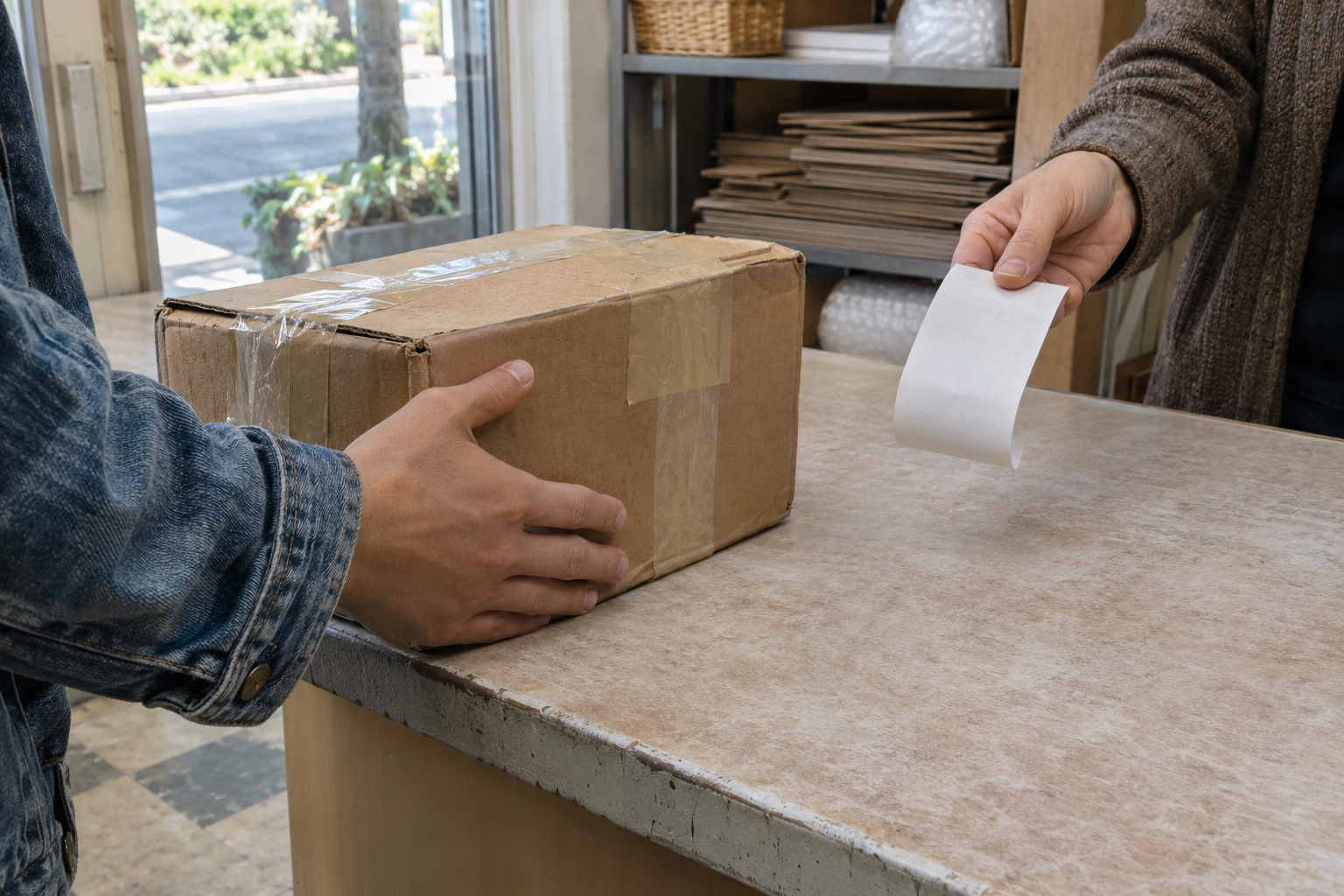
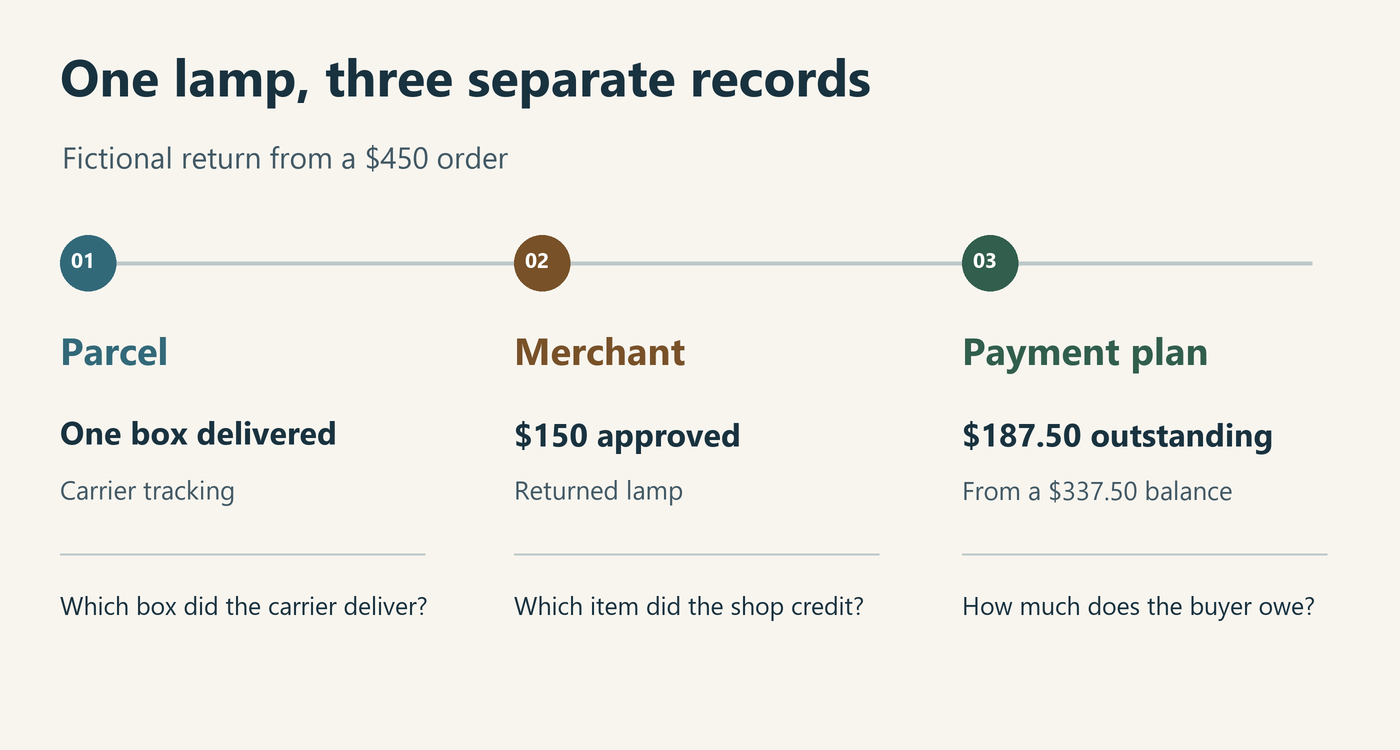
Imagine buying a lamp and two chairs, then returning only the lamp. The carrier handles a box, the shop handles an item, and your payment plan covers all three.
That difference matters when a receipt says “delivered.” You can use it to find the shipment without knowing whether the shop credited a lamp, a chair, or nothing yet.
Choose the number you want to explain
Is the puzzle an upcoming installment, an order balance, or a credit you expected in your bank account? Write down the figure and the label next to it.
A $50 change in each of three upcoming payments would account for $150.
- For a missing parcel, start with its tracking reference.
- For a disputed item value, start with the seller’s itemized approval.
- For an unexplained installment, start with that order’s dated payment schedule.
- For a missing cash credit, identify the amount actually designated for payout.
Use the order as the boundary
Two orders at the same furniture store can share an amount. Match the order reference before comparing numbers, even when the merchant name, date, and price look familiar.
Consider one order placed Monday for a lamp and another placed Tuesday for a rug. A $150 adjustment to Monday’s order doesn’t explain Tuesday’s next installment.
This guide concerns US Klarna purchases. Its worked examples use invented receipts and schedules so you can practice without sharing account details or making another payment.
How to Check a Klarna Return Against Your Payments
Step 1: Make a copy of the plan you started with
Find the receipt for the particular purchase, including the items you kept. Save the starting plan and note which payments had actually posted when you made your copy.
Put a date beside that copy. A schedule viewed on Tuesday and a card statement downloaded Friday may describe different stages of the same order.
Imagine two identical chair lines, one gray and one blue. If you sent back the blue chair, use its color or item reference instead of writing “one chair.”
That small detail can settle a later argument about price. Perhaps only the gray chair had a markdown, even though both chairs shared the same description on the packing slip.
Step 2: Record the handoff and report the return
Follow the shop’s instructions for the goods. Klarna’s US return guide then directs you to Payments in its app, where you choose the order or items and select Report return.
Klarna says reporting pauses payments while the store registers the return. Check the status on your particular order rather than treating the carrier receipt as a pause confirmation.
If the store hasn’t registered the return correctly after 21 days, Klarna asks you to let it know. Have the return date and tracking details ready.
For a counter return, keep the itemized handoff receipt. A receipt that names only the store location may help locate the visit without identifying which online order was involved.
Step 3: Read what the shop actually approved
Suppose a lamp originally listed at $180. In this fictional receipt, a $30 line discount leaves $150 paid for it, with no tax or shipping in the example.
The shop’s email identifies the same lamp and approves $150. Comparing that approval with the crossed-out price would create a $30 mystery that the original receipt already explains.
Now change just one detail: the shop approves $135, with no deduction explained. The open question is the missing $15 on the merchant calculation, not a missing $180 transfer.
Ask which line accounts for the difference. A receipt breaking out a deduction would let you check its basis; a warehouse acknowledgment saying the box arrived would not.
Step 4: Work out what should remain unpaid
Use the original $150 approval for this example. The fictional order cost $450, divided into four equal payments without interest, fees, tax, or additional adjustments.
One payment of $112.50 has posted, so $337.50 remains before the refund. Klarna’s US refund guide explains how a partial refund smaller than the balance reduces the remaining installments evenly.
| Fictional order entry | Amount | How to check it |
|---|---|---|
| Original purchase | $450.00 | Four payments of $112.50 |
| Unpaid before adjustment | $337.50 | $450.00 minus $112.50 already paid |
| Unpaid after adjustment | $187.50 | $337.50 minus the $150.00 approval |
| Each new installment | $62.50 | $187.50 divided among three remaining payments |
Test the answer from the other direction. Add the $112.50 already paid to the new $187.50 balance and you get $300, exactly the value kept from the $450 order.
There isn’t a second $150 to find at the bank.
Step 5: Compare the same point in time
Suppose the buyer makes a second $112.50 payment before the adjustment posts. The original example no longer starts from the right unpaid balance.
Two payments totaling $225 would leave $225 outstanding. Subtracting the approved $150 leaves $75, not $187.50. With two equal payments left, the example now works out to $37.50 apiece.
Both versions lead to the same $300 purchase after the return. The difference is where the money sits: more has already been paid in the second version.
Before querying an unexpected installment, check the date of the last posted payment against the date of the displayed balance. Don’t subtract a payment already reflected in the balance.
When the Refund Is Larger Than the Amount Still Owed
Take a different fictional purchase totaling $240. The shopper has already paid $180, leaving $60 unpaid. The store approves a $95 refund on the items sent back.
Only $60 can reduce that unpaid amount to zero. The remaining $35 needs its own entry.
Klarna identifies the original payment method for excess on a partial refund. Read that alongside your particular payment product and refund preferences.
An open Klarna Personal account can receive refunds.
With Pay over time, an excess can instead leave a positive account balance.
At the exact boundary, suppose the approved refund is $60 instead of $95. The subtraction leaves nothing unpaid and no excess; no guess about a cash destination is needed.
Three Records That Look Like Extra Money
A replacement schedule is not a second bill
Imagine printing three remaining payments in the morning and their revised versions that afternoon. Staple the old schedule behind the new one, rather than adding all six amounts.
Compare one due date at a time. In the lamp example, each revised $62.50 replaces an earlier $112.50. There are still three future installments rather than six.
If both figures appear as separate posted withdrawals for one date, that’s a different question. Look for two distinct transaction entries instead of inferring two withdrawals from two schedule versions.
A second email may contain a running total
Suppose a store first approves $60 for a lamp shade. Later it sends another notice showing $90 refunded to date after accepting a matching base.
In this version, the second notice adds $30, not $90. Entering both headline totals as new refunds would make the worksheet expect $150 when the store approved $90 altogether.
Now suppose the second notice instead says the base alone was refunded for $90. Two separately identified approvals of $60 and $90 really would total $150.
Check whether the second document identifies a new item amount or a total for the order. If it doesn’t say, ask which interpretation its reference supports.
A store voucher does not move funds between accounts
A store gift card doesn’t settle the associated Klarna payments. An in-person return of an online order can also produce a store refund outside Klarna’s system.
Suppose a shop gives you an $80 voucher and you spend $25 there later. The remaining $55 is purchasing power at that shop.
Keep the voucher receipt with the order, but give its amount a separate column. Adding $80 to both the store-credit and payment-plan columns would count one remedy twice.
Untangle Returns That Cross Orders or Parcels
Imagine buying two sizes of the same jacket a week apart. You return the first size, but both order confirmations say “navy jacket” and show the same price.
The first order ends in 41 and the second ends in 17. Your drop-off slip identifies the parcel but shows neither order. Which document actually joins these records?
A return label or store acknowledgment carrying both the tracking reference and order 41 supplies that link. A matching color and price do not distinguish the two jackets.
Now imagine the shop instructed you to send two parcels for order 41. One holds the jacket and the other a belt. Keep the two tracking numbers on separate lines.
If the shop accepts the belt first, a refund matching its invoice amount can reconcile one item cleanly. The jacket still needs its own acceptance or explanation.
Conversely, one adjustment could cover both items together. Compare the itemized approval with the combined amount before reporting either one as missing solely because there was only one entry.
What if the merchant lists only a parcel weight?
Weight can help distinguish two boxes, but it doesn’t identify a jacket size. Ask for the item reference attached to the warehouse entry rather than guessing from pounds alone.
How a Correct Grand Total Can Hide the Wrong Order
Here’s a reason to keep the order numbers even when everything seems to add up. Suppose a household returns a $40 kettle and $65 headphones from two separate orders.
The kettle and headphones approvals total $105. Two account entries also total $105, but the kettle order fell by $50 and the headphones order fell by $55.
Set the totals aside and check each row. The kettle order fell $10 too far, while the headphones order fell $10 too little, relative to those two approvals.
Those differences cancel on paper but could change what you need on different dates. Request an explanation of the two references, not another $105 for the household.
Change the example once more: the headphones receipt also shows a separate $10 adjustment for a damaged case. Which total are you checking now?
The merchandise return and case allowance together come to $75 for that order. Preserve the second approval even if both adjustments concern the same set of headphones.
When you receive a corrected breakdown, put it alongside those two promises. A correct total for one purchase shouldn’t be used to close the other purchase’s open question.
Make a Useful Request About the Remaining Difference
Start with something a support representative could check. For the $135 approval above, the question is why the credited lamp line differs by $15 from its paid price.
For the $150 approval on the $450 order, the question might be why one of three revised installments still shows the original amount. Those questions belong to different records.
Make the discrepancy measurable before sending anything. Suppose the three displayed amounts are $62.50, $62.50, and $112.50. They total $237.50, which is $50 above the calculated $187.50.
That $50 points to the line worth asking about. It doesn’t prove a billing error until you’ve accounted for other posted activity and established that all three figures belong together.
A penny can tell a different story. Suppose another written breakdown totals $187.51, and its three entries show $62.50, $62.51, and $62.50.
Those entries add up exactly as written. Copying the first amount into all three rows would create a one-cent shortage that wasn’t on the breakdown.
After a partial refund, nonmembers using Klarna’s One-time card Pay in 4 service still owe its service fee.
Do not insert a guessed fee to make the numbers balance. Look for a named fee on your own agreement or statement and compare its amount separately.
A schedule can also add up perfectly and still surprise you. Suppose all three amounts show $62.50 but the first date is a week earlier than you expected.
Identify the document that gave you the other date. Ask about that date specifically instead of requesting an amount correction that would leave the timing question unanswered.
What to Do If Your Klarna Plan Still Looks Wrong
-
Identify the last record that agrees. If the seller lists only the belt, ask about the jacket by item and parcel reference. Don’t start with the whole purchase total.
-
Write the difference in one sentence. Include the approved amount, the dated balance you expected, and the balance shown. State which other payments had posted by then.
-
Keep the request with the right party. Ask the shop about eligibility or an unexplained deduction. Take a documented approval with a conflicting schedule to Klarna through your authenticated account.
-
Find out what is currently due. If a due date is close and the status is unclear, ask Klarna what applies. Don’t skip a payment based on your own worksheet.
-
Close only the line that was resolved. Record the adjustment date and amount. Keep a separate note for an outstanding item or payout instead of restarting the case.
Frequently Asked Questions
Does a refund confirmation name the payment that changed?
Not necessarily; a seller can identify the merchandise without listing your installments. Match the merchant order reference to the plan, then compare its dated entries.
What if I receive two packages for one purchase?
Use the order for the money comparison and the parcel references for delivery questions. Two outgoing boxes don’t establish that you opened two payment plans.
Can I compare installments in different currencies?
Compare amounts in the same currency first. If your card statement shows a converted amount, keep its original transaction currency visible rather than treating the difference as a missing refund.
Is fourteen days a guaranteed refund deadline?
Members and Personal account holders usually see refunds within a few business days. Fourteen days marks a troubleshooting question, not a guarantee.
What if my receipt includes an exchange?
Identify the returned item’s credit and the replacement item’s price separately. A $70 credit beside a $60 replacement leaves a $10 difference, assuming no other entries.
Can my own spreadsheet tell me a payment was collected?
Your calculation gives you an expectation. A posted transaction identifies money actually collected; a scheduled amount or a reminder alone does not establish that collection.
The Bottom Line
Match the shop’s approved amount to the right Klarna order before deciding what is missing. Money removed from future installments and money sent back to you are different outcomes.
If something still doesn’t add up, take the unmatched item, amount, or due date to the party that can explain it. Follow the confirmed schedule while you resolve the discrepancy.

Join the discussion
0 commentsShare your experience or ask a question about this article.
Community experiences
Did this happen to you?
Your experience could help someone recognize the same scam. Submit a private report for our team to review.
I experienced this tooReports are reviewed before publication. Sharing publicly is always your choice.
Discussion
Start the conversation
Have a question or something useful to share? Add the first comment.