

LEGO is one of the most popular and beloved toy brands in the world, with millions of fans and collectors of all ages. However, this popularity also attracts scammers who try to take advantage of unsuspecting customers by creating fake online shopping sites that sell LEGO products at very low prices. These sites are designed to look like legitimate LEGO websites, using the LEGO logo, images, and fonts. They are often promoted via social media platforms such as Facebook, TikTok, and Instagram, as well as spam emails. In this blog post, we will explain what the LEGO fake online shopping sites scam is, how it works, and what you can do if you have fallen victim to it.
What is the LEGO Fake Online Shopping Sites Scam?
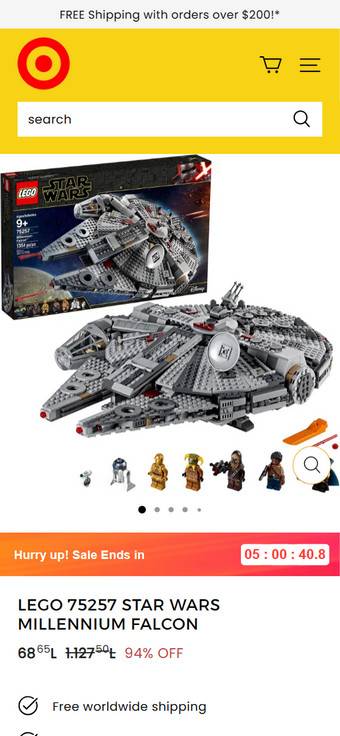
The LEGO fake online shopping sites scam is a type of online fraud that involves creating and operating fake websites that claim to sell LEGO products at very high discounts, sometimes up to 90% off. These websites are not authorized by LEGO and do not have any affiliation with the company. They are simply using the LEGO name and logo to lure customers into buying counterfeit or non-existent products.
The scammers behind these websites usually register domain names that are similar to the official LEGO website, such as lego-shop.com, lego-store.com, lego-official.com, etc. They also use SSL certificates to make their websites appear secure and trustworthy. They copy the layout, design, and content of the official LEGO website, including the product descriptions, reviews, and customer service information. They also offer free shipping, easy returns, and various payment methods.
However, these websites are nothing but a scam. Customers who order from these websites either receive fake or low-quality products that do not match the description or images on the website, or they receive nothing at all. The scammers then disappear with the money and personal information of the customers, leaving them with no way to contact them or get a refund.
How does the LEGO Fake Online Shopping Sites Scam work?
The LEGO fake online shopping sites scam works by exploiting the trust and enthusiasm of LEGO fans who are looking for a good deal on their favorite products. The scammers use various techniques to attract and deceive customers, such as:
- Advertising their websites on social media platforms such as Facebook, TikTok, and Instagram, using sponsored posts, ads, or fake accounts that pose as LEGO fans or influencers. They often use hashtags such as #lego, #legofan, #legodeal, etc. to reach a large audience.
- Sending spam emails to potential customers, using subject lines such as “LEGO Clearance Sale”, “LEGO Exclusive Offer”, “LEGO Limited Time Deal”, etc. The emails usually contain links to their fake websites or attachments that contain malware or phishing software.
- Creating fake reviews and testimonials on their websites or on third-party platforms such as Trustpilot, Google Reviews, or Facebook Reviews. They often use bots or paid reviewers to generate positive feedback and ratings for their websites and products.
- Using fake customer service agents or chatbots to respond to customer inquiries or complaints. They often use generic or scripted responses that do not address the specific issues or questions of the customers. They also use excuses such as delays in shipping, customs issues, technical problems, etc. to avoid providing refunds or replacements.
The scammers usually target customers from different countries and regions, using different domain names and currencies. They also change their website names and addresses frequently to avoid detection and legal action.
What to do if you have fallen victim to the LEGO Fake Online Shopping Sites Scam?
If you have ordered from a fake LEGO website and realized that you have been scammed, here are some steps you can take to protect yourself and prevent further losses:
- Contact your bank or credit card company immediately and report the fraudulent transaction. Ask them to cancel your card and issue a chargeback if possible.
- Contact the official LEGO customer service and report the fake website. Provide them with as much information as possible about your order and the website you ordered from, such as screenshots, receipts, emails, etc.
- File a complaint with your local consumer protection agency or law enforcement agency. Provide them with the same information you provided to LEGO customer service.
- Report the fake website and social media accounts to the platform providers such as Facebook, TikTok, Instagram, Google, etc. Ask them to remove or block the scam content.
- Warn your friends and family about the scam and advise them not to order from any suspicious websites that claim to sell LEGO products at very low prices.
Conclusion
The LEGO fake online shopping sites scam is a serious threat to LEGO fans who want to buy their favorite products online. It is important to be vigilant and careful when shopping online and avoid falling for these scams. Here are some tips to help you spot and avoid fake LEGO websites:
- Always check the domain name of the website and make sure it matches the official LEGO website, which is www.lego.com. Look for spelling errors, extra characters, or unusual extensions.
- Always check the security of the website and make sure it has a valid SSL certificate. Look for a padlock icon or a “https” prefix in the address bar.
- Always check the reviews and ratings of the website and the products on third-party platforms such as Trustpilot, Google Reviews, or Facebook Reviews. Look for negative feedback, complaints, or warnings from other customers.
- Always check the prices and discounts of the products and compare them with the official LEGO website or other authorized retailers. If the prices are too good to be true, they probably are.
- Always check the contact information and customer service of the website and make sure they are legitimate and responsive. Look for a physical address, phone number, email address, or live chat option.
- Always use a secure payment method such as PayPal or a credit card when ordering online. Avoid using direct bank transfers, wire transfers, gift cards, or cryptocurrencies.
Remember, if you have any doubts or questions about a website that claims to sell LEGO products, you can always contact the official LEGO customer service or visit the official LEGO website for more information. Stay safe and happy building!

Join the discussion
0 commentsShare your experience or ask a question about this article.
Discussion
Start the conversation
Have a question or something useful to share? Add the first comment.