Target is one of the most popular and trusted retailers in the US, offering a wide range of products at affordable prices. However, some scammers are taking advantage of Target’s reputation and customer loyalty by creating fake online shopping sites that look like the real Target website. These sites are designed to trick unsuspecting shoppers into buying counterfeit or non-existent goods, or to steal their personal and financial information. In this blog post, we will explain what the Target Fake Online Shopping Sites Scam is, how it works, and what you can do if you have fallen victim to it.
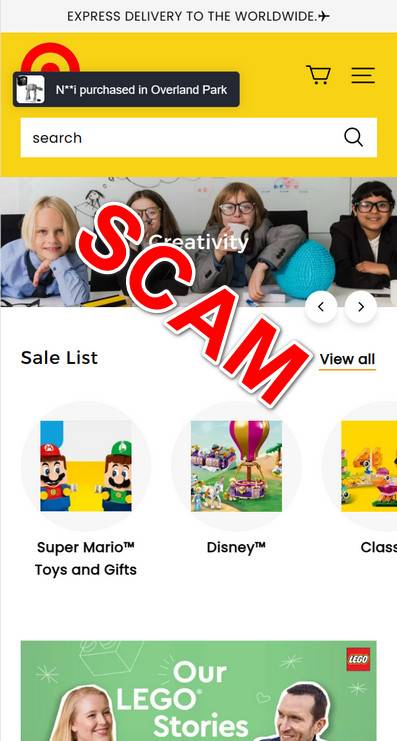
The Target Fake Online Shopping Sites Scam is a type of online fraud that involves scammers creating fake websites that mimic the appearance and functionality of the official Target website. These websites may use a similar domain name, logo, layout, colors, and product images as the real Target website, but they are not affiliated with or authorized by Target in any way. The scammers may also use fake social media accounts, email addresses, phone numbers, and customer service representatives to make their sites seem more legitimate and trustworthy.
The scammers behind the Target Fake Online Shopping Sites Scam use various methods to lure potential victims to their fake websites. They may send phishing emails or text messages that claim to offer discounts, coupons, free shipping, or other incentives to shop at their sites. They may also use online ads, pop-ups, or redirects that appear on legitimate websites or search engines. Alternatively, they may rely on typosquatting, which is when they register domain names that are similar to the real Target website but have slight misspellings or variations. For example, they may use targett.com, targget.com, target-shop.com, or target-official.com instead of target.com.
Once the victims land on the fake websites, they may browse through the products and add them to their shopping carts. The products may be priced lower than the real Target website or other online retailers, or they may be advertised as exclusive or limited edition items. However, these products are either counterfeit, poor quality, damaged, or do not exist at all. The scammers may also use fake reviews, ratings, testimonials, or seals of approval to make their products seem more appealing and authentic.
When the victims proceed to checkout, they may be asked to enter their personal and financial information, such as their name, address, email, phone number, credit card number, expiration date, security code, and billing address. The scammers may also ask for additional information that is not required for online shopping, such as their social security number, driver’s license number, bank account number, or password. The scammers may use encryption or security logos to make their payment pages look secure and safe. However, once the victims submit their information, the scammers will either charge them for products that they will never receive or sell their information to other criminals who may use it for identity theft or fraud.
What to do if you have fallen victim to the Target Fake Online Shopping Sites Scam?
If you have fallen victim to the Target Fake Online Shopping Sites Scam, you should take immediate action to protect yourself and your money. Here are some steps you can take:
- Contact your bank or credit card company and report the fraudulent transaction. Ask them to cancel your card and issue a new one. You may also be able to dispute the charge and get a refund.
- Change your passwords and PINs for your online accounts, especially if you have used the same ones on the fake website.
- Monitor your credit reports and bank statements for any suspicious activity or unauthorized charges.
- Report the scam to Target’s customer service at 1-800-440-0680 or guest.service@target.com. Provide them with as much information as possible about the fake website and how you were contacted by the scammers.
- Report the scam to the Federal Trade Commission (FTC) at https://reportfraud.ftc.gov/. You can also file a complaint with your state attorney general’s office or consumer protection agency.
- Report the scam to the Internet Crime Complaint Center (IC3) at https://www.ic3.gov/. This is a partnership between the FBI and the National White Collar Crime Center that collects and analyzes online fraud complaints.
- Report the scam to Scamwatch at https://www.scamwatch.gov.au/. This is an Australian government website that provides information and advice on how to recognize and avoid scams.
- If you suspect your device is infected with malware, run a scan with Malwarebytes Anti-Malware Free.
Summary
The Target Fake Online Shopping Sites Scam is a serious threat that can cost you money and compromise your identity. To avoid falling for this scam, you should always shop from the official Target website at https://www.target.com/ or use their mobile app. You should also be wary of any unsolicited emails or messages that claim to offer deals or discounts from Target. Always check the sender’s address, the website’s URL, and the spelling and grammar of the message. If you are unsure about the legitimacy of a website or an offer, you can contact Target’s customer service or do some research online before making a purchase. Remember, if it sounds too good to be true, it probably is.
Advertisements


Join the discussion
0 commentsShare your experience or ask a question about this article.
Discussion
Start the conversation
Have a question or something useful to share? Add the first comment.