

If you’ve received a text message from the “Maryland State Department of Motor Vehicles” warning of unpaid traffic tickets and threatening to suspend your license, you’re not alone. These alarming messages look official, but they are part of a dangerous phishing scam designed to steal your personal and financial information. In this article, we’ll break down everything you need to know: what the scam is, how it works step by step, and what to do if you’ve already interacted with it.
Scam Overview: What is the Maryland DMV Text Scam?
The Maryland DMV “Final Notice” text scam is a sophisticated phishing scheme targeting drivers across the state. These fake messages claim you have an unpaid traffic ticket and include urgent warnings about consequences like license suspension or credit score damage. To “resolve” the issue, the message provides a link to make a payment. Unfortunately, this link leads to a fraudulent website designed to steal sensitive data such as credit card details, addresses, and phone numbers.
Why the Scam is Effective
- Authority Impersonation: Scammers pretend to be the Maryland DMV or State Department of Motor Vehicles, leveraging trust in government agencies.
- Urgency and Fear: Phrases like “Enforcement Penalties Begin” and “Final Notice” push recipients to act quickly without thinking.
- Legal-Looking Language: References to codes like “Maryland State Administrative Code 15C-16.003” add legitimacy.
- Low Financial Barrier: Scammers often request a small payment (as little as $5-$10) to avoid suspicion.
Key Characteristics of the Scam Text
- Mentions an exact date for enforcement (e.g., “Penalties Begin June 5”).
- Lists severe consequences: license suspension, registration hold, credit score impact.
- Provides a shortened or deceptive link, such as one with odd domain endings (.win, .xyz, .info).
- Encourages immediate action to “avoid legal disputes.”
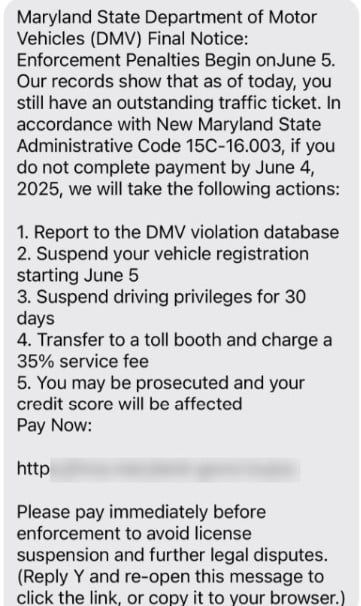
A Real Example of the Scam Message:
Maryland State Department of Motor Vehicles (DMV) Final Notice: Enforcement Penalties Begin on June 5.
Our records show that as of today, you still have an outstanding traffic ticket. In accordance with New Maryland State Administrative Code 15C-16.003, if you do not complete payment by June 4, 2025, we will take the following actions:
- Report to the DMV violation database
- Suspend your vehicle registration starting June 5
- Suspend driving privileges for 30 days
- Transfer to a toll booth and charge a 35% service fee
- You may be prosecuted and your credit score will be affected
Pay Now: [malicious link]
The Goal of the Scam
The scammers aim to:
- Collect credit/debit card numbers, CVV codes, and expiration dates.
- Obtain personal information (name, address, phone number) for identity theft.
- Use or sell the stolen data on black markets for profit.
This is not a random prank—it’s a highly organized cybercrime targeting thousands of residents across multiple states, not just Maryland.
How the Maryland DMV Text Scam Works
Understanding how scammers operate can help you recognize and avoid the trap. Here is a detailed breakdown of their process:
Step 1: Mass Text Distribution
Scammers send bulk SMS messages using spoofed numbers or short codes. These texts are distributed to thousands of random numbers, often scraped from leaked databases or purchased online.
Key Tactic: The sender often appears local or includes “MD DMV” in the name field to build trust.
Step 2: Psychological Pressure
The message includes:
- Specific deadlines like “Pay by June 4 or enforcement begins June 5.”
- Threats of severe penalties: suspension of vehicle registration, license, and even legal prosecution.
- Financial consequences: warnings about credit score impact.
This triggers fear of legal trouble and compels quick action.
Step 3: Malicious Link Placement
The text includes a link mimicking an official DMV site:
- Fake URL Structure: Examples include
md-dmv.gov-pay.winordmv-maryland.info/portal. - Look-alike Branding: The landing page often copies Maryland DMV colors and logos.
Step 4: Fake DMV Payment Portal
Once you click the link:
- You’re redirected to a phishing website designed to look like an official Maryland DMV payment page.
- The page requests details such as:
- Name
- Address
- Driver’s license number (in some cases)
- Credit/debit card information
Step 5: Data Theft
As soon as you submit your details:
- The scammers collect and store your financial and personal information.
- Victims might receive a fake confirmation page stating “Payment Successful” to avoid suspicion.
Step 6: Fraudulent Activity
Within hours or days:
- Scammers may make small test charges to check if the card is active.
- Larger unauthorized transactions follow.
- Your personal data may be sold to identity thieves or on dark web markets.
Step 7: Domain and Number Rotation
To avoid detection:
- Scammers frequently change the domain name used in the text.
- They use disposable phone numbers or spoofed caller IDs.
Step 8: Secondary Scams
Victims often receive follow-up messages like:
- “Your refund is ready—please confirm your bank details.”
- “We noticed suspicious activity; verify your identity here.”
This is a double scam strategy designed to exploit victims further.
What to Do If You Fell Victim to This Scam
If you clicked the link or provided any personal or financial details, act immediately:
1. Contact Your Bank or Card Issuer
- Report your card as compromised.
- Request a freeze, cancellation, and replacement.
- Monitor recent transactions and dispute any unauthorized charges.
2. Set Up a Fraud Alert
- Contact major credit bureaus: Equifax, Experian, and TransUnion.
- Place a 90-day fraud alert on your credit file.
3. Consider a Credit Freeze
- A credit freeze prevents scammers from opening new accounts in your name.
- This is free and highly recommended if sensitive data was shared.
4. File Official Reports
- FTC: Report the scam at reportfraud.ftc.gov.
- Maryland Attorney General: Submit a consumer complaint online.
- Local Police: File a report for documentation and potential evidence.
5. Change Passwords and Enable Two-Factor Authentication
- Secure your email, financial accounts, and DMV-related portals.
- Use strong, unique passwords stored in a password manager.
6. Monitor Your Accounts
- Check your credit report regularly for any suspicious activity.
- Watch for new accounts, unauthorized transactions, or loan applications.
7. Inform Others
- Warn family, friends, and coworkers.
- Share the scam details on social media and community groups.
Frequently Asked Questions About the Maryland DMV “Final Notice” Text Scam
What is the Maryland DMV “Final Notice” text scam?
The Maryland DMV “Final Notice” text scam is a phishing scheme that uses fake text messages claiming you have an unpaid traffic ticket. The message urges you to click a link to pay immediately to avoid license suspension or legal action. The link leads to a fraudulent website designed to steal personal information and credit card details.
Does the real Maryland DMV send text messages about traffic tickets?
No. The Maryland Department of Motor Vehicles (DMV) or Maryland Motor Vehicle Administration (MVA) does not send unsolicited text messages asking for payment of fines. Official communication regarding traffic tickets is done through mail or secure government websites ending in .gov.
How can I tell if the text message is a scam?
Look for these red flags:
- The sender’s phone number is unfamiliar or looks suspicious.
- The message contains an urgent deadline (e.g., “Pay by June 4 or penalties begin June 5”).
- It mentions severe consequences like license suspension or credit score impact.
- The URL is not an official government website and may use strange endings like .win, .xyz, or .info.
- It includes fake legal references such as “Administrative Code 15C-16.003.”
What happens if I click the link in the scam message?
Clicking the link redirects you to a fake Maryland DMV payment page. There, you may be asked to enter:
- Personal information (name, address, email, phone number).
- Financial information (credit or debit card details).
Once submitted, scammers steal your data for fraudulent purchases, identity theft, or resale on the dark web.
How much do scammers usually ask for?
Most scam messages claim you owe a small fine—usually between $5 and $15. This low amount makes the scam seem believable and increases the likelihood of victims paying without questioning the source.
What do scammers do with my information?
Scammers use stolen information for:
- Making unauthorized credit or debit card charges.
- Committing identity theft by opening new accounts in your name.
- Selling your personal data on black market sites for profit.
- Using your contact information for additional scams.
Is the URL in the text message legitimate?
No. The URL in the scam message often mimics an official domain but is fake. For example, it may look like md-dmv.gov-pay.win or mva-maryland.info/portal. Real Maryland DMV or MVA websites will always end in .gov and will not use random words or domain endings.
What should I do if I clicked the link or gave my information?
Take immediate action:
- Contact your bank or credit card provider to report the card as compromised.
- Request a new card and dispute unauthorized charges.
- Place a fraud alert or credit freeze with major credit bureaus (Equifax, Experian, TransUnion).
- Report the scam to:
- Federal Trade Commission (FTC): reportfraud.ftc.gov
- Maryland Attorney General’s Consumer Protection Division.
- Local law enforcement for documentation.
- Monitor your accounts and credit report for any suspicious activity.
Can I report the scam message?
Yes, reporting is essential. You can:
- Forward the message to 7726 (SPAM) to alert your mobile carrier.
- File a complaint with the FTC and Maryland Attorney General.
- Share the scam details on community forums and social media to warn others.
Will the Maryland DMV ever ask for payment by text?
No. The Maryland DMV or MVA does not request payment through text messages or unofficial websites. Any legitimate payment request will come through official mail or via a secure, government-approved online system ending in .gov.
How do I protect myself from future text scams?
- Never click on links in unsolicited messages.
- Verify traffic ticket information directly with the Maryland MVA using official contact channels.
- Block and report suspicious numbers.
- Enable two-factor authentication on important accounts.
- Use reputable mobile security software to detect phishing links.
Who is most at risk of falling for this scam?
Anyone can become a victim, but scammers often target:
- Drivers unfamiliar with online scams.
- Older adults or less tech-savvy individuals.
- People under stress who may act quickly without verifying the message.
What does the scam message typically say?
It often includes language like:
“Maryland State Department of Motor Vehicles (DMV) Final Notice: Enforcement Penalties Begin on June 5… If you do not complete payment by June 4, we will take the following actions…”
These messages mimic official tone and include threats to create urgency.
The Bottom Line
The Maryland State DMV “Final Notice” text scam is part of a growing wave of phishing schemes designed to exploit urgency, fear, and trust in government institutions. Always remember:
- The Maryland DMV will never request payment via text message.
- Legitimate government domains always end with .gov.
- If in doubt, verify through official DMV channels before acting.
Staying informed and cautious is your best defense. Share this information widely—awareness can stop the spread of this dangerous scam.








