

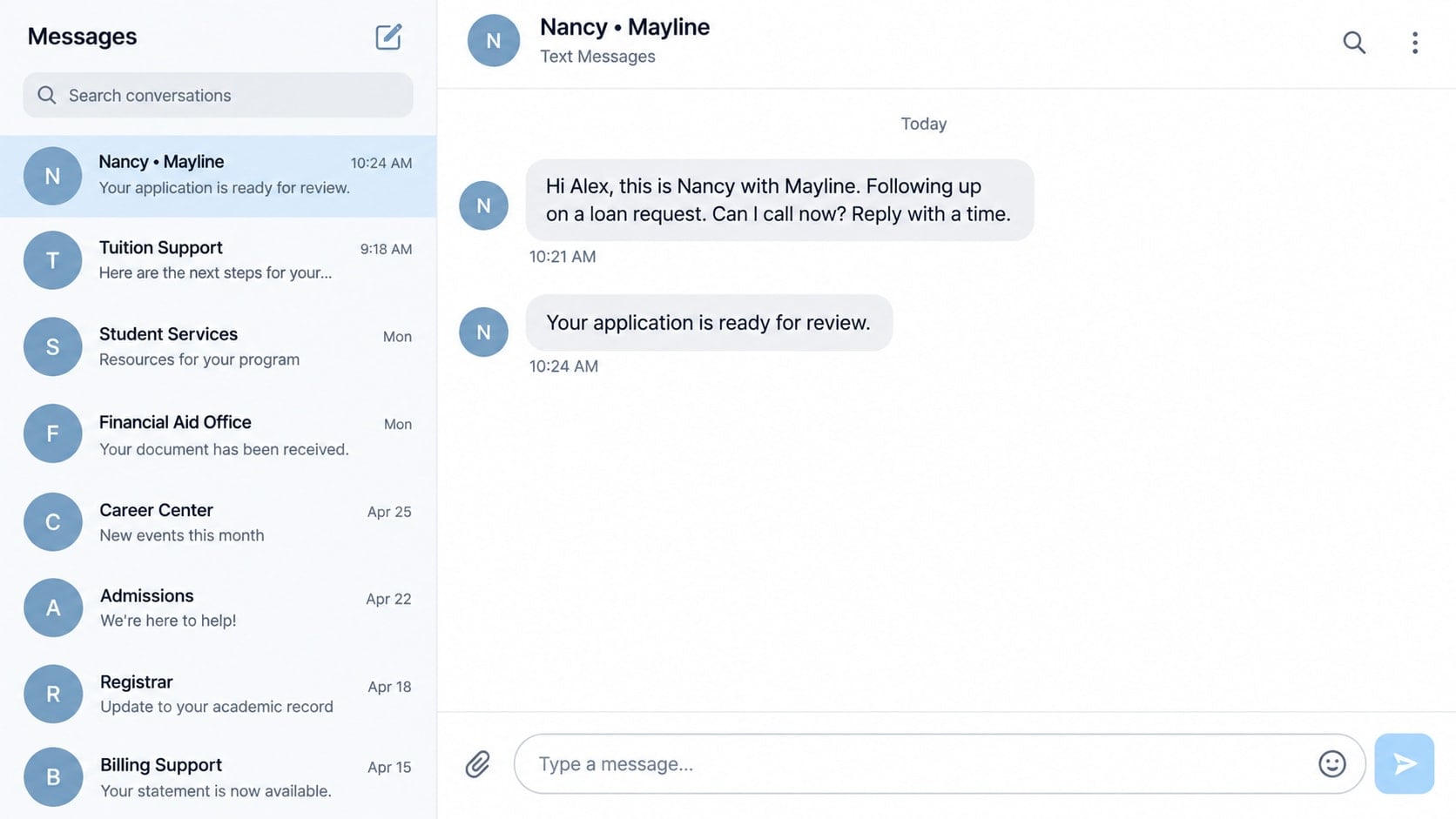
A text from “Nancy” at Mayline sounds as though a loan conversation is already underway. She is following up, checking whether you still need help, and leaving a number to call. There is just one problem: you never asked for a loan.
Before you reply to correct the mistake, take a closer look at what the message actually proves. That small pause can keep an unwanted sales approach from turning into something much more intrusive.
Overview
What is the Mayline loan text?
Consumer reports describe unsolicited messages using the name Mayline and an agent called Nancy. The message refers to a loan request or follow-up that recipients say they did not initiate. One reported callback number is 855-417-7888.
A May 2026 BBB Scam Tracker report describes that mismatch. It is a consumer-submitted account, not a court finding or proof of who owns every number involved. The useful warning is the unrequested financial conversation, not an assumption about every business with a similar name.
Is it a confirmed lender or a proven fraud operation?
The reports reviewed do not establish a verified lender identity, a completed loan, or a documented payment loss for this specific message pattern. An unsolicited text can be spam, aggressive lead generation, a wrong number, or the opening to fraud.
That uncertainty does not make it safe to provide information. Until the sender is independently identified, treat the message as an unverified loan solicitation. Do not confuse a personal-sounding follow-up with evidence that an application exists in your name.
What should make you stop?
- You cannot find an application you actually submitted.
- The sender will not identify the legal lender and its official contact details.
- A promised approval depends on paying money first.
- Someone asks for your bank password, a security code, or remote access.
- The caller pressures you to act before you can verify the offer.
The following walkthrough separates the reported opening from possible later-stage loan fraud. The reconstructed images are explanatory examples. In particular, the sample fee portal is not an observed Mayline website and does not establish that this sender operates one.
How the Mayline Loan Text Scam Risk Develops
Step 1: A follow-up creates a sense of familiarity
The message starts midway through a conversation: someone is checking on your request rather than introducing an unexpected offer. That framing encourages you to search your memory for a forgotten form, comparison website, or previous inquiry.
If you recently shopped for credit, the coincidence can feel convincing. If you did not, you may want to reply simply to correct the record. Either response can turn a one-way message into a live conversation.
First check your own records without contacting the sender. Search your email for applications you recognize and consider whether you authorized a broker to contact lenders. Do not assume that remembering a different loan inquiry authenticates this particular message.
Step 2: The conversation moves to the callback number
A callback gives the caller room to answer objections, ask questions, and build rapport. A pleasant voice can make an unidentified operation feel more credible, especially when the caller uses ordinary lending language rather than obvious threats.
The reported 855-417-7888 number is an identifying detail from consumer accounts, not a safe verification route. Phone numbers can be reassigned, spoofed, or used by intermediaries. A familiar area code or toll-free prefix tells you nothing about lending authorization.
You do not need to call in order to decline an unrequested offer. If you want to investigate, find the legal business and official contact information independently. Ask that verified business whether the agent, number, and proposed product genuinely belong to it.
Step 3: An innocent correction can become a data request
A caller might ask for your full name or other details to locate the supposed application. In a dishonest interaction, the explanation gives them a reason to collect information they did not previously have.
There is an important boundary between identifying a legitimate file and supplying a complete financial profile to an unknown person. Do not provide your Social Security number, identity-document image, bank details, or date of birth just to prove that you never applied.
If the caller already knows your name, that is not proof of an authentic application either. Personal information may have come from marketing lists or previous exposure. Ask what independently verifiable evidence supports the claim instead of volunteering more details.
Step 4: A possible loan offer introduces a financial hook
In advance-fee loan scams generally, the pitch changes from checking eligibility to promising funds. A claimed approval can make the money feel almost available, especially if the borrower has urgent bills or has been turned down elsewhere.
The FTC’s advance-fee loan guidance warns about payment demands tied to guaranteed credit. Some legitimate lending processes have disclosed fees, so the mere existence of a charge is not the whole test. The dangerous combination is unverified identity, guaranteed approval, and payment demanded to unlock funds.
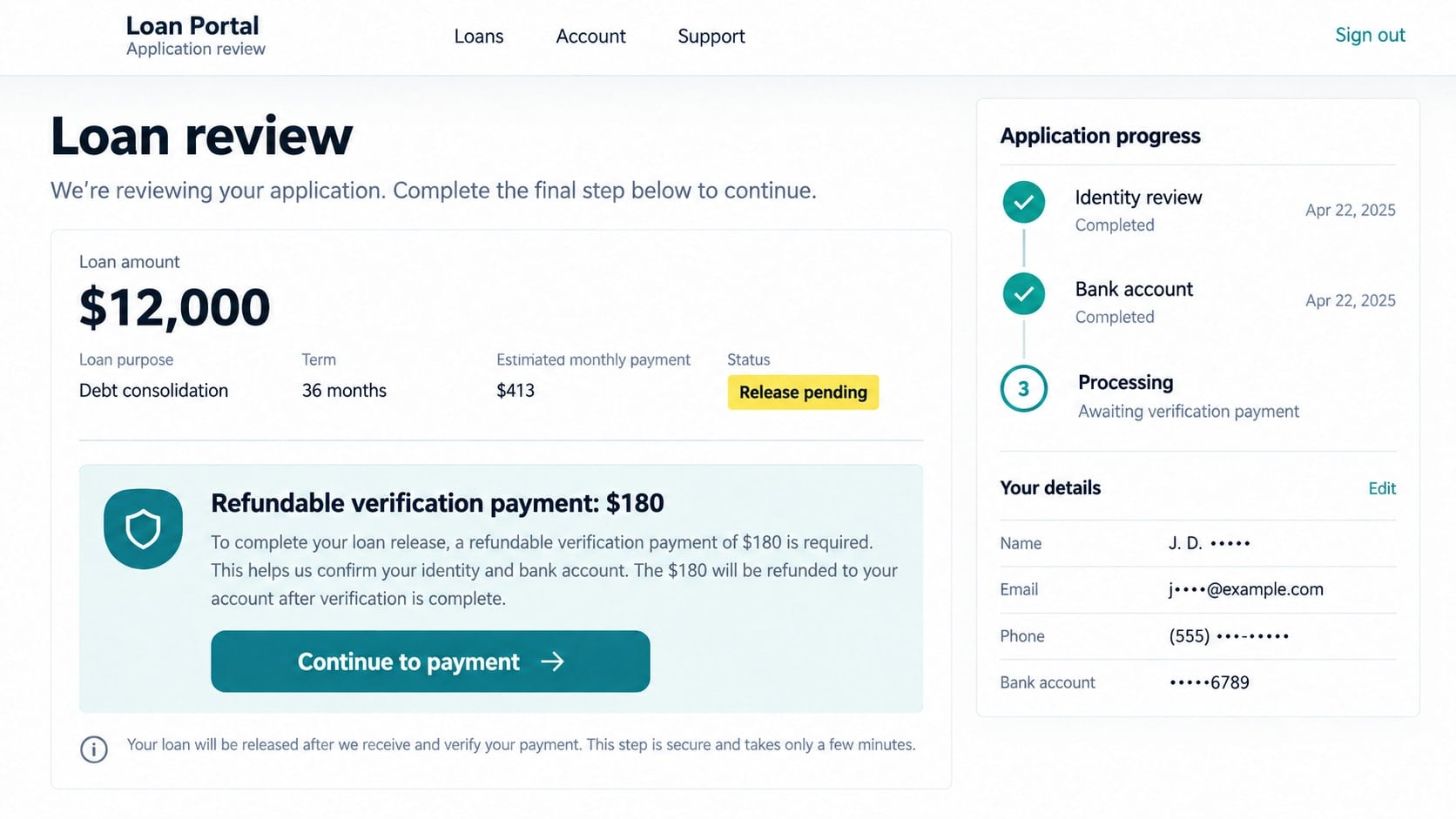
For example, an invented loan portal might show an approved balance but require a smaller verification payment before release. The balance on that screen is only a claim. It is not money you can spend, and paying a fee does not validate it.
Step 5: Urgency pushes verification out of the conversation
A dishonest lender impersonator may say an approval expires today or a payment must be completed while the agent stays on the phone. That pressure matters because it discourages the very checks a genuine financial decision needs.
Requests for gift cards, cryptocurrency, or a transfer to an unrelated individual are strong reasons to stop. So are instructions to misdescribe a payment to your bank or conceal the transaction from someone helping you assess it.
These are warning scenarios, not confirmed actions by the Mayline texter in the reports reviewed. Keeping that distinction clear makes the advice more useful: judge the conduct you encounter, and do not wait for an exact match to a previous victim’s experience.
Step 6: Further contact can exploit what was shared
If you respond, an unwanted operation knows the number reaches someone willing to discuss credit. If you submit documents, the potential exposure is broader. Later callers may reuse the loan story while pretending to be a supervisor, bank, or refund specialist.
More messages do not mean that a loan was approved or a debt exists. Verify any new claim through the purported institution’s genuine channels. Never accept an unsolicited caller’s explanation as the only evidence of a financial obligation.
If the interaction ends after a single unanswered text, your response can remain simple: save it if needed, report spam, and block the sender. Receiving a message alone does not mean your device has been infected or your identity stolen.
Identity, Contact, and Payment Checks
Find the actual lender behind the name
Ask whether the business is a lender, broker, lead generator, or marketing service. Those roles are different. An agent who cannot explain which company would issue the loan has not provided enough information for an informed decision.
For a U.S. offer, verify relevant licensing with your state financial regulator and, where applicable, NMLS Consumer Access. Match the entity, address, website, and contact details. A similar business name is not enough to connect a text to a legitimate license holder.
Check the application claim against your records
Look for a submission confirmation, the date, the original website, and any consent you gave for follow-up. If you used a comparison form, review its disclosure about sharing information with partners. That may explain unwanted contact without proving the caller is trustworthy.
If you never applied, do not fill out a new form to cancel the supposed old one. An unexpected inquiry on your credit report deserves direct investigation, but an unsolicited message by itself does not establish that such an inquiry occurred.
Read the real terms before considering money
A credible offer should allow you to understand the lender, total borrowing cost, repayment schedule, and applicable fees. An enthusiastic verbal promise cannot replace those terms. Be cautious if the only written material is a generic approval graphic.
Compare the destination of any requested payment with the verified business. Do not send a test payment to establish trust. A small successful transfer only proves that someone can receive money, not that they can or will fund your loan.
Keep account access outside the discussion
Your bank password and one-time login codes are not ordinary details to read to an unfamiliar loan agent. If a legitimate process uses a financial-data connection, verify the service and permissions independently before deciding whether to proceed.
Do not install remote-support software to complete a loan review. Someone controlling your screen may view accounts, intercept codes, or direct transfers. End the interaction if access to your device becomes a condition for receiving funds.
What to Do if You Have Fallen Victim to This Scam
- Match your response to what actually happened.
If you only received the text, block and report it after preserving any needed evidence. If you replied with a greeting, stop the conversation. Neither situation automatically requires replacing every password or freezing all financial activity.
Write down any information you disclosed and any actions you took. This short inventory helps distinguish nuisance contact from payment fraud, account exposure, or identity-document misuse.
- Contact your payment provider immediately if you sent money.
Use the number on your card or the provider’s official app. Explain the loan promise, payment destination, date, and amount. Ask what reversal, recall, or dispute options remain available, without assuming recovery is guaranteed.
If the payment is still pending, say so. Do not send another payment to correct a supposed error or release a refund. Save transaction references and follow the provider’s instructions for securing the affected account.
- Secure any accounts whose credentials were exposed.
Change a shared password from a trusted device, end unfamiliar sessions, and review recovery details. Where available, enable multifactor authentication. If the same password protects your email or banking elsewhere, replace it there too.
Tell the bank if you disclosed a security code or allowed someone to view account information. Ask it to review suspicious access and payments rather than merely changing a password and assuming the incident is finished.
- Address sensitive identity information separately.
If you submitted a Social Security number or identity documents, use IdentityTheft.gov for a tailored U.S. recovery plan. Consider credit freezes where appropriate and review your reports for applications you do not recognize.
Keep monitoring proportionate to what was exposed. A name and phone number are different from a complete identity packet. If misuse appears, preserve the account or inquiry details and contact the institution directly.
- Check the device only if the interaction created a device risk.
If you installed an attachment or an app supplied by the caller, remove untrusted remote-access software and run a Malwarebytes scan. Seek reliable technical help if you cannot confirm what was installed or whether access remains active.
AdGuard may help limit some malicious advertising and tracking during future browsing. It does not validate loan offers, stop every scam text, or recover a transferred payment. Treat it as an additional browsing safeguard, not a financial verification service.
- Preserve and report the message pattern.
Keep the complete text, sender number, callback number, timestamps, links, and any payment instructions. Report unwanted texts through your messaging app and carrier. In the U.S., supported carriers accept spam-text forwarding to 7726.
Submit suspected fraud to the FTC and report any impersonated lender through its genuine contact channel. Describe what you personally observed. Avoid assigning ownership of a telephone number based only on the text displayed on your screen.
- Ignore unsolicited recovery and cancellation agents.
A new caller may claim your application must be canceled for a fee or that a refund requires another verification payment. Do not continue the original interaction under a different name.
Use existing case numbers with your bank or regulator, and initiate contact yourself. A real recovery process should not depend on keeping the matter secret or giving a stranger control of your device.
Frequently Asked Questions
Who is Nancy from Mayline?
Nancy is the name used in reported unsolicited loan follow-up messages. The reviewed consumer reports do not independently establish the sender’s identity or employment. A first name in a text is not proof of a legitimate lending relationship.
Is 855-417-7888 a verified Mayline contact number?
It appears as a callback number in reports about the message pattern. That does not verify ownership or make calling it a safe authentication method. Find contact information through a business and regulator you have independently identified.
Does the message mean someone applied for credit in my name?
Not necessarily. Spam and lead-generation messages can refer to applications that never existed. Check your own application records and credit reports if you have concerns. Investigate an unfamiliar inquiry with the named institution rather than with the unsolicited texter.
Should I reply STOP?
Recognized legitimate marketing services may support opt-out replies. For an unidentified suspicious sender, reporting and blocking through your messaging app avoids starting a conversation. Do not follow a separate cancellation link that requests personal or financial information.
Are all advance loan fees fraudulent?
No. Some legitimate credit processes include disclosed charges. The major warning is an unverified operation promising guaranteed funds if you pay first. Verify the lender and terms independently, and never use a payment as a substitute for that verification.
Can I safely ignore an unrequested loan follow-up?
Yes. You do not owe a response merely because a message claims to be following up. If you have an actual pending application, contact the lender through your existing records. Do not let an unknown sender choose your verification route.
The Bottom Line
The Mayline loan text deserves caution because it presents an unverified financial approach as an existing conversation. Consumer reports raise questions, but they do not justify inventing a lender identity, a payment loss, or a confirmed scam website.
Check your own records, verify any lender independently, and keep money and sensitive data out of an unsolicited exchange. If you already acted, focus on the specific exposure and involve the appropriate provider promptly.

Join the discussion
0 commentsShare your experience or ask a question about this article.
Discussion
Start the conversation
Have a question or something useful to share? Add the first comment.